
Transcription vv2.5 2026 Rank: #230
Vocova ✓
Transcribe audio, video, or links into text. 1,000+ platforms, 100+ languages.
Verdict
A quick read before you dig into the full page.
- Best if
- Transcribe audio, video, or links into text. 1,000+ platforms, 100+ languages
- Skip if
- No offline functionality
- Pick this when
- Transcribes 100+ languages
Considering Voicetype AI instead? Compare side by side
Overview


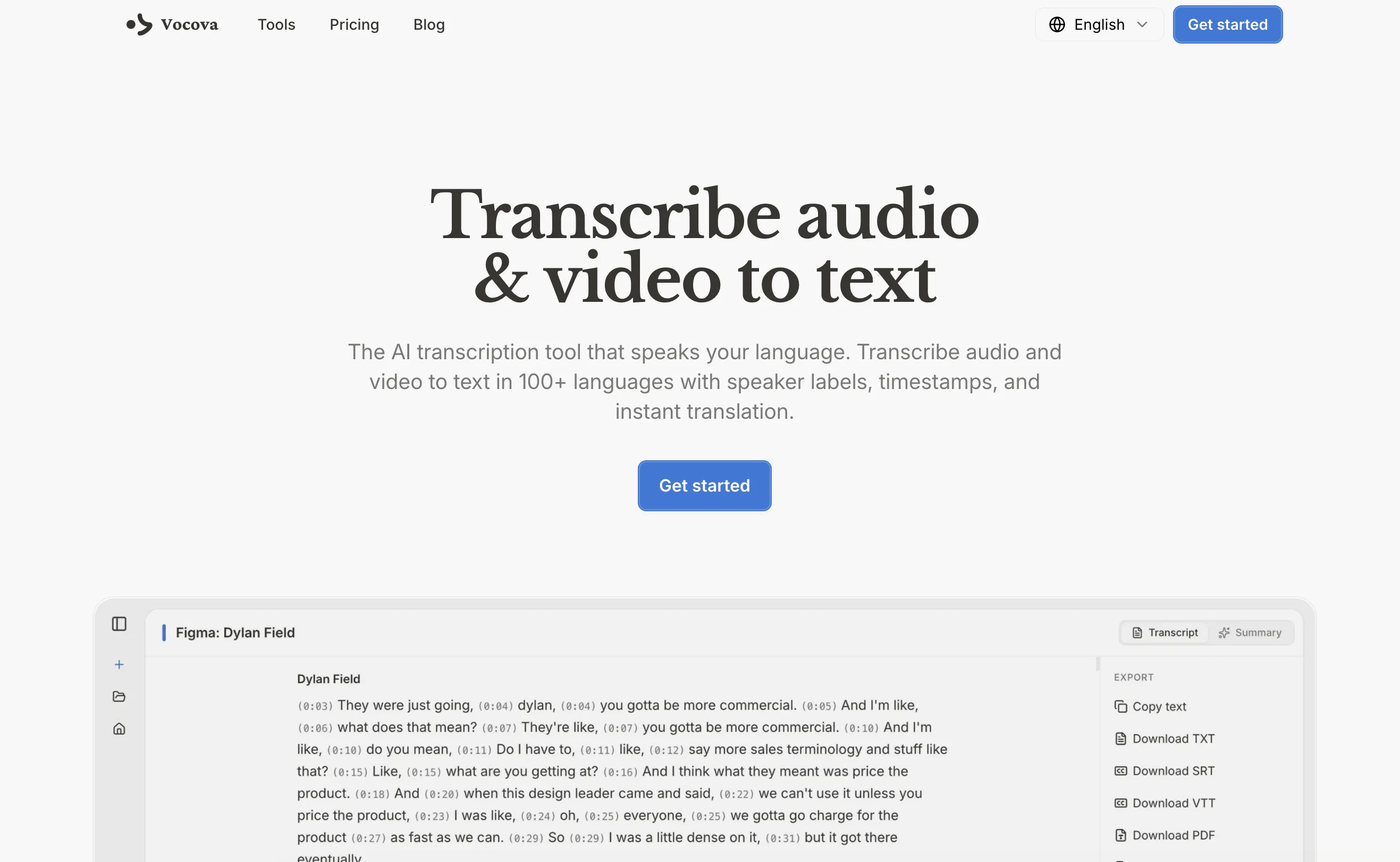
Each transcript includes speaker identification, word-level timestamps, and an AI-generated summary. After transcription, users can translate the full transcript into 145+ languages and view it in three modes: original, translated, or bilingual side by side. Both the original and translated text can be edited directly in the interface.
Vocova exports transcripts in multiple formats including PDF, DOCX, SRT, VTT, TXT, and CSV, with support for bilingual side-by-side export. Transcripts can also be shared instantly via a public link — no account needed for viewers.
All files are stored securely in the cloud and accessible only by the owner. Vocova works entirely in the browser on desktop, tablet, and mobile, with no downloads or installations required. Free to start with no credit card needed.
- Transcribe From 1,000+ Platforms Via Url Paste
- 100+ Language Transcription With Auto-detection
- Translate Transcripts To 145+ Languages
- Bilingual Side-by-side Transcript View And Export
- Speaker Identification And Labeling
- Word-level Timestamps
- Ai-generated Transcript Summary
- Youtube, Tiktok, Instagram, Vimeo, Bilibili Support
- Export As Pdf, Docx, Srt, Vtt, Txt, Csv
- Edit Original And Translated Text Inline
- Share Transcript Via Public Link
- No Download Or Installation Required
Best for
Short scenarios where Vocova tends to shine.
-
Transcribe audio, video, or links into text. 1,000+ platforms, 100+ languages.
Example outputs 1
Sample generations and before/after results for Vocova.
Access & connections
Where you can use Vocova, and what it plugs into.
Platforms
Integrations
Capabilities
What this tool accepts, produces, and is strongest at.
Input
- Text
- Video
- Audio
Output
- Tabular
- API
- Text
Supported features
- Translation
- Transcription
- STT
- Video Understanding
- Text Generation
- Podcast
Pros & cons
Pros
- Transcribes 100+ languages
- Multi-platform import support
- PDF, DOCX, SRT exports
- Automated language detection
- Native-level transcription accuracy
- User-friendly interface
- Accurate word-level timestamps
- Speaker identification
Show 18 more
- Review and edit in-line
- Translate to 140+ languages
- Link extraction for audio
- Privacy-focused file handling
- Cloud-based storage
- Adaptable across devices
- No downloads or installations required
- Real-time progress tracking
- Video/Audio auto-extraction from URL
- Edit original and translated texts
- Multi-format export capability
- Bilingual view mode available
- Video/Audio import from 1,000+ platforms
- State-of-the-art speech recognition
- Transcribe directly from URLs
- Transcript sharing by link
- Timestamped speaker labels
- Works seamlessly on any device
Cons
- No offline functionality
- No real-time live transcription
- No dedicated mobile app
- No offline mode
- No browser extension
Compare alternatives
Similar tools in the catalog — with a clear reason to open each one.

Voicetype AI ✓
Free TrialWrite 9x Faster with AI Speech to Text on all Apps
Why look Better for writing
Full comparison
Transcript LOL ✓
FreemiumUnlimited transcripts, summaries, 99.8% accuracy, speaker recognition, superfast
Why look Offers a public API
Full comparison
TurboScribe ✓
Freemium🎯 3 free transcripts every day. 🔥 Unlimited transcription starting at $10/mo.
Free + from $10/mo
Full comparison
RambleFix ✓
Paid⚡ Write by thinking aloud - emails, notes, articles, in your style.
Why look Better for writing
Full comparison
Paraspeech ✓
Free TrialPrivate dictation, cloud optional
Why look More privacy-focused
Full comparisonPeople also view
Tools that often show up alongside Vocova in collections and comparisons.
Voicetype AI ✓
Free TrialWrite 9x Faster with AI Speech to Text on all Apps
TurboScribe ✓
Freemium🎯 3 free transcripts every day. 🔥 Unlimited transcription starting at $10/mo.
Transcript LOL ✓
FreemiumUnlimited transcripts, summaries, 99.8% accuracy, speaker recognition, superfast
RambleFix ✓
Paid⚡ Write by thinking aloud - emails, notes, articles, in your style.
Paraspeech ✓
Free TrialPrivate dictation, cloud optional
Recap Raven ✓
Free TrialTTRPG Discord bot that recaps, transcribes, GM prep notes and campaign memory

Realms of Shod ✓
Free TrialMultiplayer tools, AI notes, and knowledge-graph surfaces for TTRPG worlds and stories

Pulse by smallest.ai ✓
FreemiumWorld's fastest and most accurate speech-to-text.
Releases 2
Paste a public video, podcast, or audio link and get an editable transcript, subtitles, summary, and translation.Works with YouTube, Instagram, TikTok, X, Facebook, Apple Podcasts, SoundCloud, Vimeo, Loom, Dailymotion, and more in 100+ languages.
FAQ 12
What is Vocova?
How do I use Vocova to transcribe audio to text?
What languages does Vocova support?
What is the process to transcribe video to text with Vocova?
Does Vocova allow for speaker identification in the transcripts?
Can Vocova detect language automatically in the files being transcribed?
Can transcripts from Vocova be translated into different languages?
What platforms are compatible with Vocova for importing audio and video content?
Which formats can I export my transcripts in with Vocova?
How does Vocova ensure privacy when handling user data?
What is the requirement to start using Vocova?
Does Vocova offer advanced features in the tool's premium offering?
Related tools
Recommended

ChatGPT ✓
FreemiumAsk anything, create anything, and move from idea to action.

Notis ✓
Free TrialThe first WhatsApp assistant that runs on your ChatGPT and Claude subscriptions

freebeat AI ✓
FreemiumTurn Music & Ideas into Viral Videos In One Click

remio: Your Personal ChatGPT ✓
FreemiumGet Tailored Answer with Your Personal ChatGPT

AppDeploy ✓
FreeDeploy real apps directly from ChatGPT or Claude

Vertech Academy ✓
Free TrialPre-built AI study workflows that outperform raw ChatGPT prompts.