

SnapDiagram ✓
AI transforms hand-drawn sketches into digital diagrams.
Free + from $3/mo
Verdict
A quick read before you dig into the full page.
- Best if
- You are engineers and need: Digitizing hand-drawn flowcharts
- Skip if
- Limited integration capabilities
- Pick this when
- Digitizes hand-drawn sketches
Considering Sketch2scheme instead? Compare side by side
Overview
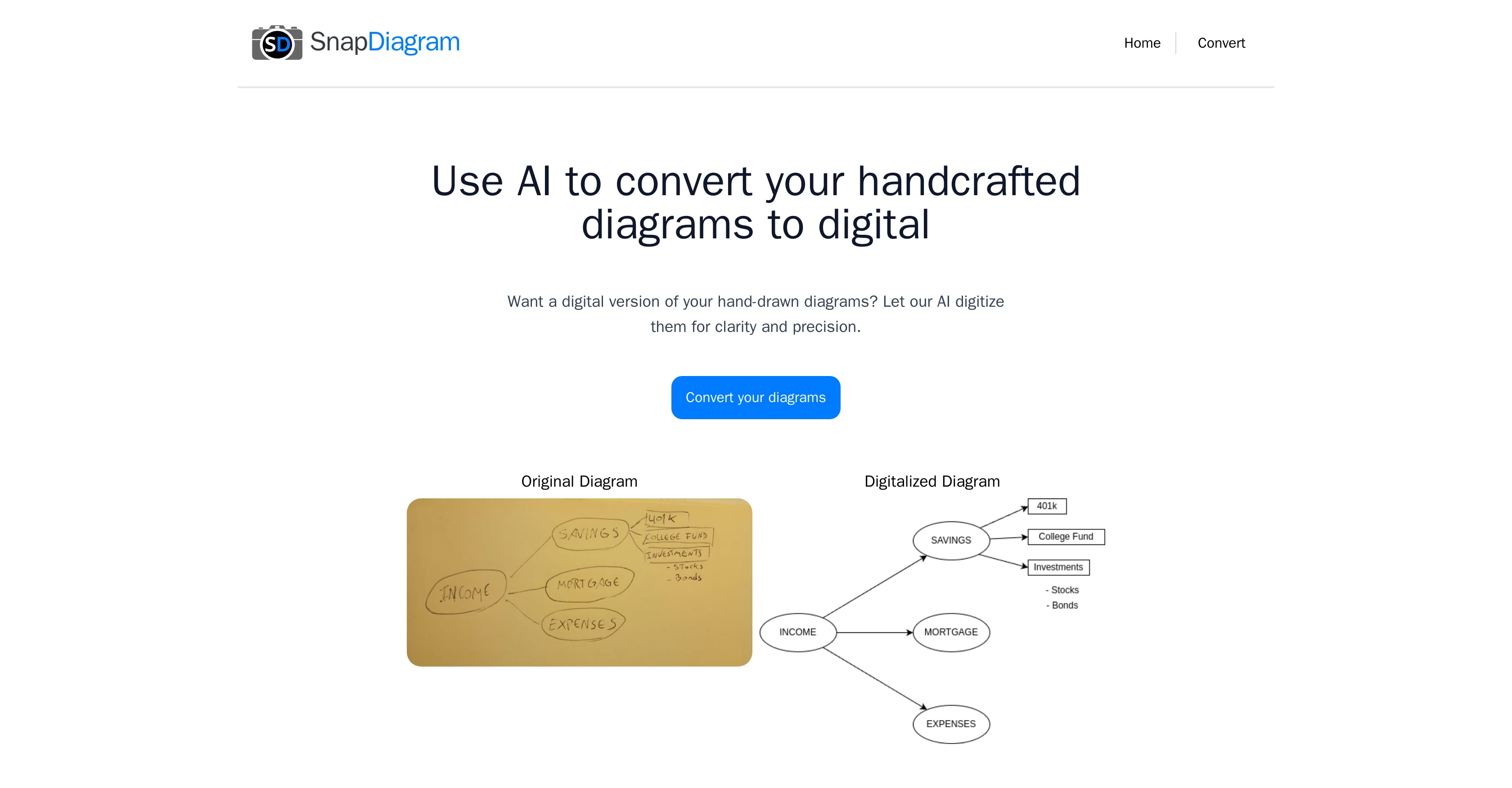
SnapDiagram is an AI-powered tool designed to digitize hand-drawn sketches and transform them into precise digital diagrams. The AI applies advanced recognition capabilities to convert handcrafted diagrams into a digital version with seamless accuracy, ensuring a high degree of clarity and precision in the final digital output.
The key functionality of SnapDiagram is increasing the utility of hand drawn sketches by turning them into professional-looking digital artifacts. Moreover, it allows for the conversion of sketches into multiple digital formats including PNG, JPG, and provides an editable file for further refinements or adaptations.
Consequently, SnapDiagram integrates conveniently into various workflows, simplifying the process of digitizing hard copy sketches and diagrams and thus making it an ideal choice for individuals and organizations seeking to streamline their diagram creation and sharing processes.
Best for
Short scenarios where SnapDiagram tends to shine.
-
Digitizing hand-drawn flowcharts
Best for Engineers
-
Converting architectural sketches into digital blueprints
Best for Architects
-
Transforming rough diagrams into professional presentations
Best for Designers
Example outputs 1
Sample generations and before/after results for SnapDiagram.
Access & connections
Where you can use SnapDiagram.
Platforms
Capabilities
What this tool accepts, produces, and is strongest at.
Supported features
- SVG
Pros & cons
Pros
- Digitizes hand-drawn sketches
- Transforms into digital diagrams
- Uses advanced recognition capabilities
- High clarity in outputs
- High precision in outputs
- Increases utility of sketches
- Produces professional-looking artifacts
- Converts to multiple formats
Show 6 more
- Outputs in PNG, JPG
- Provides editable output files
- Integrates into various workflows
- Simplifies digitization processes
- Ideal for diagram sharing
- Supports all image formats
Cons
- Limited to 2D sketches only
- No real-time collaboration features
- Doesn't support vector formats
- No free version available
- Requires clean hand-drawn inputs
- Not compatible with mobile devices
- No offline functionality
- No support for text recognition
Show 2 more
- Lack of multi-language support
- Limited integration capabilities
Compare alternatives
Similar tools in the catalog.

SciFig ✓
FreemiumTurn text into publication-ready scientific figures.
Free + from $12/mo
Full comparison
PaperPlot ✓
PaidGenerate publication-ready scientific diagrams from text.
from $9.9/mo
Full comparisonPeople also view
Tools that often show up alongside SnapDiagram in collections and comparisons.

Sketch2scheme ✓
PaidTurn sketches into digital diagrams instantly.

DFIRST AI ✓
FreemiumLet AI Agents build & execute personalized marketing strategies for you

Sketch Studio ✓
Free TrialOne prompt. Every format. Always on-brand.
SciFig ✓
FreemiumTurn text into publication-ready scientific figures.
PaperPlot ✓
PaidGenerate publication-ready scientific diagrams from text.

PaperFig ✓
FreemiumAI scientific figures with editable labels, built-in OCR, and 4K

Figviz ✓
Free TrialFrom a sentence to a science-ready diagram.

Ideogram ✓
FreemiumAI-powered creativity booster
Releases 1
In the news
Launch coverage and community mentions for SnapDiagram.
Imported reviews 2
Idea is nice, but recognizes only 15% of nicely drawn sketch, so for now - it's crap.
fnobody should have to pay for this kind of service. For conversion I uploaded a flowchart diagramm image with est. 10 decision nodes and i got back one decision that showed the title with a yes/no tree, thats all. - ridicolous -
Related tools
Recommended

Thunderbit ✓
FreemiumScrape leads & other data in just 2-clicks.

Calvin - AI Shorts Maker ✓
FreemiumEffortless video creation like never before with AI.
Code2Docs ✓
FreeTransform your codebase into comprehensive, beautiful documentation automatically.

FileAI ✓
FreemiumAutomate document analysis and data extraction

RAGNA Desktop ✓
PaidYour private AI multitool for local productivity.

Recall ✓
FreemiumSummarize Anything, Forget Nothing!