

Video editing 2026 Rank: #1565
Seedeo AI Video Editor ✓
Edit video with text prompts and motion control.
Free + from $8.3/mo
Verdict
A quick read before you dig into the full page.
- Best if
- Edit video with text prompts and motion control
- Skip if
- Strict input file size limit
- Pick this when
- Prompt-based video editing
Considering CapCut Online Creative Suite instead? Compare side by side
Overview
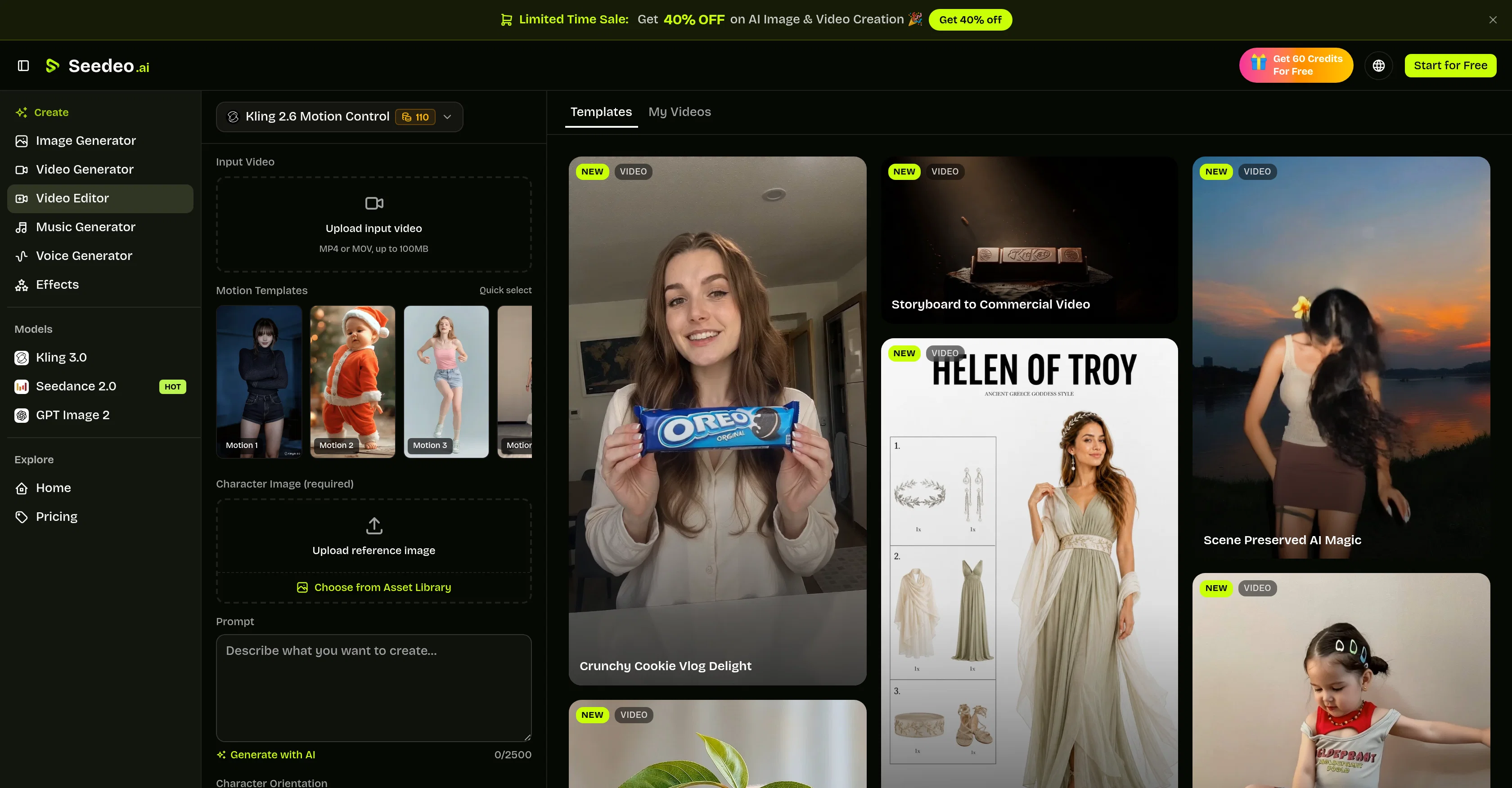
Seedeo AI Video Editor is a tool that combines prompt-based video editing and motion control into one workspace. Instead of manual editing, users can upload source media and describe a targeted change such as adjusting a setting, changing an object, or applying a new visual direction.
It facilitates the creation of stylized transformations and animations based on text inputs, making it ideal for generative revisions and controlled transformations rather than traditional editing tasks like timeline cutting, subtitles, or audio mixing.
Additionally, Seedeo supports motion-control workflows by using a reference video and a character image to create a new performance driven by original movements.
The tool makes it easier to iterate on controlled visual variations by adjusting one prompt detail at a time. It's particularly robust for tasks that need a clear source, specific visual changes, and time to review generative variations.
Whether for exploring alternate environments, materials, moods, and art directions, testing product presentation ideas, animating characters, creating varying versions of social content or pre-visualizing changes before a production team executes them, Seedeo AI Video Editor's capabilities streamline the video editing process for a variety of use cases.
Access & connections
Where you can use Seedeo AI Video Editor.
Platforms
Capabilities
What this tool accepts, produces, and is strongest at.
Input
- Text
- Image
- Video
Output
- Video
Pros & cons
Pros
- Prompt-based video editing
- Motion control capabilities
- Allows iterating visual variations
- Ideal for generative revisions
- Accommodates text-based input
- Supportive of specific visual changes
- Animated character creation
- Variety of use cases
Show 26 more
- Alters environments, materials, moods
- Product presentation testing
- Provides pre-visualization capabilities
- Facilitates social content versions
- Clean and focused workspace
- Edit instructions follow natural language
- Models understand visual instructions
- Supports motion-control workflows
- Video and character image input
- Flexibility in input workflow based on intended edit
- Transfer movement from reference video
- Allows iterative variations in editing
- Multiple editing modes
- Customizable character motion transfer
- Editing prompts for easy instructions
- Clear source requirement
- Generates controlled variations
- Accommodates review time for generative variations
- Facilitates creative concept testing
- Allows for visual experimentation
- Supports strong source media
- Convenient for testing product visual variations
- Efficient for character animation
- Streamlines previsualization processes
- Tool for art and motion experiments
- Respects elements to preserve
Cons
- No manual editing support
- Lacks traditional editing tasks
- No timeline cutting
- No subtitles functionality
- Cannot handle audio mixing
- Requires clear source media
- Requires specific visual changes
- Strict input file size limit
Show 2 more
- Restricted video length
- Limited resolution options
Compare alternatives
Similar tools in the catalog — with a clear reason to open each one.

CapCut Online Creative Suite ✓
FreemiumUnleash creativity with CapCut's all-in-one online suite
Free + from $28.5/mo
Full comparison
ClipFinder ✓
FreemiumTurn hours of streams and VODs into viral clips automatically.
Why look Offers a public API
Full comparison
Gling - AI Video Editing Software for YouTube ✓
FreemiumAI-powered video editing for YouTube creators.
Free + from $10/mo
Full comparison
Captions ✓
PaidAI-powered creative studio for studio-grade videos.
Why look Offers a public API
Full comparison

Releases 1
FAQ 12
What is the main functionality of Seedeo AI Video Editor?
How does the Seedeo AI Video Editor streamline the video editing process?
How does the prompt-based video editing feature in Seedeo AI Video Editor work?
Can Seedeo AI Video Editor handle traditional video editing tasks like audio mixing and timeline cutting?
How does the motion-control feature of Seedeo AI Video Editor work?
What type of tasks is Seedeo AI Video Editor ideal for?
How does Seedeo AI Video Editor utilize text inputs in video editing?
What kind of changes can I make to my video using Seedeo AI Video Editor?
What does adjusting a prompt detail at a time in Seedeo AI Video Editor mean?
How can Seedeo AI Video Editor help in creating varying versions of social content?
Can I use Seedeo AI Video Editor for pre-visualizing changes in production?
Does Seedeo AI Video Editor support creating animations?
Related tools
Recommended

freebeat AI ✓
FreemiumTurn Music & Ideas into Viral Videos In One Click

Movie Maker Studio ✓
FreeTurn Ideas into finished Ad, TV show, or short movie in Minutes

GetLogit ✓
FreemiumArtificial intelligence, available for everyone.

ChatGPT ✓
FreemiumAsk anything, create anything, and move from idea to action.

Pounce ✓
Free TrialGet real followers and engagement in minutes.

Whacka ✓
Free TrialTurn ideas into real apps from your phone.