

Writing vv2.18.0
RewriteBar ✓
Rewrite. Refine. Accelerate. — AI productivity for every macOS app. 🚀
Trial; then from $29
Verdict
A quick read before you dig into the full page.
- Best if
- You are non-native speakers and need: Improve Markdown blog posts
- Skip if
- Learning curve for creating custom AI actions (advanced users benefit most)
- Pick this when
- Fixes grammar and spelling errors instantly
Considering Voila instead? Compare side by side
Overview



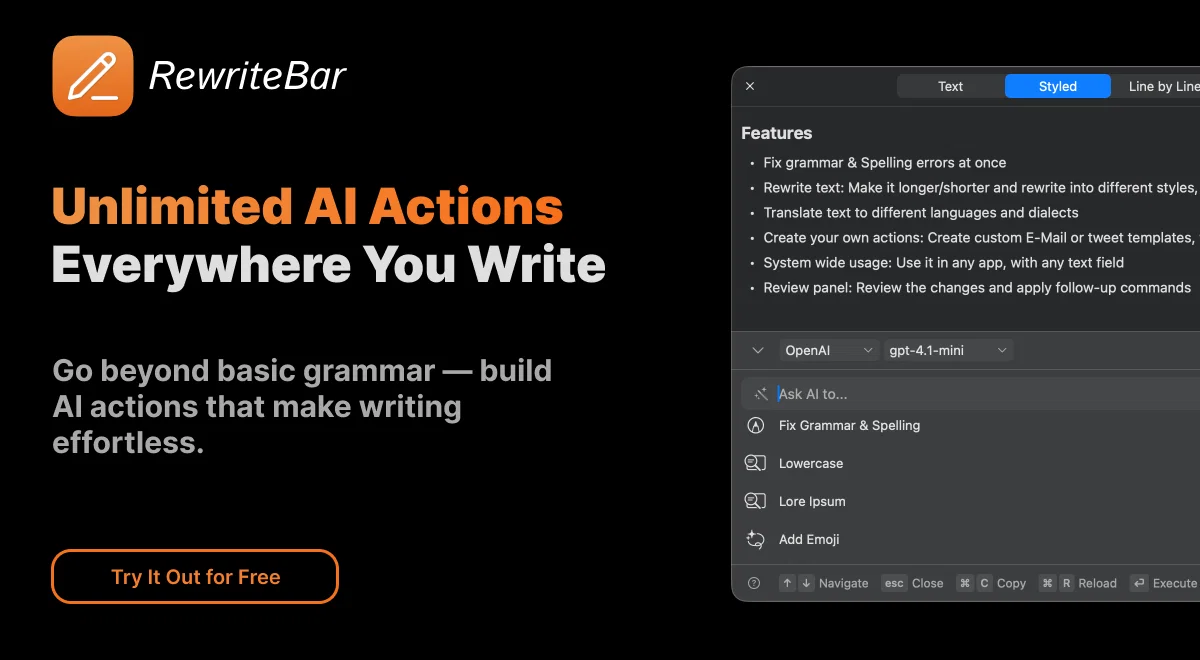
Simply select text in any macOS application—whether you're composing emails in Mail, writing messages in Slack, coding in your favorite editor, or drafting documents—and choose from a variety of AI-powered actions to instantly transform your content. The app works harmoniously with existing tools like Grammarly, providing an additional layer of writing assistance without conflicts.
Key capabilities include correcting grammar errors that even advanced spell-checkers miss, rewriting text in different tones and styles, translating content without leaving your current application, simplifying complex sentences for clarity, and expanding or summarizing paragraphs. You can even create custom AI actions tailored to your specific workflows.
Powered by OpenAI and other leading AI providers, RewriteBar delivers professional-grade writing assistance that adapts to your needs. Whether you're a developer crafting technical documentation, a professional writing business communications, or anyone who values clear, effective writing, RewriteBar streamlines your workflow and elevates your content quality with just a few clicks from your menubar.
Best for
Short scenarios where RewriteBar tends to shine.
-
Improve Markdown blog posts
Best for Non-native speakers
-
Enhance code editor writing
Best for Developers
-
Translate code blocks
Best for Indie founders
-
Improve writing during daily work
Best for Marketers
-
Craft emails
Best for Students
-
Create content
Best for Pastors
-
Improve ChatGPT prompts
Best for Churches
Example outputs 1
Sample generations and before/after results for RewriteBar.
Access & connections
Where you can use RewriteBar, and what it plugs into.
Platforms
Integrations
Capabilities
What this tool accepts, produces, and is strongest at.
Input
- Text
Output
- Text
Highlights
- API
- Local
- Use code TAAFT
- 25% OFF
Supported features
- API
- Runs Locally
Pros & cons
Pros
- Fixes grammar and spelling errors instantly
- Works offline with local models like Ollama or LM Studio
- Works across all macOS applications — Mail, Slack, Notion, VS Code, Figma, etc.
- Lightweight (≈20MB), optimized for Apple Silicon
- Custom AI actions and reusable templates for advanced workflows
- Adjusts tone and writing style automatically
- Supports 12+ AI providers (OpenAI, Anthropic, Gemini, Claude, Apple Intelligence, etc.)
- Seamlessly integrates with macOS using lightweight menubar design
Show 17 more
- Translates text and code snippets across 500+ languages
- No need to copy-paste or switch apps
- Customizable keyboard shortcuts for every action
- Improves writing speed and overall productivity
- Compatible with Grammarly and other AI tools
- Includes Compare View for reviewing changes before applying
- Multilingual interface (15+ supported languages)
- Slack and Figma integration ready
- Fast performance — no UI slowdown
- Privacy-friendly: does not store user data
- Refund policy within 14 days
- Uses macOS accessibility permissions only when needed
- Simple pay-as-you-go or one-time license options
- No mandatory subscription
- Translates into multiple languages
- Flexible pricing plans + 25% TAFT launch discount
- Built by a solo macOS developer who uses it daily
Cons
- macOS only — not available for Windows or web yet
- Learning curve for creating custom AI actions (advanced users benefit most)
- No built-in voice or speech input support (text only)
- Requires macOS Ventura (13.0) or newer
- Needs macOS accessibility permissions to function across apps
- One-time license plan requires your own API key
Compare alternatives
Similar tools in the catalog — with a clear reason to open each one.

Voila ✓
Free TrialSeamless AI assistant to help you create, write, brainstorm, and research.
Why look Typically cheaper
Full comparison
Rizz! Keyboard ✓
FreeAI-powered creative responses in your iPhone keyboard.
Why look Fully free option
Full comparison
Werd - Vibe Write with Multi-agent AI ✓
Free TrialVIBE WRITE With Multi-agent AI
Why look Typically cheaper
Full comparison
Sudowrite ✓
Free TrialAI writing partner for faster, more creative storytelling
Why look Typically cheaper
Full comparisonPeople also view
Tools that often show up alongside RewriteBar in collections and comparisons.
Voila ✓
Free TrialSeamless AI assistant to help you create, write, brainstorm, and research.

TextWisely ✓
Paid⚡ Your everyday writing companion: Fix grammar, Reply emails, Paraphrase, and more...

WriteMage ✓
PaidSeamlessly integrate ChatGPT into your macOS workflow.

Rewriteit ✓
FreemiumRewrite content with AI, enhance your writing style.

MacCopilot ✓
PaidNative copilot app for macOS with advanced AI integration
Kerlig ✓
PaidContextual AI Writing Assistant & Chat for macOS

IntelliBar ✓
FreemiumAI-powered assistant for your Mac

FridayGPT ✓
PaidYour AI copilot for Mac, offering instant access to ChatGPT, voice-to-text, and quick AI actions.
Releases 2
🚀 RewriteBar 2.0 — Your AI Writing & Productivity Copilot for macOS
It’s been one year since RewriteBar’s first release 🎉
Version 2.0 is the biggest update yet — faster, smarter, and beautifully integrated into macOS.
✨ What’s New
All Major AI Providers — RewriteBar now supports all known AI platforms, including OpenAI, Anthropic, Gemini, Claude, OpenRouter, Apple Intelligence, and more.
Offline AI Mode — Run RewriteBar fully offline with Ollama or LM Studio for private, local processing.
New Review Window — Compare AI suggestions side-by-side with your original text in multiple view modes.
Follow-Up Actions — Chain multiple rewrites or translations without leaving your workflow.
Template Library — Explore and import dozens of pre-made rewrite templates or create your own custom actions.
macOS Tahoe (26) Support — Optimized for the latest macOS release with Liquid Glass UI integration.
Performance Boost — Faster, more efficient, and more stable across all macOS apps.
Smarter Interface — Improved keyboard navigation, layout scaling, and AI response handling.
💡 Why You’ll Love It
RewriteBar 2.0 is more than an AI writing assistant — it’s a productivity copilot for macOS.
Instantly fix, rewrite, or translate text in any app, online or offline. ⚡️
Imported reviews 2
makes rewriting rough essay sentences way less annoying lol :) really useful.
It's a useful app.
FAQ 12
💻 What is RewriteBar?
🛠️ 1
tool
wrote:
RewriteBar is a lightweight macOS menubar app that enhances your writing in any app using AI. Select text anywhere (Mail, Slack, Notion, etc.), choose an AI action, and instantly improve or translate your text — no context switching needed.
🚀 How does RewriteBar work?
🛠️ 1
tool
wrote:
Once installed, RewriteBar sits in your menubar. Highlight any text, open the menu (or use a keyboard shortcut), and pick an AI action — such as fix grammar, simplify language, translate, or rewrite tone.
The AI instantly returns a rewritten version that replaces or appears next to your original text.
What applications does RewriteBar support?
🛠️ 1
tool
wrote:
RewriteBar works in any macOS app — from Mail, Notes, and Slack to Xcode, VS Code, Notion, or Figma.
If you can select text, you can transmit it with RewriteBar.
💻 Can RewriteBar be used for correcting code snippets?
🛠️ 1
tool
wrote:
Yes! 🚀 RewriteBar can polish code comments, fix grammar in your documentation, and even translate snippets between programming languages or styles.
It’s perfect for developers who want to write cleaner, clearer code — without leaving their editor. 💡
🍏 How is RewriteBar integrated into macOS?
🛠️ 1
tool
wrote:
RewriteBar blends seamlessly into macOS. Once installed, it sits in your menubar and works in any app — no copy-pasting needed. Just select text, press a shortcut, and RewriteBar instantly improves it. ✨
⌨️ Is there a way to customise RewriteBar’s actions using keyboard shortcuts?
🛠️ 1
tool
wrote:
Yes — you can set your own keyboard shortcuts to trigger RewriteBar actions. It’s a quick way to fit the app perfectly into your workflow and boost productivity. ⚡️
🔑 Can I use my own OpenAI API key with RewriteBar?
🛠️ 1
tool
wrote:
Yes — you can connect your own OpenAI API key to use RewriteBar with your preferred models and settings. It gives you full control over how your AI requests are handled. ⚙️
🛍️ What is included in the purchase of RewriteBar?
🛠️ 1
tool
wrote:
Every purchase includes a personal license key, easy installation instructions, and one year of free updates and support. ✨
💻 What requirements does my macOS need to meet for RewriteBar?
🛠️ 1
tool
wrote:
RewriteBar runs on macOS Ventura (13.0) or later. Just install and you’re ready to go. ⚙️
✏️ How does RewriteBar adjust the tone of written content?
🛠️ 1
tool
wrote:
RewriteBar uses AI to adapt your writing tone based on context — for example, switching from casual to professional or friendly to formal. It helps your text sound just right. 💡
🌍 Does RewriteBar provide translation services?
🛠️ 1
tool
wrote:
Yes — RewriteBar supports fast translation of words, sentences, and even code snippets into over 500 languages. 🌐
🎨 Can I use RewriteBar in Figma documents?
🛠️ 1
tool
wrote:
Yes — RewriteBar works perfectly in Figma and any other macOS app. Just select text and apply AI-powered actions right where you work. ✨
Related tools
Recommended

Mindsmith ✓
FreemiumPlatform for building and sharing eLearning content

PrometAI ✓
FreemiumTurn ideas into viable reality with AI business plan generator.

B12 AI Website Builder ✓
FreemiumAI-powered website builder

Recall ✓
FreemiumSummarize Anything, Forget Nothing!

Stunning ✓
PaidBuild AI-powered websites in seconds

IllumiChat ✓
FreemiumFrom Ticket Backlog to Instant Answers Powered by AI