

IntelliBar ✓
AI-powered assistant for your Mac
Free + from $29
Verdict
A quick read before you dig into the full page.
- Best if
- You are researchers and need: Quickly accessing AI models without switching apps
- Skip if
- Limited to Mac OS
- Pick this when
- No login or captcha required
Considering ChatGPT instead? Compare side by side
Overview
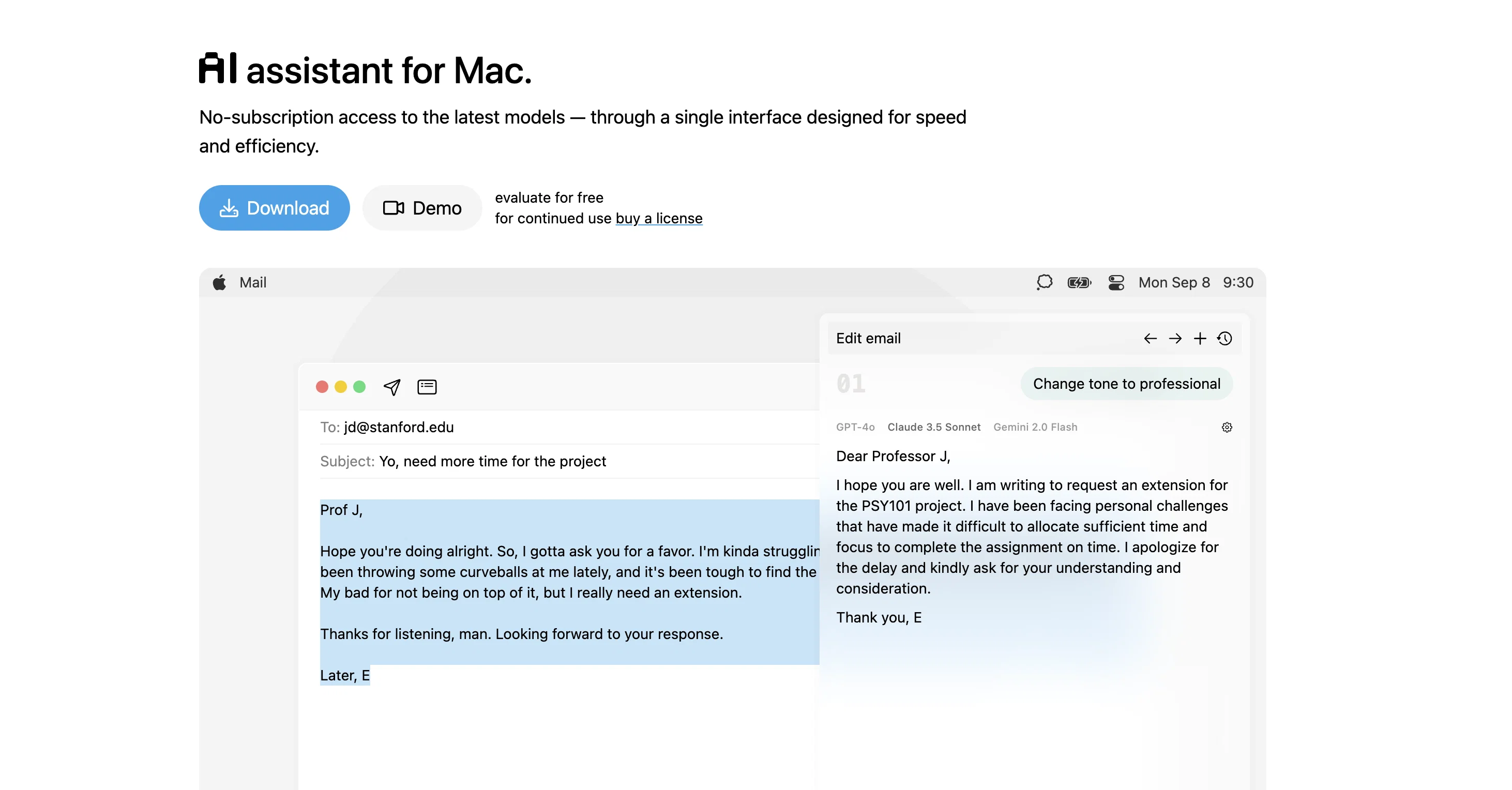
IntelliBar is an AI-powered assistant designed for use on Mac OS. The tool is a ChatGPT client that helps users efficiently perform tasks or answer queries directly on their Mac.
It offers a selection-editing feature, enabling the user to modify any visible text, ranging from amending emails to summarizing online articles. This includes changing the tone of a text, fixing grammar, translation, and even refactoring code.
IntelliBar is optimized for keyboard use, with a majority of actions achievable through key commands, providing a greater sense of control and quickness in use.
Providing AI-based understanding, IntelliBar can also receive and respond to questions about any text, file, or image. A 'Read' feature is available, allowing the user to select any text in any app for IntelliBar to read aloud.
Prompts to IntelliBar are sent directly to the OpenAI API, enhancing the security of the process. Furthermore, it is compatible with GPT-4 and utilises OpenAI's latest DALL-E, TTS, and Whispers models for various tasks.
Accessibility to IntelliBar requires an OpenAI account, but there is no necessity for a ChatGPT Plus account. Users must provide an OpenAI API key upon first launch, which facilitates IntelliBar's access to the OpenAI's API.
Cost depends on usage, with detailed expenditure tracked on the OpenAI dashboard, and option for setting monthly budget limit.
Best for
Short scenarios where IntelliBar tends to shine.
-
Quickly accessing AI models without switching apps
Best for Researchers
-
Comparing responses from different AI models
Best for Writers
-
Proofreading and writing assistance
Best for Developers
-
Travel planning and recommendations
Best for Students
-
Personal finance advice
Best for Professionals
-
Recipe suggestions and cooking tips
Best for Researchers
-
Tech support
Best for Researchers
-
Career advice and resume tips
Best for Researchers
Example outputs 1
Sample generations and before/after results for IntelliBar.
Access & connections
Where you can use IntelliBar.
Platforms
Capabilities
What this tool accepts, produces, and is strongest at.
Input
- API
- Text
- Audio
Output
- Audio
- API
- Text
Pros & cons
Pros
- No login or captcha required
- Programmable hotkeys
- Prompt completions feature
- Past chat search
- Find in chat feature
- Ability to go back
- Adaptive UI
- Code highlighting
Show 40 more
- Direct access to ChatGPT API
- Checks for updates regularly
- Free while in beta
- Lifetime license available
- Involved developers
- Efficient task performance
- Text selection-editing feature
- Amends emails
- Summarizes articles
- Changes text tone
- Fixes grammar
- Translates text
- Refactors code
- Optimized for keyboard use
- Responds to diverse queries
- Read aloud feature
- Compatible with GPT-4
- Uses latest DALL-E, TTS, Whispers models
- No necessity for ChatGPT Plus account
- Provides expenditure tracking
- Allows setting monthly budget limit
- Extensive accessibility
- Retains user control
- Promotes hands-free interactions
- Supports multiple API keys
- Supports revoking API keys anytime
- Compatible with Mac OS
- Follows on Twitter for updates
- Accessible documentation
- Follows prompt to API design
- Budget-friendly pre-order licensing
- Supports speech to text
- Supports turning text into speech
- Supports image generation
- High user control
- Nonintrusive updates checking
- Integrated with Nota app
- Accessible devs via Twitter
- Timely development updates
- Editable visible text
Cons
- Need API key on launch
- Usage costs dependent
- Limited to Mac OS
- No login-free usage
- Pre-beta free use only
- Uncertain post-beta costs
- Reliance on keyboard inputs
- No touch or voice control
Compare alternatives
Similar tools in the catalog — with a clear reason to open each one.

ChatGPT ✓
FreemiumAsk anything, create anything, and move from idea to action.
Why look Typically cheaper
Full comparison
Smarter ChatGPT by Athena AI ✓
FreemiumAI assistant that gets your tasks done. Smarter than ChatGPT.
Why look Typically cheaper
Full comparison
Free AI Chatbot & Image Generator ✓
FreeFree AI chat and image creation, no signup required
Why look Fully free option
Full comparison
KoalaChat ✓
FreemiumThe best AI writer and chatbot for your needs
Why look Typically cheaper
Full comparison
FlowGPT ✓
FreemiumVisualize ChatGPT conversations on a canvas board.
Free + from $50
Full comparison
Chatmind app ✓
PaidAI-powered mind mapping for effortless brainstorming
Why look Typically cheaper
Full comparisonPeople also view
Tools that often show up alongside IntelliBar in collections and comparisons.

BoltAI ✓
PaidmacOS assistant for automated tasks.

WriteMage ✓
PaidSeamlessly integrate ChatGPT into your macOS workflow.

Voila ✓
Free TrialSeamless AI assistant to help you create, write, brainstorm, and research.

TextWisely ✓
Paid⚡ Your everyday writing companion: Fix grammar, Reply emails, Paraphrase, and more...

Rewriteit ✓
FreemiumRewrite content with AI, enhance your writing style.

MacCopilot ✓
PaidNative copilot app for macOS with advanced AI integration
Kerlig ✓
PaidContextual AI Writing Assistant & Chat for macOS

FridayGPT ✓
PaidYour AI copilot for Mac, offering instant access to ChatGPT, voice-to-text, and quick AI actions.
Releases 1
Imported reviews 1
A spotlight-ish and unique design styled app for Mac with support for local LLMs and the major flagship LLM models via API key like OpenAi, Anthropic, xAi, Groq, Google, perplexity and last but not least Deepseek.
The UI blends perfectly with the MacOS UI. Has support for keyboard shortcuts. It has Some design decisions adding a touch of uniqueness.
You can contextually talk with it, like, with files, audio, and document texts.
So far so good.
FAQ 12
What is IntelliBar?
How to access ChatGPT API using IntelliBar?
What are the key features of IntelliBar?
Can you explain IntelliBar's prompt completion feature?
How does IntelliBar's past chat searching work?
Which languages does IntelliBar support for code highlighting?
Is IntelliBar compatible with ChatGPT Plus?
Can IntelliBar operate in hand-free mode?
Does IntelliBar offer text editing and email amendment?
How does IntelliBar offer article summarization?
Is there a 'Read' feature in IntelliBar?
How secure is IntelliBar in terms of user data?
Related tools
Recommended

Photo AI ✓
PaidCreate beautiful AI photos and videos of real people

LogoAi ✓
PaidAI-powered branding in seconds.

Claude ✓
FreemiumBuilding reliable, interpretable AI systems
BoltAI ✓
PaidmacOS assistant for automated tasks.

Typing Mind ✓
PaidChatGPT with superpowers

Opera AI Prompts ✓
FreeYour faster, smarter, safer web companion