
Reshot AI ✓
Professionally reshoot your photos with AI.
from $9/mo
Verdict
A quick read before you dig into the full page.
- Best if
- You are photographers and need: Create professional headshots
- Skip if
- Expensive monthly subscription
- Pick this when
- Professional image enhancements
Considering Viyou AI Image Generator instead? Compare side by side
Overview

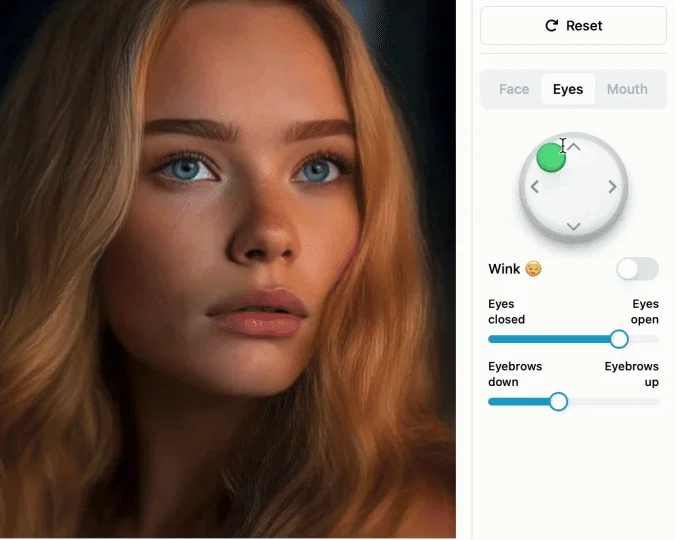
Reshot AI is an AI-powered photo editing tool, designed for professional enhancements of images. This tool provides an effortless way to reshoot photos by making use of artificial intelligence to tweak various attributes such as facial expressions, pose, lighting, and background.
It is useful for creating polished and expressive visuals for profile pictures, YouTube thumbnails, and for social media posts. Reshot AI is ideally structured for those seeking to increase their content's impact and engagement, since it offers the ability to create optimal professional-quality photos in mere seconds.
The tool also permits users to generate multiple edited versions of a photo quickly, providing a range of options to choose the one best-suited for their needs.
Users have full commercial rights and ownership of the photos, allowing them to use the edited photos freely for any intended purpose. Moreover, while Reshot AI is capable of producing high-quality edits, users can make minor adjustments or use the AI suggestions as a starting point for their final design.
The advanced features of Reshot AI aid in creating stunning images, from relighting headshots to background removal, enhancing the overall quality and appeal of photos.
Best for
Short scenarios where Reshot AI tends to shine.
-
Create professional headshots
Best for Photographers
-
Enhance YouTube thumbnails
Best for YouTubers
-
Edit 3D avatars
Best for Content creators
-
Improve AI art
Best for Social media managers
-
Photo retouching of faces
Best for Graphic designers
-
Create stunning profile pictures
Best for AI artists
-
Enhance social media posts
Best for Marketing professionals
Example outputs 1
Sample generations and before/after results for Reshot AI.
Access & connections
Where you can use Reshot AI, and what it plugs into.
Platforms
Integrations
Pros & cons
Pros
- Professional image enhancements
- Effortless photo reshooting
- Facial expression editing
- Pose manipulation capability
- Lighting adjustment function
- Background editing feature
- Ideal for social media
- Optimized for YouTube thumbnails
Show 26 more
- Increases content's impact
- Quick photo editing
- Generates multiple versions
- User has full rights
- Option for minor adjustments
- Relights headshots
- Background removal capability
- High-quality edited images
- Full commercial rights
- Fast design suggestions
- Stunning visual results
- Flexible editing features
- Helps create expressive visuals
- Multiple options to choose
- Designed for professional usage
- Secure user ownership
- Quick enhancing options
- Works great with green-screen
- Generates options optimized for user
- Professional-looking results
- Quick editing times
- User-friendly interface
- Generous editing allowances
- Photo editor subscription plans
- Highly praised by users
- Ideal for content creators
Cons
- Limited to 250 edits/month
- Expensive monthly subscription
- Limited background editing capabilities
- No free version available
- No specific features for green-screen
- Doesn't support batch editing
- Time-consuming customization
- No relighting tool available yet
Show 2 more
- No normals estimation tool available yet
- Doesn't mention support for different file formats
Compare alternatives
Similar tools in the catalog — with a clear reason to open each one.

Viyou AI Image Generator ✓
FreemiumTransform text and images into stunning videos and visuals.
Why look Freemium alternative
Full comparison
Img2Img AI ✓
FreemiumTransform any image with AI in seconds.
Why look Freemium alternative
Full comparison

Photoeditor ✓
PaidEnhanced image editing with object and text removal.
from $9.99/mo
Full comparison
Cleanup pictures ✓
FreemiumRemove unwanted elements from photos instantly.
Why look Freemium alternative
Full comparisonPeople also view
Tools that often show up alongside Reshot AI in collections and comparisons.
Photoeditor ✓
PaidEnhanced image editing with object and text removal.

Viesus enhancing PDFs and images ✓
Free TrialEnhancing and Upscaling for images and PDFs

UniFab Studio ✓
PaidSharper Details, Smoother Motion, Enhanced in Every Frame

Topaz Labs | Photo AI 4 ✓
PaidMake every shot perfect with AI-powered photo enhancement.

AI Portrait - Remaker ✓
Free TrialConvert photos into artistic AI portraits instantly.

Jupitrr ✓
FreemiumVoice-recorded & podcast-based personalized videos

HitPaw Edimakor ✓
FreemiumAI-powered video editing made easy.

Face26 ✓
Free TrialEnhance photos with AI in one click
Releases 1
Imported reviews 5
It isn't free. What a waste of time.
Terrible not be able to even test this one without paying!
Works super well, using it for work to edit movie posters
It asks for payment right away after forcing you to log in.
Asks for payment straight away, no way to establish an opinion without subscription.
FAQ 12
What is Reshot AI?
How does Reshot AI work?
Can you adjust facial expressions with Reshot AI?
Can Reshot AI change the pose in a photo?
How does Reshot AI handle lighting adjustments?
Can Reshot AI edit the background of a photo?
What sort of uses does Reshot AI have for social media content?
How good is Reshot AI for creating YouTube thumbnails?
Do users maintain ownership of their photos after editing with Reshot AI?
How much time does it take to edit a photo with Reshot AI?
Can users make further adjustments after Reshot AI has edited a photo?
What advanced features does Reshot AI offer?
Related tools
Recommended

SellerPic ✓
FreemiumSupercharge photos with AI, boost sales in minutes.
OverallGPT ✓
Free TrialCompare AI models side-by-side for informed decisions.

Video Studio AI ✓
FreemiumGenerate AI videos from text or images instantly

Automateed ✓
Free TrialCreate eBooks effortlessly with Automateed, the AI-powered writing tool.

Informly Idea Validator ✓
FreemiumValidate and grow your business idea with AI.

SpeedNote AI ✓
FreemiumWrite clear notes. Fast.