

Verdict
A quick read before you dig into the full page.
- Best if
- You are anime artists and need: Generating anime-style artwork for personal or commercial use
- Skip if
- Limited image customization
- Pick this when
- High-quality Anime art
Considering Photo AI instead? Compare side by side
Overview





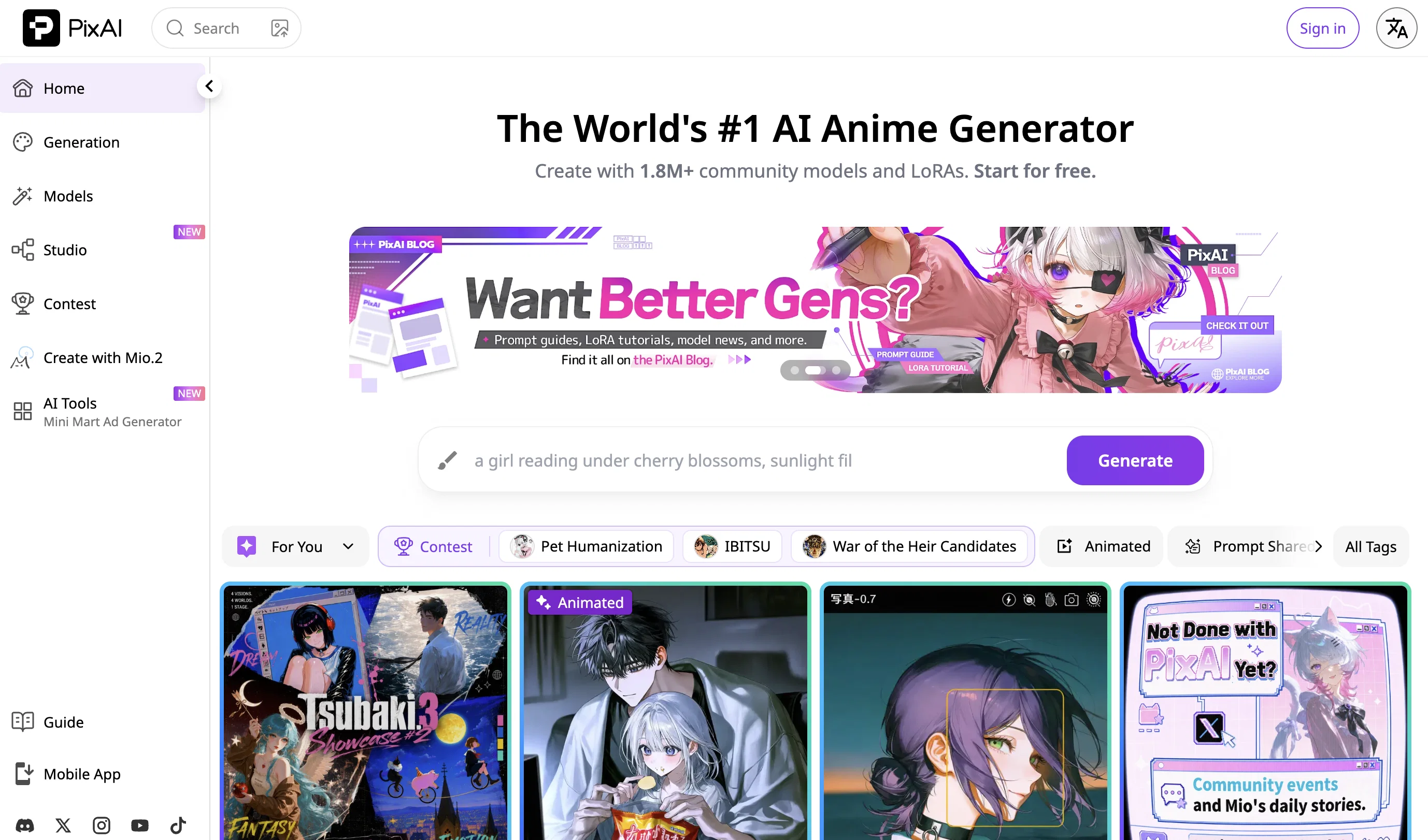
Generate with the models that fit your vision. PixAI's core is its image generation engine, backed by a diverse lineup of models spanning classic anime, semi-realistic, watercolor, chibi, and more. Beyond community models, PixAI develops its own in-house SDXL model series and the advanced DiT models — each trained for distinct aesthetics and use cases. The Model Market gives you access to thousands of community-created LoRAs organized by character, style, pose, and outfit, so you can mix, match, and layer up to 15 at a time to achieve exactly the look you want.
Make it yours with LoRA training. On PixAI, you can train your own LoRAs directly in the browser — no local GPU required. Create character LoRAs for your OCs, style LoRAs to match a specific art aesthetic, or outfit and pose LoRAs for recurring use. Trained models can be kept private or shared with the community.
Edit with precision. The image editing suite covers everything from targeted fixes to full transformations: Inpaint and Outpaint for structural edits, Flow Edit for natural-language-driven changes, Reference Pro for multi-image editing that keeps character identity consistent across panels and scenes, and one-click Enhance tools and color filters.
Animate your art. Bring static images to life with Image-to-Video (up to 10 seconds, with audio support in V3.2), or go straight from text to video with Text-to-Video — compatible with all models and custom LoRAs.
Free to use, with plenty of ways to earn more. Every user gets daily free credits just by logging in, plus additional credits from completing daily creative tasks, and participating in seasonal events like Christmas, Valentine's Day, and more.
Learn and grow with the community. PixAI publishes an extensive library of tutorials and guides covering prompting, model selection, LoRA training, video generation, and advanced techniques — written by both the PixAI team and top community creators. The community itself is active across Discord, X (Twitter), Reddit, Instagram, and YouTube, with regular events, contests, and giveaways running throughout the year.
Best for
Short scenarios where PixAI Art tends to shine.
-
Generating anime-style artwork for personal or commercial use
Best for Anime artists
-
Participating in AI art contests
Best for AI art enthusiasts
-
Training custom AI models for art generation
Best for Content creators
-
Sharing and discovering AI-generated art within a community
Best for Game developers
Example outputs 1
Sample generations and before/after results for PixAI Art.


Access & connections
Where you can use PixAI Art, and what it plugs into.
Platforms
Integrations
Capabilities
What this tool accepts, produces, and is strongest at.
Input
- Image
- Text
Output
- Video
- Text
- Image
Supported features
- Fine-tuning
Pros & cons
Pros
- High-quality Anime art
- Anime character templates
- Simple platform navigation
- Community features
- Discord channels for interaction
- Daily rankings
- Trending content feature
- Different style options
Show 19 more
- Free to use
- Personalization features
- Web-based
- Examples of generated art
- Themed options (Genshin Impact, Pokemon)
- Varied poses and settings
- Supports visual content generation
- Empowers creativity
- Realistic style option
- Cyberpunk style option
- Applicable to images, photos, pictures
- In-app collaboration and inspiration
- Visibility of latest creations
- Generated art is visually compelling
- Option for various characters
- Supports user registration
- Option for image bot
- Mobile app availability
- Supports LGBT themes
Cons
- No API offered
- Limited styles themes
- No desktop application
- Limited image customization
- Lacks multi-language support
- Doesn't support batch processing
- Focuses on Anime only
- No option for image size/resolution
Show 1 more
- Lacks offline functionality
Compare alternatives
Similar tools in the catalog — with a clear reason to open each one.


Stockimg AI ✓
PaidGenerated images and text for design ease.
Why look Stronger for image work
Full comparison

Midjourney ✓
PaidExpand human imagination through AI-powered visuals.
Why look Typically cheaper
Full comparison
People also view
Tools that often show up alongside PixAI Art in collections and comparisons.

Ideogram ✓
FreemiumAI-powered creativity booster

Adobe Firefly ✓
FreemiumCreate stunning visuals with AI-powered text prompts
Midjourney ✓
PaidExpand human imagination through AI-powered visuals.

Stable Diffusion ✓
FreemiumUnleash humanity's potential with generative AI

Recraft ✓
FreemiumGenerate vector art and 3D images effortlessly

Raphael AI ✓
FreemiumCreate stunning AI images instantly, for free.

Playground AI ✓
FreemiumCreate art and visuals with AI, for free

Perchance AI ✓
PaidFree AI image generation with 18 tools and 75 styles.
Prompts 1
My Anime Villain Form · James Heart
Ever wonder what you'd look like as the ultimate anime villain? This is where you bring that version of you to life. Add a photo, pick your powers, style, mood, and setting. The result? Pure villain energy, fully visualized.
Turn yourself into an unforgettable anime-style villain. Use this prompt to generate a high-quality image based on your photo and a short character description. The result should feel dramatic and bold, capturing your villain energy in full stylized form. Facial features, clothi…
Loading full prompt…
Releases 2
What's New on PixAI
-
Smarter Prompting: Write prompts in your own language. Prompt Helper automatically interprets and optimizes your input — whether it's natural language, mixed tags, or non-English text — so you spend less time on syntax and more time creating.
-
Expanded Model Library: PixAI has launched a new series of SDXL models alongside a growing lineup of DiT models, supporting a wider range of artistic styles and more expressive, high-quality outputs than ever before.
-
One-Click Creative Tools A new suite of one-click tools and generators makes it easy to achieve specific results without manual editing. From Sketch Coloring, Change Emotion, to Galgame UI generator, Character Sheet Generator, and more — professional-quality adjustments in a single click.
-
Image-to-Video & Text-to-Video: Bring your artwork to life with PixAI's video generation suite. Choose from multiple video models optimized for different needs — character consistency, cinematic motion, fast drafting, and more. Also supports audio generation, including voiceover and sound effects.
-
Powerful Image Editing: A comprehensive editing suite now covers everything from targeted fixes to full transformations: Inpaint, Outpaint, Flow Edit for natural-language-driven edits, and Reference Pro for multi-image editing that keeps character identity consistent across scenes and panels.
-
A Cleaner, More Intuitive Interface: The PixAI interface has been redesigned with a focus on usability and visual polish. Navigation is smoother, workflows are more streamlined, and the overall experience — from generation to editing to model browsing — is cleaner and more enjoyable to use.
-
Regular Events & Community Activities: PixAI runs seasonal events throughout the year — including Christmas, Valentine's Day, and more — where users can earn free credits, win prizes, and join themed art contests. Weekly art contests on the platform and activities across Discord, X, and other social channels keep the community active year-round.
Imported reviews 7
Used to be good. I guess now that they've sold out to the play store they no longer offer good realistic generation. Just another self censoring soulless crapp
Very good..i love it.....
Love it. Tons of stuff packed into one place (image gen, editing, upscaling, even video stuff like kiss/hug animations) The workflows are a really cool touch as well.
But there are a couple things (that I think) could make it even better: an option to stop the infinite scroll so you can actually reach the footer, folders to organize your gens, and maybe a way to collab with others on shared projects. Would def take it up a level.
Still, really great setup overall.
Really fun to use! The 10,000 credits let me try lots of ideas, and most images turned out great. Definitely convinced me to keep using it.
very good results but i wished that the low priority mode wouldn’t take this long (approx. an hour). if you have the credits and turn on high priority, it takes only seconds :) nice tool
One of the better AI websites that offer a blend of free and paid training LLM that can be adjusted. Everyday if you log in you get a decent amount of coins to use instead of other AI websites that only give you limited coins and after 5 tries you have to wait the next day.
Turns bad drawings into GOOD drawings, 95.5% of the time.
gooooooooooood
FAQ 12
What is PixAI?
🛠️ 1
tool
wrote:
PixAI (pixai.art) is an AI art platform specializing in anime and stylized digital art. It offers image generation with a wide range of models and LoRAs, image editing tools, video generation, online LoRA training, and a large creative community — all accessible from your browser or mobile app.
Is PixAI free to use?
🛠️ 1
tool
wrote:
Yes, PixAI is free to use. Any user can access and use the Anime AI Art Generator without any cost.
Do I own the art I create on PixAI?
🛠️ 1
tool
wrote:
Yes. The artwork you generate on PixAI belongs to you.
Can I use PixAI on my phone?
🛠️ 1
tool
wrote:
Yes. PixAI is available on both iOS and Android, supporting image generation, editing, and Model Market access on the go.
What languages does PixAI support for prompting?
🛠️ 1
tool
wrote:
PixAI's Prompt Helper supports multiple languages — you can write prompts in your native language and the tool will convert them into optimized generation inputs.
How do I get started?
🛠️ 1
tool
wrote:
Visit pixai.art, create a free account, and start generating right away. Check out the Quick Start guide on the PixAI blog for a step-by-step walkthrough.
Do I need any art or technical skills to use PixAI?
🛠️ 1
tool
wrote:
No. PixAI is designed for all skill levels. Beginners can start by simply describing what they want in plain language. Built-in tools like Prompt Helper even let you write in your native language and automatically convert it into optimized prompts. Advanced settings are available as you grow.
Does PixAI allow personalizing anime characters?
🛠️ 1
tool
wrote:
Yes. You can customize characters through prompts, ControlNet for pose and composition control, LoRAs for specific character styles or identities, and editing tools like Flow Edit and Reference Pro for targeted adjustments.
What tools are available in PixAI for creating anime art?
🛠️ 1
tool
wrote:
PixAI offers a full creative toolkit: image generation, a suite of editing tools (Inpaint, Outpaint, Flow Edit, Reference Pro), one-click Enhance tools (Hand Fix, Face Enhance, Background Remover, Convert to Line Art, Sketch Coloring, Change Emotion), image-to-video and text-to-video generation, and online LoRA training.
What is the Model Market in PixAI?
🛠️ 1
tool
wrote:
The Model Market is PixAI's library of AI models, including community-created LoRAs and PixAI's own in-house models. Models are organized by character, style, pose, and outfit, making it easy to find exactly the aesthetic you're after. You can browse, combine, and even publish your own models for others to use.
What types of AI art can be generated with PixAI?
🛠️ 1
tool
wrote:
PixAI supports a wide range of styles — including semi-realistic, watercolor, chibi, cyberpunk, flat illustration, and more. You can generate character illustrations, multi-character scenes, backgrounds, comic panels, sticker sheets, character concept sheets, and animated video clips.
Does PixAI have a community?
🛠️ 1
tool
wrote:
Yes. PixAI has an active community across Discord, X (Twitter), Reddit, Instagram, and YouTube. On the platform itself, you can browse a public gallery, follow trending content, check daily rankings, and enter weekly art contests. The PixAI blog also features tutorials and guides from both the team and community creators.
Related tools
Recommended

Stratup.ai ✓
FreemiumInnovative idea generation for businesses.

VenturusAI ✓
FreemiumBusiness idea analysis and reporting.

ArtBot ✓
FreeCreate AI images with Stable Diffusion for free

LearningStudioAI ✓
Free TrialAI-powered authoring tool for effortless online course creation.

GPTExcel ✓
FreemiumGenerate spreadsheet formulas with AI

Business Idea Generator AI ✓
FreeGenerate innovative business ideas with AI