

ArtBot ✓
Create AI images with Stable Diffusion for free
Verdict
A quick read before you dig into the full page.
- Best if
- Create AI images with Stable Diffusion for free
- Skip if
- Complex for non-tech-savvy users
- Pick this when
- Web-based platform
Considering Photo AI instead? Compare side by side
Overview
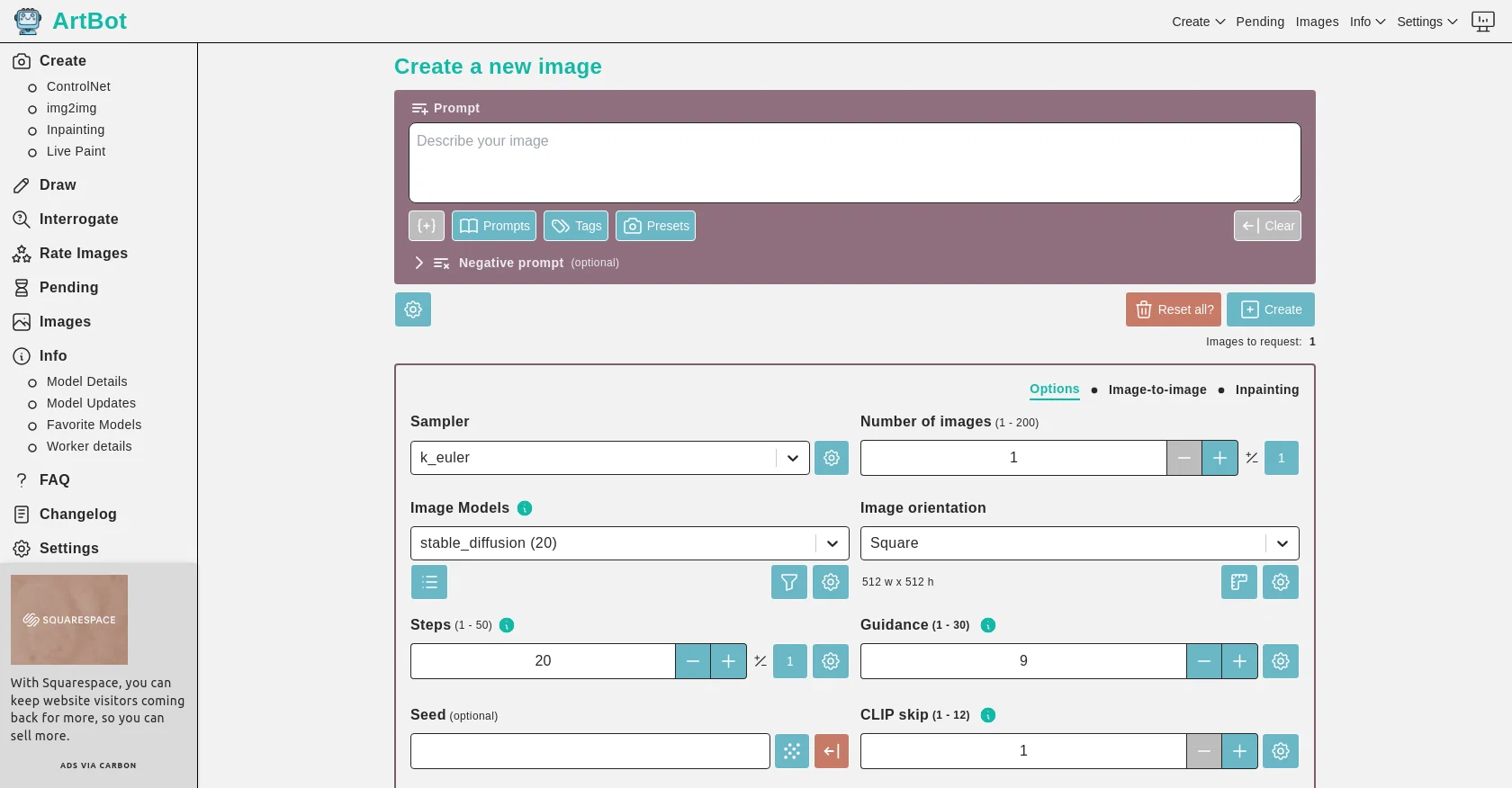
ArtBot is a web-based tool that enables users to generate AI-created images and photos using Stable Diffusion. The tool utilizes a distributed computing cluster known as the AI Horde to process the creations.
With ArtBot, users can create images without the need for login or any associated costs, as it is free to use.By navigating through the various options provided, users can control the image generation process.
They can define prompts, select image models, and set the image's orientation and size. Additionally, users can determine the number of steps and the level of guidance for the AI algorithm.
Optional inputs such as seed and CLIP skip can also be specified.ArtBot offers post-processing options to enhance the generated images. Users can utilize GFPGAN and CodeFormers to improve facial features, strip the image's background, or apply upscaling techniques using RealESRGAN_x4plus and RealESRGAN_x4plus_anime_6BNMKD_Siax4x_AnimeSharp.The web application, designed with care and passion by @davely, is easily accessible and user-friendly.
Users can find more information about ArtBot, as well as frequently asked questions and the changelog, on the corresponding website pages. In addition, the project's GitHub repository provides further details and resources.Overall, ArtBot provides a convenient platform for those interested in creating AI-generated images using Stable Diffusion, offering various customization options and leveraging the power of distributed computing through the AI Horde.
Best for
Short scenarios where ArtBot tends to shine.
-
Create AI images with Stable Diffusion for free
Example outputs 1
Sample generations and before/after results for ArtBot.
Access & connections
Where you can use ArtBot, and what it plugs into.
Platforms
Integrations
Capabilities
What this tool accepts, produces, and is strongest at.
Input
- Text
Output
- Image
Pros & cons
Pros
- Web-based platform
- Image generation with Stable Diffusion
- No login required
- Free to use
- Various image generation settings
- Control over number of steps
- Optional seed and CLIP inputs
- Post-processing options
Show 33 more
- GFPGAN and CodeFormers options
- Upscaling via RealESRGAN_x4plus
- RealESRGAN_x4plus_anime_6BNMKD_Siax4x_AnimeSharp for anime
- Strip image background
- Control over image orientation
- Control over image size
- Flexible image models selection
- Options to generate multiple images
- Preset settings available
- Supports optional negative prompts
- Images request up to 200
- Steps configurable (1 - 50)
- Guidance configurable (1 - 30)
- KarrasHires fix option
- Use slow workers option
- Allow NSFW Generations option
- Prompt Replacement Filter option
- Reset options available
- Frequently asked questions provided
- Changelog available
- GitHub repository accessible
- Option for square images
- User-friendly application
- Defined image prompts
- Support for tag prompts
- FAQ and support accessible
- Option for image-to-image Inpainting
- Manage Worker functionality
- ArtBot Prefs Import/Export function
- Detailed model information provided
- Live paint option
- Image interrogate functionality
- Rate images feature
Cons
- Limited to web-based operation
- No application version
- No mentioned API
- No login option implies lack of personalization
- Upscaling options might be limited
- No multi-language support
- Image creation limited to specific parameters
- Complex for non-tech-savvy users
Compare alternatives
Similar tools in the catalog — with a clear reason to open each one.

Stockimg AI ✓
PaidGenerated images and text for design ease.
Why look Stronger for image work
Full comparisonPeople also view
Tools that often show up alongside ArtBot in collections and comparisons.
Stockimg AI ✓
PaidGenerated images and text for design ease.

Photo AI ✓
PaidCreate beautiful AI photos and videos of real people

Midjourney ✓
PaidExpand human imagination through AI-powered visuals.

CreativePixel ✓
FreemiumOut-create Your Competition in Minutes

BestPhotoAI ✓
FreemiumCreate amazing AI photos instantly

Nathan Tailors AI Suit Generator ✓
FreeDescribe your dream suit. We draw it, then build it.

LineArt ✓
Free TrialTurn one photo into a whole coloring book.

Line Drawing Converter ✓
Free TrialConvert photos into clean line drawings online.
Releases 1
In the news
Launch coverage and community mentions for ArtBot.
Imported reviews 3
For advanced users!
After a little training, you can create fantastic images. Lots of options and therefore possibilities. Tons of models. You can adjust everything by yourself. Picture-to-picture and inpainting also available.
You can even participate by your own GPU and be a part of the 'AI Horde'. One of the best text-to-image sites out there, FOR FREE!
Fantastic!
Good app, but it takes 10 minutes to process 1 request with the default settings
Easy to use and produces some very interesting results. It is going to be my Go To image creation tool.
FAQ 12
What is ArtBot?
How does ArtBot generate images?
What is Stable Diffusion in the context of ArtBot?
What is the AI Horde utilized by ArtBot?
How can users control the image generation process in ArtBot?
Does ArtBot require users to login or make a payment?
What post-processing options does ArtBot offer?
How can I improve facial features in my ArtBot generated images?
How can I strip the background of an image generated by ArtBot?
What upscaling techniques does ArtBot support?
Who is the creator of ArtBot and how can I get in contact with them?
How can I access more information about ArtBot?
Related tools
Recommended

Kittl ✓
FreemiumCreate stunning designs effortlessly.
Getimg.ai ✓
PaidBest content generation tool for marketers and social media creators

Ideogram ✓
FreemiumAI-powered creativity booster

LearningStudioAI ✓
Free TrialAI-powered authoring tool for effortless online course creation.

VenturusAI ✓
FreemiumBusiness idea analysis and reporting.
PixAI Art ✓
FreemiumAnime artwork generator