Photodot AI ✓
AI-driven photo editing online for free.
Free + from $8.33/mo
Verdict
A quick read before you dig into the full page.
- Best if
- AI-driven photo editing online for free
- Skip if
- Unspecified processing quality on complex tasks
- Pick this when
- Online photo editing services
Considering Viyou AI Image Generator instead? Compare side by side
Overview
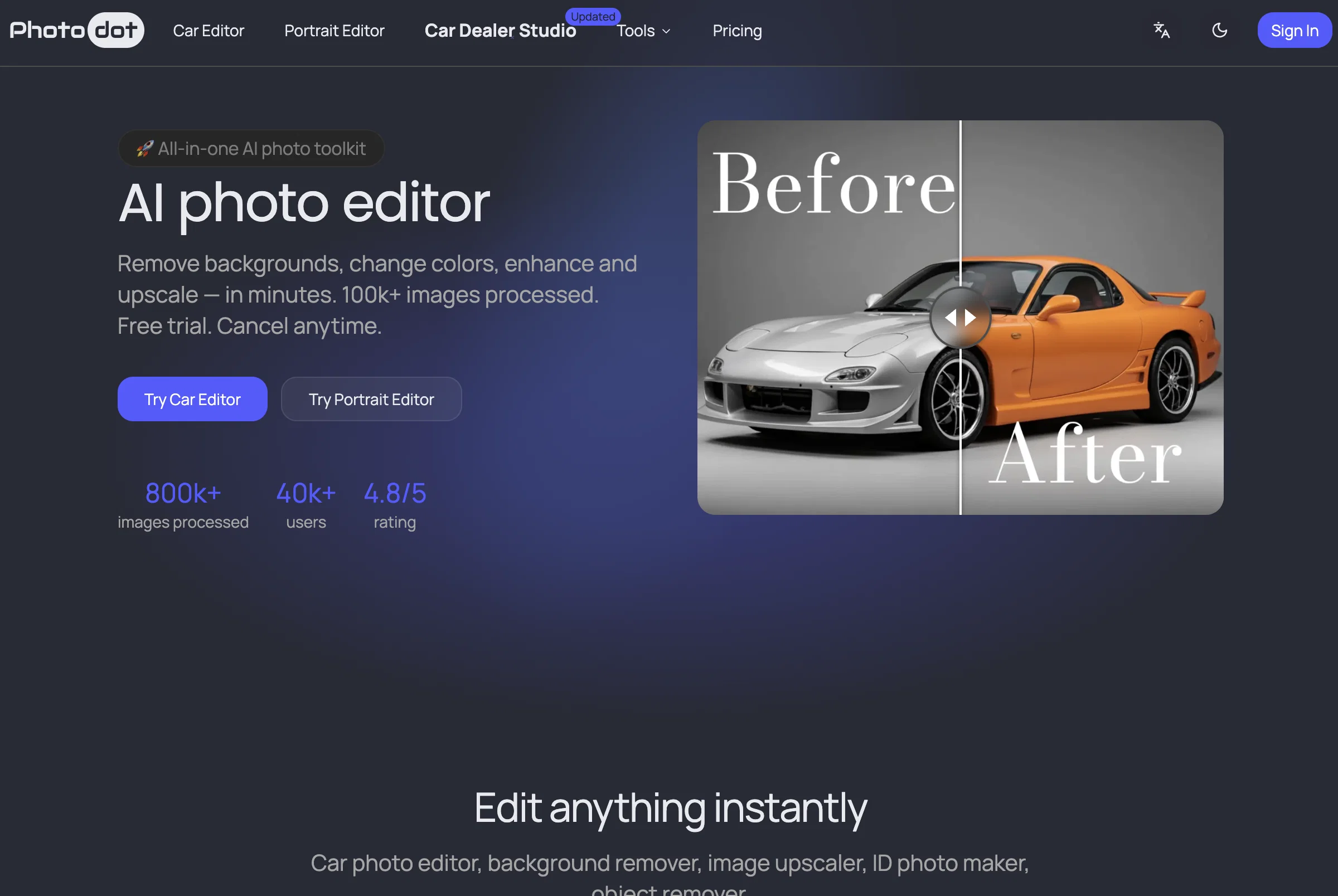
PhotodotAI is an AI-driven tool offering online photo editing services. Its main specialisation is car customisation and portrait retouching. The tool is accessible directly from the web, thus eliminating the need for any installations.
Its robust features include a Car Editor, Portrait Editor, Image Upscaler, and Watermark Remover, among others. The Car Editor feature permits alterations to car photos, such as color adjustment, background clearing, lighting and reflection corrections, object removal, and exporting images ready for listing.
The Portrait Editor feature allows for the creation of passport photos and professional headshots based on preset sizes and with compliant backgrounds.
This feature excels in preserving natural skin tones and fine hair edges. PhotodotAI's Image Upscaler function can magnify image size whilst reducing noise and enhancing details, resulting in clearer, more impactful visuals ideal for ecommerce, listing images, or print-ready assets.
Future features, as indicated, include a Watermark Remover, a Background Remover, and a Design Editor for consistent branding.While the platform is free to start with, and does not require sign-up, it appears to include paid packages for more extensive features and higher quality results.
PhotodotAI positions itself to be a reliable service with fast processing time.
Access & connections
Where you can use Photodot AI.
Platforms
Capabilities
What this tool accepts, produces, and is strongest at.
Input
- API
- Image
Output
- API
- Image
Highlights
- API
Supported features
- API
- Denoise
Pros & cons
Pros
- Online photo editing services
- Specialises in car customisation
- Specialises in portrait retouching
- No need for installations
- Feature-rich tool
- Car Editor function
- Color adjustment for car images
- Can clear car backgrounds
Show 32 more
- Corrects lighting and reflections
- Facilitates object removal
- Exports images ready for listing
- Portrait Editor for headshots
- Passport photo creation
- Preserves natural skin tones
- Preserves fine hair edges
- Image Upscaler feature
- Reduces noise in images
- Enhances image details
- Ideal for ecommerce
- Ideal for listing images
- Ideal for print-ready assets
- Future feature: Watermark Remover
- Future feature: Background Remover
- Future feature: Design Editor
- Branding consistency
- Free to start
- No sign-up required
- Paid packages for advanced features
- Ensures high quality results
- Fast image processing
- Supports multiple languages
- Reference-Guided Consistent Generation
- 99.8% Uptime
- 40+ Countries support
- Average edit time <15s
- 98% customer satisfaction
- No watermark on paid exports
- Commercial use allowed
- Web-based tool
- Cancellation allowed anytime
Cons
- Web-based without offline version
- Future features still unavailable
- Free version may include watermarks
- Limited image editing specialisations
- Paid packages for better quality
- No multi-language support
- Unspecified processing quality on complex tasks
- No sample images for experiment
Show 2 more
- Lack of plugin support
- Premium needed for watermark-free photos
Compare alternatives
Similar tools in the catalog — with a clear reason to open each one.

Viyou AI Image Generator ✓
FreemiumTransform text and images into stunning videos and visuals.
Free + from $39.99/yr
Full comparison
Img2Img AI ✓
FreemiumTransform any image with AI in seconds.
Why look Typically cheaper
Full comparison

Photoeditor ✓
PaidEnhanced image editing with object and text removal.
from $9.99/mo
Full comparison
Cleanup pictures ✓
FreemiumRemove unwanted elements from photos instantly.
Why look Typically cheaper
Full comparisonReleases 1
FAQ 12
What is PhotodotAI?
What are the main features of PhotodotAI?
Does PhotodotAI specialize in any specific type of photo editing?
How does the Car Editor feature of PhotodotAI work?
Can I create professional headshots and passport photos with PhotodotAI?
What is the Image Upscaler function in PhotodotAI?
Does PhotodotAI have a Watermark Remover?
Is PhotodotAI free to use?
Are there paid packages for PhotodotAI?
How long does PhotodotAI take to process edit requests?
Does PhotodotAI require signup to use?
What are the future features indicated for PhotodotAI?
Related tools
Recommended
Askpot ✓
FreemiumEfficient analysis of products & services for competition.

Voice Cleaner AI ✓
FreemiumRemove background noise from audio instantly with AI.

Prompt Sloth Write Better AI Prompts ✓
FreemiumChrome extension that turns lazy prompts into pro-level instructions.

Grokipedia ✓
FreeAI-powered knowledge encyclopedia in development.
Photo to Video AI.io ✓
Free TrialTurn photos into cinematic videos instantly.

Soniq Chat ✓
FreemiumYour AI copilot for songwriting, production, and cover art