

Image editing 2026 Rank: #832
MojoMake - AI Image to Image Generator ✓
Restyle any photo with every top image model.
Verdict
A quick read before you dig into the full page.
- Best if
- Restyle any photo with every top image model
- Skip if
- No traditional layer, brush, or mask editor
- Pick this when
- One subscription instead of several image tools
Considering Viyou AI Image Generator instead? Compare side by side
Overview
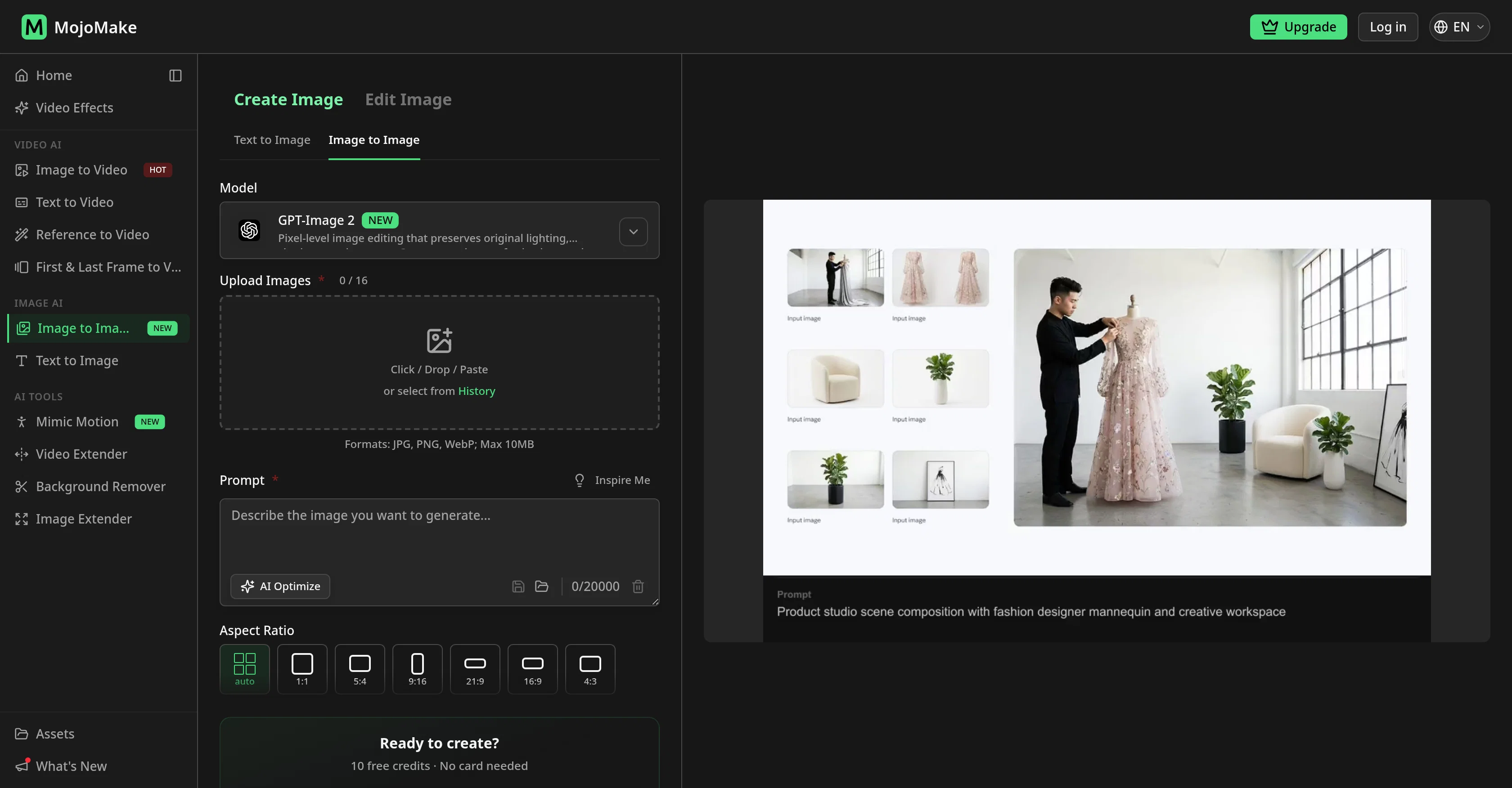
Most people show up with a specific thing in mind. A product shot restyled for Shopify. A portrait turned into watercolor for a client gallery. A sketch pushed into a photoreal mockup. Style transfer, relighting, background swaps, quality fixes. Models disagree on the same edit, so switch once, compare, keep the best. Subject and composition usually stick.
Need video later? Same account has Veo, Kling, Seedance, Wan, and 100+ ready-made effects. 4K stills, 1080p video. Commercial rights, watermark-free on paid plans.
- Image-to-image Editing From A Photo + Text Prompt
- Gpt Image 2, Nano Banana 2, Nano Banana Pro, Seedream 5, Grok Imagine, Qwen, And Flux In One Account
- One-click Model Switch To Compare Outputs
- Style Transfer And Photo Restyle
- Sketch To Photoreal And Product Image Restyle
- Text-to-image Generation
- Background Removal
- Official Provider Apis; Replaces Multiple Image Subscriptions
- 4k Commercial Exports; Free Credits To Start
Best for
Short scenarios where MojoMake - AI Image to Image Generator tends to shine.
-
Restyle any photo with every top image model.
Example outputs 1
Sample generations and before/after results for MojoMake - AI Image to Image Generator.
Access & connections
Where you can use MojoMake - AI Image to Image Generator, and what it plugs into.
Platforms
Integrations
Capabilities
What this tool accepts, produces, and is strongest at.
Input
- Image
- Text
Output
- Image
Highlights
- SOTA
- Use code TAAFT
- 30% OFF
Models
Text
Image
Audio
Video
Pros & cons
Pros
- One subscription instead of several image tools
- Restyle photos with GPT Image 2, Nano Banana 2, Nano Banana Pro, Seedream 5, Grok Imagine, Qwen, and Flux
- Switch models with one click and compare outputs
- Product restyles, client gallery variants, and sketch-to-photo from one tool
- Official APIs — same model output as going direct
- 100% commercial rights, watermark-free on paid plans
- Free to start with 10 credits, no credit card
Cons
- No traditional layer, brush, or mask editor
- No native mobile app
- Output quality depends on source image and prompt
- No offline or desktop app
- No built-in video timeline editor
- No direct social media posting
Compare alternatives
Similar tools in the catalog — with a clear reason to open each one.

Viyou AI Image Generator ✓
FreemiumTransform text and images into stunning videos and visuals.
Free + from $39.99/yr
Full comparison
Img2Img AI ✓
FreemiumTransform any image with AI in seconds.
Why look Typically cheaper
Full comparison
Photoeditor ✓
PaidEnhanced image editing with object and text removal.
from $9.99/mo
Full comparison
Cleanup pictures ✓
FreemiumRemove unwanted elements from photos instantly.
Why look Typically cheaper
Full comparisonPeople also view
Tools that often show up alongside MojoMake - AI Image to Image Generator in collections and comparisons.
Viyou AI Image Generator ✓
FreemiumTransform text and images into stunning videos and visuals.
Photoeditor ✓
PaidEnhanced image editing with object and text removal.
Img2Img AI ✓
FreemiumTransform any image with AI in seconds.

Creen AI ✓
Paid40+ AI models for video, image and art. Free, no sign-up.
Cleanup pictures ✓
FreemiumRemove unwanted elements from photos instantly.

MF0.ai ✓
PaidEvery top AI in one chat. Real memory. No subscription.

LineArt ✓
Free TrialTurn one photo into a whole coloring book.

Kyukoma ✓
Free TrialTurn your stories into manga pages with AI.
Releases 1
FAQ 12
What is the MojoMake AI Image to Image Generator?
How does the MojoMake AI Image to Image Generator work?
What type of transformations can the MojoMake AI Image to Image Generator perform?
Are there any specific technical skills required to use the MojoMake AI Image to Image Generator?
Which professional profiles find the MojoMake AI Image to Image Generator beneficial?
Can the MojoMake AI Image to Image Generator turn a standard photo into different art styles?
What specific edits can the MojoMake AI Image to Image Generator perform?
Can the MojoMake AI Image to Image Generator improve the quality of old and blurry photos?
What is the resolution of the outputs delivered by the MojoMake AI Image to Image Generator?
Can I use the MojoMake AI Image to Image Generator for commercial purposes?
Does the MojoMake AI Image to Image Generator support all image formats?
Are there any specific requirements for uploading photos to the MojoMake AI Image to Image Generator?
Related tools
Recommended

ThumbnailCreator.com ✓
Free TrialCreate eye-catching YouTube thumbnails in seconds.

MagicSlides.app AI PPT Maker ✓
FreemiumCreate Stunning PPTs in Seconds with the AI PPT Maker

Transcript LOL ✓
FreemiumUnlimited transcripts, summaries, 99.8% accuracy, speaker recognition, superfast

Automateed ✓
Free TrialCreate eBooks effortlessly with Automateed, the AI-powered writing tool.
NSFW JS
FreeIdentify NSFW images in the browser

Notis ✓
Free TrialThe first WhatsApp assistant that runs on your ChatGPT and Claude subscriptions
