

Image upscaling 2026 Rank: #1571
Mejorar - AI Photo Enhancer ✓
Restore, sharpen and upscale photos in seconds.
Verdict
A quick read before you dig into the full page.
- Best if
- Restore, sharpen and upscale photos in seconds
- Skip if
- Limited to JPG, PNG, WebP
- Pick this when
- Online photo enhancing
Considering Deep Image instead? Compare side by side
Overview
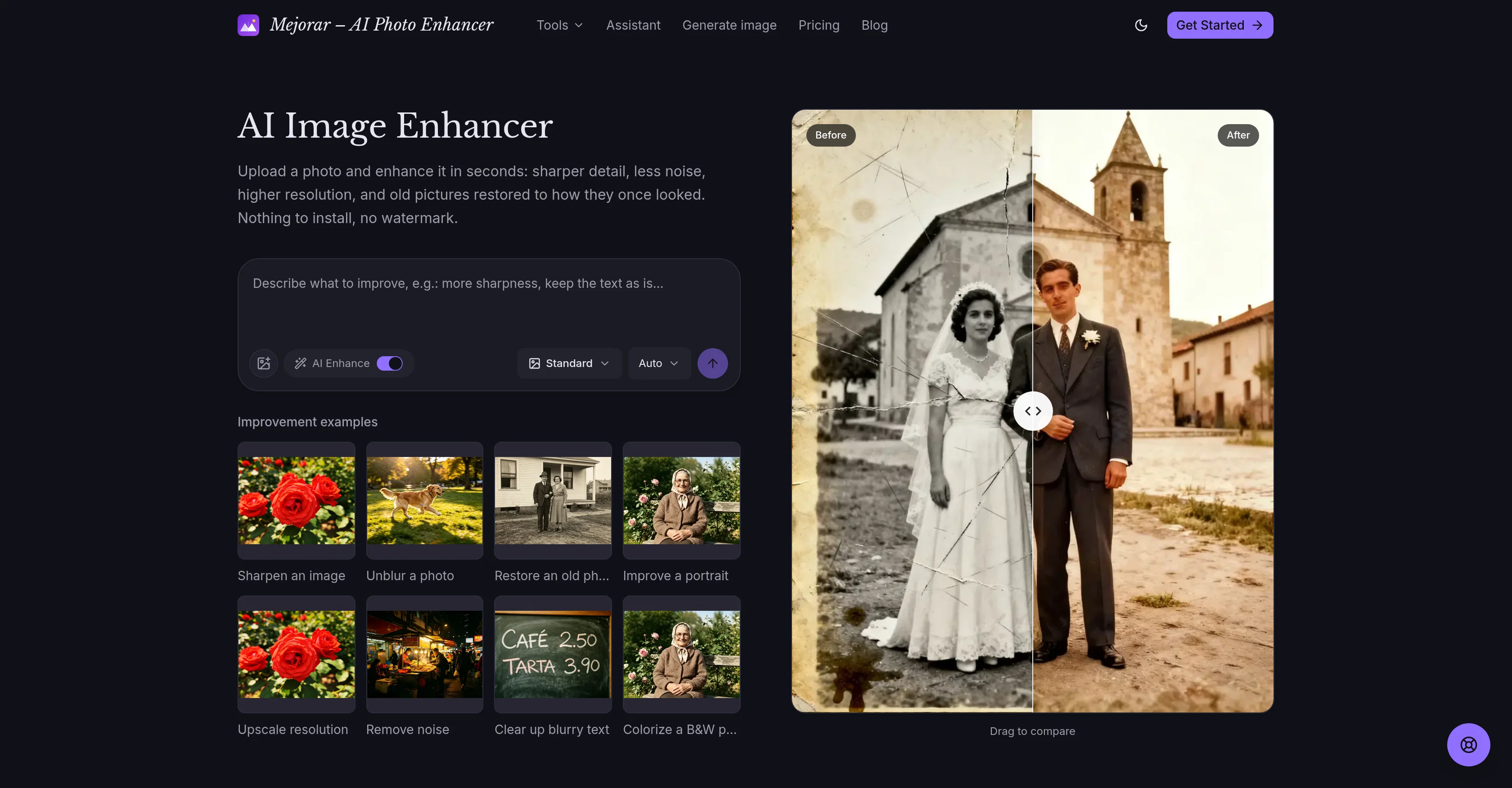
Mejorar - AI Photo Enhancer is an online tool that uses artificial intelligence to digitally enhance images. It offers features that add sharpness, reduce noise, increase resolution, restore old or damaged photographs to their original appearance, and colorize black and white images while ensuring the period-specific colors are authentic.
The tool also specializes in clarifying text obscured by blur and upscaling the resolution of an image while maintaining clarity of detail. The notable aspect about Mejorar is that it gives the user the freedom to instruct the system what to improve on the uploaded image specifically, thus facilitating customization.
Once the processing is done, users can compare the edited version to their original image, make adjustments if necessary, and then download the improved file.
The platform also values user privacy, stating that uploaded images remain private and are not used for retraining its models. A unique feature of this tool is its capability to animate restored images, adding subtle movement like blinks and smiles, which could be particularly valuable for enhancing old portrait photographs.
Access & connections
Where you can use Mejorar - AI Photo Enhancer, and what it plugs into.
Platforms
Integrations
Capabilities
What this tool accepts, produces, and is strongest at.
Input
- Image
- Structured data
Output
- Image
Supported features
- Upscaling
Pros & cons
Pros
- Online photo enhancing
- Sharpness adjustment
- Noise reduction
- Resolution increase
- Original image restoration
- Old/damaged photo repair
- Authentic period colorization
- Text clarification in blur
Show 36 more
- Image upscaling
- Detail clarity preservation
- User customization
- Comparative view (original versus edited)
- Downloadable improved files
- Strong user privacy
- No model retraining
- Image animation
- Old portrait photo enhancement
- Image sharpening
- Clear documentation
- No watermark
- Image file size limit (10MB)
- Retain original image aspects
- Responsive customer service
- Free registration credits
- JPG, PNG, WebP support
- Photo movement addition
- Maintains original image composition
- Conserves image content
- Commercial usage license
- High-quality download
- Quick result generation
- Realistic B/W photo colorization
- Maintains sharp image edges
- Text legibility enhancement
- Noise and grain removal
- Removes blur from photos
- Damaged photo correction
- Repairs scratches and fade
- Private user account images
- Blurred photo focus recovery
- Custom instruction processing
- Images not used for training
- Natural skin in portraits
- Detailed photo repair instructions
Cons
- Might introduce minor changes
- Only for images under 10MB
- Limited to JPG, PNG, WebP
- Requires user instruction
- No batch processing mentioned
- Results not instant, seconds
- Commercial license unclear
- Privacy after account deletion?
Show 2 more
- No hardware acceleration mentioned
- No offline usage
Compare alternatives
Similar tools in the catalog — with a clear reason to open each one.

Deep Image ✓
Free TrialEnhance photos with advanced editing features.
Free + from $9/mo
Full comparison
Upscayl ✓
Free TrialEnhance images with free, open-source AI upscaling.
Why look More privacy-focused
Full comparison
AI Upscaler ✓
FreemiumSmarter AI 4K Upscaler for Images & Videos
Why look Higher community rating
Full comparison
AI Image Combiner ✓
FreemiumInstantly blend multiple photos into one seamless image.
Free + from $4.49
Full comparison

Releases 1
FAQ 12
How does Mejorar enhance the sharpness of an image?
What AI technology does Mejorar use to reduce noise in photos?
How does Mejorar restore old or damaged photos to their original appearance?
Can Mejorar colorize black and white images to period-specific colors?
How does Mejorar clarify text obscured by blur?
Can Mejorar help in upscaling the resolution of an image?
What makes Mejorar unique in customizing the improvement of an uploaded image?
How does Mejorar's feature of comparing edited and original images work?
How does Mejorar maintain user privacy?
Does Mejorar have the ability to animate restored images?
How does Mejorar preserve detail while upscaling an image?
Does Mejorar support all types of image formats?
Related tools
Recommended

remio: Your Personal ChatGPT ✓
FreemiumGet Tailored Answer with Your Personal ChatGPT

Pounce ✓
Free TrialGet real followers and engagement in minutes.

Bookabout ✓
FreeDiscover your next favorite book with AI-powered search.

DRIV AI ✓
PaidAI-powered driving lessons revolutionize your skills
CoachNed ✓
Free TrialWalk into the case like you've already sat it.

OpenMusicPrompt ✓
FreemiumAll-in-One AI Music Studio: Analyze, Generate & Perfect