

Images 2026 Rank: #2091
img2.ai ✓
Create consistent photo variations in any style.
Verdict
A quick read before you dig into the full page.
- Best if
- Create consistent photo variations in any style
- Skip if
- Limited customization options
- Pick this when
- Transforms and remixes images
Considering Photo AI instead? Compare side by side
Overview
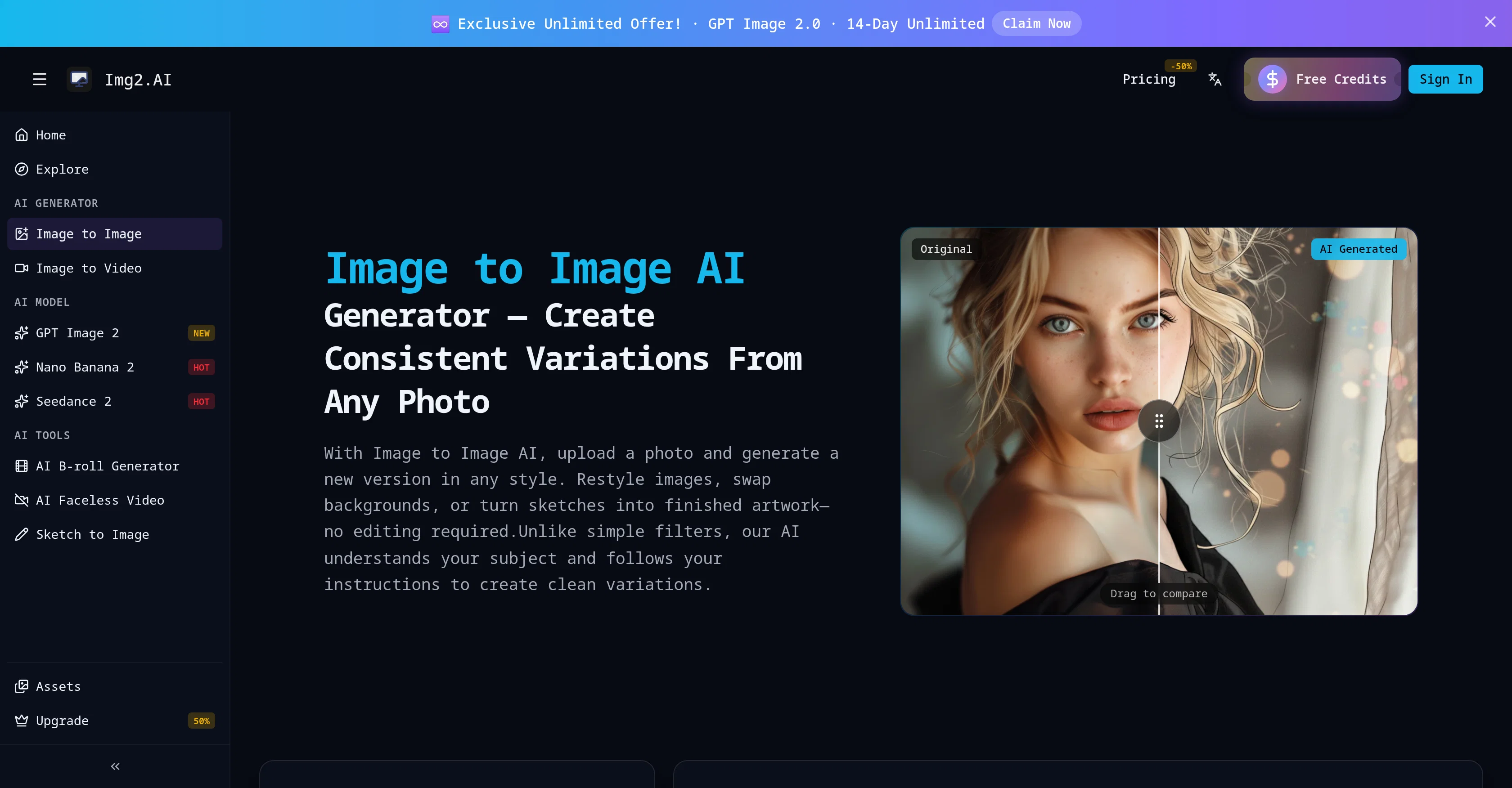
The Image to Image AI Generator is an AI tool designed to transform, remix, and restyle images. It allows users to upload images and generate new versions styled as per their specifications.
The AI can not only restyle images but also swap their backgrounds, or turn sketches into finished artwork, all without requiring manual editing. Unlike common filters, this AI comprehends the subject in use and follows user instructions to create refined variations.
It supports various image formats including JPEG, PNG, and WEBP with a file size limit of 10MB. The tool has use cases in photo restyling, creating image variations, professionalizing selfies into headshots, and genre conversion like turning an image into styles resembling anime, painting, cartoon, or cyberpunk.
It retains the layout and subject of the original image while offering a totally refreshed style and look. It also facilitates conversion of simple sketches or line drawings into complete images, useful for designers, students, and architects, as well as background and object editing, including replacing the background with a new setting like an office, studio, or beach.
The output maintains the recognizability of the main subject while delivering a new visual language as per user specifications.
Access & connections
Where you can use img2.ai.
Platforms
Capabilities
What this tool accepts, produces, and is strongest at.
Input
- Image
Output
- Image
Supported features
- Image Edit
- Image Generation
- Image Understanding
- Styling
- Visual Creation
Pros & cons
Pros
- Transforms and remixes images
- Restyles images to specifications
- Swaps image backgrounds
- Turns sketches into artwork
- Comprehends subject in use
- Supports JPEG, PNG, WEBP formats
- 10MB file size limit
- Useful for various professions
Show 17 more
- Retains original layout and subject
- Delivers refreshed style and look
- Converts line drawings into images
- Facilitates background and object editing
- Maintains subject recognizability
- Generates new visual language
- Creates photo variations
- Professionalizes selfies into headshots
- Converts genres - anime, painting
- Converts genres - cartoon, cyberpunk
- Creates consistent variations
- Turns selfie into professional headshot
- Adjusts lighting and clothing
- Easily removes, replaces backgrounds
- Places subject in new scene
- No manual editing required
- Accurate subject placement
Cons
- Limited to 10MB files
- Doesn't support GIF format
- No real-time editing
- Lacks layered editing capability
- Possible style inconsistency
- No batch processing option
- No API for integration
- Unpredictable output results
Show 2 more
- No vector image support
- Limited customization options
Compare alternatives
Similar tools in the catalog — with a clear reason to open each one.


Stockimg AI ✓
PaidGenerated images and text for design ease.
Why look Stronger for image work
Full comparison
BestPhotoAI ✓
FreemiumCreate amazing AI photos instantly
Why look Freemium alternative
Full comparison

CreativePixel ✓
FreemiumOut-create Your Competition in Minutes
Why look Freemium alternative
Full comparisonReleases 1
FAQ 12
What file formats does img2.ai support?
What's the file size limit for images on img2.ai?
Can I restyle images using img2.ai?
How can img2.ai help me swap the background of an image?
What is the process to turn sketches into artwork on img2.ai?
Can img2.ai convert a selfie into a professional-looking headshot?
What genres can img2.ai convert an image into?
What elements of the original image does img2.ai retain in the transformed image?
Can I use img2.ai to edit objects in an image?
How does img2.ai ensure the recognizability of the main subject?
How can I create consistent photo variations in any style with img2.ai?
In what ways can img2.ai transform line drawings into images?
Related tools
Recommended

Wan Video ✓
UnknownAI creative platform that lowers creative barriers.
Vidnix | AI Text to Video Generator ✓
Free TrialAll-in-one AI video and image generation platform

Sea Imagine | Motion Control ✓
FreemiumTransform text into stunning AI videos and images.

Flixly | Text to Video Generator ✓
FreemiumTurn simple prompts into viral videos, stunning images, and realistic audio.

Scenes AI ✓
FreemiumTurn any idea into professional video in minutes.

Saveto AI | TikTok Transcript Generator ✓
FreeGet 99.9% accurate TikTok transcripts in seconds.