

Videos 2026 Rank: #203
Sea Imagine | Motion Control ✓
Transform text into stunning AI videos and images.
Verdict
A quick read before you dig into the full page.
- Best if
- Transform text into stunning AI videos and images
- Skip if
- Difficulty with complex motions
- Pick this when
- Generates motion-controlled animations
Considering freebeat AI instead? Compare side by side
Overview
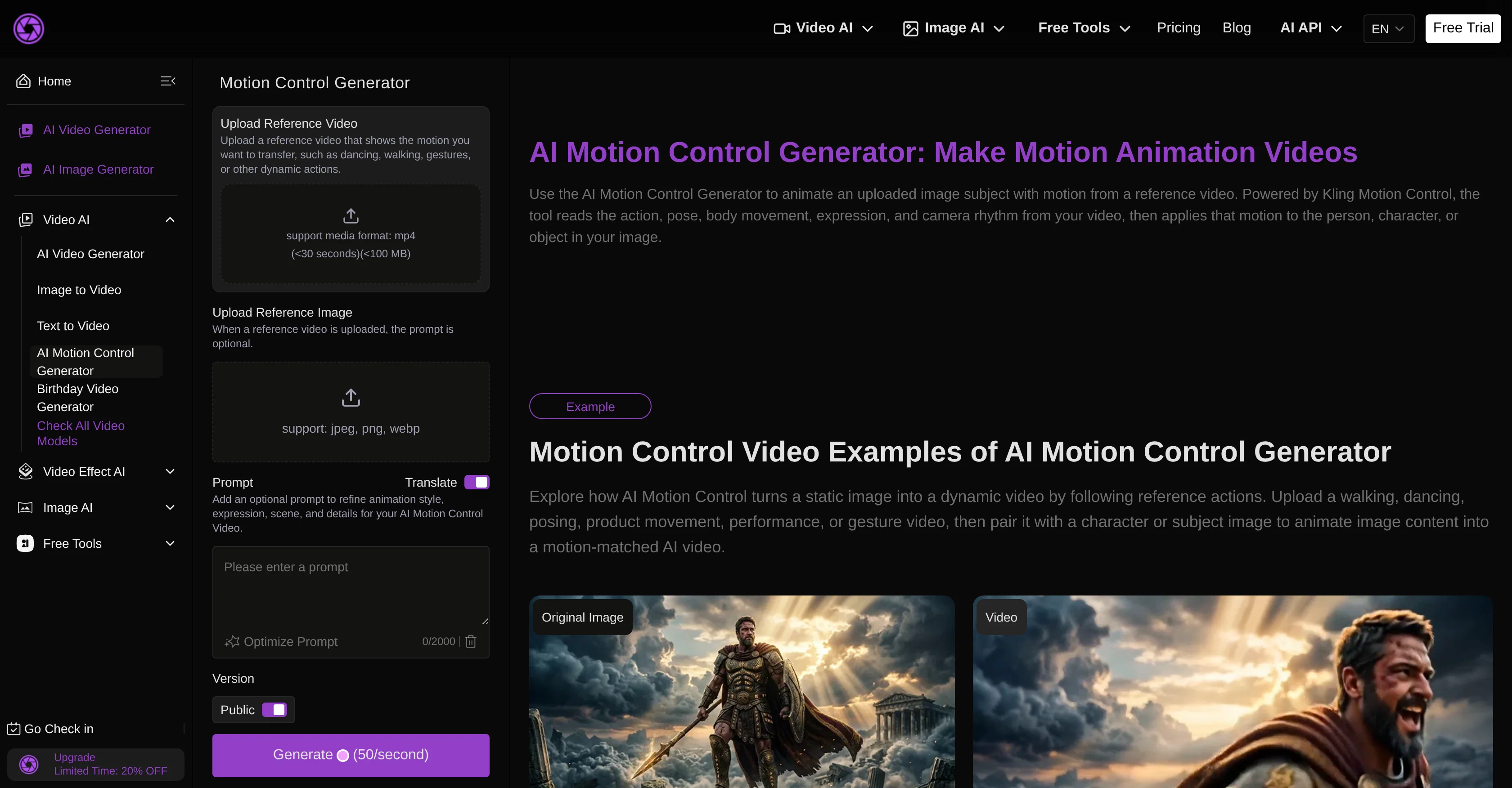
Kling Motion Control Animation is an AI video tool designed to generate motion-controlled animations by animating static images based on reference videos.
Users can upload a reference action video, such as dancing, gesturing, or other dynamic movements, and pair it with an image of a person, character, or object.
The tool then transfers the motion cues from the video to the image subject, creating an animated video. The tool's functionality is centered around the Kling Motion Control technology that assists in aligning posture, facial expressions, motion, and scene continuity.
The AI Motion Control Animation tool is equipped with a feature that allows users to refine details of the animation, such as expression, posture, and action details according a user prompt provided.
It is primarily useful for animators, marketers, designers, and product teams who need to animate still images based on movement references, making it easier to create visuals such as walking shots, dance clips, or concept videos.
In addition, it can help enhance social media content or marketing materials by applying motion effects to static images.
Access & connections
Where you can use Sea Imagine | Motion Control.
Platforms
Capabilities
What this tool accepts, produces, and is strongest at.
Input
- Image
- Text
Output
- Video
- Image
Supported features
- Image Generation
- Image Edit
- Video Generation
Pros & cons
Pros
- Generates motion-controlled animations
- Animate static images
- Usage of reference videos
- Transfers motion cues
- Posture alignment functionality
- Control for facial expressions
- Secures scene continuity
- Refines details of animation
Show 40 more
- Control for action details
- Beneficial for animators
- Helpful for marketing teams
- Useful for designers
- Improves social media content
- Enhances marketing materials
- Generates concept videos
- Produces dance clips
- Creates walking shots
- Features Sea Imagine Art Studio
- Transforms text into videos
- Transforms images into videos
- Polished results in minutes
- Flexible styles
- Unify art generation platform
- Supports multi-model video generation
- Unified creation interface
- Allows editing of results
- Reusable results
- Offers modular pricing plans
- Supports commercial projects
- Fair and scalable plans
- Professional support
- Transparent processing priority
- Validates creative directions
- Instant access
- Offers different access levels
- Supports priority support
- Supports private usage
- Offers commercial license
- Transforms Text to Image
- Transforms Image to Image
- Restores old photos
- Turns photos into Cartoon
- Image to video feature
- Transforms text to video
- Supports action descriptions parsing
- Streamlined generation methods
- Clear structure of generated videos
- Supports further editing of videos
Cons
- Limited to making animations
- Dependence on reference videos
- Difficulty with complex motions
- Posture alignment not always accurate
- Complexity of refining animation details
- Limited utility outside marketing
- No provided object detection
- Lack of real-time editing tools
Show 2 more
- Inability to handle group animations
- No integrated sharing features
Compare alternatives
Similar tools in the catalog — with a clear reason to open each one.

freebeat AI ✓
FreemiumTurn Music & Ideas into Viral Videos In One Click
Why look Offers a public API
Full comparison
MagicLight ✓
FreemiumTransform text into captivating videos instantly.
Free + from $8.4/mo
Full comparison



Seedance ✓
FreemiumMulti-shot video generation from text and image.
Why look Stronger for image work
Full comparisonReleases 1
FAQ 12
What is Kling Motion Control Animation?
How does Kling Motion Control Animation work?
Can I upload my own reference video to Kling Motion Control Animation?
How specific can I get when refining details on Kling Motion Control Animation?
Is Kling Motion Control Animation suitable for professional animators?
Can Kling Motion Control Animation be used for social media content?
What type of movements can I animate on static images using Kling Motion Control Animation?
What type of images can be used on Kling Motion Control Animation?
How does Kling Motion Control Animation ensure scene continuity?
What technologies does Kling Motion Control Animation use to animate static images?
Can Kling Motion Control Animation produce walk shots or dance clips?
How well does Kling Motion Control Animation handle facial expressions and posture alignment?
Related tools
Recommended

Movie Maker Gemini ✓
FreeGenerate watermark-free AI videos with your Gemini key
MeshGPT ✓
FreeTurn text into 3D masterpieces.

Anyvids ✓
FreemiumAny idea to video, made simple.

Flixly | Text to Video Generator ✓
FreemiumTurn simple prompts into viral videos, stunning images, and realistic audio.

remio: Your Personal ChatGPT ✓
FreemiumGet Tailored Answer with Your Personal ChatGPT

AppDeploy ✓
FreeDeploy real apps directly from ChatGPT or Claude