

Videos vv5.2 2026 Rank: #75
Movie Maker Create ✓
Generate watermark-free AI videos with your xAI key
Verdict
A quick read before you dig into the full page.
- Best if
- Generate watermark-free AI videos with your xAI key
- Skip if
- Limited to five modes
- Pick this when
- Generates watermark-free videos
Considering freebeat AI instead? Compare side by side
Overview
Start with the subscription you already pay for. Generate your opening clips inside SuperGrok or SuperGrok Heavy, 30 to 80 or more per session depending on the tier. When those quotas run out, Movie Maker Create takes over with no quota at all, and no SuperGrok subscription is required to use the app on its own.
All four Grok Imagine modes are unlocked from the start: text to video, image to video, reference images, and extending a clip you have already made. Reference images holds a person, object or style consistent across separate generations, which is what you need when a character has to look the same shot after shot. Every clip is produced watermark-free and free of provenance marking, with synchronized audio generated in the same pass, in any of four aspect ratios: 16:9 and 4:3 for landscape, 9:16 and 3:4 for portrait.
Text and image clips run six, eight, ten or fifteen seconds; reference clips stop at ten. An extension appends six to ten seconds, or six to eight if the source is already an extension. Output is 480p, 720p or 1080p, with 1080p on image to video only, through the Enhanced 1.5 model. Advanced settings add a negative prompt for what to keep out of frame and a seed for repeatable results. Options a mode cannot serve are greyed out rather than hidden, and the app warns you when your source photo and chosen aspect ratio disagree, which is the commonest way to waste money on any tool like this. HEIC and 40MB phone photos are resized in your browser before anything is sent, and a failed generation is never charged.
You supply your own xAI API key and pay xAI directly, from $0.05 per second at 480p to $0.25 at 1080p, with no subscription and no per-clip limits. A fifteen second clip costs $1.05 at 720p or $3.76 at 1080p. An itemised estimate appears before you commit, and a Usage tab totals what you have spent by session and lifetime, broken down by mode and model, exportable as CSV. Output is H.264 MP4 with AAC audio, yours to publish or sell. Finished clips stay on xAI's servers for thirty days, so download what you want to keep.
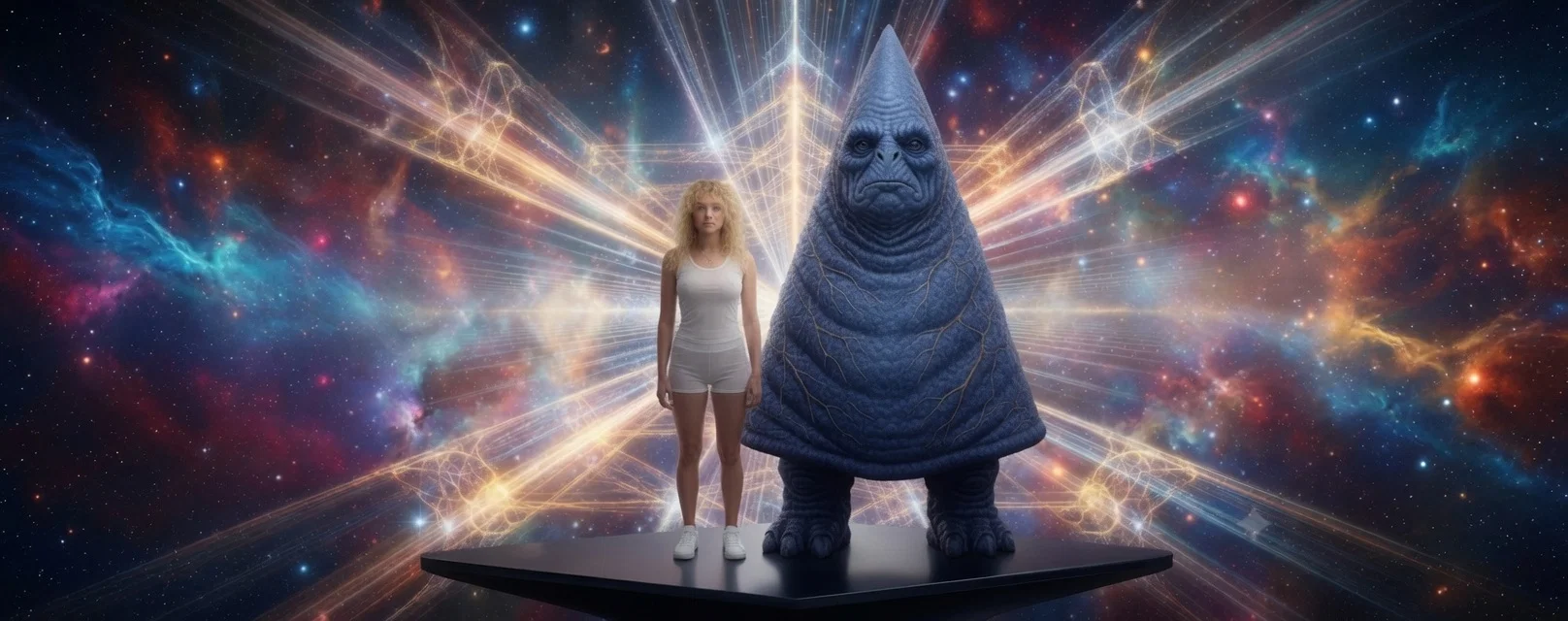
Then build the movie. Assemble your clips in the free Movie Maker Edit, Web Edition v7.2.1, or in Movie Maker Edit Pro, Desktop Edition v7.2.1 if you want the full power of your PC and its NVIDIA, Intel or AMD hardware encoder. Original soundtracks come from Lyric Remix Studio. Alternative Dimensions, the 1:21:37 feature shown above, was built clip by clip from 347 Grok Imagine clips.
Also by Iacoletti Software, Movie Maker Studio 7.2.1, which automates the whole process of making a movie from a written description.
REQUIRES YOUR OWN API KEY. An xAI key is required, and generation is billed by xAI directly to your account.
- Generate Ai Video From A Text Prompt Or A Photo
- Synchronized Audio Generated With The Video
- Four Generation Modes
- Text To Video, Invents The Whole Scene
- Image To Video, Animates Your Photograph Forward
- Reference Images, Hold A Subject Consistent Across Generations
- Extend A Clip Already In Your Gallery
- Two Models, Standard And Enhanced 1.5
- Clips Up To 15 Seconds
- 480p, 720p And 1080p Output
- 16:9, 4:3, 9:16 And 3:4 Aspect Ratios
- 6, 8, 10 Or 15 Second Clips
- Negative Prompt Control
- Seed Control For Reproducible Results
- Live Itemized Cost Estimate Before You Generate
- Usage Tab Totals Spend By Session And Lifetime
- Csv Export Of Your Usage
- Failed Generations Are Never Charged
- Unavailable Options Greyed Out, Never Hidden
- Aspect Ratio Mismatch Warning Before You Waste Money
- Heic And 40mb Photos Handled In Your Browser
- H.264 Mp4 With Aac Audio, Yours To Publish Or Sell
- No Watermark And No Provenance Marking
- Ai Image Analysis, Photo To Written Description
- Runs On Your Own Xai Key, No Subscription
- Pay Xai Directly From $0.05 Per Second
- Clips Feed Straight Into Movie Maker Edit Or Studio
- Stateless Proxy, Requests Go Straight To Xai
- No Signup, Runs In Your Browser
- Clips Feed Straight Into Movie Maker Edit And Movie Maker Studio
Best for
Short scenarios where Movie Maker Create tends to shine.
-
Generate watermark-free AI videos with your xAI key
Example outputs 1
Sample generations and before/after results for Movie Maker Create.
Access & connections
Where you can use Movie Maker Create.
Platforms
Capabilities
What this tool accepts, produces, and is strongest at.
Input
- API
- Tabular
Output
- Video
Highlights
- API
Supported features
- Video Generation
- Video Edit
- Video Avatars
- API
Pros & cons
Pros
- Generates watermark-free videos
- Offers 720p video content
- No subscription required
- Users only pay for usage
- Unlocks all five Grok Imagine modes
- Suitable for occasional users
- Designed for short videos
- Streamlines video creation process
Show 11 more
- Ideal for marketers, content creators
- BYOK feature for direct payment
- Removes watermarks for professional look
- Beneficial for social media influencers
- No subscription model
- Full-fledged functionality
- Dynamic videos generation
- Flexible payments
- $0.07/second direct payment
- No markup fees
- Generates up to 23-second videos
Cons
- Limited to short videos
- Only 720p resolution
- Pay-per-use model
- No subscription options
- Limited to five modes
- Lack of advanced editing
- Requires direct payment
- No support for longer content
Show 1 more
- No markup may deter businesses
Compare alternatives
Similar tools in the catalog — with a clear reason to open each one.

freebeat AI ✓
FreemiumTurn Music & Ideas into Viral Videos In One Click
Free + from $4.99/mo
Full comparison
MagicLight ✓
FreemiumTransform text into captivating videos instantly.
Free + from $8.4/mo
Full comparison
Seedance ✓
FreemiumMulti-shot video generation from text and image.
Why look Stronger for image work
Full comparisonPeople also view
Tools that often show up alongside Movie Maker Create in collections and comparisons.
Seedance ✓
FreemiumMulti-shot video generation from text and image.
MagicLight ✓
FreemiumTransform text into captivating videos instantly.

Kaiber Superstudio ✓
Free TrialAI Video Generation

HeyGen ✓
FreemiumCreate AI spokesperson videos from text
freebeat AI ✓
FreemiumTurn Music & Ideas into Viral Videos In One Click

D-ID ✓
FreemiumCreate AI-generated videos with ease

ResearchMonkey AI | YouTube Summarizer ✓
Free TrialSave Hours of Research in Seconds with 40+ AI Tools

OutlierKit ✓
PaidEnter one channel, see the entire niche.
Releases 2
Movie Maker Create (Grok) v5.2 generates the raw material your movies are built from, powered by xAI’s Grok Imagine. Free with your own xAI API key.
Start with the SuperGrok or SuperGrok Heavy subscription you already pay for and generate your opening clips there, 30 to 80 or more per session depending on the tier. When those quotas run out, Movie Maker Create takes over with no quota at all, and no SuperGrok subscription is required to use the app on its own.
Four modes cover everything a scene needs: text-to-video, image-to-video, reference images, and extend. Every clip comes back watermark-free and free of SynthID, with synchronized audio, in any of five aspect ratios (16:9, 4:3, 1:1, 3:4, 9:16). Text and image clips run six to fifteen seconds; reference clips run six to ten seconds. Extensions append six to ten seconds (eight seconds maximum on an already-extended clip); a single chain can reach 30 seconds. Output is 480p, 720p, or 1080p (1080p on image-to-video only). You pay xAI directly from $0.05 per second at 480p to $0.25 at 1080p, with no per-clip limits. A fifteen-second clip costs about $1.05 at 720p or $3.76 at 1080p, and new xAI accounts often start with $25 in free credits.
Finished clips stay on xAI’s servers for thirty days, so download what you want to keep. Then assemble them in the free Movie Maker Edit, Web Edition v6.2, or in Movie Maker Edit Pro, Desktop Edition v6.2 if you need the full power of your PC and GPU (NVIDIA, AMD, or Intel). The app runs in 100+ languages. Alternative Dimensions, the feature-length movie below, is what that looks like finished: 347 Grok Imagine clips, 1:21:37, assembled clip by clip into a single film, and believed to be the first full-length feature movie ever made with Grok Imagine clips.
Coming Soon to TAAFT: Movie Maker Studio v2.1, an integrated AI tool that will automate the entire process of making a movie from beginning to end.
Imported reviews 1
Best Free Movie Maker App on the Market
FAQ 12
What is the functionality of the xAI key in MovieMaker Grok?
Does MovieMaker Grok require a subscription?
Can you explain the payment process for MovieMaker Grok?
What resolution does MovieMaker Grok produce?
Why are there no watermarks in videos created by MovieMaker Grok?
How does MovieMaker Grok cater to occasional users?
What are the Grok Imagine's modes that MovieMaker Grok unlocks?
How can I benefit from the various modes provided by MovieMaker Grok?
Who is the primary audience for MovieMaker Grok?
Does MovieMaker Grok impose a limit on the video duration?
Why is MovieMaker Grok primarily designed for short videos?
How might marketers or content creators benefit from using MovieMaker Grok?
Related tools
Recommended

Movie Maker Gemini ✓
FreeGenerate watermark-free AI videos with your Gemini key
Lyric Remix Studio ✓
FreeAI-powered music generation, transcription, and album art

AppDeploy ✓
FreeDeploy real apps directly from ChatGPT or Claude

MeshGPT ✓
FreeTurn text into 3D masterpieces.

Promtist AI ✓
FreeGenerate optimized prompts for better AI results.

AgentSwarms ✓
FreeLearn, Build and Run Agentic AI on your Browser!
More from this creator
ScamCheck Claude ✓
FreeAI-powered scam detection for photos and documents.
WhatsTheCatch ✓
FreeAI that spots risks before you sign.
ScamCheck Grok ✓
FreeAI-powered scam detection for photos and documents.
Movie Maker Gemini ✓
FreeGenerate watermark-free AI videos with your Gemini key
Wiki 2066 ✓
FreeYour Wikipedia entry from the year 2066.