

UI design 2026 Rank: #311
Flowstep ✓
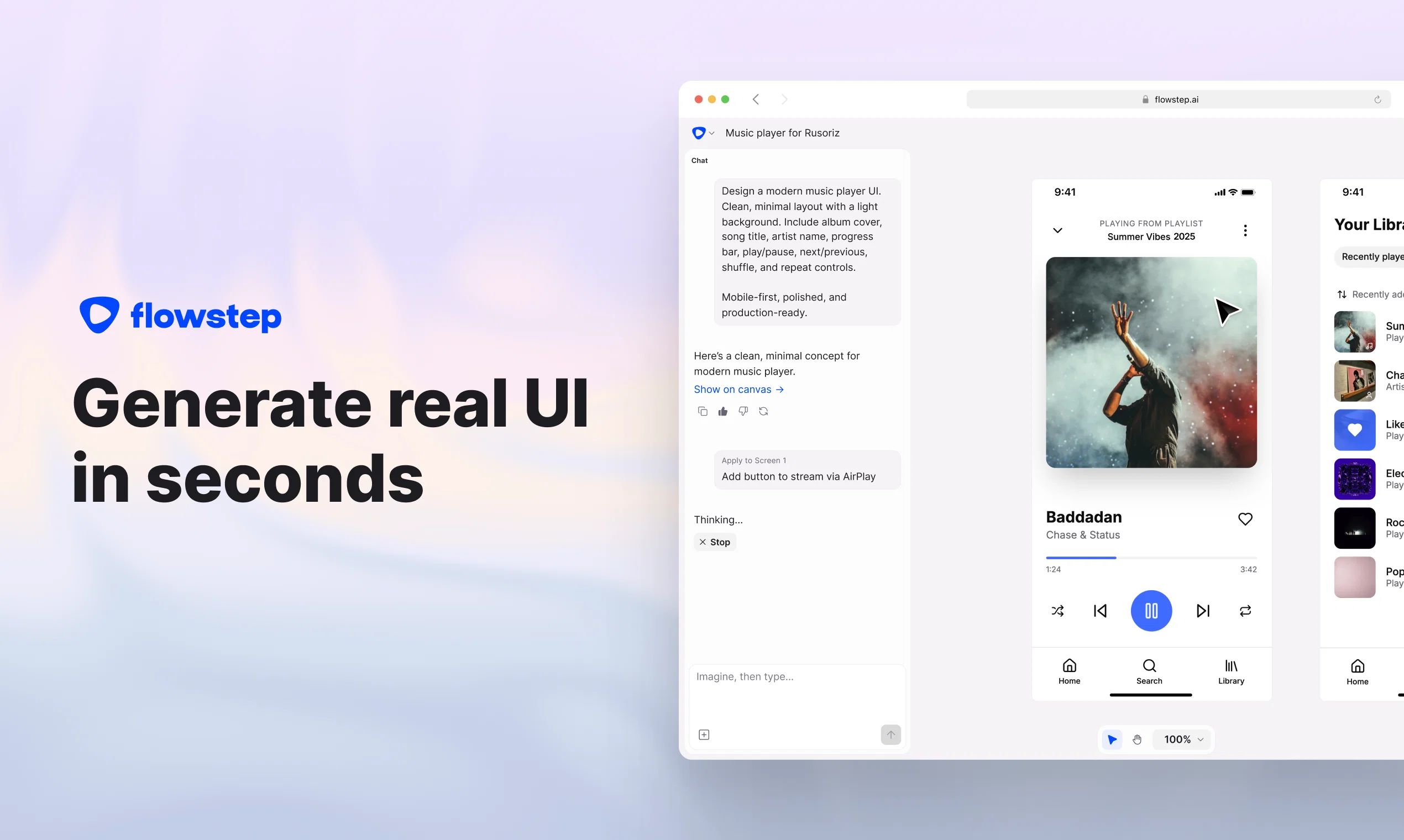
Generate real UI in seconds
Verdict
A quick read before you dig into the full page.
- Best if
- You are creatives and need: Teams who want to ship fast
- Skip if
- Limited manual edits capability
- Pick this when
- Generates UI designs instantly
Considering 1UI instead? Compare side by side
Overview





Why people love Flowstep:
- Generate single or up to 10 screens from one prompt
- Design using references (PRDs, images, etc)
- Edit your designs by chatting with AI
- Copy to Figma without any plugins (just use ⌘C and ⌘V)
- Your designs are 1to1 with code. Just hit export or view in the canvas
Best for
Short scenarios where Flowstep tends to shine.
-
Teams who want to ship fast
Best for Creatives
-
Designers and Product Managers who want to quickly ideate concepts
Best for Designers
-
Non-designers who want to get incredible UI
Best for UI/UX professionals
-
Teams who want to collaborate in the same canvas
Best for Product managers
Example outputs 1
Sample generations and before/after results for Flowstep.
Access & connections
Where you can use Flowstep, and what it plugs into.
Platforms
Capabilities
What this tool accepts, produces, and is strongest at.
Input
- Image
- Text
Output
- Code
- Image
Highlights
- MCP
Supported features
- Styling
- Integrations
- MCP
- Team Collaboration
Pros & cons
Pros
- Generates UI designs instantly
- Infinite canvas
- No complex design tool knowledge required
- Simultaneous multi-screen generation
- Real-time collaboration
- Design using references
- Copy/paste to Figma
- Designs are in sync with code
Show 2 more
- Export code or view in the canvas
- Great for beginners and professionals
Cons
- No offline functionality
- Limited manual edits capability
- Doesn't build the backend functionality
- Can't pre-set theme or design system
- No localization
Compare alternatives
Similar tools in the catalog — with a clear reason to open each one.

UXCanvas.ai ✓
Free TrialIdea to UI/UX Design Prototype in Seconds
Free + from $49/mo
Full comparison
C1 Artifacts API - Thesys ✓
FreemiumMake AI apps respond with interactive UI in real-time.
Free + from $49/mo
Full comparison
Draw My UI ✓
FreeTransform sketches into real UI designs.
Why look Fully free option
Full comparison
Mowgli ✓
Free TrialTurn your idea into production-ready designs in minutes.
Why look Typically cheaper
Full comparisonPeople also view
Tools that often show up alongside Flowstep in collections and comparisons.

1UI ✓
PaidGenerate pixel-perfect UI designs with AI in seconds.
UXCanvas.ai ✓
Free TrialIdea to UI/UX Design Prototype in Seconds
Mowgli ✓
Free TrialTurn your idea into production-ready designs in minutes.
Draw My UI ✓
FreeTransform sketches into real UI designs.
C1 Artifacts API - Thesys ✓
FreemiumMake AI apps respond with interactive UI in real-time.

Banani ✓
Free TrialGenerate UI designs from text with AI.

Home Design AI ✓
Free TrialRedesign any room or home with a single photo.

Dessn ✓
FreemiumBuild custom sales demos without derailing your day.
Releases 1
FAQ 12
What is Flowstep?
How does Flowstep's AI-powered design tool work?
What is the 'infinite canvas' in Flowstep?
How can users edit their designs in Flowstep?
What types of screens can Flowstep generate?
How does collaboration work in real-time with Flowstep?
What types of references can be incorporated into designs in Flowstep?
How does Flowstep integrate with Figma?
How does Flowstep simplify the design to code process?
What coding languages/format does Flowstep support for export?
Who is Flowstep designed for?
What measures does Flowstep take to ensure data privacy?
Related tools
Recommended

Thea ✓
FreemiumAI study tools to master material, not just memorize it.

TheLibrarian.io ✓
Free TrialYour WhatsApp AI assistant for instant productivity.

Automateed ✓
Free TrialCreate eBooks effortlessly with Automateed, the AI-powered writing tool.

Midjourney ✓
PaidExpand human imagination through AI-powered visuals.

Mind Map Wizard ✓
FreemiumGenerate mind maps with AI: free, no sign-up, no ads

freebeat AI ✓
FreemiumTurn Music & Ideas into Viral Videos In One Click