

Meeting notes 2026 Rank: #1973
ClearCortex | Meeting Notes ✓
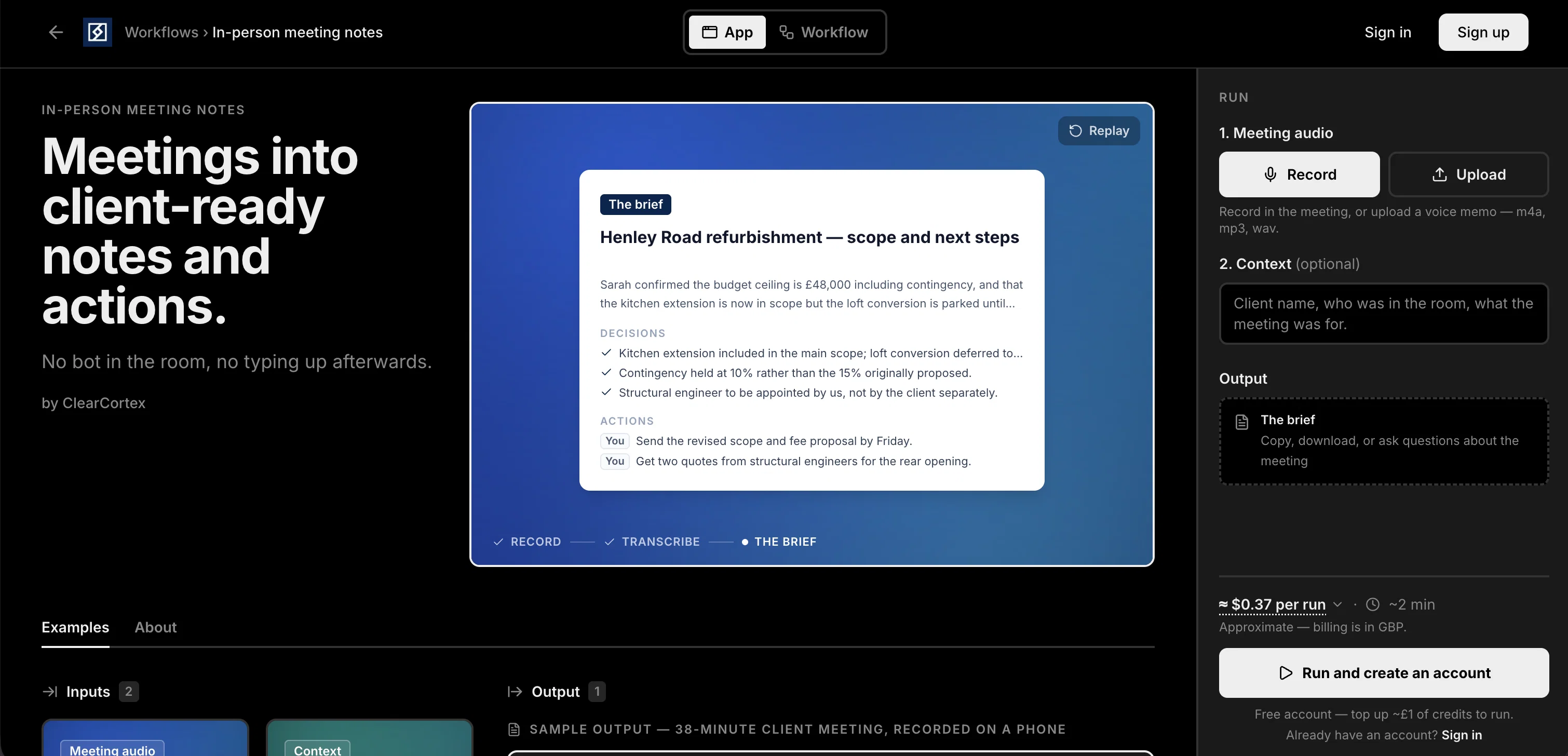
Meetings into client-ready notes. No bot, no typing.
Verdict
A quick read before you dig into the full page.
- Best if
- Meetings into client-ready notes. No bot, no typing
- Skip if
- Limited audio format support
- Pick this when
- Transforms audio to notes
Considering Mumble AI: Voice-first workspace for Mac & iOS instead? Compare side by side
Overview


Users can add a line of context — who was in the room, what the meeting was about — to make the brief sharper and more specific. The output is yours to copy or download, and you can ask follow-up questions about anything that was said.
Because nothing joins the meeting, it works anywhere a conversation happens: client meetings, site visits, discovery calls, or any conversation you'd otherwise be scribbling through. Instead of splitting attention between the discussion and note-taking, users stay present in the room and leave with the follow-up email practically written.
- No-bot Meeting Recording
- Record In The Room On Your Phone — No Meeting Bot
- Structured Brief: Summary, Decisions, Action Items With Owners
- Add Context To Make The Brief Sharper
- Ask Follow-up Questions About The Meeting
- Ready In About 2 Minutes
Access & connections
Where you can use ClearCortex | Meeting Notes, and what it plugs into.
Platforms
Integrations
Capabilities
What this tool accepts, produces, and is strongest at.
Input
- Text
- Audio
Output
- Text
Pros & cons
Pros
- Transforms audio to notes
- No bot needed
- Allows in-app recording
- Supports m4a, mp3, wav
- Provides meeting briefs
- Supports context addition
- Promotes distraction-free meetings
- Uploadable voice memos
Show 13 more
- Systematic data capture
- Supports post-meeting discussions
- Tracks action items
- User-friendly interface
- Good for high-volume meetings
- Client-ready note output
- Transcriptions can be downloaded
- Can ask questions post-meeting
- Affordable pricing (~29p/run)
- Fast processing (~2min/run)
- Free account setup
- Optional top-ups for credits
- Replay recording feature
Cons
- Limited audio format support
- No voice recognition
- No offline capabilities
- No in-app editing features
- Run-based pricing system
- No default meeting categorization
- No specific language support
Compare alternatives
Similar tools in the catalog — with a clear reason to open each one.

Mumble AI: Voice-first workspace for Mac & iOS ✓
FreemiumVoice-first AI workspace for meetings, notes, and dictation. Works offline.
Why look Freemium alternative
Full comparison
Discord DiscMeet ✓
FreemiumDiscord voice transcription and note taking app for teams and DnD sessions
Why look Freemium alternative
Full comparison
Discord NotesBot ✓
Free TrialRecord, Transcribe, and AI Summarize Discord Calls
Why look Higher community rating
Full comparison
TicNote Cloud ✓
FreemiumAI note taker for meetings and insights.
Why look Freemium alternative
Full comparison
Granola ✓
FreemiumTransform raw meeting notes into brilliance
Why look Freemium alternative
Full comparisonReleases 1
FAQ 12
What is ClearCortex In-person Meeting Notes?
How does ClearCortex In-person Meeting Notes work?
Do I need a bot using ClearCortex In-person Meeting Notes?
Can I upload a voice memo to ClearCortex In-person Meeting Notes?
What audio formats does ClearCortex In-person Meeting Notes support?
How does ClearCortex In-person Meeting Notes transcribe meeting audios?
What is the role of 'context' in ClearCortex In-person Meeting Notes?
Can I download the transcriptions or 'briefs' from ClearCortex In-person Meeting Notes?
Is ClearCortex In-person Meeting Notes a tool that helps manage meeting outputs and action items?
Who could benefit from using ClearCortex In-person Meeting Notes?
Can ClearCortex In-person Meeting Notes capture and categorize data from a high volume of meetings?
Does ClearCortex In-person Meeting Notes provide a distraction-free meeting environment?
Related tools
Recommended

Clear Cortex ✓
Free TrialYour desk for AI.

MagicSlides.app AI PPT Maker ✓
FreemiumCreate Stunning PPTs in Seconds with the AI PPT Maker

GetLogit ✓
FreemiumArtificial intelligence, available for everyone.

ChatGPT ✓
FreemiumAsk anything, create anything, and move from idea to action.

Automateed ✓
Free TrialCreate eBooks effortlessly with Automateed, the AI-powered writing tool.

Kin - Personal AI Advisors ✓
FreePrivacy-first & designed your for mind, and life at work