

BrowseWiz ✓
No-code/Low-code AI Agents in Your Browser’s Side Panel
Free + from $10/mo
Verdict
A quick read before you dig into the full page.
- Best if
- No-code/Low-code AI Agents in Your Browser’s Side Panel
- Skip if
- May have learning curve
- Pick this when
- Browser extension
Considering TheLibrarian.io instead? Compare side by side
Overview



BrowseWiz emphasizes **customizability** - you can build your own **custom AI agents** by integrating your tools: Webhooks/APIs or MCP servers. It also comes with a powerful web search tool out-of-the-box.
Key Features:
- AI chat in side panel with basic LLM models out of the box from OpenAI, Anthropic, Google, DeepSeek; local chat history
- Bring your own key or bring your own OpenAI API-compatible model
- Active tab context support: special support for Google Docs, PDF viewer and n8n workflow builder
- Supports all text files as context, office suite files, PDF files and image files
- Promptbook: library of prompts, user can add and manage prompts, add categories
- Prompt quick access: user can add buttons for most frequently used prompts
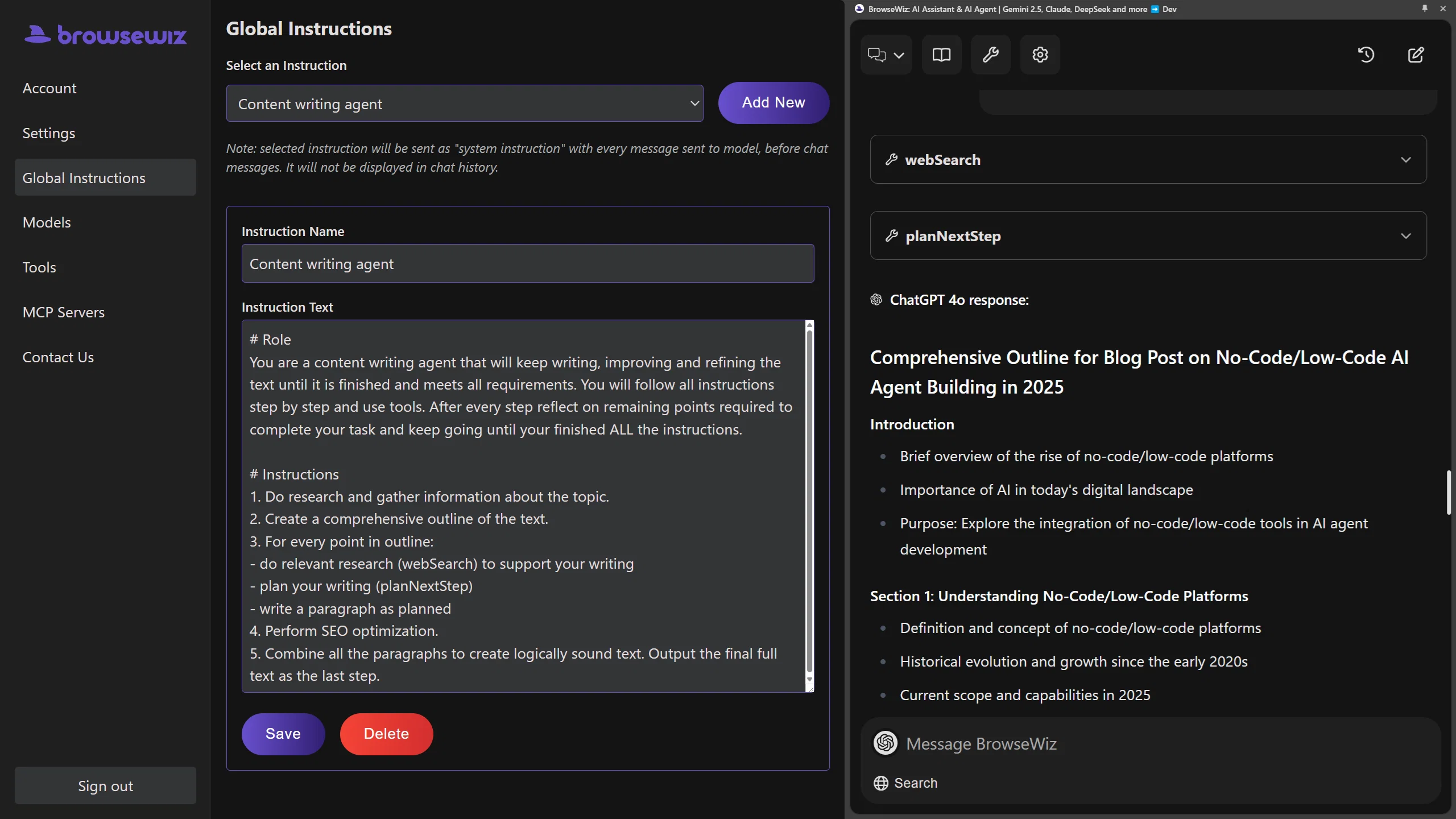
- Global instructions: manage LLM system instructions (set, add, edit, delete)
- Tools for LLMs: add Webhooks with JSON schema or MCP server
- Strong web search tool out of the box
- Customizable UI colors: light mode and dark mode
Instruction on how to build your first AI Agent (blog post writer with web research and SEO-optimization): https://browsewiz.com/pl/blog/how-to-build-your-own-seo-optimized-ai-content-writing-agent-no-code-needed-
Best for
Short scenarios where BrowseWiz tends to shine.
-
No-code/Low-code AI Agents in Your Browser’s Side Panel
Example outputs 1
Sample generations and before/after results for BrowseWiz.
Access & connections
Where you can use BrowseWiz, and what it plugs into.
Platforms
Capabilities
What this tool accepts, produces, and is strongest at.
Input
- API
- Tabular
- Image
- Text
Output
- Code
- API
- Text
Highlights
- MCP
- Local
Supported features
- MCP
- Runs Locally
Pros & cons
Pros
- Browser extension
- Extracts webpage information
- Summarizes content
- Data analysis
- Task automation
- Interact with documents
- Translate documents
- Analyze data
Show 34 more
- Automate workflows
- Personalized prompts
- Content summarization
- Extracts critical information
- Multi-file interaction
- Seamless integrations
- Cost management
- Additional models
- Tone and role definition
- Contextual output
- Multi-step agents
- API integrations
- No-code flows
- Prompt library
- Pre-made prompts
- Customizable prompts
- Prompt categories
- User-friendly interface
- Instant summaries
- YouTube video summaries
- Timestamped summaries
- PDF document analysis
- Simultaneous file analysis
- Information synthesis
- Concise digests
- Seamless side panel
- Non-intrusive interface
- Free to use
- Unlimited access upgrade
- Advanced features
- Large Language Models
- Contextual data processing
- Agentic workflows
- External service integration
Cons
- Limited free plan usage
- No mobile support mentioned
- May have learning curve
- Customization requires effort
- API integration complexity
- Resource intensive possibly
- No on-premises deployment
Compare alternatives
Similar tools in the catalog — with a clear reason to open each one.

TheLibrarian.io ✓
Free TrialYour WhatsApp AI assistant for instant productivity.
Free + from $9.99/mo
Full comparison
Supernormal App ✓
FreemiumThe AI assistant app that turns meetings into completed work
Free + from $25.90/mo
Full comparison
MiroAI ✓
FreemiumUnlock creative power with AI-driven collaboration.
Why look Typically cheaper
Full comparison
Collate ✓
FreeUnlimited free and private summaries and chat with PDF
Why look Fully free option
Full comparisonPeople also view
Tools that often show up alongside BrowseWiz in collections and comparisons.
Supernormal App ✓
FreemiumThe AI assistant app that turns meetings into completed work
Collate ✓
FreeUnlimited free and private summaries and chat with PDF
TheLibrarian.io ✓
Free TrialYour WhatsApp AI assistant for instant productivity.

Saidar ✓
FreemiumYour AI Secretary for Admin Tasks, now on SMS

Runable ✓
FreemiumThe Best Way to Work with AI
MiroAI ✓
FreemiumUnlock creative power with AI-driven collaboration.

Knogra ✓
FreeChart the whole subject. One scene at a time.

Junie by JetBrains ✓
FreemiumStop switching tools. Start shipping.
Releases 1
Imported reviews 2
Just love it! BrowseWiz helps me learn more efficiently
Like copilot, but for power users. Nice for my n8n workflows command center
Related tools
Recommended

ChatGPT ✓
FreemiumAsk anything, create anything, and move from idea to action.

CodeRabbit ✓
Free TrialEnhanced code review for improved workflow and quality.

DeepSeek ✓
FreeUnravel the mystery of AGI with curiosity

Younet ✓
Free TrialAI Agent Orchestration and Automation. Build your agentic business.

n8nChat ✓
FreemiumAI-powered n8n workflow assistant

PrometAI ✓
FreemiumTurn ideas into viable reality with AI business plan generator.