

Productivity vv1.8 2026 Rank: #91
Collate ✓
Unlimited free and private summaries and chat with PDF
Verdict
A quick read before you dig into the full page.
- Best if
- Unlimited free and private summaries and chat with PDF
- Skip if
- Limited platforms shown
- Pick this when
- Content managed in one place
Considering TheLibrarian.io instead? Compare side by side
Overview



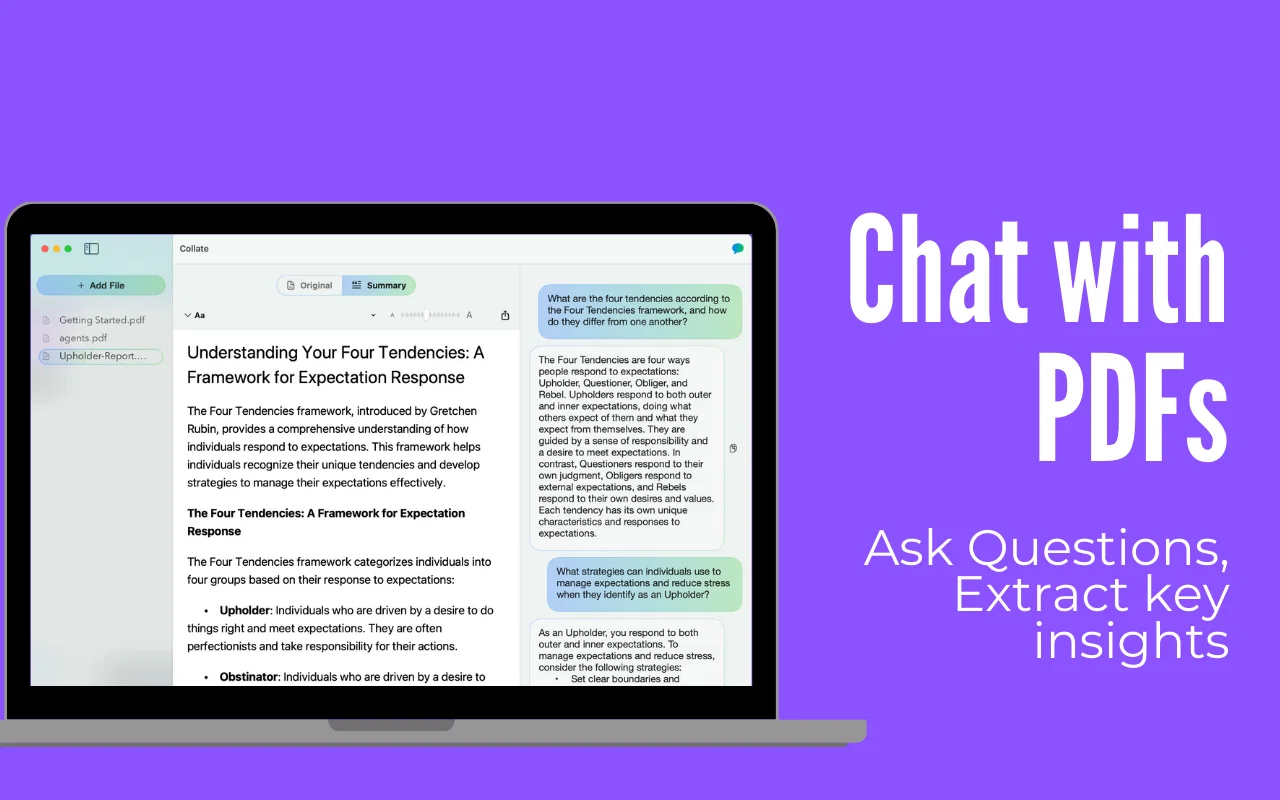
• Summarize PDFs: Turn lengthy documents into concise insights, saving time and effort.
• Chat with Your PDFs: Ask questions, dive into specific sections, and extract information without endless scrolling.
• All Your PDFs in One Place: Keep all your important PDFs organized in one place. Revisit them anytime to ask new questions or review key insights effortlessly.
• No Sign-Ups, No Limits: Collate is completely free to use with no sign-ups or restrictions, so you can enjoy unlimited access to all its features.
• Export Summaries: Share concise summaries or save them as PDFs to streamline collaboration and review.
• Work 100% Offline: All processing happens on your device, ensuring your data stays private and secure.
Whether you’re studying, researching, or learning something new, Collate is your personal knowledge assistant that simplifies the complex and keeps your workflow seamless. Designed for privacy, Collate works without the need for internet access, making it a reliable and secure tool for everyone.
Streamline your learning journey today with Collate—because your time and privacy matter.
- Document Analysis Pdf/excel/etc
- Exporting (svg, Jpg, Pdf, Md)
Best for
Short scenarios where Collate tends to shine.
-
Unlimited free and private summaries and chat with PDF
Example outputs 1
Sample generations and before/after results for Collate.
Access & connections
Where you can use Collate, and what it plugs into.
Platforms
Integrations
Capabilities
What this tool accepts, produces, and is strongest at.
Input
- Text
Output
- Text
Highlights
- Local
- No Signup
Supported features
- Assistant
- Runs Locally
- No Signup
- Instant file search
- Education
- Memory
Pros & cons
Pros
- Content managed in one place
- Compatible with various sources
- Natural language processing search
- Collaborative sharing of insights
- Study plan feature
- User-friendly interface
- Free beta version
- Early access option
Show 8 more
- Supports diverse content types
- Optimized for students and professionals
- Possible to track progress
- Aids in information recall
- Interactive Q&A assistance
- Efficient content organization
- Retrieve relevant information quickly
- Enhances knowledge retention
Cons
- Depends on external sources
- Sharing functionality limited
- No offline access mentioned
- Request for early access
- No pricing details provided
- Limited platforms shown
- No mention of security
- Study plan usefulness unclear
Show 2 more
- No mention of API
- Only in beta version
Compare alternatives
Similar tools in the catalog — with a clear reason to open each one.

TheLibrarian.io ✓
Free TrialYour WhatsApp AI assistant for instant productivity.
Why look Higher community rating
Full comparison
Supernormal App ✓
FreemiumThe AI assistant app that turns meetings into completed work
Free + from $25.90/mo
Full comparison

MiroAI ✓
FreemiumUnlock creative power with AI-driven collaboration.
Free + from $8
Full comparison

Recall ✓
FreemiumSummarize Anything, Forget Nothing!
Why look Higher community rating
Full comparisonPeople also view
Tools that often show up alongside Collate in collections and comparisons.
TheLibrarian.io ✓
Free TrialYour WhatsApp AI assistant for instant productivity.

Thea ✓
FreemiumAI study tools to master material, not just memorize it.
Supernormal App ✓
FreemiumThe AI assistant app that turns meetings into completed work

Thetawave AI ✓
FreemiumTransform lectures into engaging study materials instantly.

ThesisAI ✓
PaidWrite 80 pages with just ONE prompt

SpeedStudy ✓
Free TrialAce exams with AI-powered study tools.

Perplexity ✓
FreemiumAI-powered answers to any question, instantly.

PDF Guru - AI PDF Summarizer ✓
FreemiumSummarize PDFs quickly with AI-powered insights.
Releases 5
Collate v1.8 — Semantic search for your PDFs, plus Find, zoom, and source-jumping citations
🔎 Search across your entire PDF library by meaning, fully on device
📍 New Find to jump through documents faster
🔍 New zoom for inspecting details without losing your place
🔗 Citations now jump straight to the source
Collate v1.7 — Shareable links, faster on-device summaries, progress tracking
🔗 Share summaries (with highlighted answers) as public links
⚡️ Faster on-device summaries, smoother reading
🧭 Progress tracker: see % coverage as you ask questions
🧠 Smarter citations + in-PDF auto-highlights
🗂️ Multi-PDF chat, merge & export into a single PDF
💻 100% offline on macOS (Apple Silicon, 13.5+). No uploads. Free.🗂️ Chat with Multiple PDFs – Ask questions across documents and get unified answers.
📎 Merge PDFs – Combine files seamlessly into one.
💬 Persistent Chat History – Your conversations are now saved per document.
🔍 Smart Citations – Answers now include auto-highlighted references.
🖥️ Better Rendering on Intel Macs – Enjoy improved text clarity and performance.
Smarter conversations, smoother reading – update now!
🎉 What’s New in This Version:
- 📂 Folders: Organize your PDFs exactly how you want.
- ⚡ Speed Boost: Load, scroll, and search—snappier than ever.
- 💻 Intel Mac Support: Collate now runs on all Mac models.
- 🔔 Live Notifications: Get pinged when summaries are ready.
- 📤 One-Click Sharing: Copy or email summaries in a flash.
- 🚀 Quick Import: Hit “Open with Collate” and you’re good to go.
⬆️ Update now and level up your PDF workflow!
In the news
Launch coverage and community mentions for Collate.
Imported reviews 2
Please release a Windows version too
I’ve been using Collate to go through technical PDFs, and it’s been surprisingly handy. Summarizing docs and being able to ask questions directly saves me time, especially when I’m skimming through research or API references.
No sign-ups, works offline, and everything stays on my device — which I appreciate.
FAQ 10
What is Collate?
🛠️ 1
tool
wrote:
Collate is a free, offline PDF assistant for macOS that helps you summarize, chat with, and organize your PDFs. Designed for everyday learners, students, and professionals, Collate ensures privacy by working entirely offline and requires no sign-up.
How does Collate work?
🛠️ 1
tool
wrote:
Collate uses AI to analyze your PDFs directly on your device. It can generate summaries, answer your questions, and organize your documents into a personal knowledge library, making it easier to access and revisit insights.
What makes Collate different from other PDF tools?
🛠️ 1
tool
wrote:
Collate is unique because it is completely offline, ensuring privacy and security. It’s free, requires no sign-up, and combines a PDF reader with advanced AI capabilities like Q&A, summarization, and bookmarking, all on your macOS device.
What types of content can Collate organize?
🛠️ 1
tool
wrote:
Collate can organize all types of PDFs, from research papers and textbooks to contracts, reports, and manuals. You can keep everything in one place, and revisit them anytime to ask more questions or generate new summaries.
Is Collate free to use?
🛠️ 1
tool
wrote:
Yes, Collate is completely free to use with no hidden fees or sign-up required. It offers unlimited access to all its features without any restrictions.
Does Collate require an internet connection?
🛠️ 1
tool
wrote:
No, Collate works entirely offline. All processing is done on your device, ensuring your data remains private and secure.
Can I export summaries generated by Collate?
🛠️ 1
tool
wrote:
Absolutely! Collate lets you export summaries as PDFs, making it easy to share insights or use them in your work or studies.
Does Collate work for scanned PDFs or images?
🛠️ 1
tool
wrote:
Currently, Collate works best with text-based PDFs. Support for scanned or image-based PDFs may require additional OCR (Optical Character Recognition) software.
How does Collate ensure my privacy?
🛠️ 1
tool
wrote:
Collate works 100% offline, and all processing happens directly on your macOS device. No data is uploaded or shared, so your information stays completely private.
What platforms is Collate available on?
🛠️ 1
tool
wrote:
Collate is currently available exclusively for macOS.
Related tools
Recommended
Thea ✓
FreemiumAI study tools to master material, not just memorize it.

DeepSeek ✓
FreeUnravel the mystery of AGI with curiosity

remio: Your Personal ChatGPT ✓
FreemiumGet Tailored Answer with Your Personal ChatGPT

Mind Map Wizard ✓
FreemiumGenerate mind maps with AI: free, no sign-up, no ads

Kin - Personal AI Advisors ✓
FreePrivacy-first & designed your for mind, and life at work

Notis ✓
Free TrialThe first WhatsApp assistant that runs on your ChatGPT and Claude subscriptions