

Concept maps 2026 Rank: #530
Knogra ✓
Chart the whole subject. One scene at a time.
Verdict
A quick read before you dig into the full page.
- Best if
- Chart the whole subject. One scene at a time
- Skip if
- Advanced features (scene curation, Paths) take some learning
- Pick this when
- Dynamic knowledge graph creation
Considering ConceptMap instead? Compare side by side
Overview

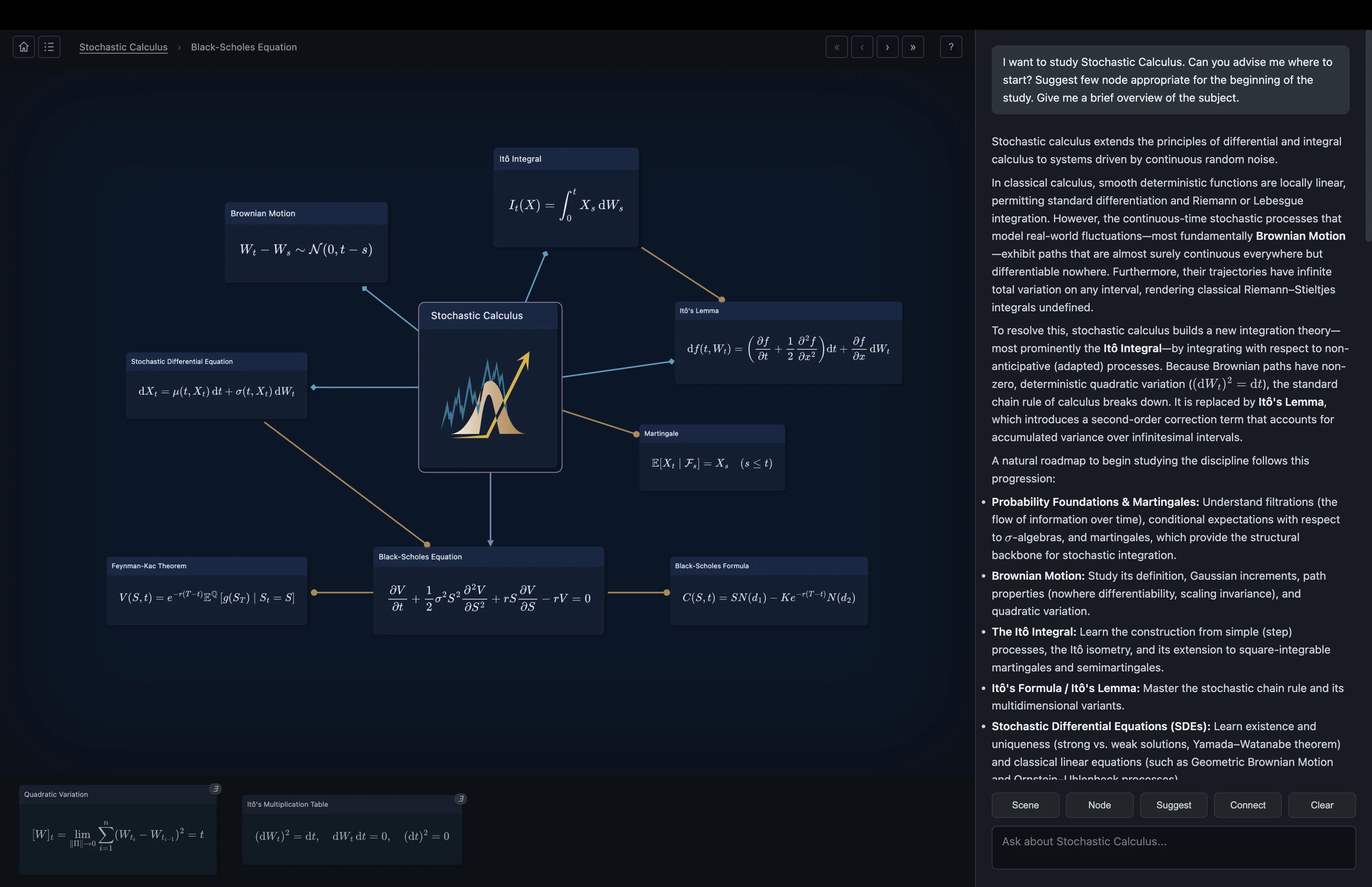
Knogra is an AI-assisted knowledge graph explorer designed for visual learners, researchers, and anyone deeply interested in various knowledge domains.
It goes beyond traditional mind mapping techniques and provides a dynamic platform for creating, exploring and presenting knowledge graphs. The tool enables users to construct mind maps, concept maps, memory palaces, equation collections, and semantic networks integrating free-form thinking, structured data, spatial associations and in-node math rendering.
It supports long-distance associations, helping users build knowledge connections across various domains. The robust 'Scenes' feature of Knogra allows users to divide large graphs into focused views, making them easier to comprehend and navigate.
At the same time, animated transitions between scenes enhance users understanding by encoding knowledge spatially. Another key feature is the 'Topology-Aware AI', a chatbot that helps users by understanding the graph's structure and suggesting what to add next.
Knogra also emphasizes user customization and self-guided education with features like 'No Design Tax' for aesthetic knowledge representation and 'Paths' for constructing walkthroughs of complex topics.
Importantly, Knogra prioritizes privacy and control, your data stays in your browser, and you can import and export anytime. It works offline and allows you to use your own AI API key if needed.
- Animated Morphing Transitions Between Scenes · Per-scene Manual Layout · Mermaid Flowchart Import · Latex Equations On Nodes · Notes, Tags And Comments Per Node · Local-first, Offline-capable · Demo Graph Library
Access & connections
Where you can use Knogra.
Platforms
Capabilities
What this tool accepts, produces, and is strongest at.
Input
- 3D
- Tabular
- Text
Output
- 3D
- Tabular
- Text
Highlights
- Open Source
- No Signup
Supported features
- Open Source
- No Signup
Pros & cons
Pros
- Dynamic knowledge graph creation
- Spatially-oriented information exploration
- Supports free-form mind mapping
- Supports concept mapping
- Semantic network creation
- 'Scenes' for focused views
- Smooth transition animations
- Suggestion for graph expansion
Show 27 more
- Automatic styling and theming
- Construct 'Paths' for learning
- LaTeX rendering for equations
- Strong data privacy measures
- Data stays in browser
- No server, account, or tracking
- Flexibility to export/import data
- Offline functionality
- Visual learning emphasis
- Helps establish memory palaces
- Equation collections inside graph
- Not locked into hierarchies
- Breaks large graphs into comprehensible chunks
- Animated transitions for better understanding
- Aesthetic knowledge representation
- Personal graph walkthrough construction
- Information encoded spatially
- Visual transitions build associations
- Math rendering inside nodes
- IndexDB storage
- 20+ node design options
- Multiple theme options
- Custom background options
- Integrates free-form thinking
- Structured data handling
- Spatial associations enabled
- In-node math rendering support
Cons
- No real-time collaboration — Knogra is a single-user workspace
- No cloud sync — moving a graph between devices means export/import
- Advanced features (scene curation, Paths) take some learning
- Young project — the demo library is growing, the community is small
- AI features require your own Gemini or OpenRouter API key
- Not built for quick note capture — suits subjects with real structure
- Limited on small screens
Compare alternatives
Similar tools in the catalog.

Releases 1
Imported reviews 3
What I like most about Knogra is the ability to break a complex topic into different scenes while still keeping all the connections between ideas. It makes a lot of information much easier to understand and remember. Moving between scenes also helps me see the whole topic more clearly.
I really enjoyed using Knogra. I like that I can build graphs and connect ideas in the way that works best for me. The graph settings are simple and intuitive, so it’s easy to customize everything the way you want. There are lots of useful tools, and the visual format really helps with learning and remembering information. I also really like the clean and beautiful design.
Interesting app, will be useful to learn
FAQ 12
What is Knogra?
What are the main features of Knogra?
How can Knogra help with visual learning?
What kind of knowledge structures can I build with Knogra?
What is the 'Scenes' feature in Knogra?
Can Knogra make suggestions based on the user's graph structure?
How can Knogra help identify well-connected, isolated, or missing ideas in your knowledge graph?
Can I customize styles, themes, and backgrounds in Knogra?
What is the 'Paths' feature in Knogra and how is it useful for studying complex topics?
How does Knogra support LaTeX rendering?
How does Knogra ensure data privacy?
How can I export and import data in Knogra?
Related tools
Recommended

Fabricate ✓
FreemiumFabricate builds entire web apps from a single prompt - free!

DocsToAudio ✓
FreemiumAI Document to Audio Converter & Voice Cloning

Clico ✓
FreemiumAI that lives where you type.

Easy MCP AI - Wordpress Connector for Claude ChatGPT ✓
FreeThe Most Complete End-to-End MCP for WordPress

CraftBot ✓
FreeThe agent that builds and operates its own Saas tools

Cosmos ✓
FreeYour space for inspiration.