

VoiSpark ✓
Create human-like voices for content with AI
Free + from $9.9/mo
Verdict
A quick read before you dig into the full page.
- Best if
- You are content creators and need: Creating voiceovers for videos
- Skip if
- Limited language support
- Pick this when
- Human-like voice generation
Considering ElevenLabs instead? Compare side by side
Overview




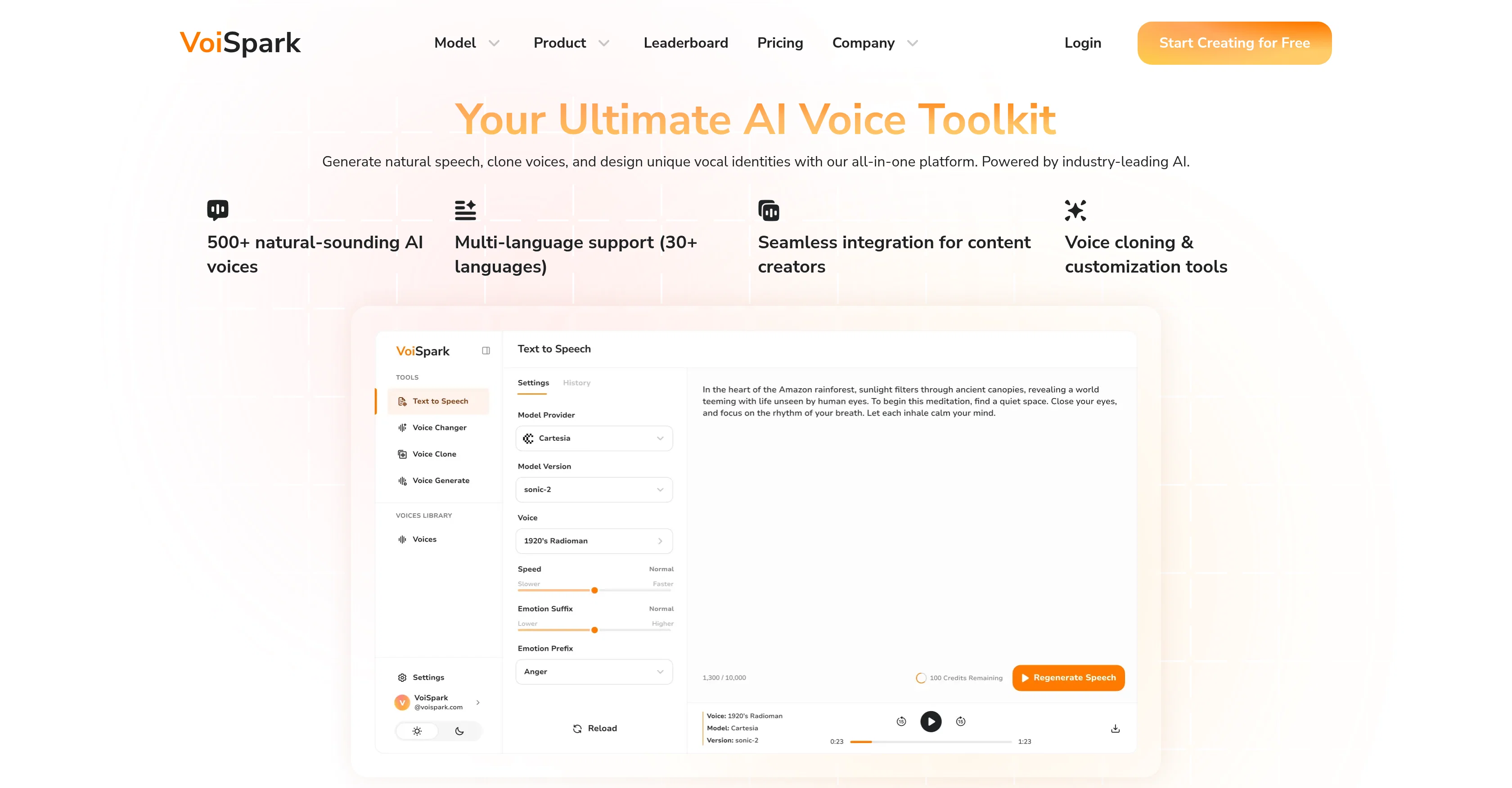
VoiSpark is an AI voice generation platform majorly oriented towards generating human-like voices. This platform can be used to create authentic text-to-speech voiceovers, clone voices, and design custom AI voices for a variety of applications, including videos, podcasts and more.
An interesting capability of VoiSpark is transforming audio into the sound of any voice you can imagine, from celebrities to unique characters, useful for content creators, gamers, and private messaging.
With VoiSpark, users can modify existing audio, fine-tune the emotion and style to create perfect audio content. Additionally, there is a feature to clone any voice from a 60-second sample, keeping the original emotion intact, thereby creating voice-overs for projects, dubbing content, or producing personalised audiobooks.
Users have the flexibility to design their own unique AI voices by defining its age, gender, and style-even singing or rapping. This feature can be used to generate exclusive narrators for brands or create multilingual characters.
Despite its advanced features, VoiSpark maintains a user-friendly and intuitive dashboard, aimed at seamless integration for content creators. VoiSpark demonstrates an empowering approach to incorporating AI into voice technology, enabling users to create audio content that sounds naturally human.
- Ai Voice
- Text To Voice
- Ai Text To Speech
- Voice Cloning
- Voice Changer
- Voice Generator
- Celebrity Voice Generator
Best for
Short scenarios where VoiSpark tends to shine.
-
Creating voiceovers for videos
Best for Content creators
-
Producing audio for podcasts
Best for Video producers
-
Developing e-learning content
Best for Podcasters
-
Designing voices for apps
Best for E-learning developers
-
Generating personalized audiobooks
Best for Gamers
-
Dubbing content
Best for Brand managers
-
Creating unique vocal identities for brands or characters
Best for App developers
-
Transforming audio for gamers and private messaging
Best for Audiobook creators
Example outputs 1
Sample generations and before/after results for VoiSpark.

Access & connections
Where you can use VoiSpark.
Platforms
Capabilities
What this tool accepts, produces, and is strongest at.
Input
- API
- Text
- Audio
Output
- Audio
- API
Highlights
- No Signup
Supported features
- No Signup
- Dubbing
Pros & cons
Pros
- Human-like voice generation
- Authentic text-to-speech voiceovers
- Voice cloning capability
- Transforms any audio
- Fine-tunes emotion and style
- 60-second sample voice cloning
- Personalised voice-overs creation
- Dubbing content
Show 24 more
- Personalised audiobooks production
- Ability to define age, gender, style
- Generates narrators for brands
- Multilingual character creation
- User-friendly dashboard
- Seamless creator integration
- Emotive speech
- Voice personalization
- Content creation for podcasting, gaming, messaging
- Multi-language support
- Studio-quality voiceovers
- No recording gear needed
- Modifies existing audio
- Accuracy in voice replication
- Advanced voice changer
- Free trial version
- Supports diverse voice styles
- Maintains original emotion in cloning
- Direct contact email provided
- Numerous voices (500+)
- Focused on creativity empowerment
- Transform text to speech
- Text-to-Speech feature showcase
- API and documentation available
Cons
- No offline operations
- Limited language support
- Requires 60-seconds for voice cloning
- Too many customization options
- Dashboard may be confusing
- Requires advanced technical knowledge
- Lack of user community
- No disclosed integration methods
Show 2 more
- Unclear pricing structure
- Lack of extensive documentation
Compare alternatives
Similar tools in the catalog — with a clear reason to open each one.

ElevenLabs ✓
FreemiumCreate lifelike AI voices for compelling storytelling.
Why look Typically cheaper
Full comparison
Free Text-To-Speech ✓
FreeText transformed into customizable spoken output.
Why look Fully free option
Full comparison
Read-this.ai ✓
PaidTransform any articles into podcast-quality audio instantly with just a click.
Why look Typically cheaper
Full comparison
Audioread.com ✓
PaidListen to any text in your podcast app or browser.
from $19.99/mo
Full comparison
TTSMaker ✓
FreemiumConvert text to natural speech in 100+ languages.
Why look Typically cheaper
Full comparisonPeople also view
Tools that often show up alongside VoiSpark in collections and comparisons.
TTSMaker ✓
FreemiumConvert text to natural speech in 100+ languages.

Speechma ✓
UnknownTransform text to speech with 400+ premium AI voices
Read-this.ai ✓
PaidTransform any articles into podcast-quality audio instantly with just a click.
Free Text-To-Speech ✓
FreeText transformed into customizable spoken output.
ElevenLabs ✓
FreemiumCreate lifelike AI voices for compelling storytelling.
Audioread.com ✓
PaidListen to any text in your podcast app or browser.
Summ-it ✓
FreemiumTurn everything you meant to read into an audio playlist.
DeepBliss.me ✓
FreemiumPersonalized mental wellness platform for future-self practice, in your own voice.
Releases 1
Imported reviews 2
Computers should be allowed to TALK to us for free, like in the Star Trek TV series. Our future grandchildren will laugh at us for "paying" to use this everyday option, biting the hook to "monthly subscriptions" like gullible fish and then getting up to 1,000 words per month" under the so-called Pro version ;-) This is crazy!
At last, we have a voice AI hub that works like OpenRouter.
FAQ 12
What is VoiSpark?
What is the process to clone a voice with VoiSpark?
What options does VoiSpark provide for customizing AI voices?
How does VoiSpark transform audio content?
What is the application of VoiSpark in the gaming industry?
Can VoiSpark create multilingual characters?
How user-friendly is the VoiSpark interface?
What differentiates VoiSpark's AI from other voice generation platforms?
Can I use VoiSpark to create voices for video and podcast content?
Does VoiSpark's AI voices sound naturally human?
What features support VoiSpark's integration for content creators?
Can I design an AI voice that can sing or rap using VoiSpark?
Related tools
Recommended

freebeat AI ✓
FreemiumTurn Music & Ideas into Viral Videos In One Click

Thea ✓
FreemiumAI study tools to master material, not just memorize it.

Automateed ✓
Free TrialCreate eBooks effortlessly with Automateed, the AI-powered writing tool.

Notis ✓
Free TrialThe first WhatsApp assistant that runs on your ChatGPT and Claude subscriptions

DeepSeek ✓
FreeUnravel the mystery of AGI with curiosity

Recall ✓
FreemiumSummarize Anything, Forget Nothing!