

PDF Management 2026 Rank: #974
UPDF ✓
Complete PDF toolkit with AI-powered features.
Trial; then from $35.99/yr
Verdict
A quick read before you dig into the full page.
- Best if
- You are students and need: Summarizing long PDF documents for quick understanding
- Skip if
- Single subscription, 4 devices limit
- Pick this when
- Works on 4 devices
Considering pdfAssistant.ai instead? Compare side by side
Overview
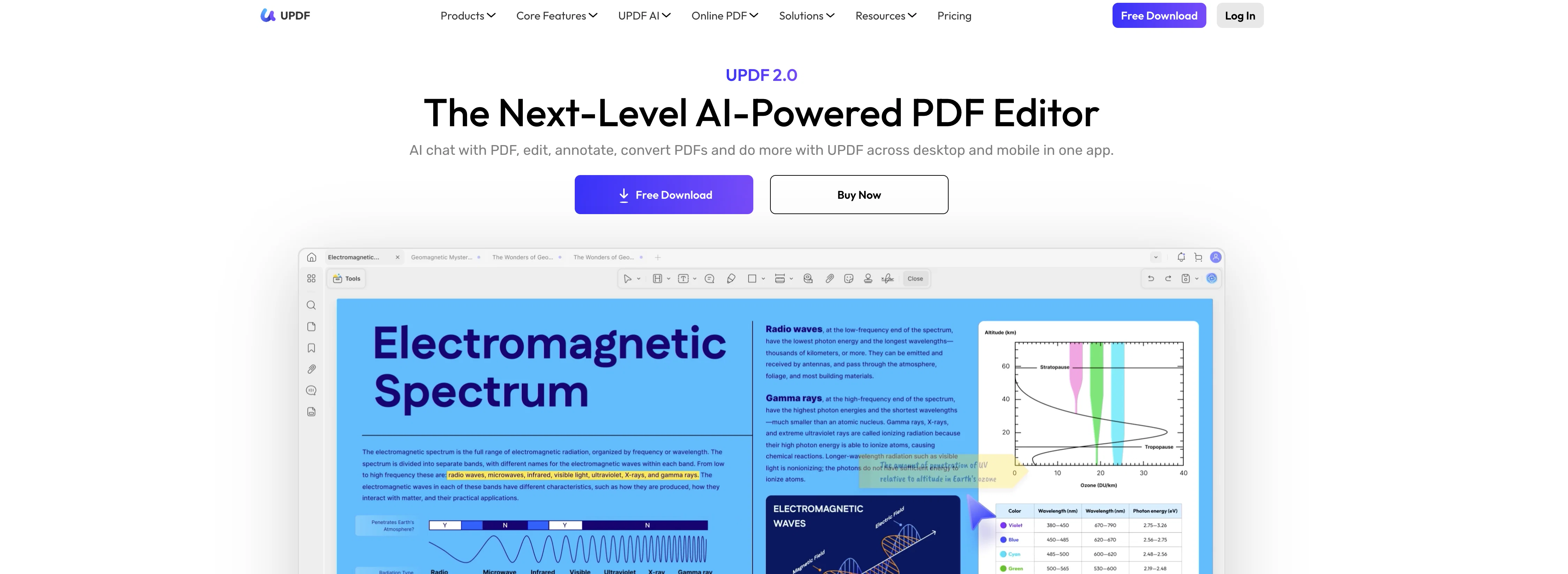
UPDF is an AI-powered tool designed for extensive manipulation and management of PDF documents. Key features of UPDF include the ability to edit PDF files, create new PDFs, and annotate existing ones.
Users can adjust text, images, links, and page layout, as well as utilize OCR technology to extract text from images. There are also specialized functions for PDF organization, such as inserting, extracting, rotating, and cropping pages.Beyond standard PDF editing, UPDF provides a range of AI features, powered by GPT-5, that enhance the user's efficiency.
The AI can summarize extensive PDFs, generate mind maps, and respond to queries related to the PDF content or images. It's designed to assist with various tasks like rewriting, brainstorming, or creative endeavors.
UPDF is available across various platforms including desktop (Windows, Mac) and mobile devices (iOS, Android) and also features a cloud storage service.
In addition to converting PDFs to different formats like Word, Excel or Images, UPDF provides tools such as PDF compression and batch processing. UPDF also offers plans for individuals, educational institutions, and enterprises, highlighting its scalability and adaptability for diverse user needs.
The software offers safeguards for PDFs as well, with options to protect, sign, redact and sanitize PDFs, ensuring both security and compliance. Additionally, UPDF has a user-friendly interface and provides ample resources for user support and education.
Best for
Short scenarios where UPDF tends to shine.
-
Summarizing long PDF documents for quick understanding
Best for Students
-
Translating PDF files to different languages
Best for Educators
-
Explaining complex technical or medical terms in PDFs
Best for Legal professionals
-
Chatting with PDFs to get answers to specific questions
Best for Healthcare professionals
-
Editing and annotating PDF documents for collaboration
Best for Banking professionals
-
Converting PDFs to other formats for compatibility
Best for Manufacturing professionals
-
Protecting sensitive PDF documents with passwords
Best for Insurance professionals
Example outputs 1
Sample generations and before/after results for UPDF.
Access & connections
Where you can use UPDF, and what it plugs into.
Integrations
Capabilities
What this tool accepts, produces, and is strongest at.
Input
- Image
- Text
Output
- Text
- Image
Supported features
Pros & cons
Pros
- Works on 4 devices
- Cross-platform (Windows, Mac, iOS, Android)
- Cloud storage
- OCR Technology
- PDF Protection
- Document Editing
- Converting PDFs to Mind Maps
- Enterpise solutions
Show 32 more
- Subscription-based model
- Text extraction from images
- Supports academic research
- Integrated GPT-5 technology
- PDF Compression
- Batch Processing
- PDF Annotation
- PDF Creation
- Content Summarization
- Image Queries
- Useful for creative endeavors
- PDFs to Word, Excel, or Images
- Support and Education resources
- Online Security and Compliance
- Free access to key features
- PDF Form option
- Optimized for organizations and individuals
- Advanced text adjustments
- PDF Page organization (inserting, extracting, rotating, cropping)
- Redacting and sanitizing PDFs
- Comparatively more scalable and adaptable
- Provides user-friendly interface
- Translate Text feature
- Automated responses to PDF/Image based questions
- PDF Rewriting Assistance
- Availability of discount deals and promotions
- Optimized for scholars
- Handles complex document management
- Generates mind maps from PDFs
- Specialized features for different industries
- Automated summarizing and translation of PDFs
- Education solutions
Cons
- Subscription-based advanced features
- Single subscription, 4 devices limit
- Requires subscription for anonymity
- Limited cloud storage
- Added watermark in trial version
- Limited conversion capabilities in free version
- Limited batch processing
- OCR not fully functional in free version
Compare alternatives
Similar tools in the catalog — with a clear reason to open each one.

pdfAssistant.ai ✓
Free TrialYour 24/7 AI-powered PDF processing assistant.
Why look Typically cheaper
Full comparison
PDFCandy PDF Editor ✓
PaidEdit PDFs online for free with powerful tools
Why look Typically cheaper
Full comparison
HiPDF ✓
Free TrialEdit, convert, and organize PDFs effortlessly online.
Free + from $69.99/mo
Full comparison
SwifDoo PDF ✓
PaidComprehensive PDF tool for all your document needs
Why look Typically cheaper
Full comparisonPeople also view
Tools that often show up alongside UPDF in collections and comparisons.
SwifDoo PDF ✓
PaidComprehensive PDF tool for all your document needs

SmallPDF ✓
UnknownTurn PDFs into instant insights with AI.
PDFCandy PDF Editor ✓
PaidEdit PDFs online for free with powerful tools
pdfAssistant.ai ✓
Free TrialYour 24/7 AI-powered PDF processing assistant.
HiPDF ✓
Free TrialEdit, convert, and organize PDFs effortlessly online.
WhatsTheCatch ✓
FreeAI that spots risks before you sign.

Thea ✓
FreemiumAI study tools to master material, not just memorize it.

Renamer.ai ✓
FreemiumAI-Powered Bulk File Renamer & Organizer
Releases 1
FAQ 12
What platforms are supported by UPDF?
What is the maximum number of devices I can use under a single UPDF subscription?
What functionalities does UPDF's AI-Powered PDF editor provide?
How does UPDF's AI chat interact with documents?
What is the role of the Optical Character Recognition feature in UPDF?
Can I use UPDF to organize my PDFs?
What are the protections available for PDFs in UPDF?
What does UPDF offer to assist with PDF Forms?
Does UPDF provide tools for academic use and, if so, what are they?
What are UPDF's Enterprise solutions?
How can I access advanced AI features on UPDF?
What are the different subscription plans available for UPDF?
Related tools
Recommended

CodeRabbit ✓
Free TrialEnhanced code review for improved workflow and quality.

Claude ✓
FreemiumBuilding reliable, interpretable AI systems

ChatGPT ✓
FreemiumAsk anything, create anything, and move from idea to action.

Mindsmith ✓
FreemiumPlatform for building and sharing eLearning content

TheLibrarian.io ✓
Free TrialYour WhatsApp AI assistant for instant productivity.

Kin - Personal AI Advisors ✓
FreePrivacy-first & designed your for mind, and life at work