Text to Speech.im ✓
Convert text to lifelike speech effortlessly
Verdict
A quick read before you dig into the full page.
- Best if
- You are content creators and need: Creating voiceovers for videos
- Skip if
- Limited child voice options
- Pick this when
- Supports multi-language
Considering ElevenLabs instead? Compare side by side
Overview
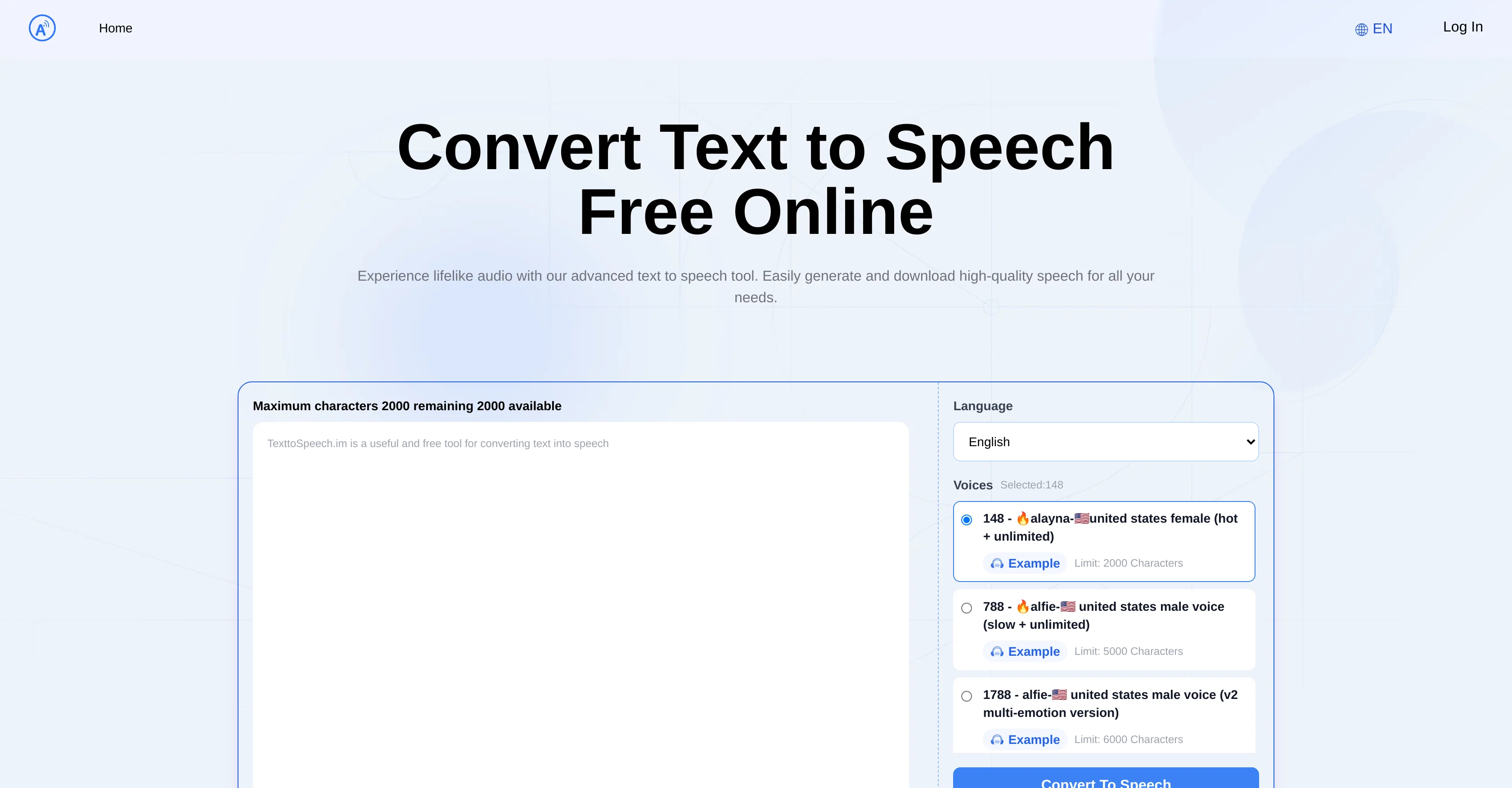
Text to Speech.im is an online tool designed to convert text to speech. It uses advanced AI technology to generate natural-sounding voices, making it ideal for creating engaging audio content.
The tool supports a wide range of languages, allowing it to be used globally. Different voice options including male, female, and child voices from different regions around the world are available for customization.
These voices can be selected based on user preference to enhance the listening experience. Notably, these voices incorporate multi-emotion versions, providing a more dynamic and lifelike audio result.
The tool also allows seamless downloading of the generated speech for high-quality audio output. Whether for personal, educational, or professional needs, the Text to Speech.im tool is well-suited for transforming written text into speech.
Best for
Short scenarios where Text to Speech.im tends to shine.
-
Creating voiceovers for videos
Best for Content creators
-
Generating audiobooks
Best for Educators
-
Making educational content more accessible
Best for Individuals with visual impairments
-
Providing audio support for individuals with visual impairments
Best for Digital marketers
Example outputs 1
Sample generations and before/after results for Text to Speech.im.
Access & connections
Where you can use Text to Speech.im.
Platforms
Capabilities
What this tool accepts, produces, and is strongest at.
Input
- Text
Output
- Audio
Pros & cons
Pros
- Supports multi-language
- Natural-sounding voices
- Wide language range
- Gender-specific voice options
- Child voice options
- Multi-emotion voices
- Audio download feature
- Support for different regions
Show 45 more
- Voices with different accents
- Characters limit per voice
- Speed adjustment feature
- Volume control
- Playback feature
- Global usage
- Long text support
- High-quality audio output
- Ease of use
- Variety of speech styles
- Customization capabilities
- Easy integration
- Support across devices
- Offline use supported
- High accuracy speech synthesis
- Cost-effectiveness
- Efficient text conversion
- Seamless user experience
- Iphone text-to-speech support
- Versatile for many purposes
- Professional and engaging voices
- Clear and precise output
- Dynamic and lifelike audio
- Helpful for visual impairments
- Online free tool
- Effortless content creation
- Reading disabilities friendly
- User preference voice selection
- Convenient MP3 download
- Accurate speech synthesis
- High compatibility
- Flexible usage
- Content accessibility
- Saves hiring voice actors
- Enhances user engagement
- Great for educational content
- Compatible with TikTok
- Ideal for social media
- Revolutionizes ad campaigns
- Helpful for YouTube content creators
- Convenient for audiobook authors
- Major tool for educators
- Supports cross-device use
- Text length handling
- Support for long text
Cons
- Character limits on voices
- Voice options complexity
- No API mentioned
- No multi-device syncing
- Lack of offline use
- Unclear upgrade options
- No technical support mentioned
- No collaborative features
Show 2 more
- Limited child voice options
- Inconsistent multi-emotion versions' availability
Compare alternatives
Similar tools in the catalog — with a clear reason to open each one.

ElevenLabs ✓
FreemiumCreate lifelike AI voices for compelling storytelling.
Why look Offers a public API
Full comparison
VoiSpark ✓
FreemiumCreate human-like voices for content with AI
Why look Better for writing
Full comparisonPeople also view
Tools that often show up alongside Text to Speech.im in collections and comparisons.
VoiSpark ✓
FreemiumCreate human-like voices for content with AI

Speechma ✓
UnknownTransform text to speech with 400+ premium AI voices

Read-this.ai ✓
PaidTransform any articles into podcast-quality audio instantly with just a click.

Free Text-To-Speech ✓
FreeText transformed into customizable spoken output.
ElevenLabs ✓
FreemiumCreate lifelike AI voices for compelling storytelling.

Audioread.com ✓
PaidListen to any text in your podcast app or browser.
Summ-it ✓
FreemiumTurn everything you meant to read into an audio playlist.

DeepBliss.me ✓
FreemiumPersonalized mental wellness platform for future-self practice, in your own voice.
Releases 1
FAQ 12
What languages does Text to Speech.im support?
Can Text to Speech.im produce male, female, and child voices?
Does Text to Speech.im offer different regional accents for its voices?
Can I choose multi-emotion versions of voices in Text to Speech.im?
Is it possible to download the speech generated by Text to Speech.im?
Can I use Text to Speech.im for professional, educational, or personal needs?
Does Text to Speech.im use AI technology?
How natural is the output of voices from Text to Speech.im?
Are there character limits for the text input in Text to Speech.im?
What customization options are available in Text to Speech.im?
How do I select a specific voice in Text to Speech.im?
What is the quality of the audio downloaded from Text to Speech.im?
Related tools
Recommended

COACH ✓
FreeAI-powered career development platform built by career experts.

AI Voice Generator Free ✓
FreeGenerate AI voices for any text instantly

Luvvoice ✓
FreemiumTransform text into lifelike speech instantly.

BypassGPT.co ✓
PaidHumanize AI text to bypass detection tools.

VoiceToText ✓
FreeType with your voice using AI-powered speech recognition.

AI YouTube Title Generator ✓
Free TrialGenerate eye-catching YouTube titles that boost views and engagement.