

Voice writing vv2.0.0
TalkText ✓
Smart Dictation in your browser or via a native macOS integration 🔥
Free + from $6.5/mo
Verdict
A quick read before you dig into the full page.
- Best if
- Smart Dictation in your browser or via a native macOS integration 🔥
- Skip if
- Limited free usage (2000 words/month)
- Pick this when
- Works in the browser
Considering Voice Writer instead? Compare side by side
Overview
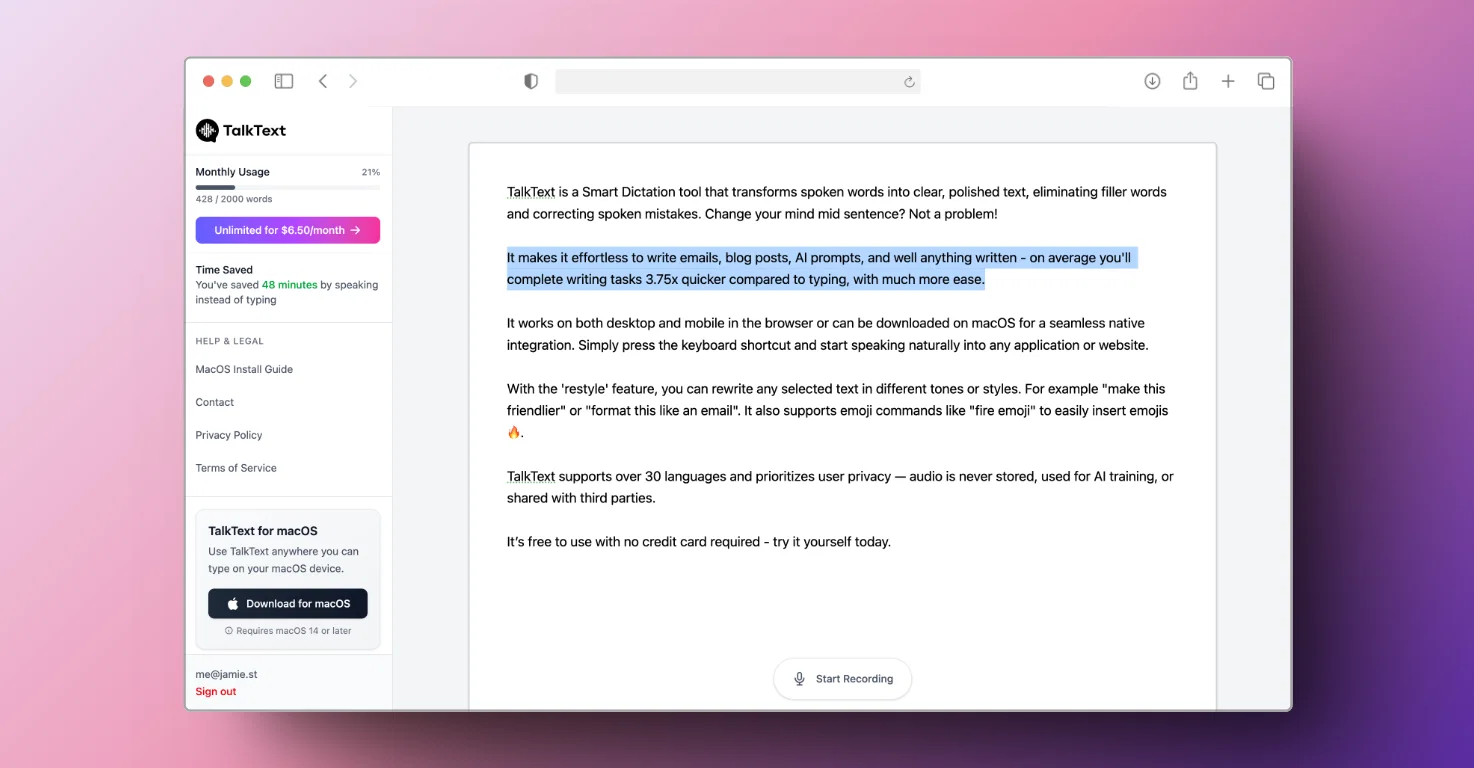
It makes it effortless to write emails, blog posts, AI prompts, and well anything written - on average you'll complete writing tasks 3.75x quicker compared to typing, with much more ease.
It works on both desktop and mobile in the browser or can be downloaded on macOS for a seamless native integration. Simply press the keyboard shortcut and start speaking naturally into any application or website.
With the 'restyle' feature, you can rewrite any selected text in different tones or styles. For example "make this friendlier" or "format this like an email". It also supports emoji commands like "fire emoji" to easily insert emojis 🔥.
TalkText supports over 30 languages and prioritizes user privacy — audio is never stored, used for AI training, or shared with third parties.
It’s free to use with no credit card required - try it yourself today.
- Smart Dictation
- Speech-to-text
- Restyle With Ai
Best for
Short scenarios where TalkText tends to shine.
-
Smart Dictation in your browser or via a native macOS integration 🔥
Example outputs 1
Sample generations and before/after results for TalkText.
Access & connections
Where you can use TalkText, and what it plugs into.
Platforms
Integrations
Capabilities
What this tool accepts, produces, and is strongest at.
Input
- Text
- Audio
Output
- Text
Pros & cons
Pros
- Works in the browser
- No download required
- Works on mobile
- Native macOS integration available
- Speech-to-Text Feature
- Improves Productivity
- Content Creation Assistance
- Supports 30 Languages
Show 21 more
- Text Correction
- Text Rewriting
- Accurate Transcriptions
- Proper Capitalization and Punctuation
- Eliminates Speech Errors
- Protects User Privacy
- No Audio Storage
- Does Not Sell User Data
- Email and Blog Dictation
- Text Restyling Feature
- Free to Get Started
- 3.75x Faster Than Typing
- Outperforms Built-in macOS Dictation
- No Third-Party Data Selling
- No User Data for Training
- Removes Speech Fillers
- Real-time Audio Processing
- Polish Speech into Professional Text
- Restyle Any Text
- Multiple Use Cases
- Adapts According to Your Style
Cons
- Requires Internet connection
- No offline functionality
- Limited free usage (2000 words/month)
Compare alternatives
Similar tools in the catalog — with a clear reason to open each one.
Voice Writer ✓
Free TrialWrite 5x faster with AI-powered voice writing.
Free + from $10/mo
Full comparison

FIRSTVERSE ✓
Free TrialWrite it in your voice. FIRSTVERSE drafts the page.
Free + from $24/mo
Full comparison
MF0.ai ✓
PaidEvery top AI in one chat. Real memory. No subscription.
Why look Typically cheaper
Full comparisonPeople also view
Tools that often show up alongside TalkText in collections and comparisons.
Voice Writer ✓
Free TrialWrite 5x faster with AI-powered voice writing.

ThoughtFuel ✓
Free TrialBuild your LinkedIn brand in 15 minutes a week.

First Read ✓
Free TrialFrom spark to script. In your voice.

PilotPost ✓
Free TrialYour authentic voice. Posted automatically. Every week.
MF0.ai ✓
PaidEvery top AI in one chat. Real memory. No subscription.

Katpult ✓
Free TrialAI blog writing that actually sounds like you.

Harker ✓
FreemiumType faster with your voice

ForthWrite ✓
FreemiumAI email writer that sounds like you.
Releases 2
We have brought TalkText to the web browser, so you no longer need a macOS device to enjoy its benefits. Don't worry the macOS integration isn't going anywhere!
Now everyone can "write" 3.75x faster with TalkText 💪🔥
Imported reviews 3
very useful, i can highly recommended to anyone who hates typing
Easily saves me an hour every day - I no longer have to type long winded “professional” sounding email replies to my colleagues, I just speak roughly with minimal effort 👏
It’s a great tool (which I created) that I personally use every day - it speeds me up in every writing task I do!
Once you start speaking instead of typing everywhere, you’ll never look back - on average it speeds you by 3.75x.
FAQ 12
What is TalkText?
🛠️ 2
tools
🙏 21
karma
wrote:
TalkText is a Smart Dictation tool that transforms spoken words into clear, polished text, eliminating filler words and correcting spoken mistakes. It makes it effortless to write emails, blog posts, AI prompts, and well anything written. It works on both desktop and mobile in the browser or can be downloaded on macOS for a seamless native integration. With the 'restyle' feature, you can rewrite any selected text in different tones or styles.
What's the difference between TalkText and the built-in dictation in macOS?
How does TalkText's 'Restyle' feature work?
How does TalkText improve my dictation?
Does TalkText support other languages apart from English?
Does TalkText value user privacy?
Does it store my audio data?
Does TalkText use my data to train their AI models?
Does TalkText sell my data to third parties?
Is TalkText able to remove speech fillers and errors?
How can TalkText assist in creating content like emails and blog posts?
What is the process of dictating an email or a blog post?
Related tools
Recommended

Automateed ✓
Free TrialCreate eBooks effortlessly with Automateed, the AI-powered writing tool.

Notis ✓
Free TrialThe first WhatsApp assistant that runs on your ChatGPT and Claude subscriptions

Marketing Assistant (Elsa AI) ✓
FreemiumDefine your ideal customers and craft a winning marketing strategy with Elsa.

Werd - Vibe Write with Multi-agent AI ✓
Free TrialVIBE WRITE With Multi-agent AI

Thea ✓
FreemiumAI study tools to master material, not just memorize it.

Mind Map Wizard ✓
FreemiumGenerate mind maps with AI: free, no sign-up, no ads