

Pixwith AI ✓
Create stunning AI videos & images in minutes.
Free + from $9.99
Verdict
A quick read before you dig into the full page.
- Best if
- Create stunning AI videos & images in minutes
- Skip if
- Complex for first-time users
- Pick this when
- Turns text prompts into HD videos
Considering freebeat AI instead? Compare side by side
Overview

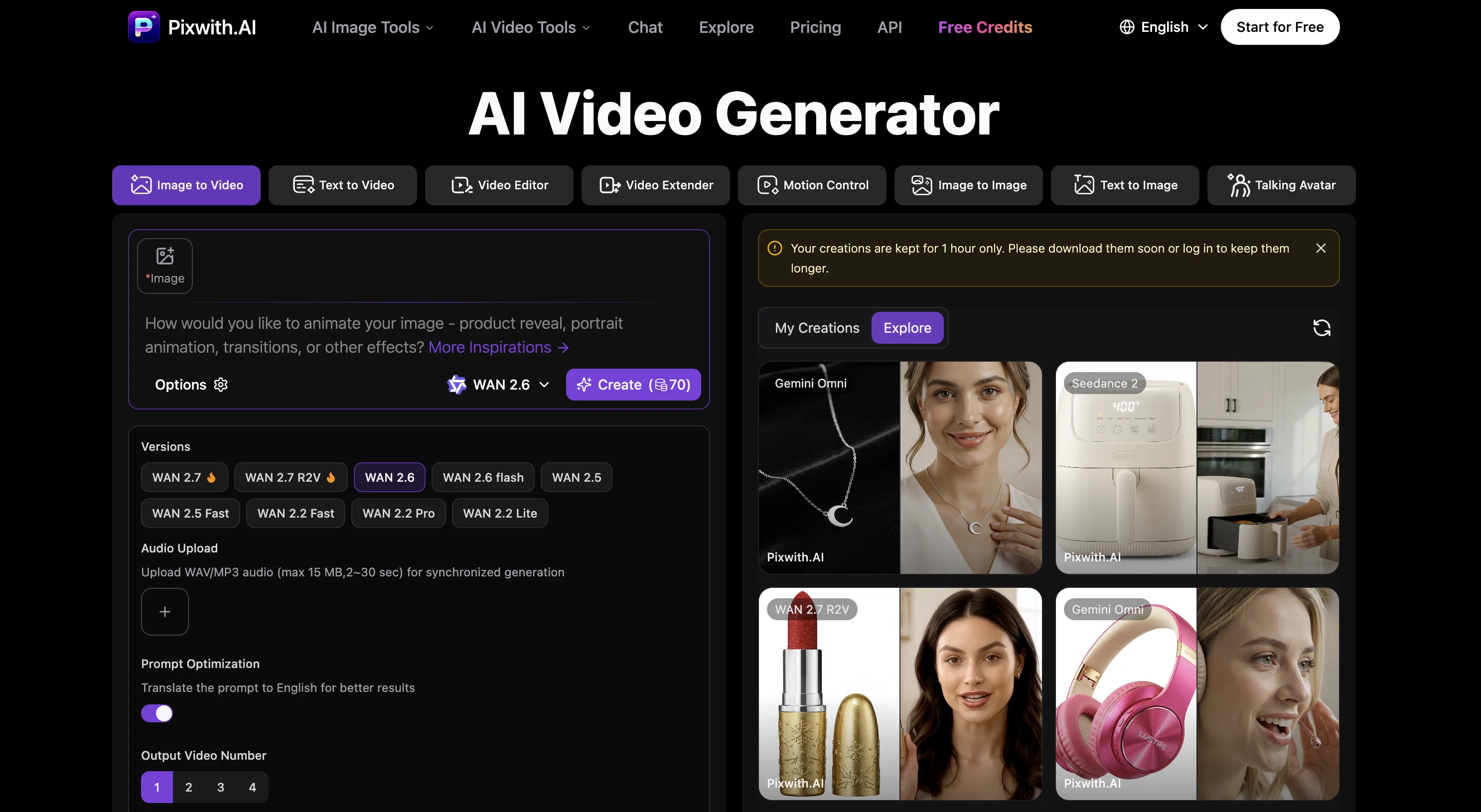
Pixwith.ai is an AI-powered platform designed to generate high-quality videos swiftly and conveniently, ideal for content creators, corporates and individuals.
It supports the creation of videos from text prompts and image inputs, integrating a variety of industry-leading AI models for comprehensive video generation needs.
It features an extensive range of models from major providers like OpenAI's Sora and Google's Veo to choose from. Users can control the resolution, duration, and style parameters according to their needs, making the tool flexible and adaptable for all types of projects.
The platform ensures watermark-free outputs, allowing users to brand and monetize their videos without restrictions. New users can explore the various models and features risk-free with complimentary trial credits.
Some advanced models include audio generation capabilities to create immersive experiences with synchronized soundscapes, voice narration, and environment audio.
Pixwith.ai also provides the functionality to create lifelike digital humans and avatars, ideal for various use cases like corporate training, marketing videos and online education.
The entire video creation process requires only three simple steps, starting from describing the idea to the tool, selecting the appropriate model and configuration, and finally generating and downloading the video.
Access & connections
Where you can use Pixwith AI.
Platforms
Capabilities
What this tool accepts, produces, and is strongest at.
Input
- API
- Tabular
- Image
- Text
Output
- Video
- API
- Image
Highlights
- SOTA
- No Signup
Supported features
- Image Edit
- Image Generation
- Video Avatars
- Video Edit
- Video Generation
- Sound Creation
- Styling
- Realism
- No Signup
Models
Text
Image
Audio
Video
Pros & cons
Pros
- Turns text prompts into HD videos
- Multi-resolutions and durations options
- Watermark-free videos
- Offers audio generation capabilities
- Creates digital humans and avatars
- Free trial available
- Simplified 3 steps workflow
- No editing skills needed
Show 31 more
- Creates professional-quality videos
- Ideal for content creators
- Immersive storytelling features
- Supports image inputs
- Flexible video style parameters
- Allows branding and monetizing videos
- Includes trial credits
- Realistic virtual presenters creation
- Ideal for corporate training
- Supports multiple language narrations
- Perfect for online education
- Ensures secure cloud storage
- 100% full ownership of content
- Consistent storytelling capabilities
- Can create social ads
- Generates video from images
- Has robust API for developers
- Supports A/B testing
- Monthly style preset updates
- Animator for drawings & art
- Perfect for design firms
- Trusted by content creators
- Supports major privacy regulations
- 24/7 Help center access
- Active community forums
- Supports all image formats
- Lighting fast result generation
- Professional-grade quality outputs
- No credit card info storage
- No creative restrictions
- Ideal for E-commerce owners
Cons
- Lacks integrated video editing
- No multi-language support
- Restricted video duration
- Lack of direct social media sharing
- Confined to model-selected styles
- Complex for first-time users
- Limited free trial model
Compare alternatives
Similar tools in the catalog — with a clear reason to open each one.

freebeat AI ✓
FreemiumTurn Music & Ideas into Viral Videos In One Click
Why look Typically cheaper
Full comparison
MagicLight ✓
FreemiumTransform text into captivating videos instantly.
Why look Typically cheaper
Full comparison



Seedance ✓
FreemiumMulti-shot video generation from text and image.
Why look Stronger for image work
Full comparisonReleases 1
Imported reviews 3
Requires log-in, not free for generation of videos, may it's censored the Flux image gen.
✨ Key Advantages of Pixwith:
1. Wide range of AI models: From video generation to image creation, enhancement, and style transformation — you get access to a full suite of cutting-edge AI models in one place.
2. Affordable and transparent pricing: Our credit-based system is flexible and offers better value compared to many similar platforms.
3. Free trials available: Several models can be used for free, allowing you to test the quality before purchasing credits.
4.Beginner-friendly interface: Simple and intuitive design — generate high-quality content in just a few clicks.
5.Constant updates: We continuously add new models and features, ensuring you always have access to the latest AI capabilities.
I like this website, Flux Model is free to use.
FAQ 12
What is Pixwith.AI?
How quickly can Pixwith.AI create videos from text?
What AI models does Pixwith.AI use for video generation?
How can I select the resolution and duration for my videos in Pixwith.AI?
Does Pixwith.AI add watermarks to videos?
Does Pixwith.AI support branding and monetization of generated videos?
What are the audio generation capabilities of Pixwith.AI?
Can I create digital humans or speaking avatars with Pixwith.AI?
Is there a free trial available for Pixwith.AI?
What are the steps to create a video on Pixwith.AI?
How does Pixwith.AI help create professional videos?
Does Pixwith.AI support HD Video Creation?
Related tools
Recommended

AIVideoMaker - Free AI Video Maker ✓
FreemiumTransform static images into animated videos instantly.

VidForge.ai ✓
Free TrialText in. Video out.
LetsMkVideo ✓
Free TrialCreate stunning videos from text and images.

Free Text-To-Speech ✓
FreeText transformed into customizable spoken output.

DeepSeek ✓
FreeUnravel the mystery of AGI with curiosity

PixPal - Free AI Chat with Image Editor & Video Gener... ✓
FreeAI chat with images – Create, edit, innovate for free!