Pixfy AI ✓
Edit photos with words, not tools.
Free + from $33/mo
Verdict
A quick read before you dig into the full page.
- Best if
- Edit photos with words, not tools
- Skip if
- Not beginner-friendly UI
- Pick this when
- Conversational photo editing
Considering Viyou AI Image Generator instead? Compare side by side
Overview
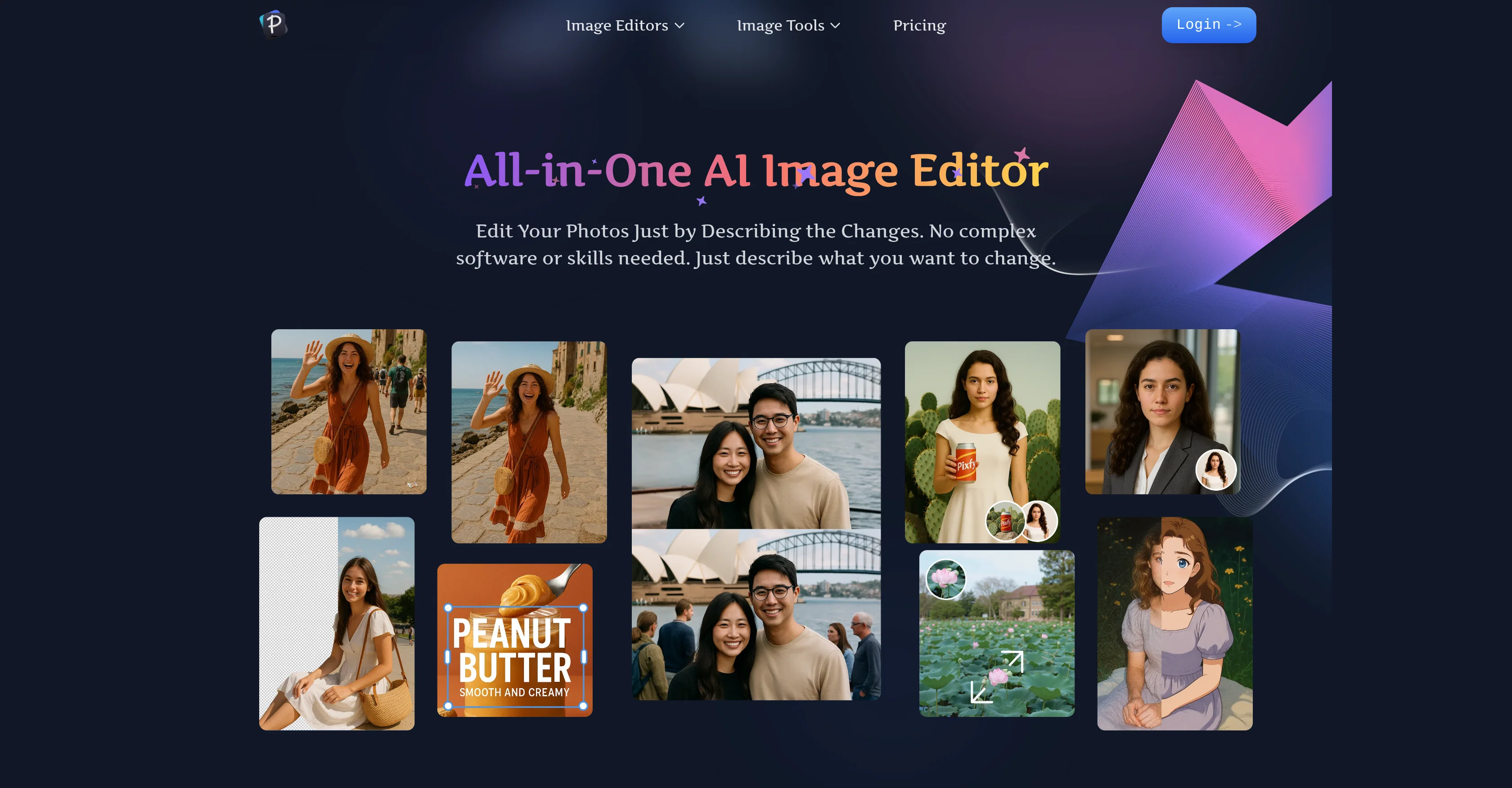
Pixfy AI is an advanced all-in-one AI image editor that simplifies and expedites the photo editing process. With innovative conversational editing, users can describe an intended edit in plain words, and the AI will produce professional edits within seconds.
Pixfy AI covers a range of applications including background removal, object erasing, face swapping, quality enhancement and more. Its intuitive design empowers even beginners with minimal experience in photo editing to create high-quality, professional results great for enhancing their social media posts, e-commerce product images, or personal photos.
Pixfy AI also features an image generator capable of creating unique visuals from simple text descriptions, and virtual try-on tools to visualize new hairstyles or clothing.
Easy to use and delivering high-quality professional results, Pixfy AI makes photo editing accessible and efficient for everyone.
Access & connections
Where you can use Pixfy AI.
Platforms
Capabilities
What this tool accepts, produces, and is strongest at.
Input
- Image
- Text
Output
- Image
Pros & cons
Pros
- Conversational photo editing
- Fast editing process
- Beginner Friendly
- Optimized for social media
- Optimized for e-commerce
- Personal photo editing
- Image generation from text
- Virtual try-on feature
Show 18 more
- High-quality, professional results
- Covers range of applications
- Background removal
- Object erasing feature
- Face swapping capability
- Quality enhancement option
- Removes text from images
- Integrated image generator
- Intuitive user experience
- Increases photo editing efficiency
- User friendly UX design
- Automatic lighting adjustment for backgrounds
- Generates studio-quality results
- Accessible to all users
- Perfect for product photos
- Ideal for content creators
- Restores old/blurry photos
- Realistic virtual previews
Cons
- No offline capabilities
- Lacks batch processing
- Limited text-to-edit functions
- No local language support
- Not beginner-friendly UI
- Missing advanced editing features
- Potential privacy concerns
- No specified data protection
Show 2 more
- No mobile app
- Usage limitations unspecified
Compare alternatives
Similar tools in the catalog — with a clear reason to open each one.

Viyou AI Image Generator ✓
FreemiumTransform text and images into stunning videos and visuals.
Free + from $39.99/yr
Full comparison
Img2Img AI ✓
FreemiumTransform any image with AI in seconds.
Why look Typically cheaper
Full comparison
Creen AI ✓
Paid40+ AI models for video, image and art. Free, no sign-up.
Why look Typically cheaper
Full comparison
Photoeditor ✓
PaidEnhanced image editing with object and text removal.
Why look Typically cheaper
Full comparison
Cleanup pictures ✓
FreemiumRemove unwanted elements from photos instantly.
Why look Typically cheaper
Full comparisonReleases 1
FAQ 12
What is Pixfy AI?
How does the conversational editing feature of Pixfy AI work?
Can Pixfy AI be used to remove backgrounds from images?
What kind of objects can Pixfy AI erase from pictures?
Does Pixfy AI offer a face swapping feature?
How can Pixfy AI enhance the quality of images?
Can Pixfy AI be used by beginners with no photo editing experience?
Can Pixfy AI be used to enhance social media posts?
Can Pixfy AI be used for e-commerce product images?
How can I use Pixfy AI for personal photo editing?
What is the Image Generator feature of Pixfy AI?
Can Pixfy AI generate visuals from text descriptions?
Related tools
Recommended

freebeat AI ✓
FreemiumTurn Music & Ideas into Viral Videos In One Click

Manus ✓
FreemiumTurn your thoughts into actions with AI

Musicful ✓
Free TrialTurn ideas into music instantly with AI, no skills needed

Automateed ✓
Free TrialCreate eBooks effortlessly with Automateed, the AI-powered writing tool.
Clever AI Humanizer ✓
FreeMake AI text undetectable and human-like.

DeepSeek ✓
FreeUnravel the mystery of AGI with curiosity