

Image editing 2026 Rank: #569
PhotoEditorAI ✓
Edit photos with words, not skills.
Verdict
A quick read before you dig into the full page.
- Best if
- Edit photos with words, not skills
- Skip if
- Limited file types support
- Pick this when
- Free-to-start
Considering Viyou AI Image Generator instead? Compare side by side
Overview
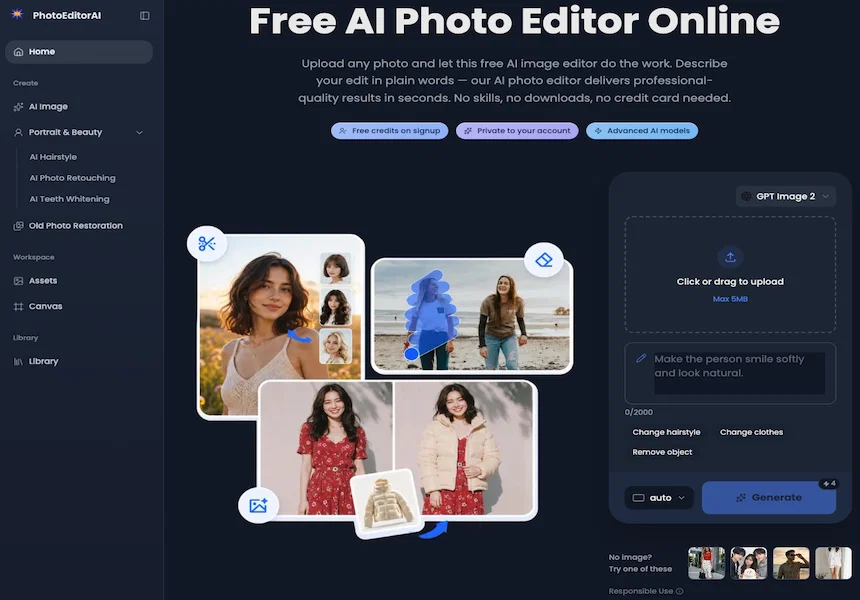
Photo Editor AI is an online application powered by most advanced artificial intelligence to enhance and edit photos. The tool allows users to generate images, change hairstyles, retouch portraits, whiten teeth, and restore old photos.
The edits are rendered through an advanced automatic process where users simply describe in plain English the changes they desire. User-friendly features remain consistent even during edits such as changing outfits, swapping backgrounds, or introducing new poses, ensuring the subject's identity and features are preserved.
The tool provides pixel-level precision editing enabling users to target specific regions like eyes, skin textures, sky gradients, or logos with accuracy.
It seamlessly blends text into images, giving a natural feel to captions, logos, and watermarks. With creative style transfer capabilities, the program can reproduce the style of a reference image onto the user's photo.
It offers AI Image Generation, Hairstyle Changing, Teeth Whitening, Photo Retouching, and Old Photo Restoration services. The tool is beneficial to personal and commercial users alike because anyone can employ it for diverse uses like social media graphics, e-commerce product banners, promotional posters, or personal images.
Its 'plug and play' style makes it accessible, requiring no credit card information or previous editing skills.
- Infinite Content Generation
- Infinite Canvas
Access & connections
Where you can use PhotoEditorAI.
Platforms
Capabilities
What this tool accepts, produces, and is strongest at.
Input
- Image
- Text
Output
- Image
Supported features
- Image Generation
- Image Edit
- Styling
Pros & cons
Pros
- Free-to-start
- No credit card required
- Changes hairstyles
- Retouches portraits
- Whitens teeth
- Restores old photos
- Advanced targeted editing
- Style transfer feature
Show 26 more
- Generates images from descriptions
- Works on any device
- Editing with plain English
- Preserves subject's identity
- Pixel-level precision
- Background swapping
- Pose introduction
- Skin texture editing
- Sky gradient editing
- Logo integration
- E-commerce suitable
- Social media graphics
- Promotional poster creation
- Plain English instruction
- Consistent character features
- Professional precision
- Natural captioning
- For personal & commercial use
- Automated advanced process
- Not skill dependent
- No manual masking needed
- Intact structural details
- Fast results
- User-friendly
- No previous experience needed
- Old Photo Restoration
Cons
- No photo import from social media
- Limited file types support
- No batch editing
- No direct social media publishing
- No collaborative editing
- No organisation or cataloguing system
- No color matching tool
Compare alternatives
Similar tools in the catalog — with a clear reason to open each one.

Viyou AI Image Generator ✓
FreemiumTransform text and images into stunning videos and visuals.
Free + from $39.99/yr
Full comparison
Img2Img AI ✓
FreemiumTransform any image with AI in seconds.
Why look Typically cheaper
Full comparison

Photoeditor ✓
PaidEnhanced image editing with object and text removal.
from $9.99/mo
Full comparison
Cleanup pictures ✓
FreemiumRemove unwanted elements from photos instantly.
Why look Typically cheaper
Full comparisonReleases 1
FAQ 12
What is Photo Editor AI?
What does the style transfer feature in Photo Editor AI do?
How does text blending work in Photo Editor AI?
How does Photo Editor AI change hairstyles in photos?
How does Photo Editor AI 'whiten teeth' in photos?
How do I use Photo Editor AI to restore old photos?
Can Photo Editor AI generate images from textual descriptions?
What's targeted editing in Photo Editor AI?
Is Photo Editor AI suitable for a business use?
How does Photo Editor AI ensure the quality of the edited photos?
How does Photo Editor AI simplify the editing process?
What kind of photos can I upload to Photo Editor AI for editing?
Related tools
Recommended

Thea ✓
FreemiumAI study tools to master material, not just memorize it.

Recall ✓
FreemiumSummarize Anything, Forget Nothing!

Claude ✓
FreemiumBuilding reliable, interpretable AI systems

Grok ✓
FreemiumConversational AI for understanding the universe.
InstaWebAI ✓
FreemiumCreate, launch and grow your business website all in one platform

Whacka ✓
Free TrialTurn ideas into real apps from your phone.