

MindMac ✓
Feature-rich & elegant ChatGPT macOS client, supports multiple AI providers
from $29
Verdict
A quick read before you dig into the full page.
- Best if
- Feature-rich & elegant ChatGPT macOS client, supports multiple AI providers
- Skip if
- Limited features on Free plan
- Pick this when
- Powerful inline mode
Considering FridayGPT instead? Compare side by side
Overview
Feature list:
- Support multiple AI providers: OpenAI, Azure OpenAI, GoogleAI with Gemini, Google Cloud Vertex AI with Gemini, Anthropic Claude, OpenRouter, MistralAI, TogetherAI, OctoAI, Perplexity, Cohere (Command R & Command R+), Grog, KeyMateAI, Anyscale, DeepSeek
- Fully support local LLM via Ollama, LMStudio, GPT4All, llama.cpp, MLX
- Support fine-tuned models
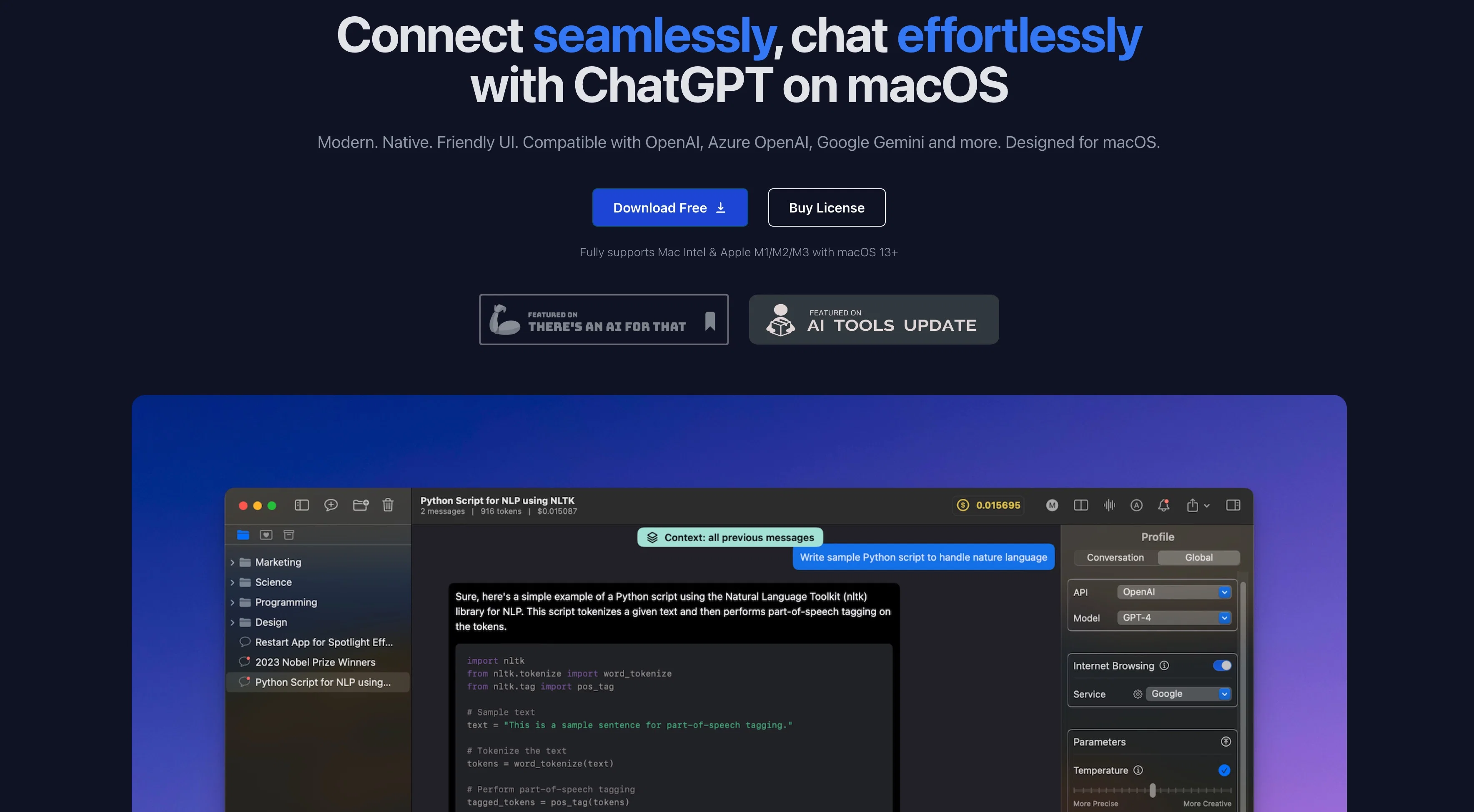
- Instant Inline mode. Use MindMac directly in any other applications. No windows switching.
- File upload (RAG): users can add files and ask something about them
- Image generation (DALLE 2 & DALLE 3) & Image vision (GPT-4o, GPT-4-Vision, Google Gemini Pro Vision, Ollama LLaVA, Claude 3 Sonnet/Opus/Haiku)
- Support Audio Input (Speech to Text) and Output (Text to Speech)
- Support web browsing with Google Search, Brave Search, Kagi Search, You Search, Tavily, Serper & SerpApi
- Customizable API parameters (temperature, topP, topK, presence penalty, frequency penalty, max tokens)
- Customizable output preferences (language, tone, style, format)
- Customizable API endpoint and network proxy (HTTP/SOCKS5)
- Conversation style control (More Precise or More Creative)
- Context control (Context-free, all messages, some first messages, some last messages)
- 150 built-in prompt templates & 25 built-in occupation templates
- Highly customizable hotkey and shortcuts
- Usage estimation (tokens & cost)
- Light/dark mode
- Export conversation to PDF/Markdown/ShareGPT
- Useful quick actions: Rewrite, Fix grammar, Summarize, Develop, Diagram (generate flow/sequence/chart diagram), Explain
- Awesome chat management: nested folder, favorite chats, archive chats, auto generate chat title
- Localized in 15 popular languages: English, Spanish, German, French, Italian, European Portuguese, Brazilian Portuguese, Japanese, Korean, Simplified Chinese, Traditional Chinese, Arabic, Indonesian, Thai, Vietnamese.
- And more at https://mindmac.app/#whatmore
It's designed to be native and fast, providing a friendly user interface that's optimized for macOS. Already trusted by numerous AI enthusiasts globally, it allows individuals and teams to easily and effectively leverage the power of ChatGPT on a macOS environment.
Best for
Short scenarios where MindMac tends to shine.
-
Feature-rich & elegant ChatGPT macOS client, supports multiple AI providers
Example outputs 1
Sample generations and before/after results for MindMac.
Access & connections
Where you can use MindMac.
Platforms
Pros & cons
Pros
- Powerful inline mode
- 150 built-in prompt templates
- Highly customizable
- Secure API key storage
- Supports 10+ languages
- Maintains user privacy
- Image Generation
- Custom API Endpoint & Proxy
Show 13 more
- Export to PDF/Markdown/ShareGPT
- Compatible with macOS 13+
- Optimized for Mac Intel & Apple M1/M2/M3
- Upcoming features like iDevices Sync via iCloud
- Fast native application
- Promises Voice Input feature
- Soon to have Text-to-Speech feature
- Promise of Instant Inline Command
- Offers API Key Security
- Supports multiple platforms
- Easy and effective leverage of ChatGPT
- Promised iDevices Sync via iCloud
- Upcoming feature of Upload Document
Cons
- Only for macOS
- No Windows support
- Pricing per device
- Several features upcoming, not present
- Limited features on Free plan
- Limitations on conversation numbers
- Limitations on inline mode uses
- No native account, only API keys
Show 2 more
- Dependent on third-party API performance
- Necessity to store API key locally
Compare alternatives
Similar tools in the catalog — with a clear reason to open each one.

FridayGPT ✓
PaidYour AI copilot for Mac, offering instant access to ChatGPT, voice-to-text, and quick AI actions.
Why look Offers a public API
Full comparison
PaletteBrain ✓
PaidPowerful and Customizable ChatGPT App for Mac
Why look Higher community rating
Full comparison
PDF Pals — ChatPDF on Mac ✓
PaidPDF document analysis & extraction for professionals
from $34
Full comparison
Gpt-tab ✓
FreeChatGPT at your fingertips, right in your menu bar.
Why look Fully free option
Full comparisonPeople also view
Tools that often show up alongside MindMac in collections and comparisons.
PaletteBrain ✓
PaidPowerful and Customizable ChatGPT App for Mac

BoltAI ✓
PaidmacOS assistant for automated tasks.
PDF Pals — ChatPDF on Mac ✓
PaidPDF document analysis & extraction for professionals

MacGPT ✓
FreeChatGPT at your fingertips on Mac
Gpt-tab ✓
FreeChatGPT at your fingertips, right in your menu bar.
FridayGPT ✓
PaidYour AI copilot for Mac, offering instant access to ChatGPT, voice-to-text, and quick AI actions.

Pismo ✓
PaidNative AI writing assistant for Windows, MacOS and iOS

Parlo ✓
Free TrialVoice dictation, meetings, and Mac control, all on-device.
Releases 1
Imported reviews 12
App crash all the time, no support for newer models, memory leak, no support... As a paying customer I'm really disappointed.
Open source the code or give the money back
Written for support 3 or 4x and no answer. I'd call it abandonware like Jeremy suggested.
Can we officially label this as abandonware?
The bugs are not fixed and the dev hasn't responded to any support questions in months.
It has a lot of useful features but all that is moot if the app is crashing constantly.
I think an app being stable and not crashing is the basic requirement of any app.
When it works it's fine. But it crashes a lot on Mac and now I am having problems setting up Claude.ai. Despite several emails to support over several weeks I've never had a response to any query.
Buyer beware.
Amazing app. I use it every day!
As an academic, MindMac is a perfect assistant to brainstorming and structuring writing. Strongly recommended.
This is the only AI companion app that brings user-AI interactions to the deepest level and leverages AI capabilities with multiple approaches. The dev truely listens to user feedbacks and updates rapidly. No compete.
MindMac for MacOS is my goto assistant app. It's flexible enough to support multiple approaches on research and content preparation. Engineer support and feedback is second to none.
Tried many apps for using GPT API and can't find anything better!
It'd be a sin not to mention author's responsiveness to users' queries! 👏
Awesome MacOS client. Highly recommended, I use this app daily.
According to screen time activity this is the app I use the second most time on my mac.
The first one is Safari.
I absolutely love this app.
And, on top of everything the creator is a humble and always ready to help individual.
I have recommended this app to all my friends and I'll keep doing so.
Many thanks to Hoang, the creator of the app for the work done❤️
FAQ 12
What is the powerful inline mode feature in MindMac?
What modifications can be made to the MindMac interface?
How does MindMac secure my API key?
What languages does MindMac support?
Does MindMac work with Azure OpenAI ChatGPT Models?
Which AI models are compatible with MindMac?
What advanced features does MindMac offer?
What kind of performance should I expect from MindMac on macOS?
What are the upcoming features of MindMac?
How does MindMac maintain user privacy?
What is the take of MindMac on User Interaction Customization?
Which AI models are primarily used in MindMac?
Related tools
Recommended

Mindsmith ✓
FreemiumPlatform for building and sharing eLearning content

Transcript LOL ✓
FreemiumUnlimited transcripts, summaries, 99.8% accuracy, speaker recognition, superfast

Beeyond AI ✓
Free TrialBeeyond AI: Unlock 50+ AI tools under one subscription

Stunning ✓
PaidBuild AI-powered websites in seconds

B12 AI Website Builder ✓
FreemiumAI-powered website builder

PrometAI ✓
FreemiumTurn ideas into viable reality with AI business plan generator.