

Spreadsheets 2026 Rank: #2559
Messy2Sheet ✓
Messy file in. Clean sheet out.
Verdict
A quick read before you dig into the full page.
- Best if
- Messy file in. Clean sheet out
- Skip if
- No functionality for complex formulas
- Pick this when
- Supports various file types
Considering SheetAI App - AI For Sheets instead? Compare side by side
Overview
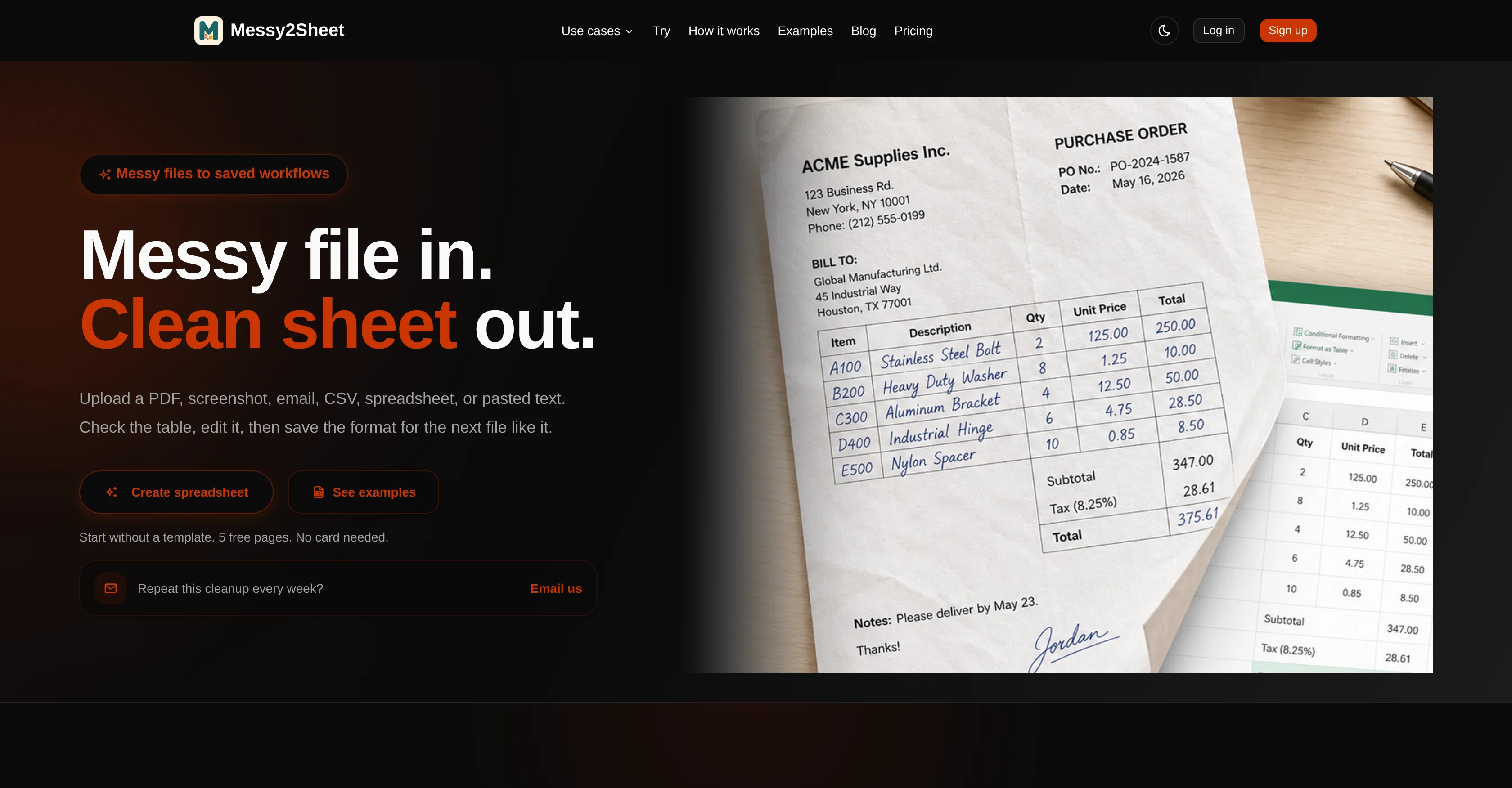
Messy2Sheet is an AI tool designed to turn assorted file types and text into clean, structured spreadsheets. The tool supports various types of inputs such as PDFs, screenshots, emails, CSVs, and pasted text.
Upon receiving the input data, Messy2Sheet organizes the provided information into a table that can be inspected, edited, and saved for future use. Additionally, the tool can extract data from a variety of sources including financial documents, invoices, and lab reports, and generate a coherent Excel or CSV document that reflects neatly cataloged data ready for inspection or further processing.
Furthermore, it offers functionality to save the formatting rules of a particular file conversion, allowing users to apply the same cleanup rules to similar files in the future.
The tool is beneficial for automating the cleanup and organization of data in weekly or recurrent jobs. Users also have the flexibility to start from scratch or use a template for fixed layouts when converting their files to spreadsheets.
Access & connections
Where you can use Messy2Sheet, and what it plugs into.
Platforms
Integrations
Capabilities
What this tool accepts, produces, and is strongest at.
Input
- Text
- Tabular
Output
- Tabular
Highlights
- No Signup
Supported features
- Spreadsheets
- No Signup
- Automation
- Finance & Accounting
Pros & cons
Pros
- Supports various file types
- Supports text inputs
- Produces structured spreadsheets
- Editable output
- Saves output for future
- Extracts from financial documents
- Extracts from invoices
- Extracts from lab reports
Show 40 more
- Generates Excel documents
- Generates CSV documents
- Saves formatting rules
- Can apply previous rules
- Automation for cleanup
- Automation for organization
- Can handle recurrent jobs
- Start from scratch
- Use fixed-layout templates
- Text-to-spreadsheet conversion
- PDF to CSV conversion
- Screenshot to spreadsheet conversion
- Email data extraction
- Invoicing processing
- Financial document processing
- Lab report data extraction
- Data cataloging
- Can export spreadsheets
- Creates reusable workflows
- Preview and edit spreadsheets
- No need for instructions
- Helpful for recurrent jobs
- Supports raw paste text
- Offers tailor-fit instructions
- No initial template needed
- Image to Excel conversion
- Text to CSV conversion
- Offers fixed-layout templates
- PDF to CSV converter
- Bank statement to Excel converter
- Upload and paste sources
- Supports scanned files
- Supports various document outputs
- Workbook preview before download
- Reuse saved cleanup rules
- Automates recurrent file processing
- Invoice automation
- Purchase order automation
- Sales order automation
- Does not publicize uploaded data
Cons
- No explicit data privacy policy
- No multi-language support
- Not for non-table data
- Requires clear file quality
- Limited to spreadsheet output
- No real-time data extraction
- No cloud storage integration
- No OCR correction toolkit
Show 2 more
- Doesn't support all file types
- No functionality for complex formulas
Compare alternatives
Similar tools in the catalog — with a clear reason to open each one.

SheetAI App - AI For Sheets ✓
FreemiumAI with brain power inside Google Sheets
Why look Offers a public API
Full comparison
Sourcetable — AI spreadsheet & data analyst ✓
FreemiumAI spreadsheet & data analyst. 10x your productivity.
Free + from $20/mo
Full comparison
TabTabTab ✓
FreemiumTurn Google Sheets into your personal research assistant.
Free + from $20/mo
Full comparison
Grist ✓
FreemiumBuild complex spreadsheet workflows with AI in minutes.
Why look Typically cheaper
Full comparison
ChatGPT in Google Sheets ✓
Free TrialChatGPT in Google Sheets: Automate insights from your data.
Why look Typically cheaper
Full comparison
Numerous ✓
Free TrialAI-powered plugin to automate spreadsheet tasks
Why look Typically cheaper
Full comparisonReleases 1
FAQ 12
What file types does Messy2Sheet support?
Can Messy2Sheet handle inputs like PDFs, screenshots, and emails?
How does Messy2Sheet organize the data into a spreadsheet?
Can I edit the tables generated by Messy2Sheet?
Does Messy2Sheet allow saving the formatting rules of a file conversion?
Can Messy2Sheet handle recurrent data cleanup tasks?
Do I need a template to use Messy2Sheet, or can I start from scratch?
Which data sources can Messy2Sheet extract data from?
Can I apply the same cleanup rules to similar files in the future with Messy2Sheet?
How does Messy2Sheet support the conversion of financial documents and invoices into spreadsheets?
Can Messy2Sheet automate the data organization of weekly tasks?
Is it possible to extract data from lab reports with Messy2Sheet?
Related tools
Recommended

MagicSlides.app AI PPT Maker ✓
FreemiumCreate Stunning PPTs in Seconds with the AI PPT Maker

GetLogit ✓
FreemiumArtificial intelligence, available for everyone.

ChatGPT ✓
FreemiumAsk anything, create anything, and move from idea to action.

Automateed ✓
Free TrialCreate eBooks effortlessly with Automateed, the AI-powered writing tool.

Notis ✓
Free TrialThe first WhatsApp assistant that runs on your ChatGPT and Claude subscriptions

CodeRabbit ✓
Free TrialEnhanced code review for improved workflow and quality.