
Lyric Video Studio ✓
Sync your sound, elevate your lyrics with AI-powered video creation.
Free + from $63
Verdict
A quick read before you dig into the full page.
- Best if
- Sync your sound, elevate your lyrics with AI-powered video creation
- Skip if
- Limited storyboard creation tools
- Pick this when
- Efficient text tools
Considering LyricEdits instead? Compare side by side
Overview




It supports third-party plug-in integrations, enabling users to create storyboards or complete videos for their music. The application allows users to prompt images and videos using their service of choice and conveniently transform them into videos within the app. The software also provides start frames for video plugins to generate content and has text prompt video creation capabilities.
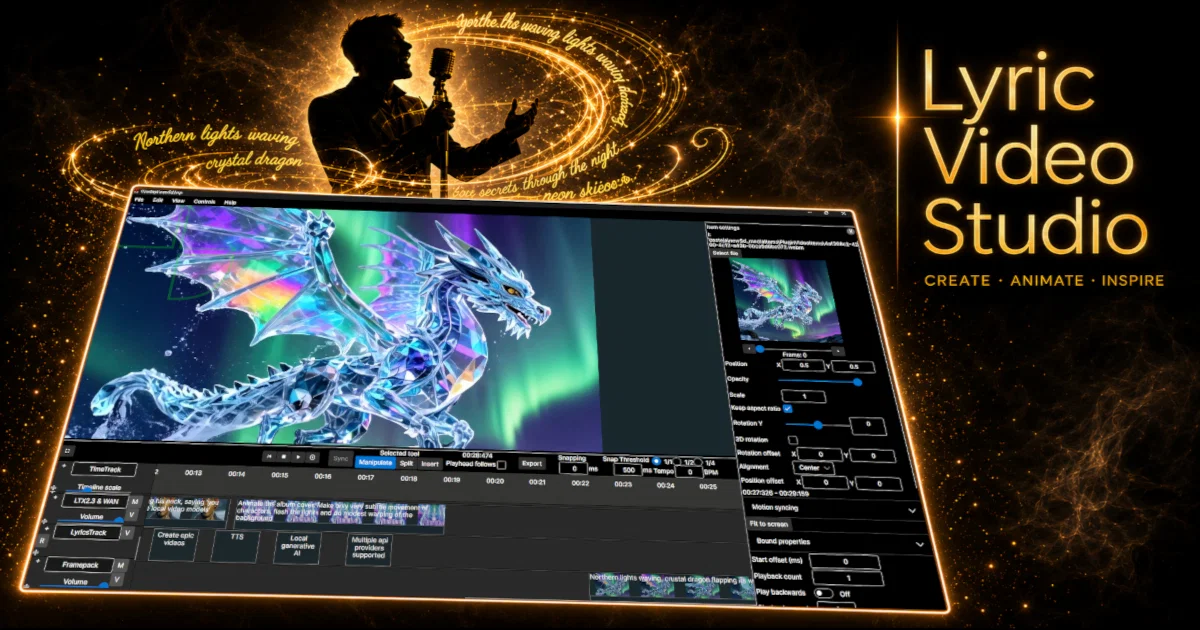
Features include simple video editing, which you do not need professional experience to use. It employs a DAW-like horizontally scrolling multi-track timeline familiar from digital audios, ensuring interactive engagement. Video, lyric, audio, and generative AI tracks can be added as needed.
The Lyric Video Studio also allows for background removal, object tracking, and the attachment of items to video objects. It has built-in functionality for applying effects and transitions on the project and track levels, making it easy to achieve consistent transitions. App also support Fragment Shaders and conversion from GLSL shader language in integrated shader editor.
Adding lyrics to existing videos is made efficient with this tool, as it offers easy synchronization. In essence, Lyric Video Studio is a comprehensive app that simplifies the process of creating lyric videos with AI capabilities and integrated video editing features, offering an efficient and creative platform for musicians and content creators.
- Music Videos
- Lyrics Visualization
- Karaoke Videos
- Large Language Models
- Non-linear Editing With Ai Image And Video Sources
- Local Stable Diffusion (nvidia / Cuda, Also Cpu), Video Generations Provided By Online Service Providers
- Supports Also Online Image Generations Services
- Easy And Fast Lyric Import, Lyric Syncing Made Easy
- Add Texts To Videos, Be It Music Video, Visualizer, Or Just Subtitles To Existing Video
- 3d Text Rotation
- Import Any Video, Image Or Image Sequences (only Limited By Ffmpeg)
- Export Audio/lyrics From Text With Local Whisper-intergration
- Storyboard Mode: View Your Images In Grid As An Alternative To Full Screen Rendering
- Emphasizing Ease Of Usage And Fast Manipulation And Editing
- Lot Of Effects. Can Be Set To Project Wide, Track Wide Or Just For Single Item
- Transition & Animations
- Multi-track And Timeline, Audio, Video, Lyrics And Ai Content Tracks Supported. Keep Your Prompts Organized!
- Fast Ai Video Creation By Using Lyrics Directly To Generate Still Images
- Llm (large Language Support) Integrated. Convert Your Lyrics To Descriptive Prompts For Images And Video. Export Then Directly To Your Favorite Plugin
- Integrating To Self-hosted Ai Content Generating, As Well As Service Provider-based (stability Ai, Sd3 For Example, Openai Dalle-e3, A1111)
- Ai Video Support (runway Ml, Luma Ai Dreammachine, More To Come Soon As Tech Matures)
- Dynamic 3rd Party Plugin Support For Generating Content
- Presets For Plugins, Primitives, Effects
- Video Manipulation: Color / Chroma Key Removal & Masking
- Background Removal With Rembg, With Images & Videos
- Clipping For Any Items And Tracks
- Image Cropping, Also In Bulk In Image Track
- Export Any Resolution Videos
- Multihreaded Off-screen Video Export Rendering (except When Using Shaders!)
- Multi-monitor Support (detachable Render View, Plugin Edit Views)
- From Musician To Musicians!!! Developed To Be Easy And Fast, With A Mindset Of ‘daw’
- Split Video And Audio, Loop Video, Alternate The Speed
- Fragment Shader Support. Add Shaders To Literally Everything. Converter From Glsl To Sksl (skiashard Shading Language) Provided
- Object Detection And Motions Tracking For Videos. Attach Any Item To Video Objects
Best for
Short scenarios where Lyric Video Studio tends to shine.
-
Sync your sound, elevate your lyrics with AI-powered video creation.
Example outputs 1
Sample generations and before/after results for Lyric Video Studio.
Access & connections
Where you can use Lyric Video Studio, and what it plugs into.
Platforms
Integrations
Capabilities
What this tool accepts, produces, and is strongest at.
Input
- Image
- Text
- Video
- Audio
Output
- Video
Pros & cons
Pros
- Efficient text tools
- Sound and visuals sync
- Supports third-party plugins
- Allows storyboard creation
- Transform images to videos
- Start frames for plugins
- Text prompt video creation
- DAW-like timeline
Show 42 more
- Interactive engagement
- Multiple types of tracks
- Background removal
- Object tracking
- Built-in FX and transitions
- Lyrics integration
- From musicians to musicians
- Easy video editing
- Consistent transitions across project
- Lyric sync with video
- Automatic video creation
- Plugin support
- Integrated video library
- Prompt organization
- Effects at project level
- Animated variable editing
- Supports fragment shaders
- Fast lyric integration
- Free trial on stores
- Multi-track timeline usually for DAW
- Attachments to video objects
- Professional experience not necessary
- Visual object tracking
- Multi-track editing
- Import and export library
- Interchangeable service provider selection
- Safe results storage
- Easy variation swapping
- Import lyrics from text
- Simplified synchronous button
- Manual fix for timing
- Tool mindset against copying
- Faster idea iteration
- Microsoft and Steam availability
- Updates with new features
- Automatic update on stores
- Backgrounds removable from videos
- Object detection and tracking
- Final projects made consistent
- Mass editing of items
- Fast consistent transitions
- Continued updates
Cons
- No version control
- No collaboration features
- No native sound design
- Limited storyboard creation tools
- No support for VR/360
Compare alternatives
Similar tools in the catalog — with a clear reason to open each one.

LyricEdits ✓
FreemiumCreate lyric videos with AI in minutes. No editing skills required.
Why look Typically cheaper
Full comparison
Music Video Generator ✓
PaidTurn your song into a cinematic, lyrics-driven music video
Why look Typically cheaper
Full comparison
Heart Melody ✓
FreemiumTurn your story into a personalized AI song.
Why look Typically cheaper
Full comparisonPeople also view
Tools that often show up alongside Lyric Video Studio in collections and comparisons.
LyricEdits ✓
FreemiumCreate lyric videos with AI in minutes. No editing skills required.

Suno ✓
FreemiumMake music at the speed of your ideas.

freebeat AI ✓
FreemiumTurn Music & Ideas into Viral Videos In One Click

AI Music Generator ✓
Free TrialCreate original songs in minutes with AI

LyricMV ✓
PaidTurn Your Songs Into Stunning Videos

Zapt ✓
FreemiumCreate and discover AI-powered chat apps

Vondy ✓
PaidCreate and explore AI-powered apps for anything

The Forge ✓
FreePlatform for creating & selling workflows.
Releases 1
FAQ 12
What is the primary function of Lyric Video Studio?
How does Lyric Video Studio use AI technology?
Can Lyric Video Studio be integrated with third-party plugins?
How does the text prompt video creation feature work in Lyric Video Studio?
Do I need professional experience to use Lyric Video Studio?
What features does the Lyric Video Studio offer for video editing?
How can I add lyrics to existing videos in Lyric Video Studio?
Can Lyric Video Studio remove backgrounds from videos?
Does Lyric Video Studio support object tracking?
How does Lyric Video Studio enable musicians to sync sound and visuals?
What type of timeline does Lyric Video Studio use?
Can I add generative AI tracks in Lyric Video Studio?
Related tools
Recommended
freebeat AI ✓
FreemiumTurn Music & Ideas into Viral Videos In One Click

Veo ✓
PaidGenerate high-quality, cinematic videos with AI.

AIMusicGen.ai ✓
FreemiumTransform ideas into instant AI-generated songs
AI Music Generator ✓
Free TrialCreate original songs in minutes with AI
Suno ✓
FreemiumMake music at the speed of your ideas.

Automateed ✓
Free TrialCreate eBooks effortlessly with Automateed, the AI-powered writing tool.