

AI workspace vv2.0.1 2026 Rank: #271
Liminary ✓
Stop hunting for things you know you saved.
Verdict
A quick read before you dig into the full page.
- Best if
- You are venture Capital Partner and need: Researchers: Synthesize literature across sources and surface relevant findings during writing
- Skip if
- Extension support only for Chrome and Firefox
- Pick this when
- Your knowledge finds you - automatic recall of relevant saved knowledge
Considering Klyra AI instead? Compare side by side
Overview



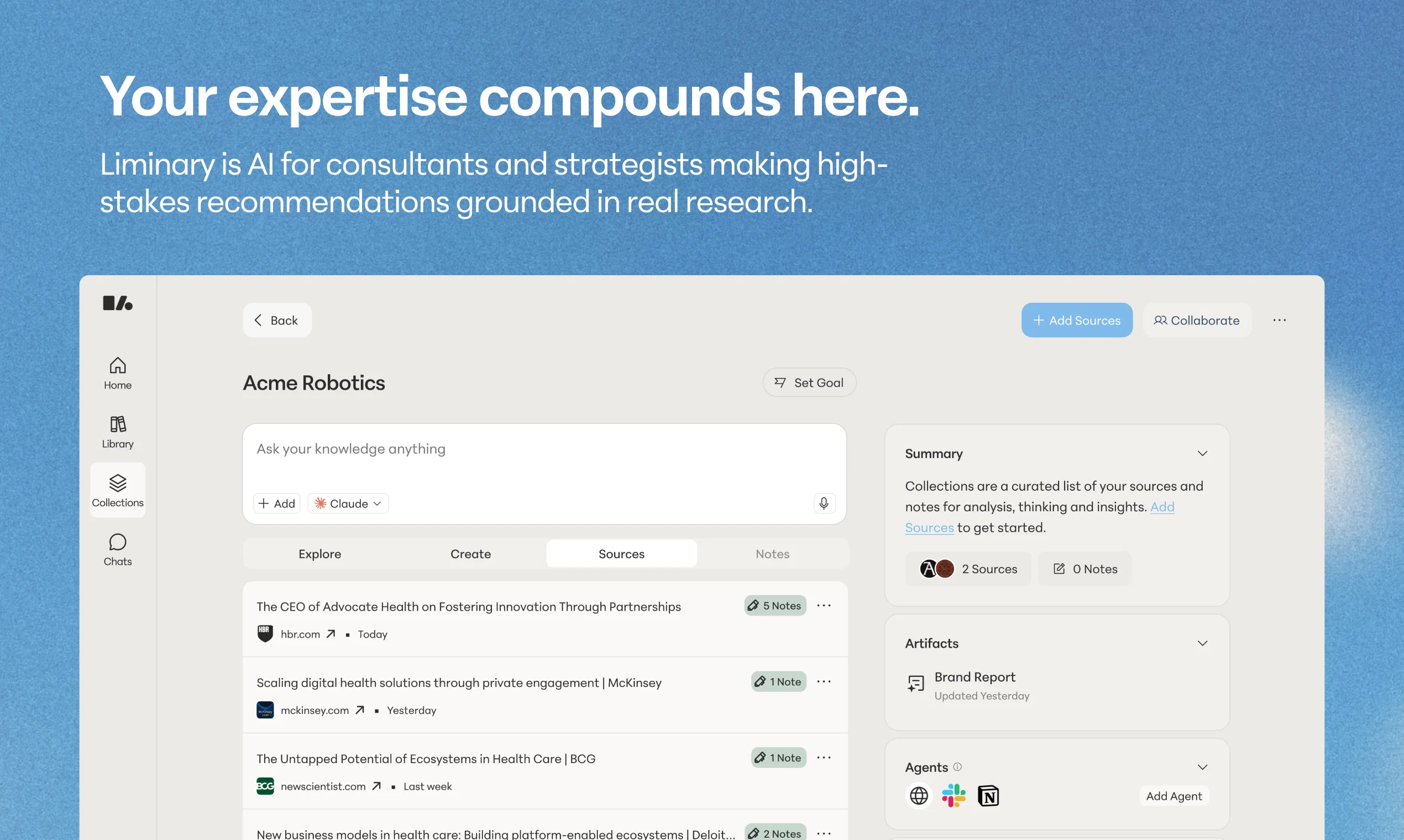
Liminary saves anything from your browser — webpages, PDFs, YouTube videos, ChatGPT or Gemini or Claude chats, Google Meet recordings, or local files. And brings it back to you while you work. No searching. No folder archaeology. No remembering which app you put it in.
Built for consultants, strategists, researchers, and freelancers who lose hours hunting for things they know they saved. Liminary gives those hours back.
WHAT YOU CAN DO WITH IT:
– Save in one click from Chrome or Firefox, or work directly in the web app
– See relevant notes and sources surface as you write in Google Docs
– Get live recall during Google Meet calls — answers pulled from your own saved content mid-conversation
– Catch errors and missing context with fact check and gap detection while you draft
– Ask anything across your saved knowledge, with every answer citing the source
– Run agents that research, organize, and save into collections for you
– Use Claude, ChatGPT, Gemini from one workspace. No more copy pasting the same thing in different tools
– Share collections with clients, collaborators, or friends
Everything Liminary surfaces comes from your sources. No hallucinations. No made-up citations.
Bookmarks pile up and die. Note apps make you remember what you wrote. Liminary captures the content and the context, including AI chats and video transcripts most tools ignore, and surfaces it before you think to look.
Save anything. Your knowledge will find you when you need it.
Best for
Short scenarios where Liminary tends to shine.
-
Researchers: Synthesize literature across sources and surface relevant findings during writing
Best for Venture Capital Partner
-
Investors: Connect market trends, startup data, and portfolio insights for investment decisions; bring it all together more efficiently in investment memos
Best for Science blogger
-
Consultants & Strategists: Recall relevant client work and frameworks while developing recommendations
Best for Policy Researcher
-
Marketing: Surface past campaign insights and audience research during strategy development
Best for Think tank researcher
-
Students & lifelong learners: Connect course materials, readings, and notes automatically during study and writing
Best for Graduate student
-
Journalists & Writers: Surface relevant sources, interviews, and background research during writing Retry
Best for Consultant
Example outputs 1
Sample generations and before/after results for Liminary.
Access & connections
Where you can use Liminary, and what it plugs into.
Platforms
Capabilities
What this tool accepts, produces, and is strongest at.
Input
- Code
- Tabular
- Image
- Text
- Video
- Audio
Output
- Tabular
- Text
- Image
Supported features
- Memory
- Video Understanding
- Web browsing
- Meeting Intelligence
- Citations
- Integrations
- Team Collaboration
- Assistant
Pros & cons
Pros
- Your knowledge finds you - automatic recall of relevant saved knowledge
- One-click save of anything
- Enhances workflow, helps you stay in flow
- Supports all types of content formats
- Self-organizing knowledge base - Facilitates idea connections
- Helps transform info overload into insights
- Enhances memory
- Built for Consultants, Fractional Executives, Strategists, and Biz Dev Teams
Show 12 more
- Run fact check and gap detection against your saved content
- Surfaces saved knowledge in context
- Improves productivity
- Meeting Note taker
- Eliminates need for manual search
- Supports wide spectrum of users
- Tailored content recall
- Instantaneous knowledge retrieval
- Reduces information fragmentation
- Specifically built for managing information overload
- Transforms information management
- Multi-user collaborative functionality
Cons
- Extension support only for Chrome and Firefox
- Lack of offline functionality
- No mobile app (but does have mobile web experience)
- No MCP support
- No desktop app yet
Compare alternatives
Similar tools in the catalog — with a clear reason to open each one.


OpenClaw OS ✓
UnknownGenerate interactive apps instantly with live data.
Why look Higher community rating
Full comparison
SoWork ✓
FreemiumYour Smart Virtual Office for Remote Teams
Why look Typically cheaper
Full comparison
Oreate AI ✓
Free TrialThe All-in-one AI workspace that makes everyone a pro
Why look Typically cheaper
Full comparison
Nya AI ✓
FreemiumAll-in-one AI workspace for teams and individuals.
Why look Typically cheaper
Full comparisonPeople also view
Tools that often show up alongside Liminary in collections and comparisons.

TheLibrarian.io ✓
Free TrialYour WhatsApp AI assistant for instant productivity.

Constella ✓
Free TrialForget files and folders, not your thoughts.
Oreate AI ✓
Free TrialThe All-in-one AI workspace that makes everyone a pro
OpenClaw OS ✓
UnknownGenerate interactive apps instantly with live data.
Nya AI ✓
FreemiumAll-in-one AI workspace for teams and individuals.

Clear Cortex ✓
Free TrialYour desk for AI.

Typefully ✓
FreemiumWrite, schedule, and publish on X/Twitter, LinkedIn and Threads.

TurboScribe ✓
Freemium🎯 3 free transcripts every day. 🔥 Unlimited transcription starting at $10/mo.
Releases 2
Three big additions, and they work together.
Meeting notes + live meeting sidekick. Save your Google Meet meetings straight into Liminary. Every meeting becomes searchable, recallable knowledge alongside the rest of your saved sources. The live sidekick joins your call and surfaces relevant context from your library in real time, so you stop scrambling for "that thing the client said three weeks ago."
Fact check and gap detection in Google Docs. Write in Google Docs as you normally would. Liminary checks your claims against your saved sources, flags anything unsupported, and points out gaps where your research is thin. No copy-pasting between tools, no hallucinations sneaking into client deliverables.
Here's where it gets interesting: the Google Meet you had on Tuesday is now a source your Google Doc on Friday can fact-check against. The transcript becomes part of your evidence base, automatically.
Agents. Describe what you need, and Liminary's agents do it — research the web, organize your library, save sources into the right collection, give you an end of week list of todos from your meetings, whatever you can describe in plain language. They take real actions in the product, not just return search results. Tell one to "watch for new pricing pages from these five competitors and save them into my Pricing Research collection," and it does.
Built for people who bill for their thinking and need their work to hold up.
FAQ 12
What is Liminary?
How does Liminary use AI to manage saved knowledge?
How can Liminary enhance my workflow?
Can Liminary really transform information overload into usable insights?
What exactly does Liminary save with a single click?
In what formats can I save information in Liminary?
How does Liminary retrieve previously saved knowledge?
What does Liminary do to prevent disruptions in my flow of work?
How does Liminary assist in connecting ideas and information?
What are the types of users that can utilize Liminary?
Is Liminary useful for students?
How can bloggers benefit from using Liminary?
Related tools
Recommended

remio: Your Personal ChatGPT ✓
FreemiumGet Tailored Answer with Your Personal ChatGPT
TheLibrarian.io ✓
Free TrialYour WhatsApp AI assistant for instant productivity.

Kin - Personal AI Advisors ✓
FreePrivacy-first & designed your for mind, and life at work

Notis ✓
Free TrialThe first WhatsApp assistant that runs on your ChatGPT and Claude subscriptions

DeepSeek ✓
FreeUnravel the mystery of AGI with curiosity

Promtist AI ✓
FreeGenerate optimized prompts for better AI results.