

Content vv2
KREA ✓
Intuitive AI for image and video generation
Verdict
A quick read before you dig into the full page.
- Best if
- Intuitive AI for image and video generation
- Skip if
- Free, but possibly limited
- Pick this when
- Generates and enhances images
Considering FlowPost instead? Compare side by side
Overview
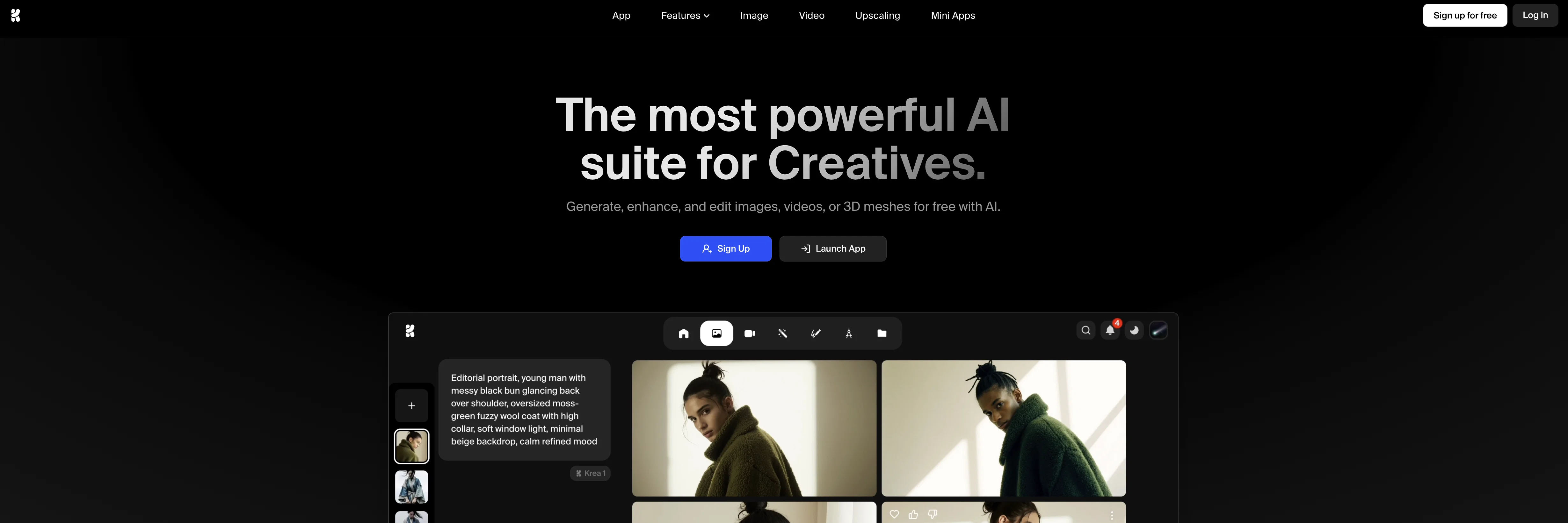
KREA is an AI tool designed for the purpose of simplifying the processes and techniques of generative AI. It's geared towards generating and enhancing both images and videos using state-of-the-art AI models.
This tool has been designed to be intuitive, meaning it's user-friendly and doesn't require deep technical knowledge to operate. Ideal for both hobbyists looking to explore the capabilities of generative AI, as well as professionals seeking an AI solution for media generation and enhancement projects.
While the tool is free to use, ensuring broad access to users, certain functionalities may require the browser to have JavaScript enabled. Performance, precision, and output quality largely depend on the sophistication of the AI algorithms deployed in the tool.
KREA streamlines the application of powerful AI processing capabilities, transforming them into convenient and easy-to-use features.
Access & connections
Where you can use KREA.
Platforms
Capabilities
What this tool accepts, produces, and is strongest at.
Input
- Image
Output
- Video
- Image
Highlights
- SOTA
- Agents
Supported features
- Agents
- Image Generation
- Image Edit
- Styling
- Video Edit
- Image to prompt
- Outpainting
- Inpainting
- Viral baseball trend
- Team Collaboration
Pros & cons
Pros
- Generates and enhances images
- Generates and enhances videos
- User-friendly interface
- Doesn't require technical knowledge
- Ideal for hobbyists
- Ideal for professionals
- Free to use
- Uses JavaScript
Show 9 more
- High performance
- High precision
- High output quality
- Convenient features
- Broad accessibility
- Intutive design
- Media enhancement
- Supports JavaScript functionalities
- For media generation projects
Cons
- Requires JavaScript enabled
- May lack advanced features
- Quality dependent on algorithms
- Potential issues with browser compatibility
- No API mentioned
- Requires internet connection
- Only for images and videos
- Quality variations
Show 1 more
- Free, but possibly limited
Compare alternatives
Similar tools in the catalog — with a clear reason to open each one.


EasyAI – AI Flow - No Code Content (Video/Image) Ge... ✓
Free TrialChain AI tasks with no-code into workflows for chatbots, video, documents, and
Why look Offers a public API
Full comparison
RightBlogger ✓
FreemiumAutomate blogging, SEO, and publishing in one simple platform
Why look Higher community rating
Full comparison
myAIninja ✓
Free TrialAI-powered content creation for social media, 10x faster
Why look Higher community rating
Full comparison

Releases 2
Stronger aesthetic control for expressive image generation across varied visual styles.
Style references guide outputs toward a specific look without relying only on long prompts.
Moodboards combine multiple images to shape palette, texture, motifs, and composition.
Faster creative iteration with generations completed in about 15 seconds or less.
More diverse outputs from simple prompts, reducing repetitive same-concept variations.
Imported reviews 3
Easy to use 👍👍
This is sick for character ideas. I tried a goofy cartoon villain and got bold colors, clean shapes, and a few poses that actually kept the same look. Some details drift between generations, but the style control is a big W.
easy to use
meets very specific need but for general purpose ( quick enhance)
FAQ 12
What is KREA?
What can KREA be used for?
Does KREA require deep technical knowledge to operate?
Who is KREA designed for?
Is KREA free to use?
What functionalities does KREA have that may require JavaScript to be enabled?
How does the performance of KREA depend on the sophistication of the AI algorithms?
What kind of media can KREA generate and enhance?
How is KREA intuitive and user-friendly?
How does KREA apply AI processing capabilities?
Is KREA suitable for professional use?
Is KREA effective for hobbyist use?
Related tools
Recommended

ChatGPT ✓
FreemiumAsk anything, create anything, and move from idea to action.

Kling ✓
FreemiumCreate high-fidelity videos from text with lifelike motion and real-world physics

Claude ✓
FreemiumBuilding reliable, interpretable AI systems

Ideogram ✓
FreemiumAI-powered creativity booster

Runway ✓
Free TrialAI-powered creative tools for content generation and editing

Midjourney ✓
PaidExpand human imagination through AI-powered visuals.
