

Videos vv2.0.0 2026 Rank: #136
ImagineGo ✓
All top AI video models in one platform.
Verdict
A quick read before you dig into the full page.
- Best if
- You are content creators and need: Generating cinematic videos from simple text prompts
- Skip if
- Limited video duration
- Pick this when
- Aspect ratio control
Considering freebeat AI instead? Compare side by side
Overview
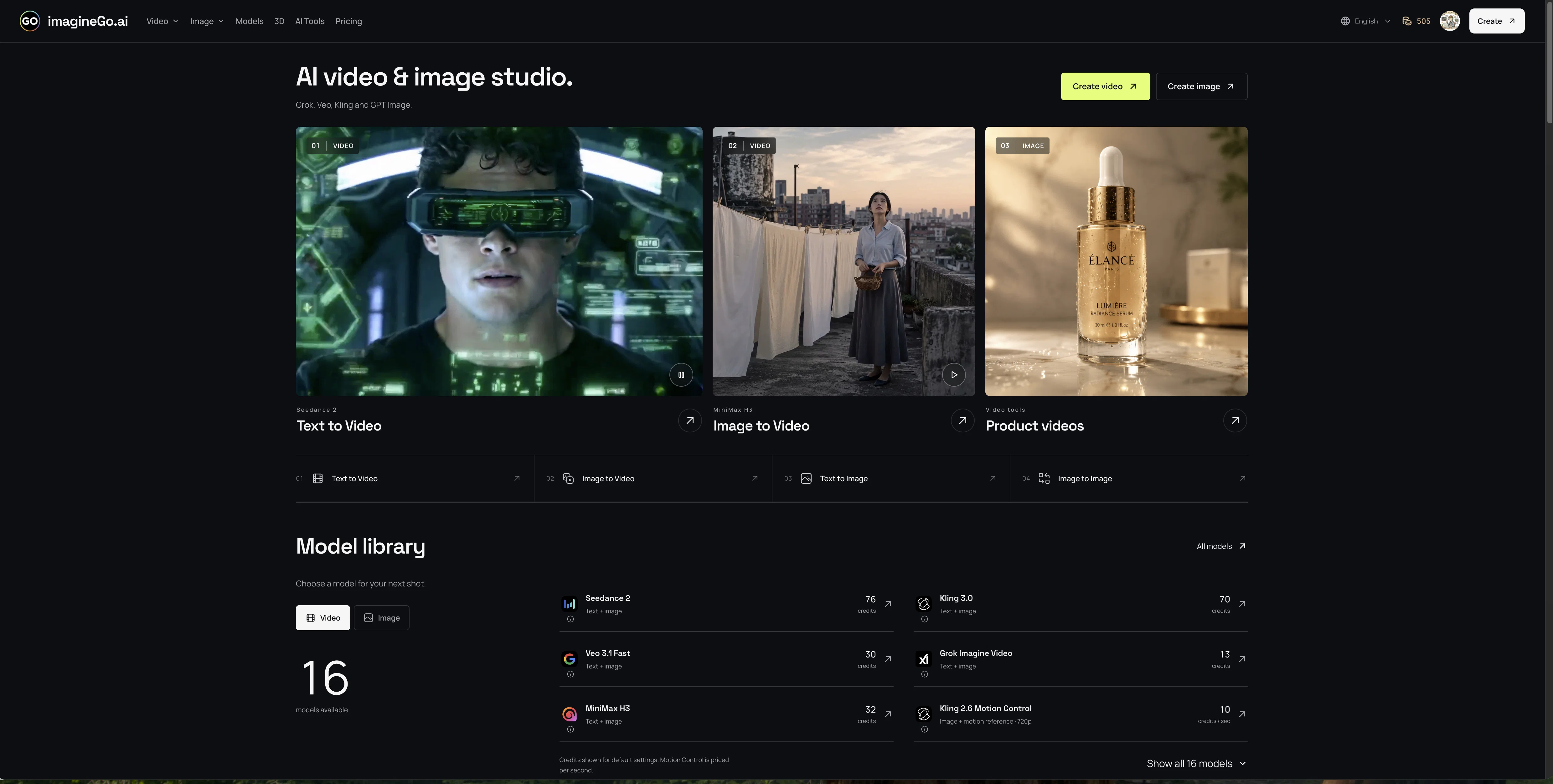
The platform supports text-to-video, image-to-video, text-to-image, and image-to-image workflows from one simple interface. Users can adjust model-specific settings such as aspect ratio, duration, resolution, audio, quality mode, and reference inputs. ImagineGo also includes ready-to-use AI tools for product images, anime videos, thumbnails, emojis, line art, and social content creation.
Best for
Short scenarios where ImagineGo tends to shine.
-
Generating cinematic videos from simple text prompts
Best for Content creators
-
Animating static photos into dynamic videos with AI
Best for Marketing professionals
-
Creating high-quality marketing assets and social media content
Best for Social media managers
-
Designing logos, character sketches, and YouTube thumbnails
Best for Digital artists
Example outputs 1
Sample generations and before/after results for ImagineGo.
Access & connections
Where you can use ImagineGo.
Platforms
Capabilities
What this tool accepts, produces, and is strongest at.
Input
- Tabular
- Text
Output
- Video
- API
Supported features
- Video Generation
- Image Generation
- Video Edit
- Image Edit
- Sound Creation
- Visual Creation
- Styling
- Social Media
- Realism
Pros & cons
Pros
- Aspect ratio control
- Duration flexibility
- Watermarking control
- Dynamic video content generation
- Motion graphics generation
- Model variety based on speed
- Model variety based on fidelity
- Professional-grade output
Show 35 more
- Full commercial usage rights
- Usage of credits across models
- No separate subscriptions required
- Fast video generation
- Resolution up to 1080p
- Model comparison feature
- Sora 2 model
- Kling 2.6 model
- Wan 2.5 model
- Grok Imagine video model
- Credit-based system
- Ideal for storytelling
- Ideal for research
- Ideal for design work
- All-in-One Text to Video Platform
- Access to Sora 2 Pro
- Flexible duration: 5-15 seconds
- Optimized infrastructure for speed
- Automatic credits refund for failures
- Transforms text prompts into images
- Transforms text prompts into short videos
- Generates realistic motion or stylized visuals
- Sora 2 tuned for everyday content creation
- Sora 2 Pro for higher fidelity, longer duration
- Flexible credits, pay only for use
- Supports simultaneous generations
- Offers high resolution upscaling
- Lifetime validity of purchased credits
- Anytime use credits, never expire
- Private Mode Visibility
- 24/7 Email Support
- No Watermarks on Outputs
- Access to premium models
- Offers optional audio for video generation
- Advanced video generation with lip-sync
Cons
- No 4K video output
- Limited video duration
- No native audio support
- Slow generation for sensitive content
- No explicit data privacy option
- No real-time preview functionality
- Output dependency on model
- No in-tool video editing
Show 2 more
- Platform-specific models
- Unclear refund policy
Compare alternatives
Similar tools in the catalog — with a clear reason to open each one.

freebeat AI ✓
FreemiumTurn Music & Ideas into Viral Videos In One Click
Why look Offers a public API
Full comparison
MagicLight ✓
FreemiumTransform text into captivating videos instantly.
Free + from $8.4/mo
Full comparison
Seedance ✓
FreemiumMulti-shot video generation from text and image.
Why look Stronger for image work
Full comparisonPeople also view
Tools that often show up alongside ImagineGo in collections and comparisons.
Seedance ✓
FreemiumMulti-shot video generation from text and image.
MagicLight ✓
FreemiumTransform text into captivating videos instantly.

Kaiber Superstudio ✓
Free TrialAI Video Generation

HeyGen ✓
FreemiumCreate AI spokesperson videos from text
freebeat AI ✓
FreemiumTurn Music & Ideas into Viral Videos In One Click

D-ID ✓
FreemiumCreate AI-generated videos with ease

ResearchMonkey AI | YouTube Summarizer ✓
Free TrialSave Hours of Research in Seconds with 40+ AI Tools

OutlierKit ✓
PaidEnter one channel, see the entire niche.
Releases 2
ImagineGo has evolved from an AI image generation tool into a one-stop AI image and video creation platform. Creators can now generate images, transform existing visuals, create videos from text, and animate photos into cinematic clips from one unified workspace.
The platform now brings together leading image and video models in one place, including Grok Imagine, Seedance, Veo 3.1, Wan 2.7, Kling 3.0, Flux 2 Pro, GPT Image 2, Nano Banana 2, Seedream 5 Lite, and more. Instead of managing multiple subscriptions across different AI tools, users can access a continuously updated model library with flexible credits.
ImagineGo also now supports a growing collection of ready-to-use AI tools for practical creative workflows, such as product photography, anime video creation, YouTube thumbnail generation, emoji generation, line art conversion, group photos, and social content creation. Credits never expire, outputs have no watermarks on paid usage, and commercial use is supported, making ImagineGo a more flexible option for creators, marketers, designers, and small teams who need fast visual production without complex editing pipelines.
Short Version
ImagineGo is now a one-stop AI image and video creation platform. It gives users access to top models like Grok Imagine, Seedance, Veo 3.1, Kling 3.0, Wan 2.7, Flux 2 Pro, GPT Image 2, Nano Banana 2, and more, all through one credit-based workspace. Create images, edit visuals, generate videos from text, animate photos, and use ready-made AI tools for product shots, anime videos, thumbnails, emojis, and social content. No subscription is required, credits never expire, and commercial use is supported.
Imported reviews 1
Really handy having all those video models in one place. Image-to-video results look pretty convincing and the controls are straightforward. Credits run out fast if you keep testing, but overall a solid option for quick YouTube clips.
FAQ 12
What is the process of generating videos on ImagineGo?
How does the text to video feature work in ImagineGo?
What different AI models are available on ImagineGo for video generation?
Can I choose the aspect ratio and duration for the videos I generate on ImagineGo?
Does ImagineGo allow watermark removal from generated videos?
Can I compare different model performances on ImagineGo?
How does the credit system work on ImagineGo?
Do I get full commercial rights for the videos generated through ImagineGo?
What is the resolution of the videos generated on ImagineGo?
Can I subscribe for individual models on ImagineGo?
What is the role of text prompts in generating videos on ImagineGo?
What use cases are appropriate for the generated videos from ImagineGo?
Related tools
Recommended

ChatGPT ✓
FreemiumAsk anything, create anything, and move from idea to action.

Kin - Personal AI Advisors ✓
FreePrivacy-first & designed your for mind, and life at work

BeatViz AI Music Video Generator ✓
FreemiumTransform your music into stunning visual experiences with AI

Pixwit AI ✓
FreemiumCreate cinematic AI videos from text or images.

SoVideo - All-in-one ai image/video generator platfor... ✓
Free TrialFree AI video generator without watermarks.

AppDeploy ✓
FreeDeploy real apps directly from ChatGPT or Claude