Image to Prompt Generator ✓
Convert images to prompts for AI art generation.
Free + from $14.99/mo
Verdict
A quick read before you dig into the full page.
- Best if
- You are aI Artists and need: Generate detailed image prompts for AI models like Midjourney, Flux, and Stable Diffusion
- Skip if
- 4MB upload limit
- Pick this when
- PNG, JPG, WEBP support
Considering Convly AI Image-to-Prompt instead? Compare side by side
Overview
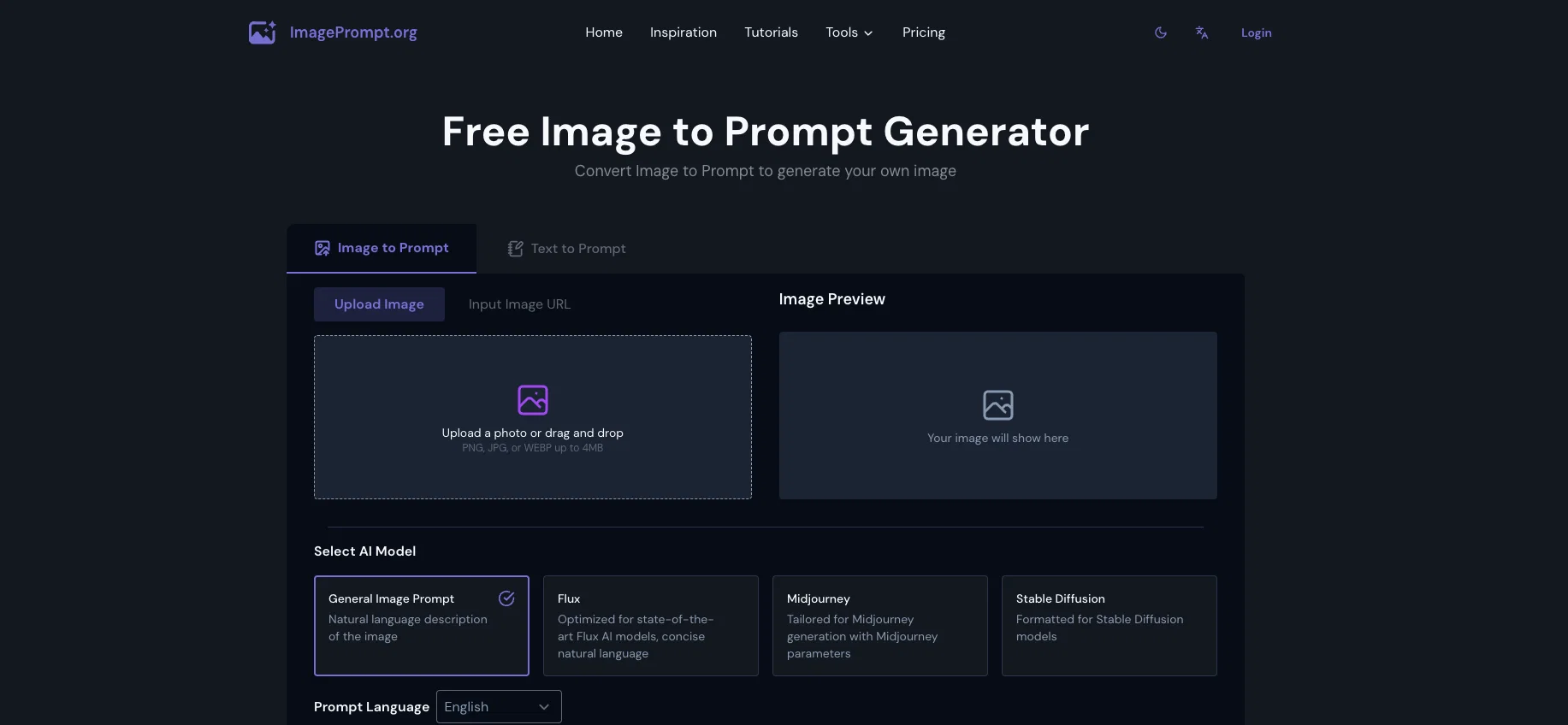
The Image to Prompt Generator from ImagePrompt.org is an AI-powered tool that effectively transforms images into detailed text prompts. Users can upload images in PNG, JPG, or WEBP formats (up to 4MB) and the tool translates these visuals into comprehensive language prompts.
This language-based representation of images can be tailored to a range of AI models, including General Image Prompt, Flux, Midjourney, and Stable Diffusion.
The tool generates descriptions by identifying main subjects, actions, or styles within images, and accurately reflects factors such as color schemes, lighting conditions, and mood.
These prompts, providing rich textual renditions of image content, can serve as foundations for creating new images or improving existing ones. The tool can be beneficial for enhancing users' understanding of AI image interpretation, ultimately improving their AI image generation capabilities.
The Image to Prompt Generator can be used with various types of images like photographs, digital art, and illustrations. However, results may be more generalized for particularly abstract or complex images.
Image security is prioritized as uploaded images are only processed temporarily to generate prompts and are immediately erased afterward. The tool comes with a usage limit for free users, with premium plans available for increased access.
Best for
Short scenarios where Image to Prompt Generator tends to shine.
-
Generate detailed image prompts for AI models like Midjourney, Flux, and Stable Diffusion.
Best for AI Artists
-
Convert static images into dynamic video prompts for image-to-video workflows.
Best for Content Creators
-
Analyze specific aspects of an image, such as art style or people, using AI.
Best for Digital Artists
-
Create unique images from text descriptions using AI image generation.
Best for Designers
-
Improve AI image generation skills by understanding how AI interprets visual information.
Best for Marketers
-
Process multiple images to generate prompts efficiently.
Best for Developers
Example outputs 1
Sample generations and before/after results for Image to Prompt Generator.
Access & connections
Where you can use Image to Prompt Generator.
Platforms
Capabilities
What this tool accepts, produces, and is strongest at.
Input
- Image
Output
- Text
Supported features
- Image to prompt
Pros & cons
Pros
- PNG, JPG, WEBP support
- 4MB image size limit
- Identifies main subjects
- Identifies actions in images
- Identifies image styles
- Color scheme identification
- Lighting condition identification
- Mood identification
Show 27 more
- Applicable to photographs
- Applicable to digital art
- Applicable to illustrations
- Abstract image processing
- Complex image processing
- Image security prioritized
- Images erased after processing
- Usage limit for free users
- Premium plans for heightened access
- Create new images from prompts
- Improve existing images
- General Image Prompt model
- Flux model
- Midjourney model
- Stable Diffusion model
- Image to text conversion
- Supports different languages
- Prompt refinement option
- Accuracy with Flux model
- Accuracy with Midjourney model
- Instant real-time prompts
- Image data not retained
- Assists in improving prompt-writing skills
- Comprehensive textual representation
- Supports high-resolution images
- Accuracy improvement efforts
- NSFW content blocking
Cons
- 4MB upload limit
- Free usage limit
- Premium access costly
- Generalized results for abstract/complex images
- Misinterpretation possible
- No NSFW content permitted
- Results may need manual adjustment
Compare alternatives
Similar tools in the catalog — with a clear reason to open each one.
Convly AI Image-to-Prompt ✓
FreeTurn any image into an editable AI prompt — free, no signup.
Why look Fully free option
Full comparison
ImagePromptGuru ✓
FreeConvert images into high-quality AI art prompts instantly.
Why look Fully free option
Full comparison
Imagetoprompts ✓
PaidTransform images into powerful prompts and ideas.
Why look Typically cheaper
Full comparison
Image to Prompt Generator ✓
PaidUpload an image, get the prompt that made it.
from $15
Full comparison
ImaginPrompt ✓
FreemiumConvert any image into AI prompts instantly.
Free + from $14.99/mo
Full comparisonPeople also view
Tools that often show up alongside Image to Prompt Generator in collections and comparisons.

AI Image to Prompt | Promptsref ✓
FreemiumTurn any reference image into an editable, reusable AI prompt.

Notis ✓
Free TrialThe first WhatsApp assistant that runs on your ChatGPT and Claude subscriptions

NotebookLM ✓
FreemiumAI-powered note-taking and research assistant

Mytales ✓
FreemiumAssisted creative writing and image visualization.

Mindsmith ✓
FreemiumPlatform for building and sharing eLearning content

Midjourney ✓
PaidExpand human imagination through AI-powered visuals.
Kupid AI Girlfriend ✓
Free TrialThe Best NSFW AI girlfriend experience, create your own AI girlfriend now!

Kin - Personal AI Advisors ✓
FreePrivacy-first & designed your for mind, and life at work
Releases 1
Imported reviews 2
This website is awesome.
I love it
i use free generative fill use in photoshop 2024