

AI Slide Generator ✓
Create stunning presentations from any text in seconds
Verdict
A quick read before you dig into the full page.
- Best if
- Create stunning presentations from any text in seconds
- Skip if
- Free usage limited
- Pick this when
- Generates presentations quickly
Considering MagicSlides.app AI PPT Maker instead? Compare side by side
Overview
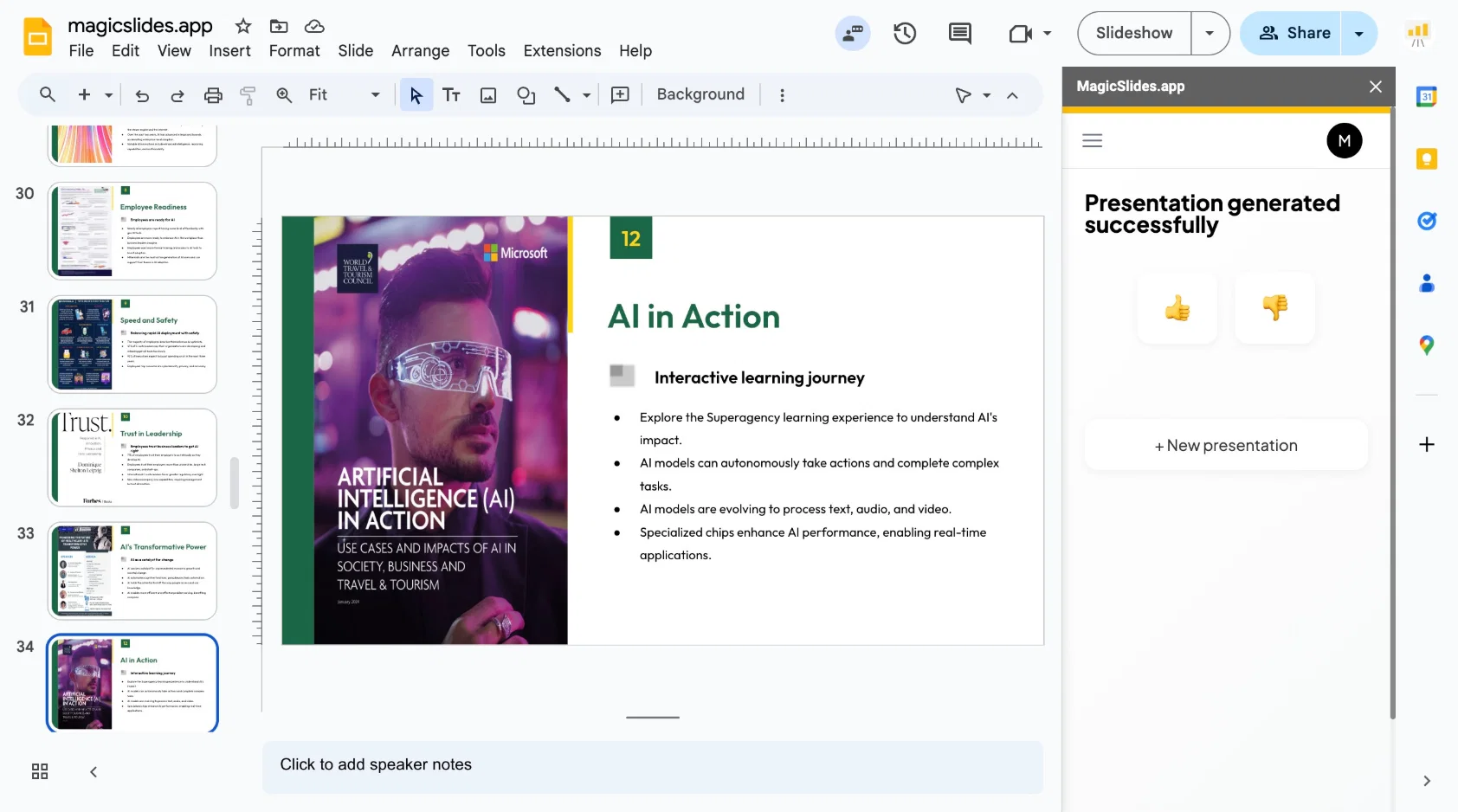
Using advanced natural language processing, the AI slide generator can summarize, rewrite, and organize information automatically. Users can input topics, raw text, YouTube URLs, PDFs, or web links, and the tool converts them into well-structured slides with clear flow and formatting.
Customization is simple and highly flexible. Users can specify the number of slides, choose content depth, and generate AI-powered images to enhance visual appeal. The tool supports multiple languages and integrates with Wikipedia for enriched, accurate information inside the presentation.
Additional features include URL-to-presentation conversion, chart creation from text, and support for a wide variety of content types—making it ideal for students, educators, marketers, and professionals who need fast, reliable presentations.
Designed for maximum ease of use, the AI slide generator can process long documents or complex topics and produce a complete slide deck in just a few minutes. After generation, users can instantly download the presentation as a PPTX file for further editing or sharing.
The AI slide generator is available through the Google Workspace Marketplace and requires minimal permissions to get started.
Best for
Short scenarios where AI Slide Generator tends to shine.
-
Create stunning presentations from any text in seconds
Example outputs 1
Sample generations and before/after results for AI Slide Generator.
Access & connections
Where you can use AI Slide Generator.
Platforms
Capabilities
What this tool accepts, produces, and is strongest at.
Input
- Image
- Text
Output
- Text
Highlights
- API
Supported features
- API
- Slides
Pros & cons
Pros
- Generates presentations quickly
- Google Slides add-on
- No-cost usage
- Video, text, URLs input
- Multiple content types support
- PDF to presentation
- Converts URLs into presentations
- Generates charts from text
Show 37 more
- User-friendly
- Text summarization for presentations
- Multi-Language support
- Output length control
- Easily downloadable output
- Web app usage
- Smooth installation process
- Incorporates images in slides
- Copy-paste content input
- YouTube URL to presentation
- Wikipedia integration
- Text to chart generation
- ChatGPT plugin
- Customizable color & font settings
- Export to PowerPoint option
- Creates presentations from blogs
- Allows topic to PPT conversion
- 100+ languages support
- Web scraping feature
- Available as standalone web app
- Integration with ChatGPT
- Enables creation of presentations in chat
- Supports PPTX to PowerPoint import
- Generates presentations from YouTube URLs
- Free use for 3 presentations per month
- Converts PDF to PowerPoint slides
- Transforms Word documents into presentations
- Gamma presentation to Powerpoint conversion
- Converts PowerPoint slides to JPG images
- PPT to PDF conversion
- Boosts video content's reach
- Quick process (less than 60 seconds)
- Ideal for educators, students, marketers
- Turns web pages into presentations
- Text-based data visualization
- PPT to MP4 conversion
- One-click generation
Cons
- Requires Google account
- Setup process needed
- Conversion to PowerPoint manual
- Not integrated with Microsoft PowerPoint
- Free usage limited
- No option to directly import PPTX to Google Slides
- Mandates granted permissions for installation
- Language support unspecified
Compare alternatives
Similar tools in the catalog — with a clear reason to open each one.

MagicSlides.app AI PPT Maker ✓
FreemiumCreate Stunning PPTs in Seconds with the AI PPT Maker
Free + from $6.7/mo
Full comparison
NextDocs.io ✓
FreemiumThe AI-native editor for docs, slides, and more
Free + from $20/mo
Full comparison
Gamma ✓
FreemiumAI-powered content creation, minus the hassle.
Why look Better for writing
Full comparisonPeople also view
Tools that often show up alongside AI Slide Generator in collections and comparisons.

VoxDeck ✓
PaidAI presentation maker crafting stunning, personalized slides.

okkslides ✓
FreemiumTransform ideas into professional PowerPoint slides in minutes.
NextDocs.io ✓
FreemiumThe AI-native editor for docs, slides, and more
MagicSlides.app AI PPT Maker ✓
FreemiumCreate Stunning PPTs in Seconds with the AI PPT Maker

GenPPT ✓
PaidThe AI Presentation Tool for Deep, Research-Backed Slides
Gamma ✓
FreemiumAI-powered content creation, minus the hassle.

Skywork ✓
Free Trial10 tasks in 1 hour, not 10 hours

OpenDeck ✓
FreeSlide decks that speak for themselves.
Releases 1
Imported reviews 1
You spent half of hour on describing how your presentation should look like, and just after that getting informed that you need to pay subscription to proceed.
Who’ll pay my time back?
FAQ 12
What is GPT for Slides?
How does GPT for Slides work?
How can I install GPT for Slides?
Can GPT for Slides integrate with YouTube?
How can I generate a presentation using GPT for Slides?
Does GPT for Slides support multiple languages?
Can GPT for Slides convert PDFs into presentations?
Can I customize the length of my presentation with GPT for Slides?
What sort of content can GPT for Slides transform?
Does GPT for Slides also work as a standalone web app?
How do I export slides to PowerPoint using GPT for Slides?
What permissions are required to access GPT for Slides?
Related tools
Recommended

GPTExcel ✓
FreemiumGenerate spreadsheet formulas with AI

Prezo ✓
UnknownBuild slide decks 10x faster

PresentationsAI ✓
FreemiumGenerate stunning presentations in minutes with AI

LearningStudioAI ✓
Free TrialAI-powered authoring tool for effortless online course creation.

SlidesAI ✓
FreemiumCreate presentation slides with AI in seconds.

Ask Your PDF ✓
FreemiumChat with your PDFs and extract valuable insights