

File management 2026 Rank: #690
Filently ✓
AI filing layer for your existing Google Drive
Verdict
A quick read before you dig into the full page.
- Best if
- You are freelancers and need: Filing any new incoming document automatically without manual work
- Skip if
- Currently Google Drive only
- Pick this when
- Works inside Google Drive - no new app to learn
Considering Dokkio instead? Compare side by side
Overview





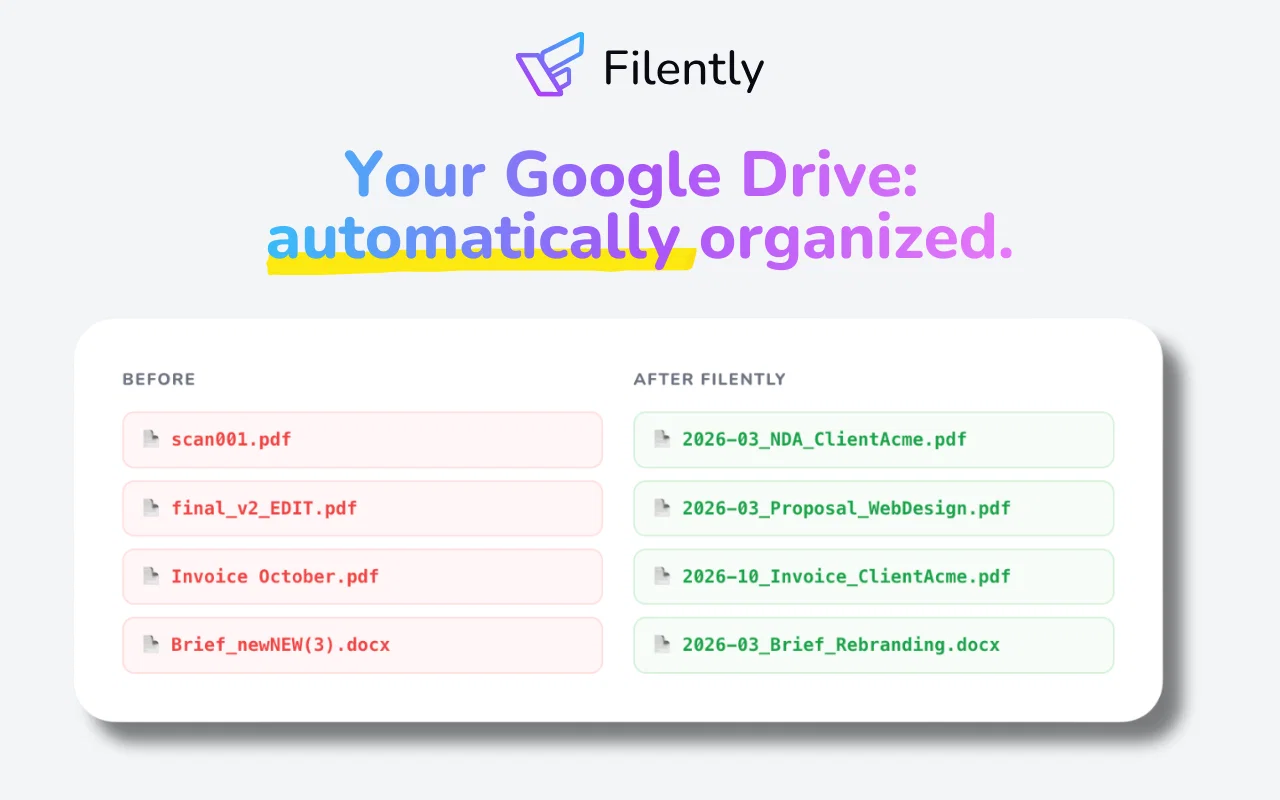
Instead of spending hours sorting folders and renaming files, Filently applies your naming convention and files every document in the right place the moment it arrives. No more "Scan_0147862.pdf". Just a clean, consistent, and searchable Google Drive.
For freelancers, agencies, and small businesses drowning in documents. If your Google Drive looks like a graveyard of unsorted files, Filently is built for you.
Filently connects to your existing Google Drive and works with your current folder structure, or helps you build a clean one from scratch. Your files stay in Google Drive. No migration, no new infrastructure, no vendor lock-in.
Supports PDF, Microsoft Office, OpenDocument formats, and images containing text across 20+ languages. Any other file type can be organized by filename.
Hosted in Switzerland and the EU. Focused on user data privacy. Your data is never used for AI training. Dropbox, OneDrive, and more coming soon.
- Automatic File Renaming
- Ai Document Identification
- Automatic Folder Routing
- Custom Naming Conventions
- Smart Folder Structure Creation
- Google Drive Native Integration
- 20+ Language Support
- Swiss Made & Casa Tier 2 Certified
Best for
Short scenarios where Filently tends to shine.
-
Filing any new incoming document automatically without manual work
Best for Freelancers
-
Organizing invoices and receipts for accountants and bookkeepers
Best for Small Business Owners
-
Automatically organize a Google Drive that has grown too chaotic to navigate
Best for Accountants
-
Batch renaming inconsistent and messy filenames across Google Drive
Best for Busy Professionals
-
Real estate agents filing listings, offers, and client correspondence
Best for Associations
-
Virtual assistants managing and organizing client documents across Google Drive
Best for Freelancers
-
Agencies consolidating and organizing deliverables from multiple freelancers
Best for Freelancers
-
Filing research results and documents across 20+ languages automatically
Best for Freelancers
Example outputs 1
Sample generations and before/after results for Filently.
Access & connections
Where you can use Filently, and what it plugs into.
Platforms
Integrations
Capabilities
What this tool accepts, produces, and is strongest at.
Input
- Tabular
- Image
- Text
Output
- Tabular
- Text
Supported features
- Docs
- Instant file search
- Integrations
Pros & cons
Pros
- Works inside Google Drive - no new app to learn
- No migration required
- Learns your existing folder structure automatically
- Files arrive automatically via Google Drive, email, or direct upload
- Free first 25 documents, no credit card required
- Cancel anytime, files stay organized
- Doesn't store document copies
- User data stays within Switzerland/ EU
Show 5 more
- CASA Tier 2 certified & Google App Defense Alliance verified
- Advanced OCR technology
- 20+ languages supported
- Optional manual confirmation before filing
- Confidence-based auto-filing mode
Cons
- Currently Google Drive only
- Requires Google account
- No desktop or offline version
- Teams features coming soon
- Full support for design files and images without text coming soon
Compare alternatives
Similar tools in the catalog — with a clear reason to open each one.

Dokkio ✓
FreemiumCloud file organization and retrieval made efficient.
Free + from $10/mo
Full comparison
Filex AI ✓
Free TrialScan, organise & search your files with AI
Why look Typically cheaper
Full comparison
FileFolder ✓
FreeAI-powered file management for effortless organization.
Why look Fully free option
Full comparisonPeople also view
Tools that often show up alongside Filently in collections and comparisons.
Filex AI ✓
Free TrialScan, organise & search your files with AI

Fenn ✓
PaidPrivate AI that finds your files

Sparkle ✓
UnknownOrganize files automatically with AI
FileFolder ✓
FreeAI-powered file management for effortless organization.
Dokkio ✓
FreemiumCloud file organization and retrieval made efficient.
Files Magic AI File Organizer for Mac ✓
Free TrialYour AI-powered file organizer that respects privacy for macos

The Drive AI ✓
FreemiumAI agents to organize files

Ritto ✓
UnknownShow it once. Ritto repeats it forever.
Releases 1
FAQ 12
How does Filently handle document renaming in Google Drive?
What languages does Filently support?
Does Filently analyze documents to suggest folder structure?
What does 'zero-touch' processing mean in Filently?
How does Filently ensure GDPR compliance and data privacy?
Is Filently integrated with Shared Drives and 'Shared with me' folders in Google Drive?
Does Filently store any copies of the documents?
Does Filently require migration of existing data?
Can I cancel the Filently service at any time?
Does Filently support Dropbox and OneDrive?
How does Filently organize Google Drive documents?
What is Filently's AI technology used for?
Related tools
Recommended

SureThing.io - "OpenClaw" for Beginners ✓
FreemiumFirst General AI Agency. Designed for long-horizon tasks.

ChatGPT ✓
FreemiumAsk anything, create anything, and move from idea to action.

Notis ✓
Free TrialThe first WhatsApp assistant that runs on your ChatGPT and Claude subscriptions

Claude ✓
FreemiumBuilding reliable, interpretable AI systems

Grok ✓
FreemiumConversational AI for understanding the universe.

Cora Intelligence ✓
PaidThe AI SDR that fills your pipeline.