

Files Magic AI File Organizer for Mac ✓
Your AI-powered file organizer that respects privacy for macos
Trial; then from $49.99
Verdict
A quick read before you dig into the full page.
- Best if
- Your AI-powered file organizer that respects privacy for macos
- Skip if
- No subscription plans , online lifetime plan for now
- Pick this when
- Instant file organization
Considering Dokkio instead? Compare side by side
Overview


Moreover, it integrates seamlessly with popular cloud services such as Google Drive, Dropbox, and OneDrive, thus ensuring files are organized across all platforms.Regarding privacy and security, Files Magic AI operates securely without uploading files or reading it's content. The application uses filenames and meta data only for organization and does not share or distribute user's data. All stored filename metadata is deleted automatically after 30 days, ensuring minimal data retention.
Additionally, the tool provides a search function within its app, allowing users to quickly locate files using their names.
Access & connections
Where you can use Files Magic AI File Organizer for Mac, and what it plugs into.
Platforms
Integrations
Capabilities
What this tool accepts, produces, and is strongest at.
Input
- API
- 3D
- Code
- Tabular
- Image
- Text
- Video
- AR/VR
- Geo
- Game
- Audio
- Sensor data
Output
- Sensor data
- Geo
- Code
- Audio
- Game
- Video
- 3D
- Tabular
- API
- Text
- Image
- AR/VR
Highlights
- Agents
- Local
Supported features
- Agents
- Automation
- Integrations
- Runs Locally
- Instant file search
Pros & cons
Pros
- Instant file organization
- One-click restore feature
- Provides smart exclusions
- Cloud services integration
- Google Drive compatible
- Dropbox compatible
- OneDrive compatible
- No user data distribution
Show 8 more
- In-app search function
- Organization based on names
- Selective folder organization
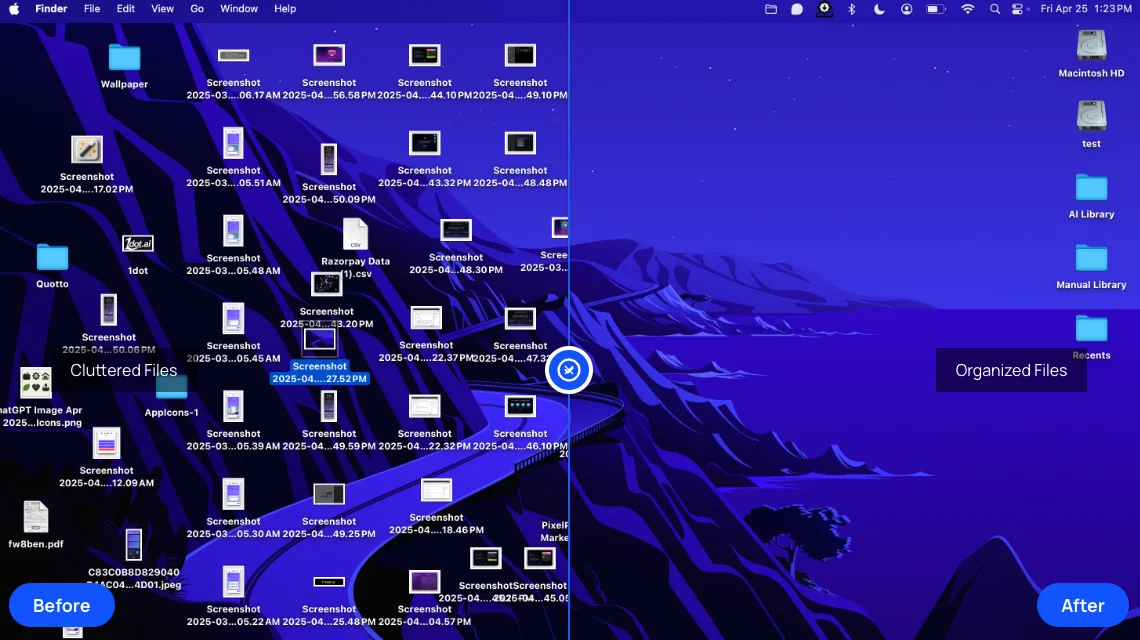
- Visual clutter transformation
- Integrated with macOS
- No credit card required
- Complete feature access in trial
- Automatic file sorting
Cons
- No content of your files are access to respect your privacy
- No subscription plans , online lifetime plan for now
- Requires local device storage
- No cross-platform compatibility
- No API integration
Compare alternatives
Similar tools in the catalog — with a clear reason to open each one.

Dokkio ✓
FreemiumCloud file organization and retrieval made efficient.
Why look Typically cheaper
Full comparison


Filently ✓
Free TrialAI filing layer for your existing Google Drive
Why look Typically cheaper
Full comparison
Filex AI ✓
Free TrialScan, organise & search your files with AI
Why look Typically cheaper
Full comparison
FileFolder ✓
FreeAI-powered file management for effortless organization.
Why look Fully free option
Full comparisonReleases 1
Imported reviews 2
Good Replacement for the sparkle. Keep it up
The only AI Files organizer with a free and 15 day full feature trial. Better than all other ai file organizers in the market
FAQ 12
How does Files Magic AI organize and manage files?
What is the one-click restore feature in Files Magic AI?
Does Files Magic AI integrate with cloud services like Google Drive, Dropbox, and OneDrive?
What privacy measures does Files Magic AI have in place?
Does Files Magic AI access or upload my files?
How long does Files Magic AI keep the stored file name metadata?
How does the search functionality work in Files Magic AI?
Can Files Magic AI organize files across different platforms?
How does Files Magic AI guarantee user data protection?
What is the exclusions feature in Files Magic AI?
Can I revert changes made by Files Magic AI?
How does Files Magic AI declutter digital workspaces?
Related tools
Recommended

RenameClick ✓
FreemiumRename, organize, and search files by content with local AI

Recall ✓
FreemiumSummarize Anything, Forget Nothing!

remio: Your Personal ChatGPT ✓
FreemiumGet Tailored Answer with Your Personal ChatGPT

Business Idea Generator AI ✓
FreeGenerate innovative business ideas with AI

B12 AI Website Builder ✓
FreemiumAI-powered website builder

Kin - Personal AI Advisors ✓
FreePrivacy-first & designed your for mind, and life at work