
Portraits vv1.1.0 2026 Rank: #328
FaceHub AI ✓
Create stunning AI photos of yourself
Verdict
A quick read before you dig into the full page.
- Best if
- Create stunning AI photos of yourself
- Skip if
- Limited to JPEG, PNG formats
- Pick this when
- Generates and transforms photos
Considering AI Portrait - Remaker instead? Compare side by side
Overview

FaceHub AI is an AI-powered photo generation and face swapping tool catering to a multitude of use-cases across various user profiles. Users can upload their pictures and transform them into professional headshots, artistic portraits, comic characters, avatars, and more in a matter of seconds.
For artists, game developers, comic creators and designers, it offers the ability to turn sketches and photos into finished illustrations and generate variations with full creative control.
Casual users, photographers, influencers, and content creators can use FaceHub AI to enhance photos, edit scenes, and replace backgrounds. Added features include being able to create ad creatives for e-commerce sellers, direct-to-consumer brands, marketing agencies, and small businesses without the need for a reshoot.
FaceHub AI also offers a feature of reference-based image generation for power users who require deterministic, repeatable results, allowing them to maintain consistency across outputs.
Personal brands, streamers, and social media users can create unique profile pictures and other eye-catching visuals. The tool offers emotive solutions as it enables users to combine photos of individuals into a single scene for creating imaginary scenarios and memory-making moments.
FaceHub AI relies on machine learning models, utilizing cutting-edge diffusion and transformer architectures to create high-quality outputs, offering an intuitive, creative and efficient tool for digital creation, marketing, and personal expression.
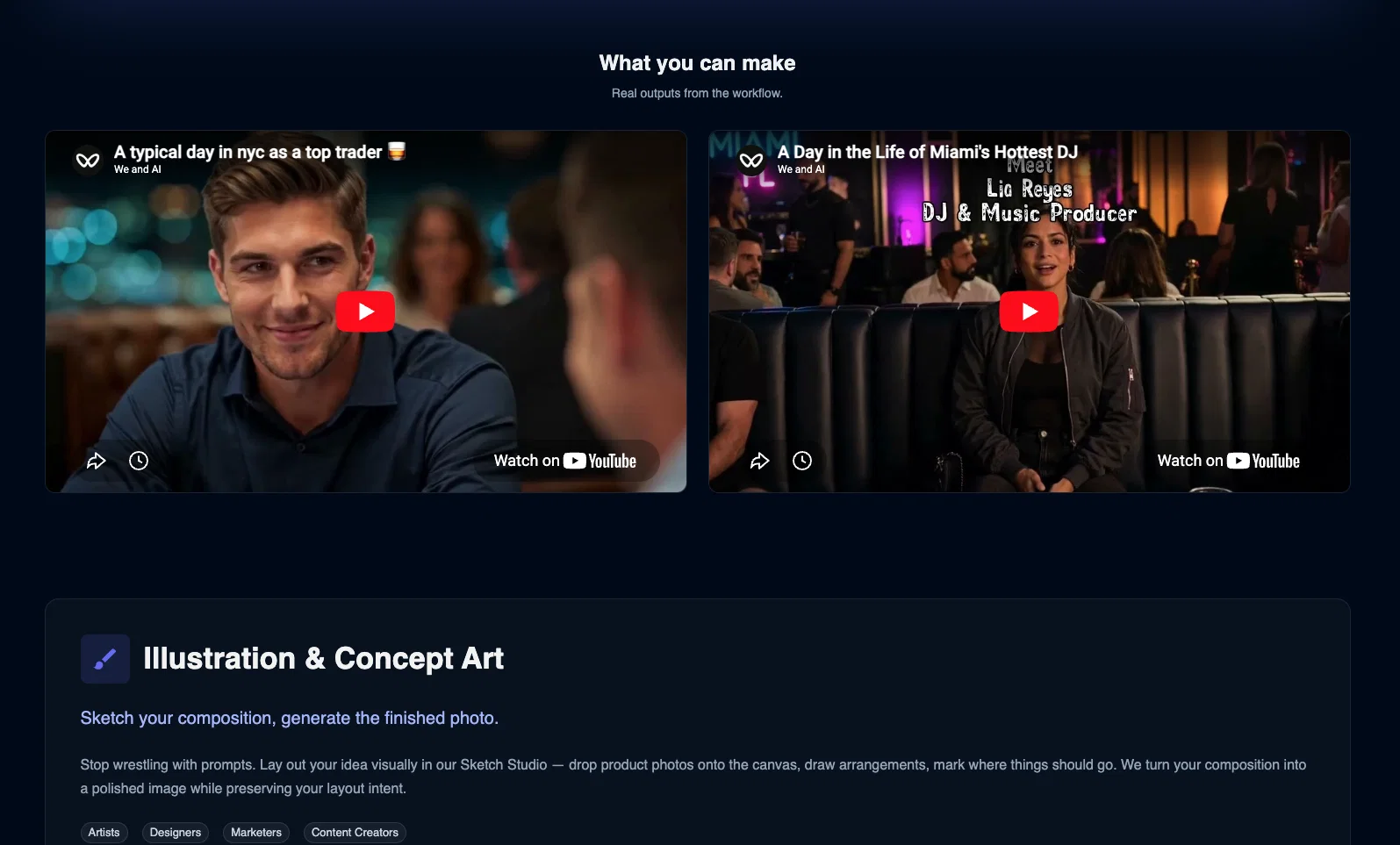
Best for
Short scenarios where FaceHub AI tends to shine.
-
Create stunning AI photos of yourself
Example outputs 1
Sample generations and before/after results for FaceHub AI.
Access & connections
Where you can use FaceHub AI.
Platforms
Capabilities
What this tool accepts, produces, and is strongest at.
Input
- Image
- Text
- Video
Output
- Video
- Image
Supported features
- Image Generation
- Image Edit
- Video Avatars
- Video Generation
- Video Edit
- Lip Sync
- TTS
- Realism
- Social Media
Pros & cons
Pros
- Generates and transforms photos
- Produces artistic portrait renditions
- Creates professional headshots
- Supports creative character depictions
- Useful for digital advertising
- Improves ordinary photos
- Edits lighting efficiently
- Alters scenery within photos
Show 43 more
- Removes and replaces backgrounds
- Consistent, on-demand results
- Eliminates trial and error
- Facilitates composite photo creation
- Ensures user data privacy
- Secure processing of images
- Temporary storage system
- Discards images post 24-hours
- Photo enhancement capability
- Scene editing functionality
- Suitable for ad creatives
- Generates varieties for game developers
- Facilitates design variations
- Turns sketches into illustrations
- Creates profile pictures
- Builds emotive solutions
- Enables creation of imaginary scenarios
- Leverages cutting-edge diffusion and transformer architectures
- High-quality output
- Supports personal expression
- Intuitive user interface
- Generates finished illustrations
- Assists in digital creation
- Turns ordinary shots to studio-quality
- Skips expensive photo reshoots
- Generates advert variations quickly
- Caters to multiple user profiles
- Supports personal branding
- Helps with viral content creation
- Assists in emotional storytelling
- Supports high-resolution uploads
- Offers in-painting and out-painting
- Accepts JPEG and PNG uploads
- Exports in high-quality PNG
- Web-optimized JPEG optional
- Features batch generation support
- Provides low-latency processing
- Supports multiple credit plans
- Offers access to all models
- Ensures predictable, production-ready outputs
- Commercial usage allowed without royalties
- Supports advertising creatives creation
- Supports reference-based image generation
Cons
- Lacks real-time editing
- Doesn't offer video support
- 10-30 seconds image generation time
- Can't handle extensive batch edits
- Limited to JPEG, PNG formats
- Not suitable for sketchy input
- Style variations might not satisfy
- Pricing based on credits
Show 1 more
- No mention of customer support
Compare alternatives
Similar tools in the catalog — with a clear reason to open each one.

AI Portrait - Remaker ✓
Free TrialConvert photos into artistic AI portraits instantly.
Why look Typically cheaper
Full comparison
Caricature Studio ✓
PaidTurn your photo into a hand-drawn caricature in minutes.
Why look Stronger for image work
Full comparison
Remove bg ✓
FreemiumFree AI cutouts for product photos and portraits.
Free + from $9.99/mo
Full comparisonPeople also view
Tools that often show up alongside FaceHub AI in collections and comparisons.
AI Portrait - Remaker ✓
Free TrialConvert photos into artistic AI portraits instantly.
Persona AI ✓
FreemiumCreate stunning, lifelike photos with AI

AI Portrait Gen ✓
PaidTurn your boring photos into stunning portraits

Vireel AI Hugging Generator ✓
PaidTurn photos into warm, realistic hug videos instantly.

Vdoo AI | Picture Generator ✓
Free TrialTurn text into stunning images instantly, free, fast, no watermark.

Storybook Studio ✓
FreemiumA book that looks like your child, from a real photo.

Square Face Icon Generator ✓
Free TrialTurn any idea or face photo into polished square icons instantly.

Kuca AI ✓
Free TrialOne idea. One cinematic scene. One AI video maker.
Releases 2
Introduce studio for character pose control and concept sketching
FAQ 12
What is FaceHub AI and what does it do?
How does FaceHub AI allow for photo alterations?
Can I use FaceHub AI to transform ordinary photos into studio-quality images?
How does FaceHub AI assist with digital product advertising?
What is the deterministic algorithm in FaceHub AI?
What types of creative depictions can I generate with FaceHub AI?
Can I use FaceHub AI to create composite photos of individuals who are physically separated?
How does FaceHub AI ensure user data privacy?
What does temporary storage mean in the context of FaceHub AI?
Is FaceHub AI useful for creating stunning avatars and unique visuals?
Can FaceHub AI generate professional headshots?
What is FaceHub AI's role in creating engaging illustrations?
Related tools
Recommended

Claude ✓
FreemiumBuilding reliable, interpretable AI systems

ChatGPT ✓
FreemiumAsk anything, create anything, and move from idea to action.

Watermelon ✓
FreemiumHandle up to 96% of your support automatically

Pounce ✓
Free TrialGet real followers and engagement in minutes.

HappySeeds ✓
FreemiumTurn ideas into AI-powered apps instantly.

Notis ✓
Free TrialThe first WhatsApp assistant that runs on your ChatGPT and Claude subscriptions