

Image editing 2026 Rank: #1300
EditPix AI ✓
AI photo editor without limits or watermarks.
Verdict
A quick read before you dig into the full page.
- Best if
- AI photo editor without limits or watermarks
- Skip if
- Subscription required for additional credits
- Pick this when
- Free online tool
Considering Viyou AI Image Generator instead? Compare side by side
Overview
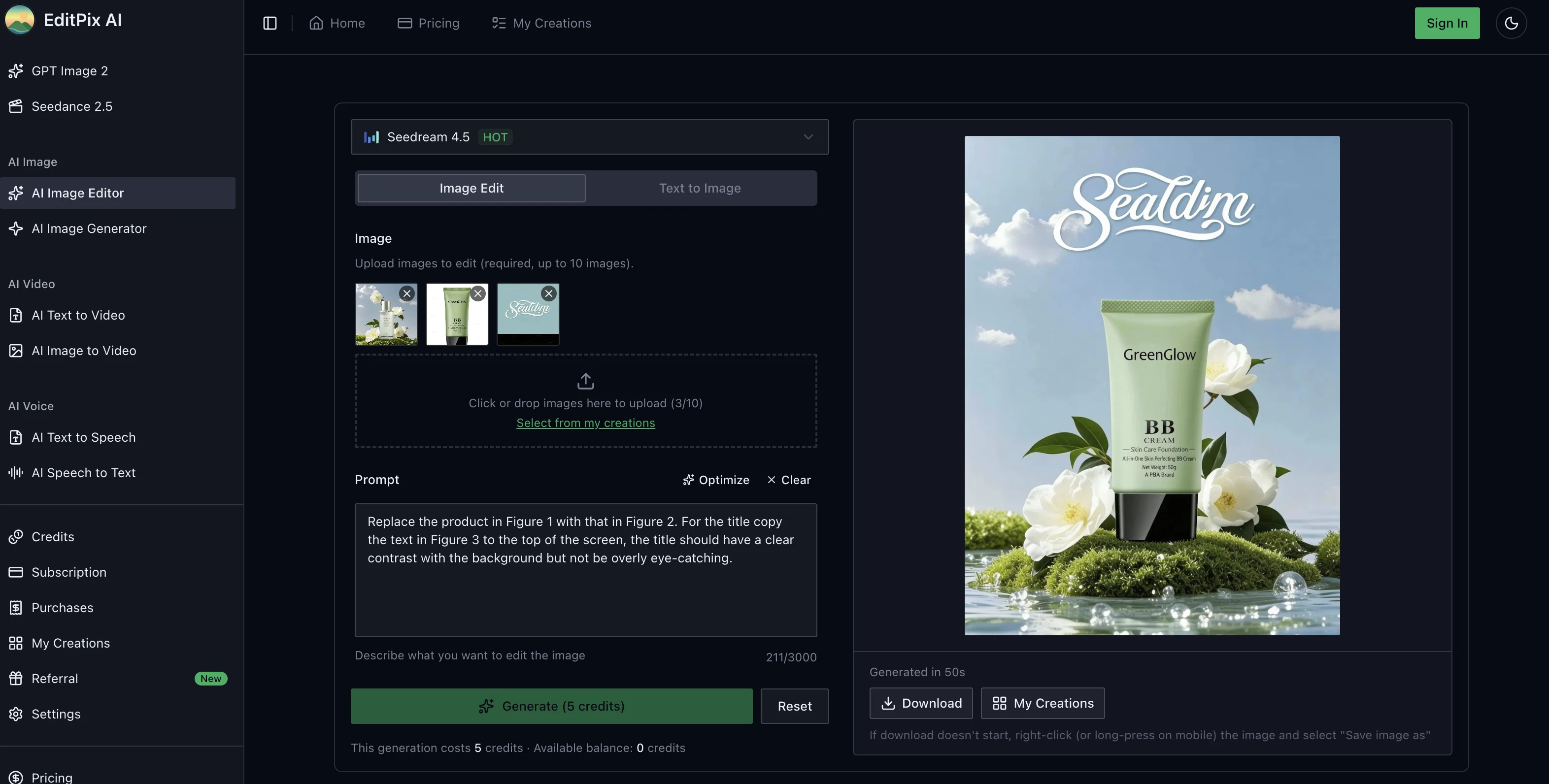
EditPix AI is an online photo editing tool that uses advanced AI models to deliver precise and professional photo editing results. With this tool, users can perform an array of transformations on their images including removing backgrounds, erasing unwanted objects, swapping scenes and editing text in images.
It also offers users the capability to restore old photos and undertake image-to-image editing. Notably, the tool's editing process is driven by natural language prompts, allowing users to just type in commands such as 'remove the person on the left' or 'make the sky a sunset'.
Users do not need to navigate complicated tools or layers, making the tool accessible to beginners and experts alike. Importantly, EditPix AI ensures user privacy by not storing any uploaded images after processing.
All images edited and downloaded by users are watermark-free regardless of the chosen plan, making it a preferred choice for content creators, entrepreneurs and designers across the globe.
The tool operates using a credit system, with free credits offered upon signing up. Users can thereafter purchase incremental credits via a subscription plan or one-time credit packs.
Access & connections
Where you can use EditPix AI, and what it plugs into.
Platforms
Integrations
Capabilities
What this tool accepts, produces, and is strongest at.
Input
- Tabular
- Image
- Text
Output
- Image
Supported features
- Image Edit
- Image Generation
Pros & cons
Pros
- Free online tool
- Full suite photo editing
- Background removal
- Object erasure capabilities
- Scene swapping feature
- Text editing within images
- Old image restoration
- Image-to-image transformations
Show 27 more
- Natural language processing
- Beginner-friendly, no complex tools
- JPEG, PNG, and WebP compatibility
- User-selected output format
- Watermark-free images
- Immediate discard of uploaded images
- Subscription-based or credit packs
- No content restrictions
- Immediate photo editing results
- Trusted by global users
- Supports creative image-to-image projects
- Free credits upon sign up
- Prompt-based editing
- Accurate results
- Fair credit system
- Annual subscription offers value
- Simple and honest pricing
- Suitable for casual users
- No content filtering or blocking
- Zero data storage policy
- Supports varied range of tasks
- Images devoid of branding
- Automatic file deletion after processing
- No penalties for cancellation
- Never-expiring one-time credit packs
- Offers unrestricted editing capabilities
- Functional without credit card requirement
Cons
- No offline version
- Limited to certain formats
- Uses credit system
- No batch processing
- Dependent on accurate prompts
- Limited user interface options
- Limited language support
- Subscription required for additional credits
Show 2 more
- Operation speed can vary
- Requires Internet connection
Compare alternatives
Similar tools in the catalog — with a clear reason to open each one.

Viyou AI Image Generator ✓
FreemiumTransform text and images into stunning videos and visuals.
Free + from $39.99/yr
Full comparison
Img2Img AI ✓
FreemiumTransform any image with AI in seconds.
Why look Offers a public API
Full comparison

Photoeditor ✓
PaidEnhanced image editing with object and text removal.
from $9.99/mo
Full comparison
Cleanup pictures ✓
FreemiumRemove unwanted elements from photos instantly.
Why look Typically cheaper
Full comparisonReleases 1
FAQ 12
What is EditPix AI?
How does EditPix AI work?
What photo editing tasks can EditPix AI perform?
How do I use EditPix AI for photo editing?
What image formats can EditPix AI handle?
Does EditPix AI apply a watermark to edited photos?
How does EditPix AI maintain user privacy?
What is the complexity level of using EditPix AI?
What are the capabilities of EditPix AI?
What differentiates EditPix AI from other AI photo editors?
Does EditPix AI support image-to-image transformations?
Can EditPix AI really understand text prompts for photo editing?
Related tools
Recommended

Whacka ✓
Free TrialTurn ideas into real apps from your phone.

Suno ✓
FreemiumMake music at the speed of your ideas.

PrompTessor ✓
FreemiumAI Prompt Workspace for Better AI Results

AppDeploy ✓
FreeDeploy real apps directly from ChatGPT or Claude

Contents Pilot ✓
FreemiumYour expertise becomes a post — with a content copilot

Lyria ✓
FreeGenerate high fidelity music and audio