

Grammar vv2.0
editGPT ✓
Proofreading and editing content with ease.
Free + from $8/mo
Verdict
A quick read before you dig into the full page.
- Best if
- You are students and need: Proofreading academic papers and thesis
- Skip if
- No subscription or pricing information
- Pick this when
- Chrome and Firefox extension
Considering Textbuddy instead? Compare side by side
Overview
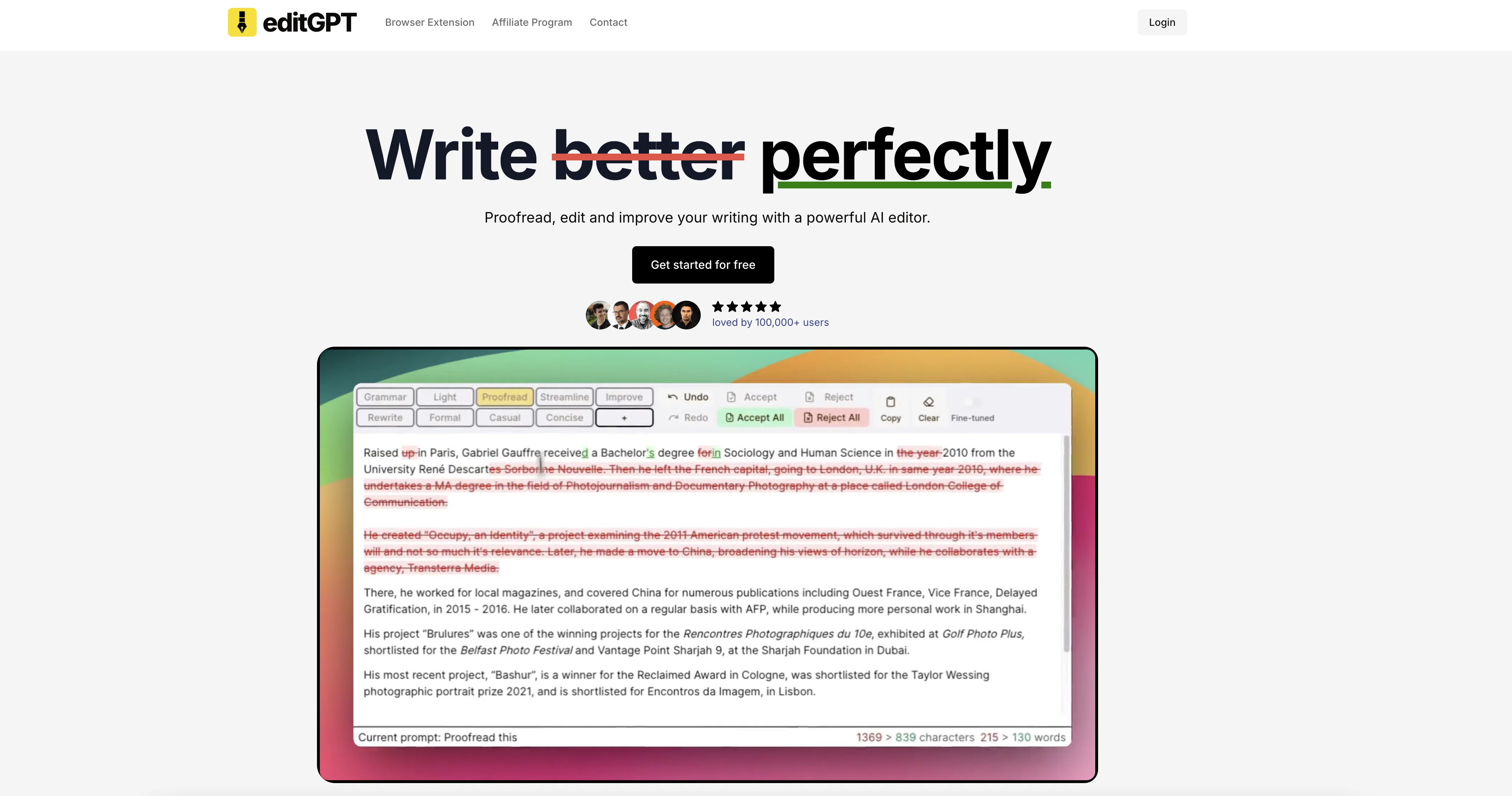
editGPT is a powerful AI tool that allows users to proofread, edit, and track changes to their content in chatGPT. It is available as a Chrome and Firefox extension, making it easy to use with the chatGPT platform.
editGPT offers a range of features, including an example prompts section for users to get acquainted with the platform, as well as a demo version for users to try out the tool before committing to it.
The tool also provides a contact form for users to reach out to the developer, @shuafeiwang, with any queries or suggestions. Overall, editGPT is a reliable and user-friendly AI tool for proofreading, editing and tracking changes to content in chatGPT.
Best for
Short scenarios where editGPT tends to shine.
-
Proofreading academic papers and thesis
Best for Students
-
Editing cover letters and CVs
Best for Academics
-
Improving clarity and flow of writing
Best for Researchers
-
Tailoring content for different audiences
Best for Professionals
-
Formatting essays and research papers
Best for Content creators
-
Editing technical proposals and legal documents
Best for Non-native English speakers
Example outputs 1
Sample generations and before/after results for editGPT.
Access & connections
Where you can use editGPT, and what it plugs into.
Platforms
Integrations
Pros & cons
Pros
- Chrome and Firefox extension
- Tracks changes
- Proofreads and edits content
- Available demo version
- Example prompts for learning
- Easy contact form
- For use with chatGPT
- User-friendly interface
Show 1 more
- Reliable proofreading and editing
Cons
- Limited to Chrome and Firefox
- Reliant on chatGPT platform
- No mobile app available
- No multi-language support mentioned
- No offline access
- No API for integration
- No batch processing feature
- No subscription or pricing information
Compare alternatives
Similar tools in the catalog — with a clear reason to open each one.

Textbuddy ✓
FreemiumImprove writing clarity with plain language analysis.
Why look Better for writing
Full comparison
CMD-C.app ✓
FreemiumTriple CMD-C for instant text perfection on macOS.
Why look Typically cheaper
Full comparison
People also view
Tools that often show up alongside editGPT in collections and comparisons.

RewriteBar ✓
Free TrialRewrite. Refine. Accelerate. — AI productivity for every macOS app. 🚀

AI Blaze ✓
FreemiumYour personal AI copilot. Write & improve text, answer questions, and more.
CMD-C.app ✓
FreemiumTriple CMD-C for instant text perfection on macOS.

Wordvice ✓
FreemiumElevate your writing with AI-powered proofreading.

Paperpal ✓
FreemiumEnhance academic writing with AI-powered language assistance.

Humanize AI Text by Akazila ✓
Free TrialTransform AI-Generated text into content that feels like it's written by human

DecEptioner ✓
FreemiumMasquerades AI Text like a pro!
Textbuddy ✓
FreemiumImprove writing clarity with plain language analysis.
Releases 2
editGPT is an AI tool that can proofread, edit and improve your writing.
- Track, accept and reject changes.
- Get the best results with battle-tested prompts
New features:
- Projects mode (edit long documents, manage revisions)
- Language selector (including support for UK English)
- Rich text support (maintain Bold, Italics and other formatting)
Imported reviews 2
first i tested it with a quick paragraph just to see if it's any good, and lemme tell you, i'm using it for all my essay grammar checks XD
The fact that it's available as a Chrome and Firefox extension makes it super convenient to integrate into my workflow. I love how it not only helps with proofreading and editing but also tracks changes, which is incredibly useful.
FAQ 12
What is editGPT used for?
Is there a way to test out editGPT before committing to it?
How can I add editGPT to my Chrome browser?
Can I also add editGPT to my Firefox browser?
Does editGPT have a range of features?
Can editGPT proofread and edit my content?
Can I track changes in content with editGPT?
Is there a section for example prompts in editGPT?
Where can I find tutorials or guides for using editGPT?
Who developed editGPT and how can I contact them?
Is editGPT a reliable AI proofreading and editing tool?
How user-friendly is editGPT as a proofreading and editing tool?
Related tools
Recommended

VenturusAI ✓
FreemiumBusiness idea analysis and reporting.

AcademicGPT ✓
FreemiumAI-powered academic writing assistant.

Scisummary ✓
Free TrialCutting-edge scientific articles summarization.

OpenRead ✓
FreemiumAI-powered interactive papers for faster, intuitive research

GPTExcel ✓
FreemiumGenerate spreadsheet formulas with AI

Eightify
UnknownAI-powered YouTube video summarizer extracting key ideas for quick content assessment.