

AI Blaze ✓
Your personal AI copilot. Write & improve text, answer questions, and more.
Free + from $2.99/mo
Verdict
A quick read before you dig into the full page.
- Best if
- You are writers and need: Generating email replies quickly
- Skip if
- Prompt creation could be complex
- Pick this when
- Email response automation
Considering Voila instead? Compare side by side
Overview

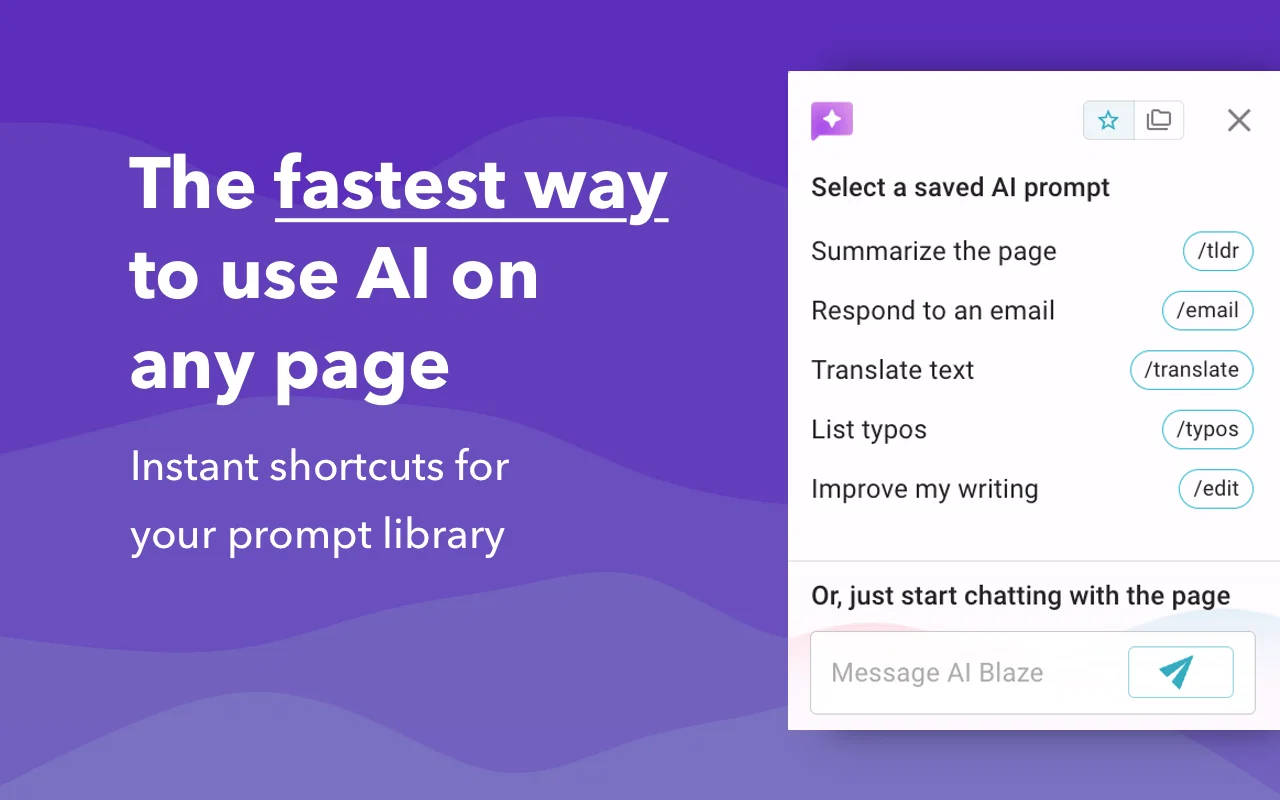
Simply type a keyboard shortcut or use our dynamic sidebar to use AI snippets and write, improve, or summarize content in just seconds!
AI Blaze works on any website via Chrome, which allows you to use ChatGPT and other AI models on any website!
AI Blaze also supports dynamic prompts, granting which allows you to customize prompts by using text fields, dropdown menus, date and time, and clipboard content. Notably, the prompts can adjust dynamically based on the user's input.
Best for
Short scenarios where AI Blaze tends to shine.
-
Generating email replies quickly
Best for Writers
-
Improving the clarity and tone of written content
Best for Marketers
-
Creating social media posts
Best for Sales professionals
-
Drafting documents and reports
Best for Customer support agents
Example outputs 1
Sample generations and before/after results for AI Blaze.
Access & connections
Where you can use AI Blaze, and what it plugs into.
Platforms
Integrations
Pros & cons
Pros
- Email response automation
- Text rewriting feature
- Spelling correction
- Compatible with any webpage
- Dynamic prompts customization
- Versatile tone adjustment
- Text shortening
- Message translation
Show 38 more
- Create custom prompts
- Real-time prompt library sharing
- GPT-4 technology application
- Text integration
- Input-based dynamic adjustment
- Trusted by established companies
- Enhances productivity
- Automates text-editing tasks
- Prompts with text fields
- Prompts with dropdown menus
- Prompts with date and time
- Prompts with clipboard content
- Collaboration feature
- Shortcuts triggering GPT-4
- Responds to any inquiry
- Spot-on text detection
- Easy to start
- Text box compatibility
- Adjusts based on input
- User input customization
- Compatible with Chrome
- Shareable Prompt Libraries
- Instant triggering anywhere
- Prompt integration in responses
- Tailors message lengths
- Increases writing efficiency
- Professionalizes message tone
- Real-time synchronization among teams
- Integrates user's personal library
- Automates various practical applications
- Trigger from user's library
- Change text tone
- Rewrites to different languages
- Easy dashboard access
- Synchronized prompts real-time
- Automated content creation
- Automates writing tasks
- Easy Installation as Extension
Cons
- No iOS app
- Limited offline functionality
- Translation accuracy might vary
- Doesn't support all languages
- Prompt creation could be complex
- Collaboration requires team training
- Potential privacy issues with prompts
- Compatibility issues with certain websites
Show 1 more
- No customer service real-time chat
Compare alternatives
Similar tools in the catalog — with a clear reason to open each one.

Voila ✓
Free TrialSeamless AI assistant to help you create, write, brainstorm, and research.
Free + from $6/mo
Full comparison
Rizz! Keyboard ✓
FreeAI-powered creative responses in your iPhone keyboard.
Why look Fully free option
Full comparison
Werd - Vibe Write with Multi-agent AI ✓
Free TrialVIBE WRITE With Multi-agent AI
Why look Higher community rating
Full comparison
Sudowrite ✓
Free TrialAI writing partner for faster, more creative storytelling
Free + from $10.00/mo
Full comparison
RewriteBar ✓
Free TrialRewrite. Refine. Accelerate. — AI productivity for every macOS app. 🚀
Why look Offers a public API
Full comparisonPeople also view
Tools that often show up alongside AI Blaze in collections and comparisons.

Wordvice ✓
FreemiumElevate your writing with AI-powered proofreading.

Paperpal ✓
FreemiumEnhance academic writing with AI-powered language assistance.

editGPT ✓
FreemiumProofreading and editing content with ease.
Werd - Vibe Write with Multi-agent AI ✓
Free TrialVIBE WRITE With Multi-agent AI
Voila ✓
Free TrialSeamless AI assistant to help you create, write, brainstorm, and research.
Sudowrite ✓
Free TrialAI writing partner for faster, more creative storytelling
Rizz! Keyboard ✓
FreeAI-powered creative responses in your iPhone keyboard.
RewriteBar ✓
Free TrialRewrite. Refine. Accelerate. — AI productivity for every macOS app. 🚀
Releases 1
In the news
Launch coverage and community mentions for AI Blaze.
Imported reviews 1
Since discovering this tool in January 2024, my workflow as an entrepreneur, educator, and content creator has undergone a complete transformation, becoming far more efficient. With a total of +13,617 snippets used, I have managed to save +3,811 hours of work that were previously spent on repetitive and tedious tasks. Its ability to combine web scraping features with AI Blaze instructions makes it far superior and more user-friendly compared to other technical alternatives. This system has truly become a bridge for me to stop worrying about exhausting operational details and shift my focus entirely to things that are essential in my career.
Although the features that currently exist are already very solid and comprehensive, I see a great opportunity for improvement if AI Blaze supported open-source models like DeepSeek or GLM. Giving users the option to add external API keys independently would be an amazing update that provides unlimited flexibility for users. Overall, this is the best productivity solution that continues to provide exceptional value to my community even after two years of active use.
FAQ 12
What is AI Blaze?
What technologies does AI Blaze utilize?
What are the practical applications of AI Blaze?
How does AI Blaze help with email responses and text rewriting?
What is the compatibility range of AI Blaze?
How can AI Blaze be directed to integrate a message part of the response prompt?
How does AI Blaze support language translation?
What is the dynamic prompts feature in AI Blaze?
Can I customize prompts in AI Blaze using date and time?
How does the dynamic prompts feature adjust to my input?
Does AI Blaze support collaboration and how?
How can I share a prompt library with my team in AI Blaze?
Related tools
Recommended

AI Carousels Cheat Sheets
FreeCreate pro LinkedIn carousels in seconds, no design skills needed.

BypassGPT.co ✓
PaidHumanize AI text to bypass detection tools.

Wix AI Website Builder ✓
FreemiumAI-powered websites, instantly ready for business.

Mindsmith ✓
FreemiumPlatform for building and sharing eLearning content

VenturusAI ✓
FreemiumBusiness idea analysis and reporting.

AI Video API ✓
FreemiumCreate AI videos effortlessly and affordably