

Diagramming ✓
Instantly design UML & workflows with AI
Free + from $3/mo
Verdict
A quick read before you dig into the full page.
- Best if
- You are software Developers and need: Software Developers: Illustrate system design with sequence diagrams and flowcharts
- Skip if
- You need enterprise SLAs or a fully managed team plan right away
- Pick this when
- Freemium · Free + from $3/mo
Considering AI Diagram Maker instead? Compare side by side
Overview
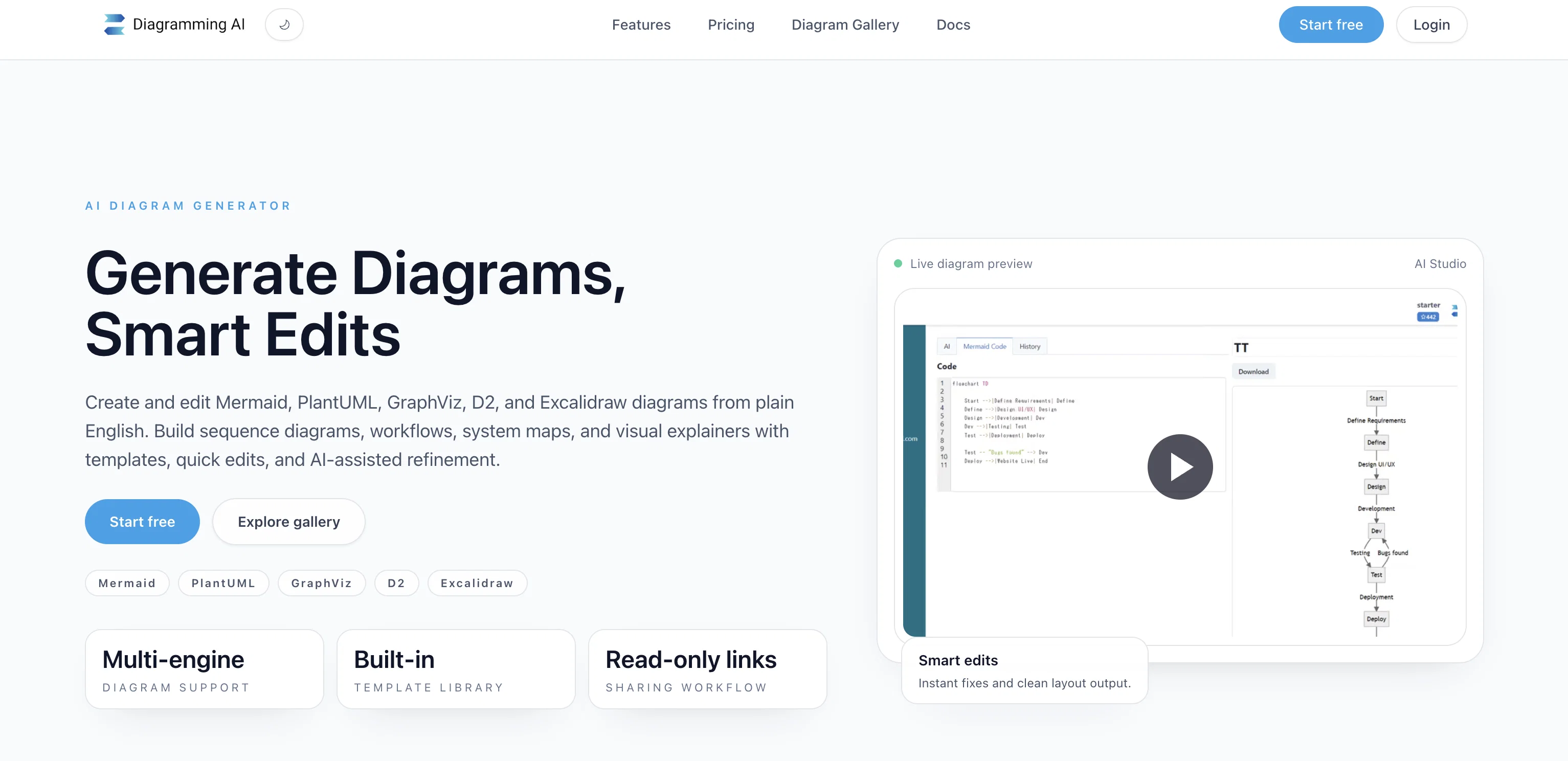
Diagramming AI is an AI-powered tool that simplifies the process of creating and editing complex UML (Unified Modeling Language) structures and workflow designs.
It harnesses the potential of AI to enhance the diagramming experience and make it more efficient. With Diagramming AI, users can instantly create and update diagrams using intuitive AI commands, resulting in dynamic and easy-to-understand visual representations.One of the key features of Diagramming AI is its AI Chat functionality, which allows users to engage in discussions about their diagrams with AI.
Through AI Chat, users can receive tailored suggestions for diagram improvements and challenges, which can be instantly reflected onto their diagrams.
This feature enhances the collaborative aspect of diagramming and facilitates the generation of high-quality diagrams.The tool also offers a seamless drawing approach, driven by AI, that ensures clarity, precision, and fluidity in every design.
Additionally, Diagramming AI provides project-based Mermaid code storage, enabling users to create multiple projects and store numerous diagrams within each project.
This feature allows for easy access, management, and effortless updates of saved diagrams.Diagramming AI supports a wide range of users, including software developers, project managers, data analysts, educators, technical writers, business analysts, product managers, researchers, students, and marketing professionals.
It offers flexible export options, customizable color themes, and the ability to download diagrams in SVG/PNG formats for further editing and sharing.The pricing plans for Diagramming AI range from a free tier with limited features to premium tiers that provide access to a higher number of projects, diagrams, and credits, as well as GPT-4 access for advanced AI capabilities.
Best for
Short scenarios where Diagramming tends to shine.
-
Software Developers: Illustrate system design with sequence diagrams and flowcharts.
Best for Software Developers
-
Project Managers: Visually represent project schedules with Gantt charts.
Best for Project Managers
-
Data Analysts: Visualize data flows and processes.
Best for Data Analysts
-
Educators and Trainers: Explain complex topics and ideas visually.
Best for Educators
-
Technical Writers: Add visual elements to technical documents and manuals.
Best for Trainers
-
Business Analysts: Create and visualize flowcharts for business processes.
Best for Technical Writers
-
Product Managers: Showcase product feature flows and user experiences visually.
Best for Business Analysts
-
Researchers: Represent research findings and data visually.
Best for Product Managers
Example outputs 1
Sample generations and before/after results for Diagramming.
Access & connections
Where you can use Diagramming, and what it plugs into.
Platforms
Integrations
Capabilities
What this tool accepts, produces, and is strongest at.
Input
- Tabular
- Text
Output
- Code
- Image
Supported features
- SVG
Compare alternatives
Similar tools in the catalog.
AI Diagram Maker ✓
FreemiumCreate professional diagrams in seconds with AI.
Free + from $5/mo
Full comparison
DiagramGPT by Eraser ✓
FreemiumGenerated engineering diagrams.
Free + from $10 per member / month
Full comparison
Tenorshare AI Diagrimo ✓
FreemiumTurn text into visuals instantly.
Free + from $6.99/mo
Full comparison
Mermaid Chart ✓
FreemiumVisualize complex data with simple charts
Free + from $6.67/mo
Full comparisonPeople also view
Tools that often show up alongside Diagramming in collections and comparisons.
Tenorshare AI Diagrimo ✓
FreemiumTurn text into visuals instantly.
Mermaid Chart ✓
FreemiumVisualize complex data with simple charts

Dreamspace.art ✓
UnknownVisualize and edit prompts effortlessly.
DiagramGPT by Eraser ✓
FreemiumGenerated engineering diagrams.
AI Diagram Maker ✓
FreemiumCreate professional diagrams in seconds with AI.

PaperClaw ✓
Free TrialMake publication-ready scientific figures with AI.

MySpec ✓
UnknownTurn vague ideas into robust technical specifications.

Knogra ✓
FreeChart the whole subject. One scene at a time.
Releases 1
In the news
Launch coverage and community mentions for Diagramming.
Imported reviews 1
Awesome tool!
FAQ 12
What exactly is Diagramming AI?
How does Diagramming AI use AI to enhance the diagramming process?
Can I update my diagrams using AI commands in Diagramming AI?
What does the AI Chat functionality in Diagramming AI do?
Can Diagramming AI give me suggestions for improving my diagrams?
Does Diagramming AI offer any kind of project storage?
Can I use Diagramming AI to create multiple diagram projects?
Who can benefit from using Diagramming AI?
In what formats can I download my diagrams from Diagramming AI?
Can I customize the color themes in my Diagramming AI diagrams?
Does Diagramming AI support SVG/PNG formats for my diagrams?
What does the term 'Mermaid code storage' in Diagramming AI mean?
Related tools
Recommended

GPTExcel ✓
FreemiumGenerate spreadsheet formulas with AI

Agentgpt ✓
FreemiumDeploy autonomous AI Agents effortlessly in your browser.

LearningStudioAI ✓
Free TrialAI-powered authoring tool for effortless online course creation.

KnowledgeGraph GPT ✓
FreeTransform unstructured text into knowledge graphs with AI.

Scisummary ✓
Free TrialCutting-edge scientific articles summarization.

PostPerfect ✓
FreemiumAutomated social media posts.