

Day Flow ✓
Imagine a day that flows smoothly with AI managing your tasks.
Verdict
A quick read before you dig into the full page.
- Best if
- Imagine a day that flows smoothly with AI managing your tasks
- Skip if
- Limited integration options
- Pick this when
- Voice commands recognition
Considering Motion instead? Compare side by side
Overview
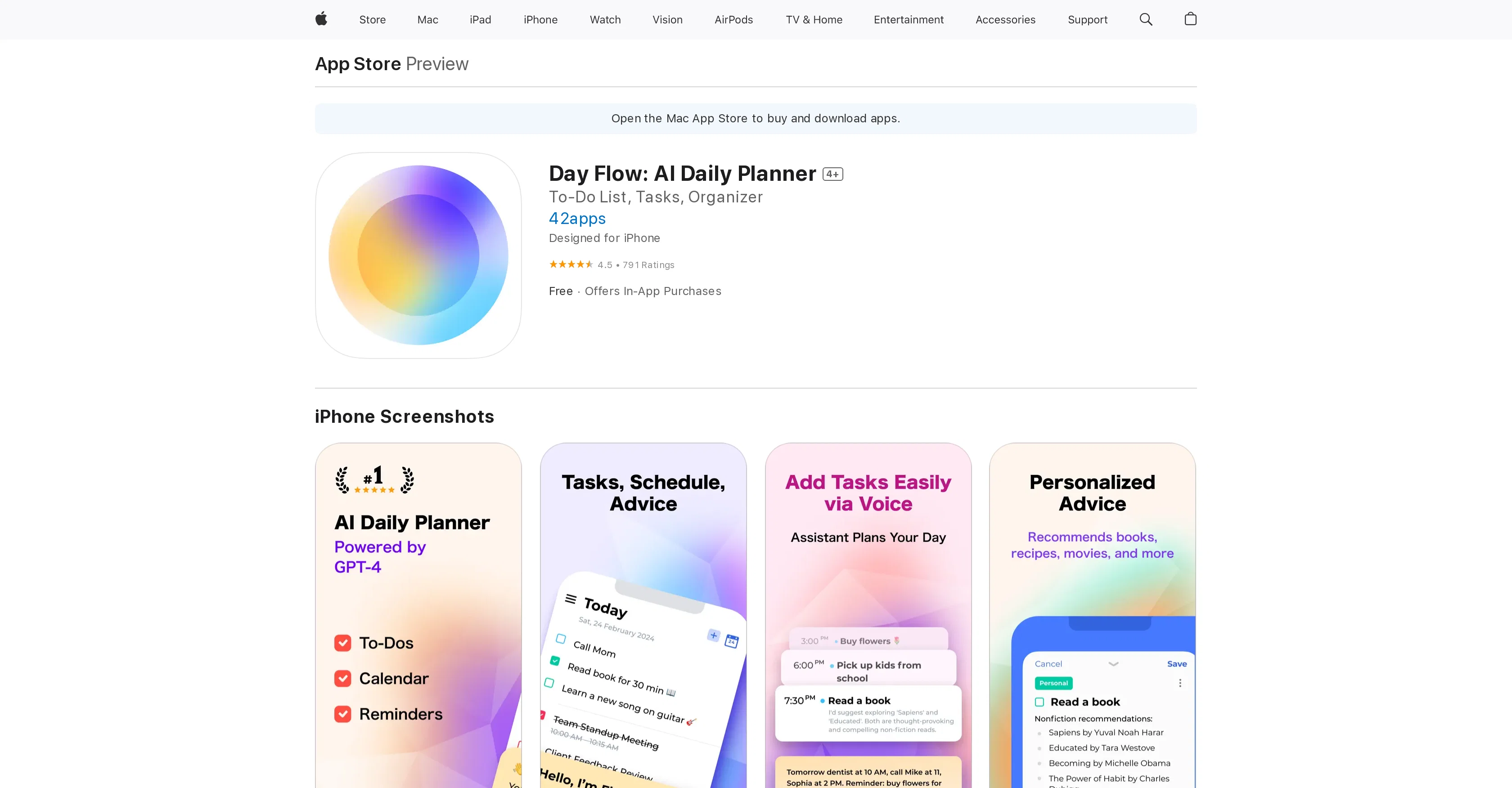
Day Flow is an artificial intelligence-powered daily planner designed to help users manage their everyday tasks with efficiency. The app operates as a personal assistant, completing scheduling tasks and providing insightful suggestions upon user commands.
Users can voice their tasks and plans for the day or week, and the app will create a schedule accordingly. Day Flow can suggest suitable time slots for desired activities and also recommend relevant items or activities based on user requests.
The application includes features for task creation, recurring task setup, reminders, and task categorization, providing a simplified overview of one's day.
Importation of Calendar and Reminders is also an available feature, ensuring all daily events and tasks are kept in one place. Despite being highly intuitive, some features, including the ability to break down tasks into sub-tasks and text-based interaction with the AI component, are still in development.
Access & connections
Where you can use Day Flow, and what it plugs into.
Platforms
Integrations
Capabilities
What this tool accepts, produces, and is strongest at.
Input
- Text
- Audio
Output
- Text
Pros & cons
Pros
- Voice commands recognition
- Automated scheduling
- Insightful suggestions
- Task categorization
- Calendar importing
- Recurring task setup
- Simple interface
- Personal assistant features
Show 22 more
- Recommendations based on input
- Designed for iPhone
- High user ratings
- Efficient task reminders
- In-app purchases available
- Task integration options
- Task organizer feature
- Proposes suitable times
- Can recommend activities
- Daily events consolidation
- All day tasks kept in one place
- Detailed App Store page
- Recurring tasks support
- Good developer engagement
- Resolving calendar sync issues
- Privacy practices for users available
- Size - 152.3 MB
- Compatibility with iOS 15.0 or later
- Foreign languages support
- Affordable in-app purchases
- Book recommendations
- Task categorization for efficient overview
Cons
- Lacks text-based interaction
- No sub-task breakdown
- No calendar back-sync
- Confusing In-App Purchase benefits
- Restricted free usage
- Frequent upsell pops-ups
- Limited integration options
- Incorrect date creation
Show 1 more
- Requires iOS 15.0 or later
Compare alternatives
Similar tools in the catalog — with a clear reason to open each one.
Motion ✓
Free TrialAI-powered productivity boost for busy people and teams.
Free + from $19/mo
Full comparison
JustVibe ✓
FreeThe search engine for doing, with instant apps built for you
Why look Fully free option
Full comparison
Ping: AI-Powered To Do List ✓
FreemiumAI-powered task list: Dictate tasks, integrate with Gmail, Slack, ChatGPT & Calendar.
Why look Typically cheaper
Full comparison
AlpacaBag ✓
FreemiumAI creates personalized travel plans for your perfect trip.
Why look Typically cheaper
Full comparison
TellDone ✓
FreemiumTurn your voice into tasks, calendar events, and notes.
Why look Typically cheaper
Full comparison
10x ✓
FreePrivate focus coaching that reveals your deep work patterns.
Why look Fully free option
Full comparisonReleases 1
Imported reviews 1
I've been exploring AI for quite some time, and it's been a true lifesaver for my severe ADHD. Finding the perfect calendar, task, and habit-tracking app that uses AI to intelligently schedule tasks with minimal interaction has been a quest. Day Flow is the closest I've found to my ideal solution. It's not perfect, but it's really good and incredibly helpful.
FAQ 12
What is the main purpose of Day Flow?
How does Day Flow use artificial intelligence?
Can I use voice commands with Day Flow?
How does Day Flow create a schedule from my tasks and plans?
What sort of recommendations can Day Flow provide me?
How does the task creation feature in Day Flow work?
Does Day Flow allow for the setup of recurring tasks?
What kind of reminders does Day Flow provide?
Can Day Flow categorize my tasks?
Does Day Flow have the ability to import Calendar and Reminders?
Are there any features in Day Flow that are still in development?
Is Day Flow able to suggest suitable time slots for my activities?
Related tools
Recommended

Ideamap - Brainstorm and Mindmap AI ✓
FreemiumBoost your creativity with AI-powered brainstorming.

Mentor: Get things done ✓
FreemiumAchieve your goals and get things done with Mentor and AI

Hyperis ✓
FreemiumOrganized task prioritization.

TheLibrarian.io ✓
Free TrialYour WhatsApp AI assistant for instant productivity.

Recall ✓
FreemiumSummarize Anything, Forget Nothing!

COACH ✓
FreeAI-powered career development platform built by career experts.