

Comics vv1.5.0 2026 Rank: #163
ComicInk ✓
Turn Your Words into Stunning Comic Books
Verdict
A quick read before you dig into the full page.
- Best if
- You are indie Comic Creators and need: Writing comics without drawing skills
- Skip if
- Pro version expensive
- Pick this when
- Maintains character consistency
Considering Comicsmaker instead? Compare side by side
Overview
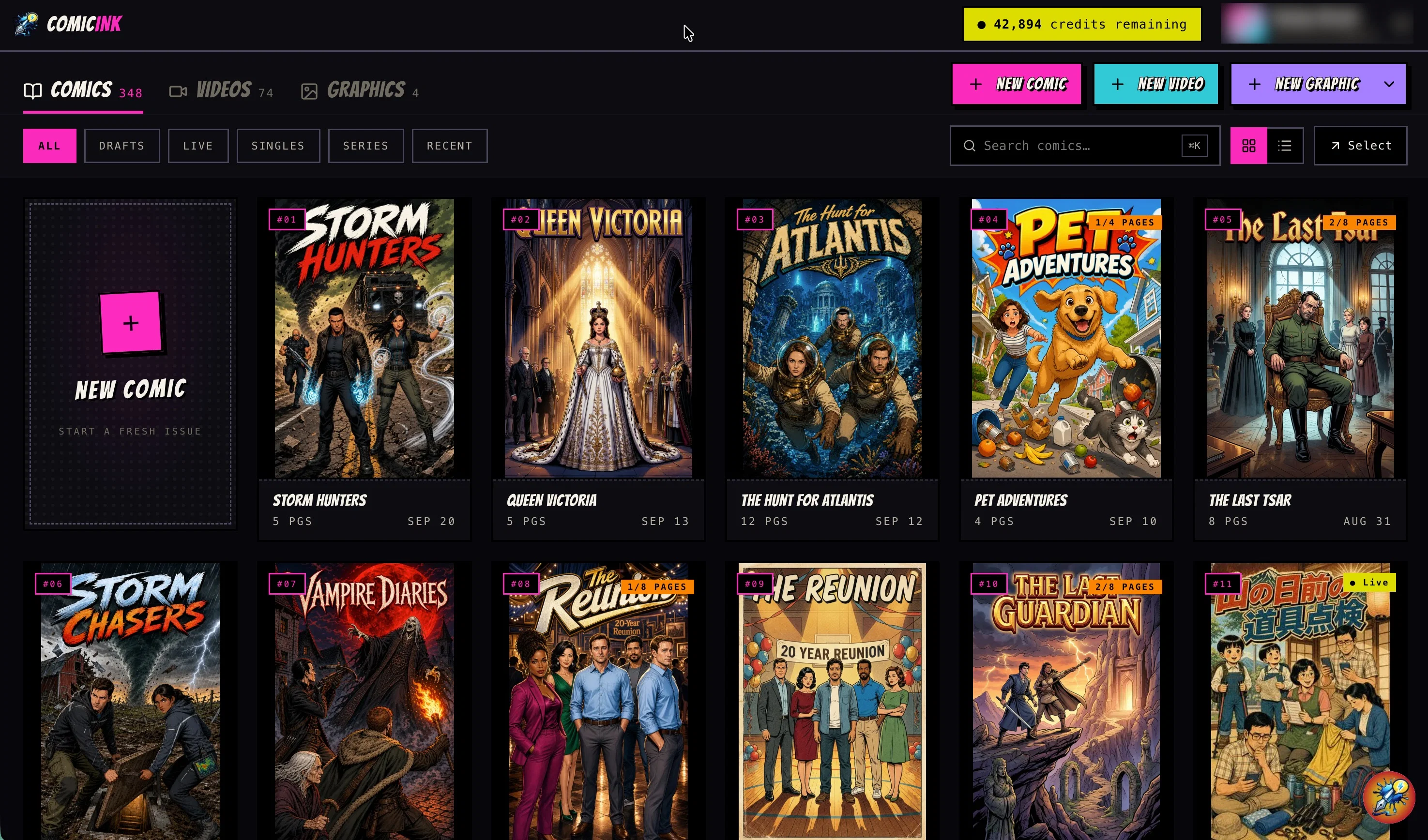
ComicInk is an Artificial Intelligence (AI) powered platform for creating visually stunning comic books. It offers users the ability to define characters, build worlds and generate stories and artwork, enabling the transformation of narratives into visual comics.
The platform employs cutting-edge AI functions to ensure smooth and efficient comic creation. Among its features are Character Consistency, which maintains a character's appearance throughout the comic, and Script to Page, which turns natural language stories into well-composed comic pages with dynamic layouts.
The platform also provides an array of art styles to choose from, or users can create their own unique visual aesthetics. Functionalities such as Story Arcs are included to aid planning of multi-issue storylines.
The platform has its user-friendly marketplace, where users can open their Creator Store for showcasing and selling their comics. Creators can set their own prices, with the platform taking a transparent 30% cut of each sale.
Payment processing is secure and direct through Stripe. The service also encourages community building among comic lovers where readers can buy, peruse catalogs, and follow creators' journeys.
Additionally, ComicInk allows users to either rapidly generate draft ideas or create premium quality images, providing flexibility based on workflow preferences.
Best for
Short scenarios where ComicInk tends to shine.
-
Writing comics without drawing skills
Best for Indie Comic Creators
-
Publishing webcomics
Best for Fantasy Writers
-
Creating personalized comic gifts
Best for Manga Artists
-
Small-business content marketing
Best for Storytellers
-
Family history in comic form
Best for Educators
-
Kids' bedtime stories
Best for Content Creators
-
Brand mascot storytelling
Best for Indie Comic Creators
-
Fan-fiction visualization
Best for Indie Comic Creators
Example outputs 1
Sample generations and before/after results for ComicInk.

Access & connections
Where you can use ComicInk, and what it plugs into.
Integrations
Capabilities
What this tool accepts, produces, and is strongest at.
Input
- Image
- Text
Output
- Image
Supported features
- Image Generation
- Visual Creation
- Writing
- Text Generation
- Styling
- Digital Personas
- Image Edit
- Social Media
Pros & cons
Pros
- Maintains character consistency
- Transforms text into visuals
- Offers variety of styles
- Ensures narrative thread continuity
- Offers monetisation through Creator Store
- Simplified comic creation process
- Includes two creation modes
- Facilitates story arc planning
Show 10 more
- Offers a user-friendly marketplace
- Secure payment processing
- Aids writers turn narratives to comics
- You can set own prices for comics
- Aids in community building
- Enables creation of unique visual aesthetics
- Rapidly generates draft ideas
- Creates premium quality images
- Workflow flexibility
- Character design assistance
Cons
- 30% sales cut high
- Limited art style choice
- May lack unique aesthetics
- Dependent on story quality
- Pro version expensive
- Lack of collaborative features
- Limited language support
- Requires credit purchasing
Show 1 more
- Only Stripe payment processing
Compare alternatives
Similar tools in the catalog — with a clear reason to open each one.

Comicsmaker ✓
FreemiumBring stories to life with AI-powered comics.
Why look Typically cheaper
Full comparison
Komiko App ✓
PaidCreate comics, webtoons, & roleplay games with AI character
Why look Typically cheaper
Full comparison
Neuralcanvas ✓
PaidCreate AI-generated comics with custom illustrations
Why look Typically cheaper
Full comparison
Comicify ✓
FreeTransform dull text into comic adventures
Why look Fully free option
Full comparison
LlamaGen ✓
FreemiumAI-powered anime, comics, and games creation at scale
Why look Typically cheaper
Full comparisonPeople also view
Tools that often show up alongside ComicInk in collections and comparisons.
Neuralcanvas ✓
PaidCreate AI-generated comics with custom illustrations
LlamaGen ✓
FreemiumAI-powered anime, comics, and games creation at scale
Komiko App ✓
PaidCreate comics, webtoons, & roleplay games with AI character

Dashtoon ✓
FreemiumCreate comics with AI magic
Comicsmaker ✓
FreemiumBring stories to life with AI-powered comics.
Comicify ✓
FreeTransform dull text into comic adventures

OpenToon ✓
Free TrialRead every manhwa in your language.
MangaMaker ✓
Free TrialTurn story ideas into full manga pages.
Releases 2
ComicInk Update — New Art Styles, Multi-Language Translation & iOS App
ComicInk has rolled out a major expansion to its AI-powered comic creation platform, building on its character consistency, script-to-page, and creator marketplace features.
Expanded Art Style Library
The platform now offers a significantly broader range of built-in art styles, spanning classic Western comics, manga and manhwa styles, watercolor and ink illustration. Creators can browse the expanded catalog to find the right visual tone for their story.
Translate Your Comic Into 15 Languages — Artwork Unchanged
ComicInk can now translate an entire comic into 15 languages including Spanish, French, German, Italian, Portuguese (Brazil), Japanese, Korean, Hindi, and Turkish — while keeping the original artwork completely intact. Only the dialogue, captions, and narration are regenerated in the target language, so creators can reach global audiences.
iOS App Now Available
ComicInk is now available as a native iOS app, letting creators build comics, manage characters and worlds, generate pages, and publish comics directly from iPhone and iPad. The app is fully synced with the web platform, so work started on desktop can be continued on mobile and vice versa.
Together, these updates push ComicInk further toward its goal of being the most complete end-to-end platform for AI-assisted comic creation — from first idea to worldwide distribution.
Imported reviews 1
Very impressed with the results! The illustrations are wonderful and really high quality
FAQ 12
What is ComicInk?
How does ComicInk ensure character consistency?
What are the main features of ComicInk?
How does the text-to-comic feature of ComicInk work?
Which art styles are available in ComicInk?
What is the process of creating comics with ComicInk?
How does ComicInk support planning multi-issue storylines?
How can I monetise my comics with ComicInk?
How to open a Creator Store on ComicInk?
What are the Express and Pro modes in ComicInk?
Who are the main target users of ComicInk?
How ComicInk facilitate both novice and professional comic creators?
Related tools
Recommended

Automateed ✓
Free TrialCreate eBooks effortlessly with Automateed, the AI-powered writing tool.

Whacka ✓
Free TrialTurn ideas into real apps from your phone.

GetLogit ✓
FreemiumArtificial intelligence, available for everyone.

freebeat AI ✓
FreemiumTurn Music & Ideas into Viral Videos In One Click

Claude ✓
FreemiumBuilding reliable, interpretable AI systems

docAnalyzer ✓
FreemiumTurn document overload into work worth putting your name on