

Videos 2026 Rank: #592
Cliptude ✓
Create cinematic videos from any idea automatically.
Free + from $99/mo
Verdict
A quick read before you dig into the full page.
- Best if
- Create cinematic videos from any idea automatically
- Skip if
- Limited in creative control
- Pick this when
- Converts ideas into videos
Considering freebeat AI instead? Compare side by side
Overview



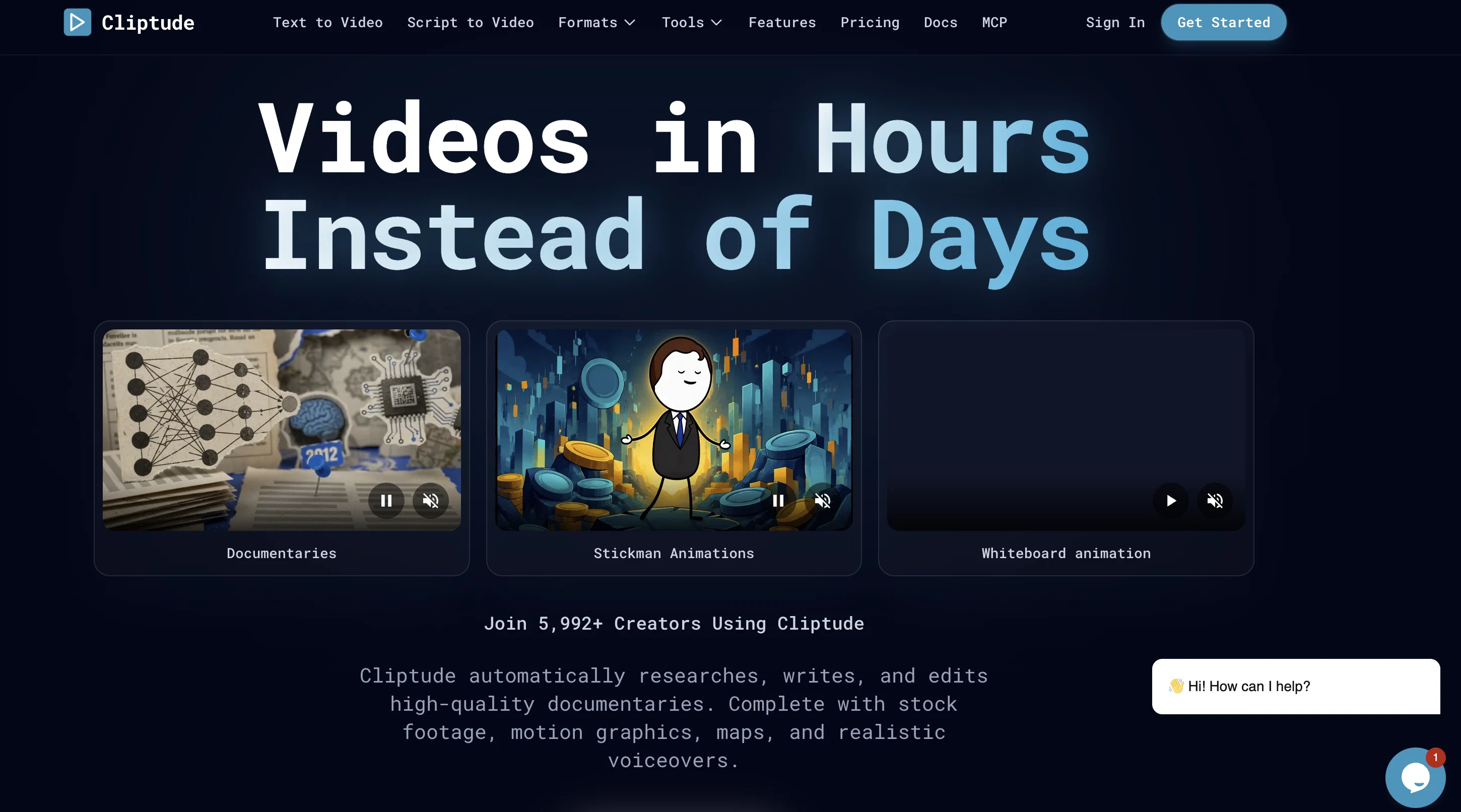
Cliptude is an AI-powered tool designed to convert ideas or scripts into video content. Its core functionality revolves around automatic generation of voiceovers, visuals, and final cut editing, creating a polished, ready-to-publish video.
A notable feature of Cliptude is its ability to generate high-quality documentaries autonomously, complete with necessary embellishments like stock footage, motion graphics, and maps enhanced with realistic voiceovers.
The platform does the heavy lifting - from researching and scripting to complex motion graphics design, which streamlines the production flow for creators.
It is designed to understand the context of a described topic, create a well-researched script, source appropriate stock footage, and align everything up to a professional beat.
Additionally, Cliptude also offers smart data visualization, converting the data in your script into maps, flight paths, timelines, or counters. Users maintain complete ownership rights to the videos they create via Cliptude, with the flexibility to download and use them across platforms like YouTube, TikTok, or Instagram.
The tool operates on a usage-based pricing model, with charges based on the length of the generated video.
Best for
Short scenarios where Cliptude tends to shine.
-
Create cinematic videos from any idea automatically.
Example outputs 1
Sample generations and before/after results for Cliptude.
Access & connections
Where you can use Cliptude, and what it plugs into.
Platforms
Integrations
Capabilities
What this tool accepts, produces, and is strongest at.
Input
- Image
- Text
- Video
- Audio
Output
- Audio
- Video
Supported features
- Video Generation
- Deep Research
- Text Generation
- Video Edit
- TTS
- Voice Cloning
- Sound Creation
- Image Generation
- Social Media
- Clipping
Pros & cons
Pros
- Converts ideas into videos
- Automatically conducts research
- Script writing feature
- Automated video editing
- Voiceovers addition
- Utilizes stock footage
- Incorporates motion graphics
- Maps production
Show 26 more
- Data visualization
- Topic to video conversion
- High-quality content production
- Direct download availability
- Full rights retention
- Social media optimized
- Automatically generates documentaries
- Automatically sources footage
- Script to map conversion
- Simple to complex theme conversion
- Automated cinematic content creation
- Facilitates storytelling focus
- Creates charts based on script
- All-in-one platform
- Produces ready-to-publish videos
- Understanding of described topic context
- complex motion graphics design
- Generates flight paths, timelines, counters
- User maintains ownership rights
- Usage-based pricing
- Tailored for YouTube, TikTok, Instagram
- Instant video download
- Separate stems download (audio, video, srt)
- Subscription plans available
- Researches, writes, edits documentaries
- Scales views and revenue
Cons
- Usage-based pricing
- Reliance on accurate initial scripting
- May use non-specific stock footage
- Limited in creative control
- Possible unsatisfactory data visualization
- Lacks advanced video editing capabilities
- No collaboration features for team projects
- Video quality depends on source material
Show 1 more
- No specific social media settings or optimizations
Compare alternatives
Similar tools in the catalog — with a clear reason to open each one.

freebeat AI ✓
FreemiumTurn Music & Ideas into Viral Videos In One Click
Why look Typically cheaper
Full comparison
MagicLight ✓
FreemiumTransform text into captivating videos instantly.
Why look Typically cheaper
Full comparison
HeyGen ✓
FreemiumCreate AI spokesperson videos from text
Why look Typically cheaper
Full comparison
Seedance ✓
FreemiumMulti-shot video generation from text and image.
Why look Typically cheaper
Full comparisonPeople also view
Tools that often show up alongside Cliptude in collections and comparisons.
Seedance ✓
FreemiumMulti-shot video generation from text and image.
MagicLight ✓
FreemiumTransform text into captivating videos instantly.

Kaiber Superstudio ✓
Free TrialAI Video Generation
HeyGen ✓
FreemiumCreate AI spokesperson videos from text
freebeat AI ✓
FreemiumTurn Music & Ideas into Viral Videos In One Click

D-ID ✓
FreemiumCreate AI-generated videos with ease

ResearchMonkey AI | YouTube Summarizer ✓
Free TrialSave Hours of Research in Seconds with 40+ AI Tools

OutlierKit ✓
PaidEnter one channel, see the entire niche.
Releases 1
FAQ 12
What is Cliptude?
How does Cliptude work?
What platforms does Cliptude support?
Does Cliptude generate voiceovers?
What features does Cliptude offer for storytelling?
Can Cliptude conduct research and write scripts automatically?
How does Cliptude handle video editing?
Can I retain the rights of the videos created through Cliptude?
How user-friendly is Cliptude for content creators?
What visual elements can Cliptude add to my videos?
Does Cliptude support the creation of maps and charts based on script data?
How realistic are the AI-generated voiceovers in Cliptude?
Related tools
Recommended

Silo ✓
FreemiumAI ad creative generator for marketers.

Aniv AI ✓
FreemiumTurn story ideas into short dramas with an AI-powered, end-to-end production workflow.

Animon - AI Video Generator ✓
Free TrialAll-in-one AI-powered video creation tool.
MP3 to MP4 AI ✓
Free TrialTurn your audio into stunning music videos.

Cursor ✓
FreemiumAI-powered IDE for faster coding

Whacka ✓
Free TrialTurn ideas into real apps from your phone.