

Image editing 2026 Rank: #1760
ClearCrowds ✓
Any photo. Fixed in one click.
Verdict
A quick read before you dig into the full page.
- Best if
- Any photo. Fixed in one click
- Skip if
- Limited batch editing functionality
- Pick this when
- Removes crowds from photos
Considering Viyou AI Image Generator instead? Compare side by side
Overview
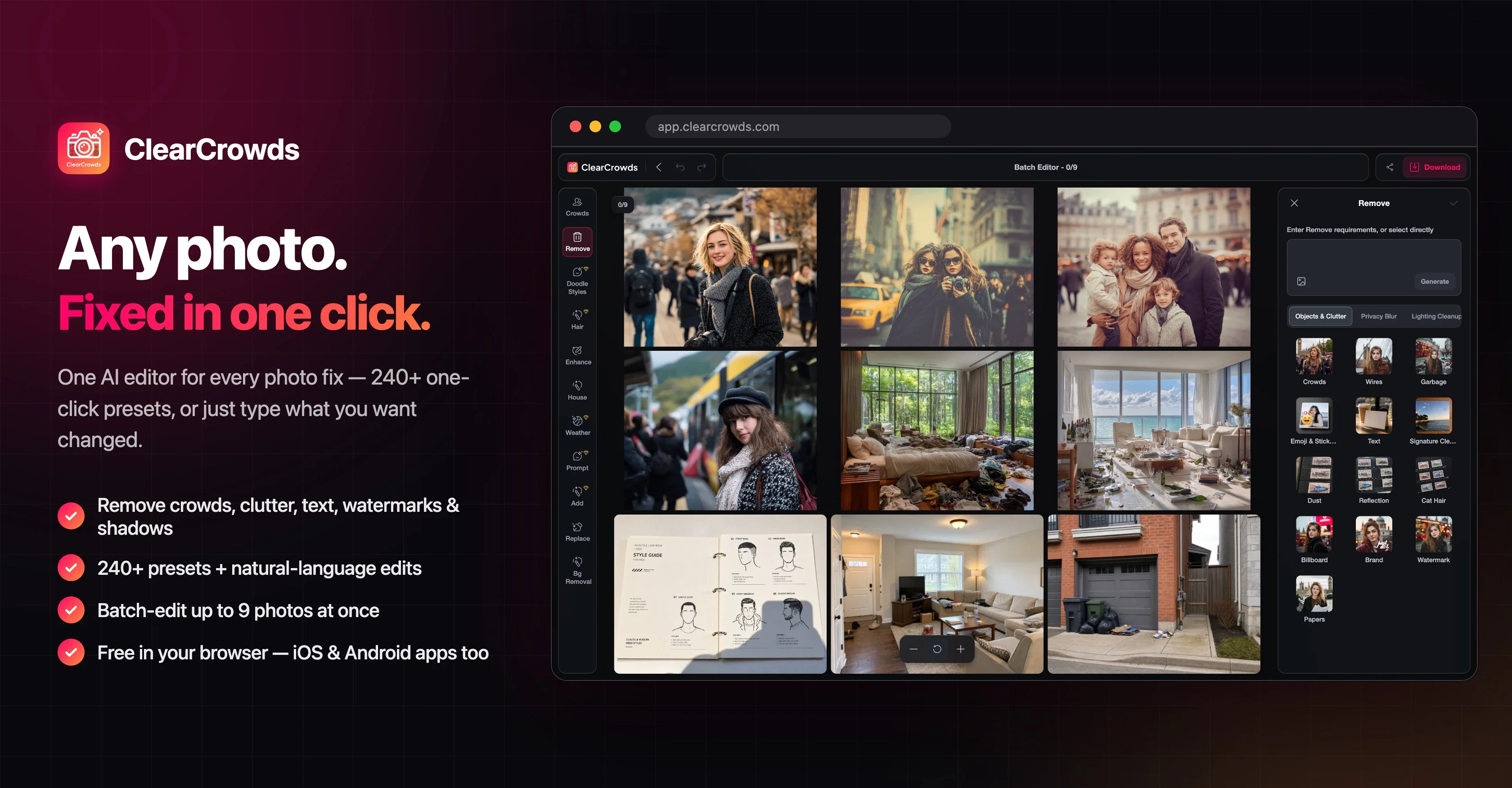
ClearCrowds is an artificial intelligence-based photo editing tool. It offers various features designed to clean, retouch and transform images without the need for a complex editor.
ClearCrowds enables users to remove crowds, glasses, shadows, and text, perform teeth whitening, blur faces, and more. Suitable for travel photography, real estate and interiors, and product and e-commerce, it lets you focus on the elements you care about and remove unnecessary or unwanted details.
Users can edit a batch of photos in one workspace, choosing one cleanup workflow and previewing the set on both desktop and mobile. The platform is designed for quick decisions where users can upload, clean, compare, and then decide if the edited image suffices.
ClearCrowds supports common web image formats such as JPG, PNG, and WebP, and ensures data protection by handling uploaded images strictly for photo cleanup workflow.
It is important for users to review the current app terms before using edited images in commercial campaigns or resale contexts.
Access & connections
Where you can use ClearCrowds.
Platforms
Capabilities
What this tool accepts, produces, and is strongest at.
Input
- Image
Output
- Image
Pros & cons
Pros
- Removes crowds from photos
- Retouches and transforms images
- Edits batch photos
- Suitable for various photography
- Removes glasses, shadows, text
- Professional teeth whitening feature
- Blurs faces for privacy
- Allows detailed photo previewing
Show 27 more
- Supports JPG, PNG, WebP
- Data protection focus
- Introduction to image cleanup
- Removes shadows effectively
- Real estate photo editing
- Doodles and presets available
- ClearCrowds object removal
- Assured data protection
- Easily edits text
- Removes handwritten signatures
- Replaces digits in images
- Real estate declutter option
- Cleans messy edges of product
- Removes room clutter
- Batch photo editor
- Alteration of image details
- Multiple cleanup workflows
- Image transformation feature
- Resale context suitability
- Quick decision making design
- Can edit product images
- Effective teeth whitening
- Before/after examples available
- Simple upload and compare process
- Straightforward editing flow
- Removes distractions from shots
- Blur Faces option for privacy
Cons
- Only supports web image formats
- Resale restrictions in terms
- Limited cleanup workflows available
- Result variations due to scene complexity
- Requires review of each edit
- Insufficient information on data deletion
- Doesn't support all image resolutions
- Limited batch editing functionality
Show 2 more
- No built-in font-matching for text editing
- Manual switch between tools and presets
Compare alternatives
Similar tools in the catalog — with a clear reason to open each one.

Viyou AI Image Generator ✓
FreemiumTransform text and images into stunning videos and visuals.
Free + from $39.99/yr
Full comparison
Img2Img AI ✓
FreemiumTransform any image with AI in seconds.
Why look Typically cheaper
Full comparison

Photoeditor ✓
PaidEnhanced image editing with object and text removal.
from $9.99/mo
Full comparison
Cleanup pictures ✓
FreemiumRemove unwanted elements from photos instantly.
Why look Typically cheaper
Full comparisonReleases 1
FAQ 12
What is ClearCrowds?
How does ClearCrowds work?
Can I easily remove objects using ClearCrowds?
What type of image formats does ClearCrowds support?
How does ClearCrowds ensure data protection?
What features does ClearCrowds offer for travel photography editing?
Is ClearCrowds suitable for real estate and interiors photo editing?
How can I use ClearCrowds for e-commerce product photo editing?
How does the batch photo editing work in ClearCrowds?
Can I use ClearCrowds on both desktop and mobile?
Does ClearCrowds support teeth whitening and face blurring features?
How can I compare the before and after images in ClearCrowds?
Related tools
Recommended

ChatGPT ✓
FreemiumAsk anything, create anything, and move from idea to action.

Automateed ✓
Free TrialCreate eBooks effortlessly with Automateed, the AI-powered writing tool.

Notis ✓
Free TrialThe first WhatsApp assistant that runs on your ChatGPT and Claude subscriptions

ElevenLabs ✓
FreemiumCreate lifelike AI voices for compelling storytelling.

leania.ai ✓
Free TrialMRI scan for Businesses: Find What to Cut, Replace, Automate with AI

Serno ✓
FreemiumCustom AI experts that map what one AI can't