
ChattyDocs ✓
AI assistant for chatting with your documents
Trial; then from $9/mo
Verdict
A quick read before you dig into the full page.
- Best if
- AI assistant for chatting with your documents
- Skip if
- Limited session persistence
- Pick this when
- Chat with documents
Considering DocGPT.io instead? Compare side by side
Overview
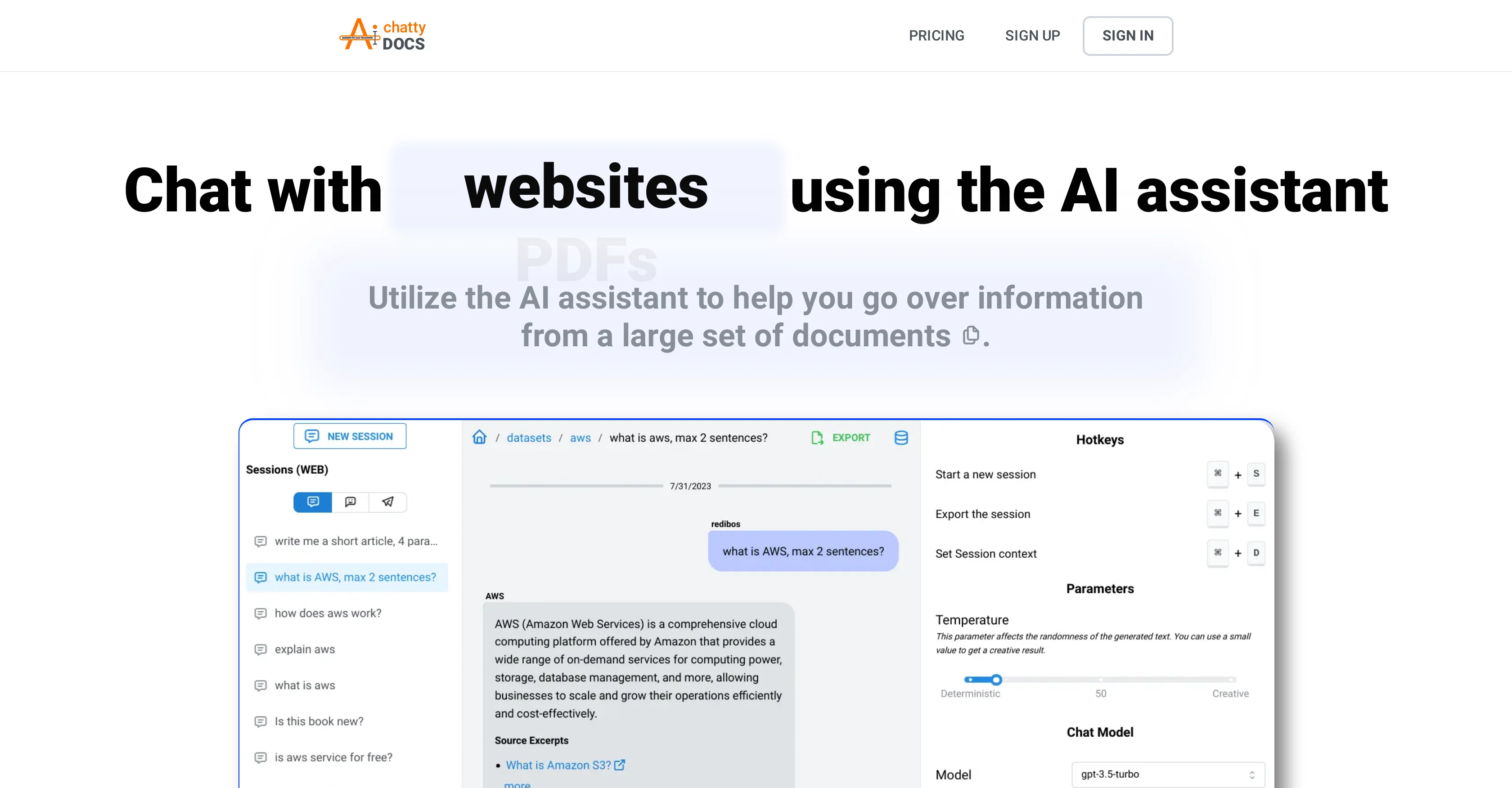
ChattyDocs is an AI-based tool designed to interact with documents, PDFs, and other files, aiding in data management via a conversational approach. It enables users to access information across various platforms, including desktop, mobile, and Telegram.
ChattyDocs allows for flexible data input with options to import files directly from your device or use website links as a data source. The data upload manager facilitates single or bulk uploads, with the ability to add or remove documents at any stage.
To aid in data management, a built-in system tracks the data each file consumes from your subscription quota. For the AI chat function, users can set chat models, control the size of input and output, and moderate the AI's creativity and responsiveness.
The tool enables users to simulate a chosen personality for their AI, which can be guided by system prompts on behavioral patterns. ChattyDocs offers a sharing feature, allowing users to create public datasets accessible via a link.
When querying data, responses include relevant sources, including document name, page number, or website link. Users can conduct multi-session chats, maintain the chat context, and export Q&A sessions.
The tool provides a functionality of persisting your chat sessions, allowing users to pick up where they left off, while also overlooking separate sessions from various chat sources.
This AI assistant amalgamates the user's query, the context, and the information from the dataset to provide comprehensive data interaction.
Access & connections
Where you can use ChattyDocs, and what it plugs into.
Platforms
Integrations
Capabilities
What this tool accepts, produces, and is strongest at.
Input
- API
- Tabular
- Text
Output
- API
- Text
Pros & cons
Pros
- Chat with documents
- Data management features
- Create public datasets
- Telegram bot creation
- GraphQL API integration
- Desktop and mobile support
- Track data usage
- Control chat models
Show 31 more
- Flexible data input
- Bulk upload capability
- Datasets sharing
- References for responses
- Multi-session chats
- Chat context maintenance
- Persisting chat sessions
- Q&A export feature
- Usage across sources
- Datasets usage tracking
- Background data indexing
- Dataset customization options
- Compatibility with Telegram
- Data extracted from websites
- Dataset deletion flexibility
- Upload from device
- Multi-platform availability
- Document-specific responses
- Background file processing
- Automated website data extraction
- Data input from website links
- Queries linked with sources
- Session preview across platforms
- Control context and history sizes
- Dataset property control
- Built-in data upload manager
- Chat session pick up
- Manage data subscription quota
- Preserve chat context
- Document organized data retrieval
- Manage multiple chat sources
Cons
- Limited to textual data
- Only supports Telegram bot
- Requires manual dataset creation
- Limited customization options
- No real-time document editing
- Potential information overload
- Consumes subscription quota
- Limited input-output control
Show 2 more
- Download dependent on original link
- Limited session persistence
Compare alternatives
Similar tools in the catalog — with a clear reason to open each one.

DocGPT.io ✓
Free TrialOnline assistant for creating and analyzing documents.
Why look Typically cheaper
Full comparison
docAnalyzer ✓
FreemiumTurn document overload into work worth putting your name on
Why look Typically cheaper
Full comparison
Ask Your PDF ✓
FreemiumChat with your PDFs and extract valuable insights
Free + from $11.99/mo
Full comparison


Humata ✓
FreemiumChat your way through long documents instantly.
Why look Typically cheaper
Full comparisonReleases 1
FAQ 12
What is ChattyDocs?
How does ChattyDocs enable me to interact with my documents?
Can I use ChattyDocs on both my desktop and mobile?
What is the function of the AI assistant in ChattyDocs?
How does ChattyDocs allow for data management?
Can I add or remove documents from a dataset in ChattyDocs?
What is a public dataset and how can I create one in ChattyDocs?
Can I create a Telegram bot with ChattyDocs?
How do I upload files to ChattyDocs?
What are the features of the built-in system for tracking data in ChattyDocs?
How can I use ChattyDocs to chat with my datasets?
Can I control the size of input and output in ChattyDocs?
Related tools
Recommended

Hyperis ✓
FreemiumOrganized task prioritization.

LearningStudioAI ✓
Free TrialAI-powered authoring tool for effortless online course creation.

Easy-Peasy.AI ✓
FreemiumAccelerates content creation.

Magic Eraser ✓
FreemiumRemove unwanted things in seconds.

ChatDOC ✓
FreemiumChat with documents for instant, cited answers.

myReach ✓
PaidEfficient personal knowledge organization and retrieval