

Cartoonize AI ✓
Turn photos into AI-powered cartoons instantly.
Trial; then from $7.99/mo
Verdict
A quick read before you dig into the full page.
- Best if
- Turn photos into AI-powered cartoons instantly
- Skip if
- 24MB file size limit
- Pick this when
- Web-based tool
Considering Vizbull instead? Compare side by side
Overview
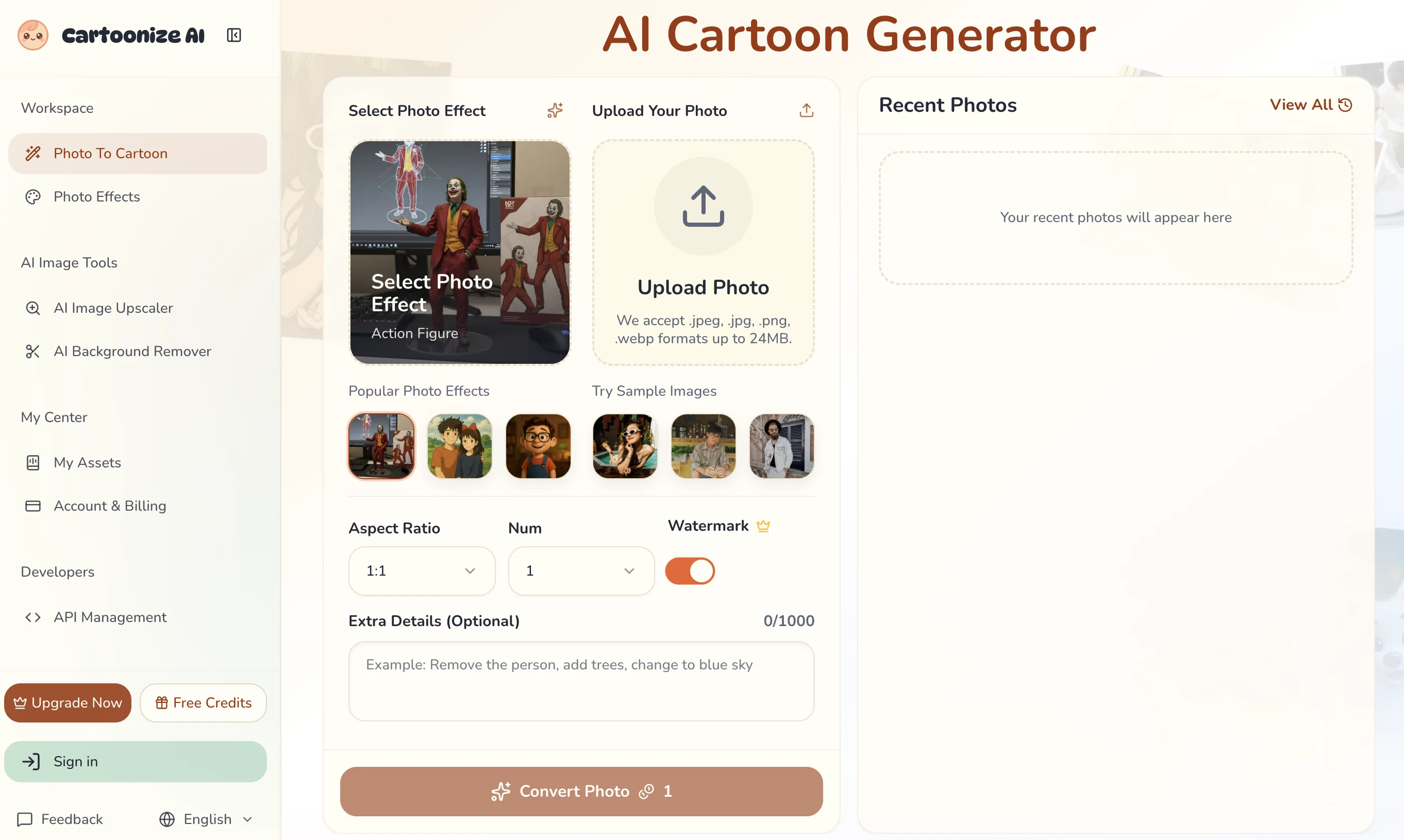
Cartoonize AI is an online tool that uses artificial intelligence to transform photos into vibrant, AI-generated cartoons. The tool can be applied to pictures of people, landscapes, and even pets, converting them into various artistic styles, from the look of classic anime, modern 3D animation to comic book style, and more.
Landscapes can be transformed into epic fantasy backdrops, serene beach sunset into a beautiful watercolor painting, or a bustling cityscape into a futuristic anime scene.
Users can also convert their beloved pet's photo into an animated cartoon character. The tool supports multiple types of photo formats including .jpeg, .jpg, .png, and .webp and allows users to adjust transformation parameters like the image's aspect ratio.
The interface is user-friendly, enabling stunning cartoon transformations in four simple steps: upload your photo, describe your desired changes (optional), fine-tune transformation parameters, and generate/download your new image.
The tool's AI engine, while making the complex transformations, preserves the core composition and recognizable elements of the original image.
Access & connections
Where you can use Cartoonize AI.
Platforms
Capabilities
What this tool accepts, produces, and is strongest at.
Input
- Tabular
- Image
Output
- Image
Highlights
- API
Supported features
- Image Edit
- Styling
- API
Pros & cons
Pros
- Web-based tool
- Various style options
- Preserves prominent photo features
- Adjustable settings
- Quick generation
- High-resolution output
- User-friendly interface
- Supports multiple formats
Show 36 more
- Supports .jpeg, .jpg, .png, .webp
- Retains original image composition
- Customizable output count
- Efficient aspect ratio adjustment
- Supports landscape transformation
- Supports pet cartoonization
- Instant cartoon transformation
- Wide range of styles
- Descriptive transformations
- Can provide extra transformation details
- Processes images under 30 seconds
- Can convert to 3D Animation Style
- Supports Comic Book Style
- Converts to Japanese Anime
- Maintains original photo's mood
- Can transform into Pixel Art
- Supports transformations to Traditional Art
- Can convert to Format Printmaking
- Can convert to Vintage & Retro styles
- Mimics numerous popular Animation Studios' styles
- Can convert to Children's Book style
- Supports customizable aspect ratio
- Photos can be transformed into Games & Pixel
- Multilingual support
- Supports conversion to numerous Artistic Styles
- Preserves intelligent structure of image
- Can process multiple images simultaneously
- Supports up to 24MB files
- Professionally usable hi-resolution output
- Free credits for usage
- Feedback option available
- Comprehensive tutorial available on page
- Detailed FAQ section
- Unlimited creative possibilities
- Commercial usage rights for premium users
- No daily usage restrictions
Cons
- Limited file format support
- 24MB file size limit
- 40964096 pixel limit
- Processing time up to 60s
- Specific lighting needed
- High resolution for premium only
- Commercial rights for premium users
- No automatic batch processing
Show 2 more
- Free version has limits
- Requires user input for best results
Compare alternatives
Similar tools in the catalog — with a clear reason to open each one.
Vizbull ✓
Free TrialTurn any photo into stunning cartoon or artwork with AI in seconds
Why look Stronger for image work
Full comparison
ImageToCartoon ✓
FreemiumTransform photos into cartoons with AI.
Why look Typically cheaper
Full comparison
Colorcinch ✓
FreemiumInstantly transform photos into cartoons online.
Free + from $8.99/mo
Full comparison
AICartoonGenerator ✓
PaidTurn text or photos into fun cartoons with AI
Why look Typically cheaper
Full comparison
ToonCrafter ✓
FreemiumBring cartoons to life with AI-powered animation
Free + from $9.99/mo
Full comparison
Releases 1
FAQ 12
What is the maximum file size Cartoonize AI can process?
How long does it take Cartoonize AI to convert a photo on average?
Is there any limitation to the number of photos I can cartoonize with Cartoonize AI?
Can I use Cartoonize AI for commercial applications?
Which Image formats are supported by Cartoonize AI?
What type of photos does Cartoonize AI handle best?
Can I control how much the photo is changed by Cartoonize AI?
What are the different cartoon styles offered by Cartoonize AI?
Is there a way to describe the transformation I want Cartoonize AI to apply?
Is there an option to adjust the settings in Cartoonize AI?
What are the steps for using Cartoonize AI to turn my photo into a cartoon?
How well does Cartoonize AI maintain the prominent features of a picture?
Related tools
Recommended

Cursor ✓
FreemiumAI-powered IDE for faster coding

Lovable ✓
Free TrialBuild software products using chat

Github Copilot ✓
FreemiumAI-powered coding assistant for faster development

Base44 ✓
FreemiumLet’s make your dream a reality. Right now.

SureThing.io - "OpenClaw" for Beginners ✓
FreemiumFirst General AI Agency. Designed for long-horizon tasks.
ImageUpscaling.net ✓
FreeUpscale images by 400% with AI, for free.