

AICartoonGenerator ✓
Turn text or photos into fun cartoons with AI
from $5.9
Verdict
A quick read before you dig into the full page.
- Best if
- You are social media users and need: Transforming selfies into cartoon avatars
- Skip if
- Limited to SDXL technology
- Pick this when
- Turns text into cartoons
Considering Vizbull instead? Compare side by side
Overview
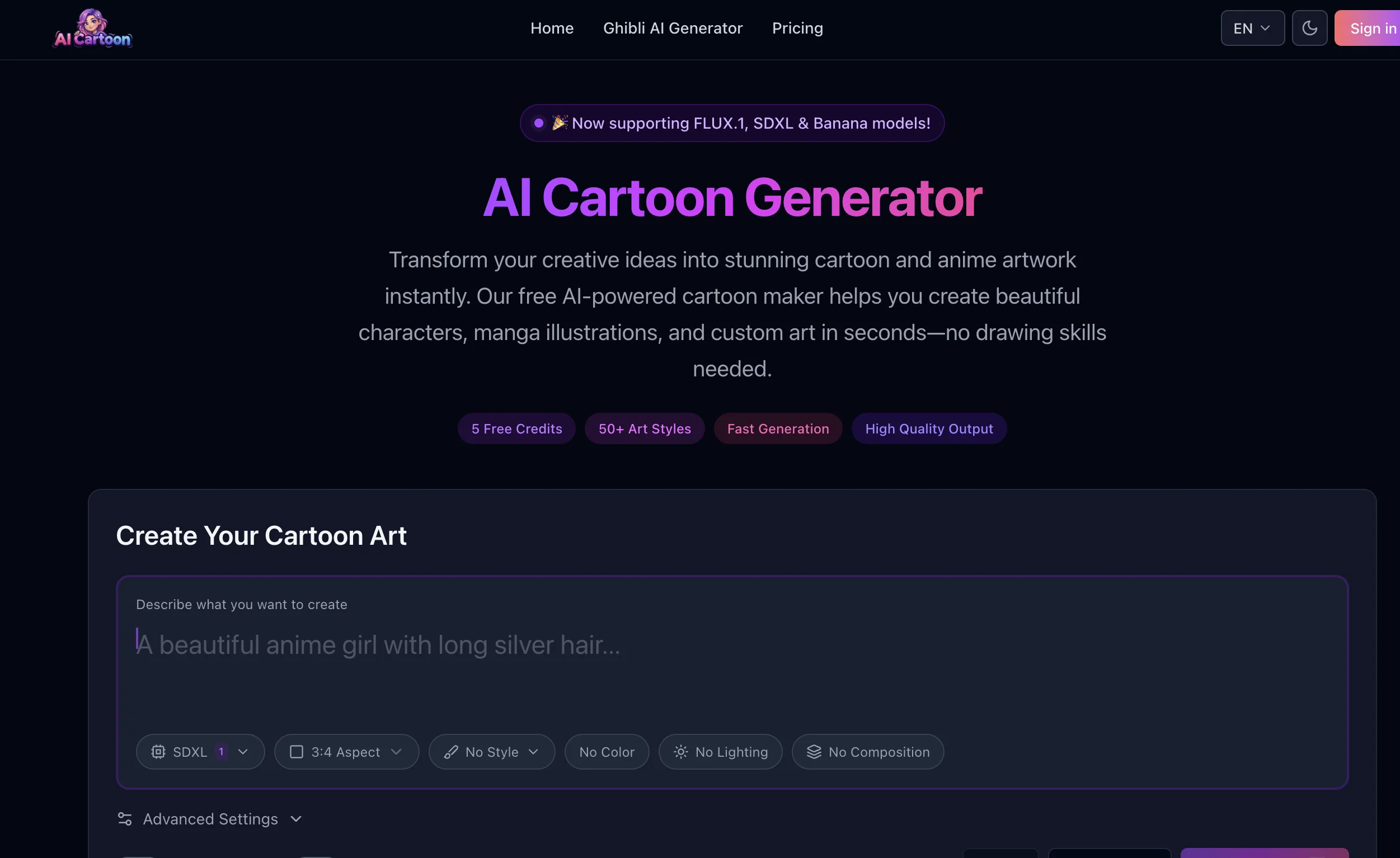
The AI Cartoon Generator is a creative tool that uses artificial intelligence to turn text descriptions into unique cartoon images. This tool is ideal for those passionate about animation and artistic creation.
It is user-friendly and does not require any professional drawing or design skills, making it accessible to everyone. The AI Cartoon Generator features a text input mode, which can be manipulated according to your needs to ensure the output matches your creative vision.
Once you input the text and click 'Generate', the AI processes your request and begins crafting a cartoon image based on your input. The tool is also highly versatile with a range of style options open to the users, from traditional anime to contemporary chic.
One of the key features of AI Cartoon Generator is its use of the latest in AI technology, the SDXL (Stable Diffusion with Extra Langevin) model, which helps generate high-quality and diverse cartoon images directly from text descriptions.
This technology ensures that every created cartoon is unique and exhibits an impressive level of artistic finesse that was once reserved for professional artists.
While the tool currently does not support image uploads, efforts to continually innovate and improve the AI Cartoon Generator to include more captivating features and styles are ongoing.
Best for
Short scenarios where AICartoonGenerator tends to shine.
-
Transforming selfies into cartoon avatars
Best for Social media users
-
Creating cartoon versions of family photos
Best for Content creators
-
Generating unique characters for social media content
Best for Educators
-
Making thumbnails for videos
Best for Game developers
-
Creating character prototypes for game development
Best for Marketing professionals
-
Generating cartoons from text descriptions
Best for Thumbnail creators
Example outputs 1
Sample generations and before/after results for AICartoonGenerator.
Access & connections
Where you can use AICartoonGenerator.
Platforms
Capabilities
What this tool accepts, produces, and is strongest at.
Input
- Text
Output
- Image
Pros & cons
Pros
- Turns text into cartoons
- User-friendly interface
- No professional skills required
- Highly versatile styles
- Uses SDXL model
- Generates high-quality cartoons
- Output are diverse
- Exhibits artistic finesse
Show 43 more
- Continuous innovation
- Turns moments into cartoons
- Adjust settings to needs
- Preview picture before downloading
- Option to download image
- Can specify color schemes
- Can define character traits
- Ability to save image
- Unique social media avatars
- Suitable for game character designs
- Drives personal amusement
- Effortlessly turns text to cartoons
- A variety of styles
- Interface designed for ease of use
- Transforms descriptions into images
- Creates fine cartoon images
- No restrictions on scene types
- Supports variety of art styles
- User-friendly for beginners
- Creates diverse backgrounds and landscapes
- Suits classic to modern styles
- Every creation is unique
- Unparalleled creative experience
- Inspires unique artwork
- Unlimited number of cartoon-style images
- Produces images for commercial use
- Creates high-resolution images
- Character customization features
- Advanced technology best quality
- Tool achieves artistic vision
- Perfect tool for animation enthusiasts
- Allows detailed cartoon creation
- Styles range from anime to chic
- No traditional drawing skills needed
- Useful for personal and commercial use
- Remains Available for free
- Ongoing innovative improvements
- Creates images in seconds
- Perfect for showcasing creative skills
- Creativity without boundaries
- Transforms any text into art
- Fast generation process
- Easy saving process
Cons
- Doesn't support image uploads
- Limited to SDXL technology
- No support for animations
- Cannot undo generated images
- No MacOS or Linux support mentioned
- High-detail requests may fail
- Doesn't support multiple languages
- No real-time preview before generation
Show 2 more
- No change log for updates
- No API for third-party integrations
Compare alternatives
Similar tools in the catalog — with a clear reason to open each one.
Vizbull ✓
Free TrialTurn any photo into stunning cartoon or artwork with AI in seconds
Why look Stronger for image work
Full comparison
ImageToCartoon ✓
FreemiumTransform photos into cartoons with AI.
Why look Freemium alternative
Full comparison
Colorcinch ✓
FreemiumInstantly transform photos into cartoons online.
Why look Freemium alternative
Full comparison
ToonCrafter ✓
FreemiumBring cartoons to life with AI-powered animation
Why look Freemium alternative
Full comparison
Neural Frames Cartoon Generator ✓
FreemiumTransform photos into vibrant AI cartoons instantly.
Why look Freemium alternative
Full comparison
Cartoon Selfie ✓
PaidTurn photos into cartoon selfies with one click
Why look Typically cheaper
Full comparisonPeople also view
Tools that often show up alongside AICartoonGenerator in collections and comparisons.
Vizbull ✓
Free TrialTurn any photo into stunning cartoon or artwork with AI in seconds
ToonCrafter ✓
FreemiumBring cartoons to life with AI-powered animation
Neural Frames Cartoon Generator ✓
FreemiumTransform photos into vibrant AI cartoons instantly.
Colorcinch ✓
FreemiumInstantly transform photos into cartoons online.
ImageToCartoon ✓
FreemiumTransform photos into cartoons with AI.
Cartoon Selfie ✓
PaidTurn photos into cartoon selfies with one click
Toonly AI ✓
PaidEdit and generate images with AI prompts instantly.

TheCartoonist.Studio ✓
Free TrialTurn your photo into a studio-quality cartoon portrait.
Releases 1
Imported reviews 3
Weird cartoon movie trailer from 1920
Terrible, they don't allow you to test it, they won't provide refunds, had to pay to try and turn a picture into a cartoon styled picture, and with the 20 credits I paid for I could not get it anywhere near what the picture resembled.
I tried a Ghibli style character going to work and I am quite impressed with the output, especially considering how Ghibli has a very specific drawing style and I wanted to check if it would be able to emulate it. Will save it for future use!
FAQ 12
What is the AI Cartoon Generator?
How do you use the AI Cartoon Generator?
Can the AI Cartoon Generator create a cartoon image from a text description?
What kind of styles does the AI Cartoon Generator support?
What is the SDXL model in the AI Cartoon Generator and how does it work?
Can I upload images to the AI Cartoon Generator?
Are there any restrictions on the number of images I can create with the AI Cartoon Generator?
Can the AI Cartoon Generator support a range of style options from traditional anime to contemporary chic?
Does AI Cartoon generator require professional drawing or design skills?
Are there any updates announced to improve AI Cartoon Generator in the future?
Is AI Cartoon Generator user-friendly for beginners?
How can I manipulate the text input to match my output needs?
Related tools
Recommended

Otio ✓
FreemiumFastest Way To Read & Write - Your Research Focused AI Workspace

LearningStudioAI ✓
Free TrialAI-powered authoring tool for effortless online course creation.

IllumiChat ✓
FreemiumFrom Ticket Backlog to Instant Answers Powered by AI

VenturusAI ✓
FreemiumBusiness idea analysis and reporting.

TutorAI ✓
FreemiumInstant knowledge on any topic

Transcript LOL ✓
FreemiumUnlimited transcripts, summaries, 99.8% accuracy, speaker recognition, superfast