

Short videos vv2.0
Bytecap ✓
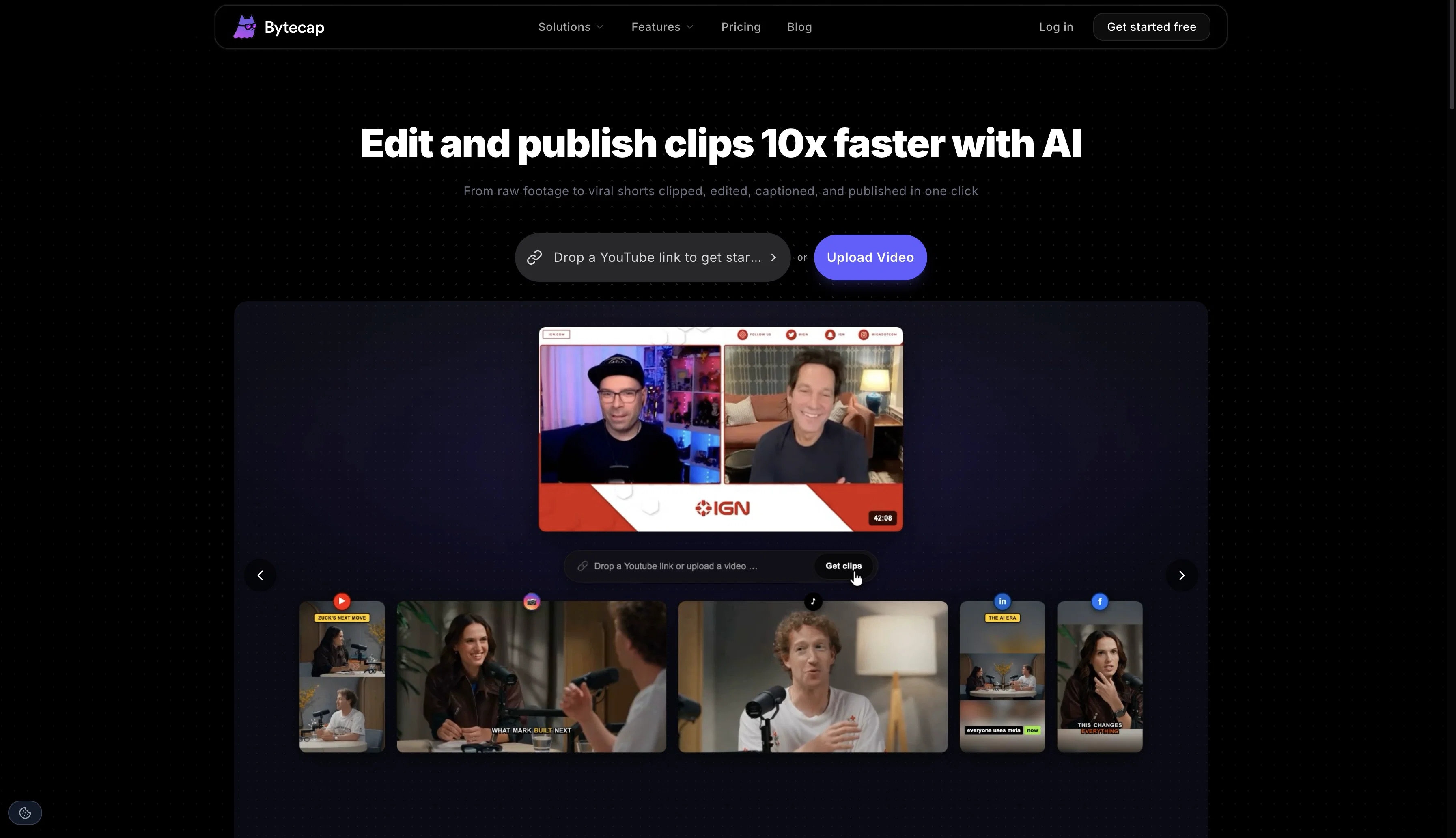
Edit and publish clips 10x faster with AI
Verdict
A quick read before you dig into the full page.
- Best if
- You are content creators and need: Turning long videos into engaging short clips for YouTube Shorts and TikTok
- Skip if
- Lacks Voice dubbing
- Pick this when
- Rapid caption creation
Considering Opus Clip instead? Compare side by side
Overview







Bytecap is the all in one AI content platform that helps creators, businesses, and teams turn one video into weeks of content.
Import a YouTube channel, paste a link, upload a video, or start with just an idea. Bytecap finds the best moments, edits them automatically, adds captions, creates thumbnails, schedules posts, and tracks performance across every platform.
No switching between five different tools. Everything happens in one workflow.
✂️ AI Clipping That Understands Your Content
Magic Clips analyzes your video using speech, motion, scene changes, facial activity, pacing, and engagement signals to find the moments people are most likely to watch and share.
Need something specific?
Search naturally with prompts like:
"Funniest moments"
"Best tips"
"Every goal"
"Biggest reactions"
"Key takeaways"
Perfect for podcasts, YouTube videos, interviews, gaming, sports, education, business content, streams, and videos with little or no dialogue.
🎬 AI Captions Built for Retention
Create highly accurate animated captions that keep viewers watching.
40+ supported languages
Word by word animations
Emoji support
Highlight important words
Multiple caption styles
Fully customizable fonts, colors, layouts, and branding
Built for TikTok, Reels, Shorts, LinkedIn, X, Facebook, and more.
🎞️ AI Video Editor
Edit videos in minutes instead of hours.
Automatically remove silences, reframe speakers, track faces, add zooms, insert B roll, generate hook titles, create thumbnails, and fine tune everything with a powerful timeline editor.
Export in up to 4K at 60 FPS.
🤖 Create Faceless Videos From a Prompt
Start with nothing but an idea.
Bytecap generates scripts, AI voiceovers, visuals, captions, and fully editable videos that are ready to publish or customize.
Perfect for educational channels, storytelling, news, motivation, business content, and social media.
🎥 Auto B Roll
Instantly make your videos more engaging.
Bytecap automatically finds the best places to insert relevant B roll, images, overlays, and visual effects based on what is being said.
You stay in control and can adjust everything with a click.
📅 Publish and Schedule Everywhere
Create your content once, then publish everywhere.
Schedule or instantly post to:
TikTok
Instagram Reels
YouTube Shorts
X
Manage every platform from one content calendar without downloading and uploading the same video over and over.
📊 Analytics That Show What's Working
Track performance across your social channels in one dashboard.
See which videos perform best, compare platforms, monitor growth, and understand what content your audience actually watches.
Stop guessing. Start creating more of what works.
🎨 More Than Just Editing
Bytecap includes everything you need to grow your content.
AI Hook Title Generator
Thumbnail Generator
Brand Kit
AI Playground for image and video generation
Content Calendar
Team workflows
Automatic YouTube imports
One click publishing
Built For Every Creator
Whether you're creating content for yourself or clients, Bytecap helps you produce more videos in less time.
Perfect for:
Content creators
Podcasters
YouTubers
Streamers
Agencies
Marketers
Coaches
Educators
Real estate professionals
Ecommerce brands
Businesses
Influencers
Why Bytecap
Instead of paying for separate clipping, captioning, editing, scheduling, analytics, thumbnail, and AI video tools, Bytecap combines everything into one platform.
Spend less time editing.
Publish more consistently.
Grow faster.
Create once. Clip. Caption. Edit. Publish. Analyze. Repeat.
- Ai Video Generator
- Ai Clipping
- Auto Subtitles
- Ai Image Generator
- Auto B-rolls
- Cross-posting
Best for
Short scenarios where Bytecap tends to shine.
-
Turning long videos into engaging short clips for YouTube Shorts and TikTok
Best for Content creators
-
Creating faceless videos with AI voiceovers, images, and captions
Best for Video editors
-
Generating captions for videos to increase accessibility and engagement
Best for Podcasters
-
Creating personalized video tours for real estate agents
Best for Streamers
-
Developing clear and accessible healthcare content
Best for Real estate agents
-
Producing engaging educational lessons with AI captions and scripts
Best for Healthcare professionals
-
Boosting marketing campaigns with engaging AI videos
Best for Educators
-
Sharing epic gameplay and walkthroughs with eye-catching captions and AI effects
Best for Marketers
Example outputs 1
Sample generations and before/after results for Bytecap.
Access & connections
Where you can use Bytecap, and what it plugs into.
Platforms
Integrations
Capabilities
What this tool accepts, produces, and is strongest at.
Input
- Image
- Text
- Video
- Audio
Output
- Audio
- Video
- Text
- Image
Supported features
- Clipping
- Thumbnails
Pros & cons
Pros
- Rapid caption creation
- Highly accurate speech recognition
- Interactive platform
- Caption customization
- Personalization options
- Font adjustment
- Color adjustment
- Effects customization
Show 41 more
- Caption position control
- Caption size control
- Automatic language identification
- Multilingual support
- Editable captions post-generation
- Fast results provision
- Sync of sounds with captions
- Enhancement to video content
- Highly appreciated by professionals
- Boosts engagement
- Improves viewership
- Useful for audience retention
- Reliable tool
- Secure processing
- Efficient for professional captioning
- Beneficial for video editors
- Advantageous for content creators
- Useful for podcasters
- Optimal for streamers
- Editable Timestamps
- Customizable to fit brand
- Various fonts
- Variety of colors
- Impressive effects
- Strategic caption positioning
- Availability of customer support
- Accessibility without technical skills
- Freeing up creative resources
- Broadening content reach
- Syncing sounds feature
- Brand style matching
- 99% Accuracy rate
- Seamless editing
- Live updates feature
- Reliable for videos
- Manipulatable subtitles after creation
- Support for all devices
- User-friendly interface
- Platform independents
- High Engagement tool
- Custom branding in captions
Cons
- Lacks Voice dubbing
- Lacks real-time captioning
- No API integration
- No offline functionality
- Dependent on internet speed
Compare alternatives
Similar tools in the catalog — with a clear reason to open each one.

Opus Clip ✓
FreemiumAI-powered livestream studio for explosive growth
Why look Typically cheaper
Full comparison
HiClip AI ✓
Free TrialDrop 1 Video, Get 10 Hooked Clips.
Why look Typically cheaper
Full comparison
Shortmake ✓
PaidFast viral video generation and editing.
Why look Typically cheaper
Full comparison
AI Video Cut ✓
Free TrialTransform long videos into viral shorts with AI.
Why look Typically cheaper
Full comparison
Postless ✓
PaidAI-generated UGC videos on autopilot for viral marketing.
Why look Typically cheaper
Full comparison
Klap ✓
PaidGenerate viral short-form videos from YouTube content in one click.
Why look Typically cheaper
Full comparisonPeople also view
Tools that often show up alongside Bytecap in collections and comparisons.

Videoinu ✓
FreemiumCreate Your First Viral Video and Start YouTube Monetization with Multilingual Content.

ThumbnailCreator.com ✓
Free TrialCreate eye-catching YouTube thumbnails in seconds.
OTO work ✓
FreemiumFinancial simplicity for freelancers.

Opencord AI, 24/7 Social Media Engagement via Reply ✓
Freemium24/7 Creative Agents Generating Value on Social Media

Ocoya ✓
Free TrialYour AI-powered hub for seamless social media scheduling and content creation.

Marketing Wizard ✓
Free TrialExtract hot leads and insights from Reddit conversations

Kvants ✓
UnknownAI-powered hedge fund strategies for everyday investors.

Imagetocaption.ai ✓
Free TrialGenerated captions for social media images
Releases 2
Bytecap began as a fast, accurate, and customizable AI captioning tool. Now with V2, it has transformed into a complete AI video studio making viral short form videos easier, smarter, and more powerful than ever.
Creators, editors, streamers, marketers, and anyone with content to share can now turn videos into scroll stopping shorts in just minutes.
✨ What’s New in Bytecap v2
🎭 Faceless Videos
Go viral without showing your face. Create motion style AI image reels (like the trending “talking gorilla” videos), add background footage, captions, voiceovers, and more all in one place.
✂️ Magic Clips
Turn long videos into instant highlights. Magic Clips finds the best moments, auto reframes speakers, and delivers ready to post shorts built to capture attention.
⚡ AI Automation
Skip the manual work. Publish directly to TikTok and YouTube with one click, and let Bytecap handle the busywork.
🎛 Dynamic Layouts & Resizing
Fill, Fit, Split, or Gameplay. Switch layouts instantly and repurpose your content for every platform: TikTok (9:16), Instagram (1:1), Reels (4:3), or YouTube (16:9).
🎶 Smarter Audio & Effects
Boost engagement with audio. Add copyright free music, upload your own, and layer trending sound effects perfectly synced to captions.
🏅 Honorable Mentions
AI Hook Title - Auto generate scroll stopping titles that hook viewers instantly.
AI Reframe — Keep every speaker in frame with smart auto centering and stacking.
Advanced Caption Customization — 20+ templates, emojis, speaker detection, and fine tuning options.
Quick Repurposing — Resize once, publish everywhere.
Simple Editing — Drag and drop controls for captions, layouts, timing, and effects.
⚡ Always Improving
Bytecap v2 is just the beginning. The app is updated daily with new features, constant improvements, and smarter AI tools, all designed to make it effortless to create the best videos on the internet.
👉 Start creating with Bytecap v2 today and turn your content into viral videos.
Imported reviews 11
the limit is toooooo low
this has completely changed my upload schedule. i can turn one 20 minute vlog into 6 shorts in like 15 minutes. my shorts views are actually outperforming my long form now which is crazy
They only allow videos above 5 mins long. What does that even mean?
Worked great for carving my podcast into TikTok clips. captions and voices are on point. I just wish timeline tweaks were finer.
Bro, Bytecap is straight fire. Dropping a full vid and getting hype‑ready clips with captions and AI voice in seconds? Unreal.
Not very practical unless you have upgraded. Nice form of captioning but frustrating how they limit the tools additionally there is no tool to exclude some parts of the video from captioning.
payantt! nothing free
it says I don't have permission to use it, company email. Does it not work in India?
Can i upload my own font?
The caption styles are really nice but id like to see more templates
Generating captions was super fast like seconds. Wish they had Anton font though
FAQ 12
How does ByteCap work for creating video captions?
What features does ByteCap offer for customization of captions?
How is the automatic language identification feature in ByteCap useful?
What is the typical processing time for ByteCap to generate captions?
Can I edit the captions after they are generated by ByteCap?
Can ByteCap sync captions with trendy sounds? How?
What makes ByteCap a reliable option for video captioning?
Who are the major users of ByteCap?
How can video editors, streamers and content creators benefit from ByteCap?
How does ByteCap maintain security for processed videos?
Can ByteCap support multiple languages for video captioning?
Can ByteCap be used for podcasting and streaming services?
Related tools
Recommended

PrometAI ✓
FreemiumTurn ideas into viable reality with AI business plan generator.

IllumiChat ✓
FreemiumFrom Ticket Backlog to Instant Answers Powered by AI

Mindsmith ✓
FreemiumPlatform for building and sharing eLearning content

Automateed ✓
Free TrialCreate eBooks effortlessly with Automateed, the AI-powered writing tool.

Transcript LOL ✓
FreemiumUnlimited transcripts, summaries, 99.8% accuracy, speaker recognition, superfast

B12 AI Website Builder ✓
FreemiumAI-powered website builder