

Blue - ChatGPT for Mac ✓
ChatGPT's power, right in your Mac apps.
Trial; then from $5
Verdict
A quick read before you dig into the full page.
- Best if
- ChatGPT's power, right in your Mac apps
- Skip if
- AppVision scope limited
- Pick this when
- MacOS integration
Considering FridayGPT instead? Compare side by side
Overview
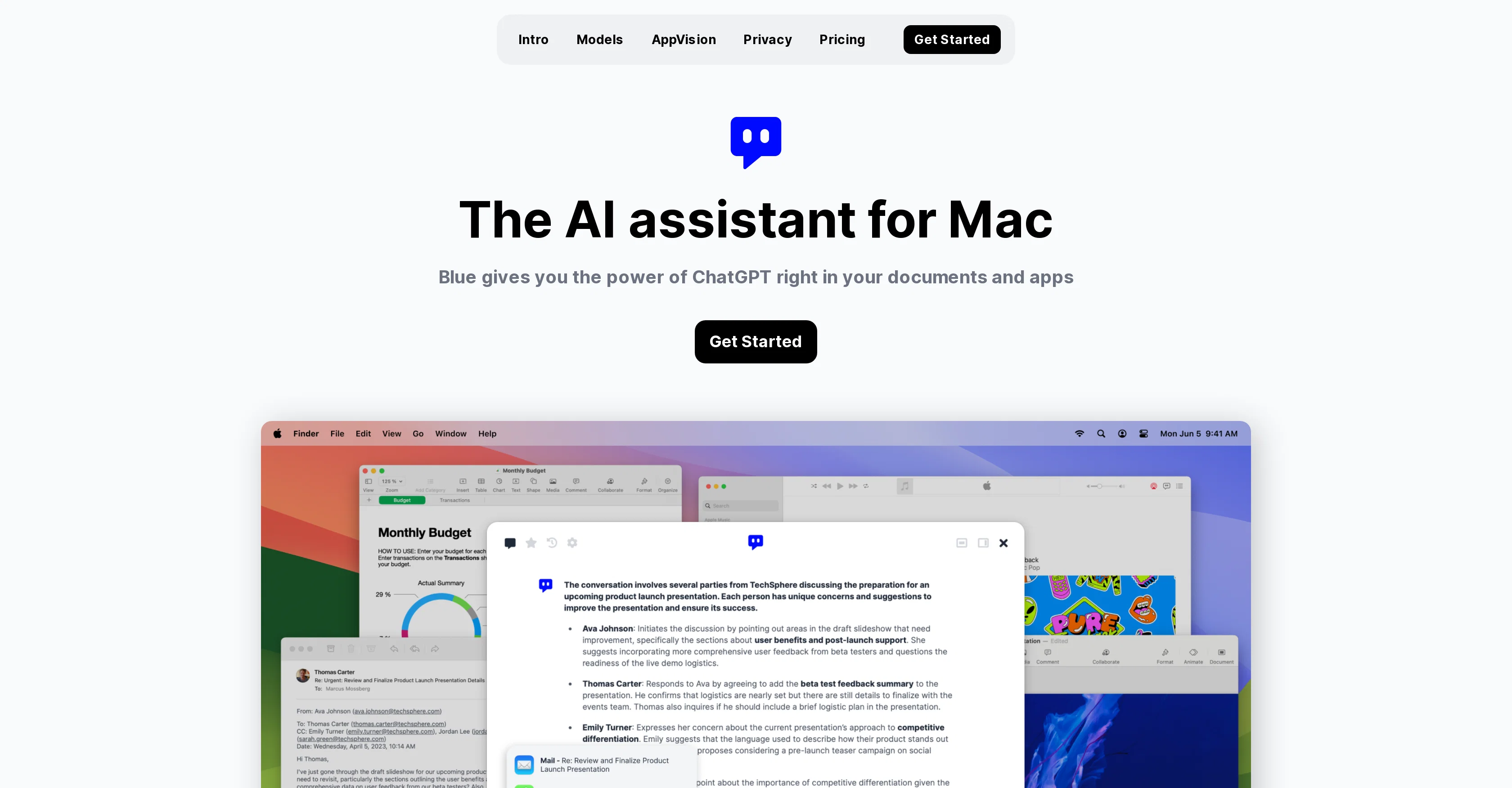
Blue is an AI assistant built for MacOs that integrates the power of ChatGPT into your applications and documents. It is always available on your Mac and can be activated by pressing option + space.
Blue can analyze, summarize or translate the content on your screen within seconds, making it a helpful tool in coding, brainstorming, or report writing.
It supports in-app interactivity and uses the latest AI models such as GPT-4 for enhanced user experience. Using AppVision, Blue comprehends your data context and provides better assistance by understanding what you're working on.
In terms of data privacy, Blue is GDPR-compliant and safe to use in a professional setting; it ensures data is stored on-device and encrypted with AES-256 using your Apple ID.
In terms of execution, Blue offers a seamless interaction with your apps and data without the need for browser tabs or copy-pasting. It also uses AppVision to capture intricate spatial information, further enriching the user experience.
All your data, including messages and files, are stored and encrypted on your Mac. Blue ensures user data is not used for model development, adhering to strict privacy standards.
Powered by Microsoft, this AI assistant is suitable for both individual and professional use and offers different pricing plans. It integrates neatly into your daily workflow, increasing general productivity and task output quality while reducing mundanity.
Access & connections
Where you can use Blue - ChatGPT for Mac.
Platforms
Capabilities
What this tool accepts, produces, and is strongest at.
Input
- Text
Output
- Text
Pros & cons
Pros
- MacOS integration
- Activated with keypress
- On-screen content analysis
- Summarizes content
- Translates content
- Helpful for coding
- Aids in brainstorming
- Assists in reports
Show 41 more
- In-app interactivity
- GPT-4 model usage
- Data comprehension with AppVision
- Functions without browser
- No copy-pasting required
- Context-based assistance
- GDPR compliant
- On-device data storage
- AES-256 encryption
- Data isn't used for development
- Microsoft powered
- Individual and professional use
- Various pricing plans
- Work productivity increase
- Enhances task output quality
- Reduces work mundanity
- Apple ID security feature
- Captures spatial information
- Encrypted messages and files
- Seamless app interaction
- Easily integrated workflow
- Different performance models
- Automatic model switch
- AppVision gives better context
- Intricate spatial capture
- Understands active application
- Special focus on privacy
- Strict data control
- No external data storage
- No tracking involved
- Message processed, data discarded
- User controlled data toggle
- EU servers
- TLS 1.2+ encryption
- Professional focused privacy
- EU data stays in EU
- Third party-free service
- No cloud storage of data
- Automatic software updates
- API key integration
- GPT-3.5 model usage
Cons
- Only for MacOS
- No multi-platform support
- Limited to GPT-4
- Reliant on Microsoft
- Lacks external APIs
- In-app interactivity limitations
- AppVision scope limited
- Data encryption only AES-256
Show 1 more
- Data localisation in EU
Compare alternatives
Similar tools in the catalog — with a clear reason to open each one.



Releases 1
FAQ 12
What is Blue - ChatGPT for Mac?
How can I activate Blue on my Mac?
In what ways can Blue assist during coding or report writing?
What are the functions of AppVision in Blue?
How does Blue ensure data privacy?
Which AI models does Blue utilize for user interaction?
What measures does Blue take to maintain user data privacy?
How does Blue handle in-app interactivity?
Can Blue work with my MacOS apps directly?
Is user data used to develop Blue's AI models?
Do Blue offer different pricing plans?
How does Blue integrate into my daily workflow?
Related tools
Recommended

Thinkbuddy ✓
FreemiumSimplify life with AI at your fingertips.

Kin - Personal AI Advisors ✓
FreePrivacy-first & designed your for mind, and life at work

Otio ✓
FreemiumFastest Way To Read & Write - Your Research Focused AI Workspace

pdfAssistant.ai ✓
Free TrialYour 24/7 AI-powered PDF processing assistant.

Odyssey ✓
Free TrialRun, build, and share AI-powered workflows

LearningStudioAI ✓
Free TrialAI-powered authoring tool for effortless online course creation.